
Download HTTPie 2025.2.0
Safe so farDeveloper: HTTPie
Last updated: · Verified by  CristianBuilt Everyversion after working at Softonic. Runs the checks and answers for the results. ClaudeAnthropic’s AI. Runs the download, checksum and signature checks and reports every result. VirusTotalScans files with dozens of security engines. We look up each file by its SHA-256 only.
HTTPie for Web & Desktop — cross-platform API testing client for humans. Painlessly test REST, GraphQL, and HTTP APIs.
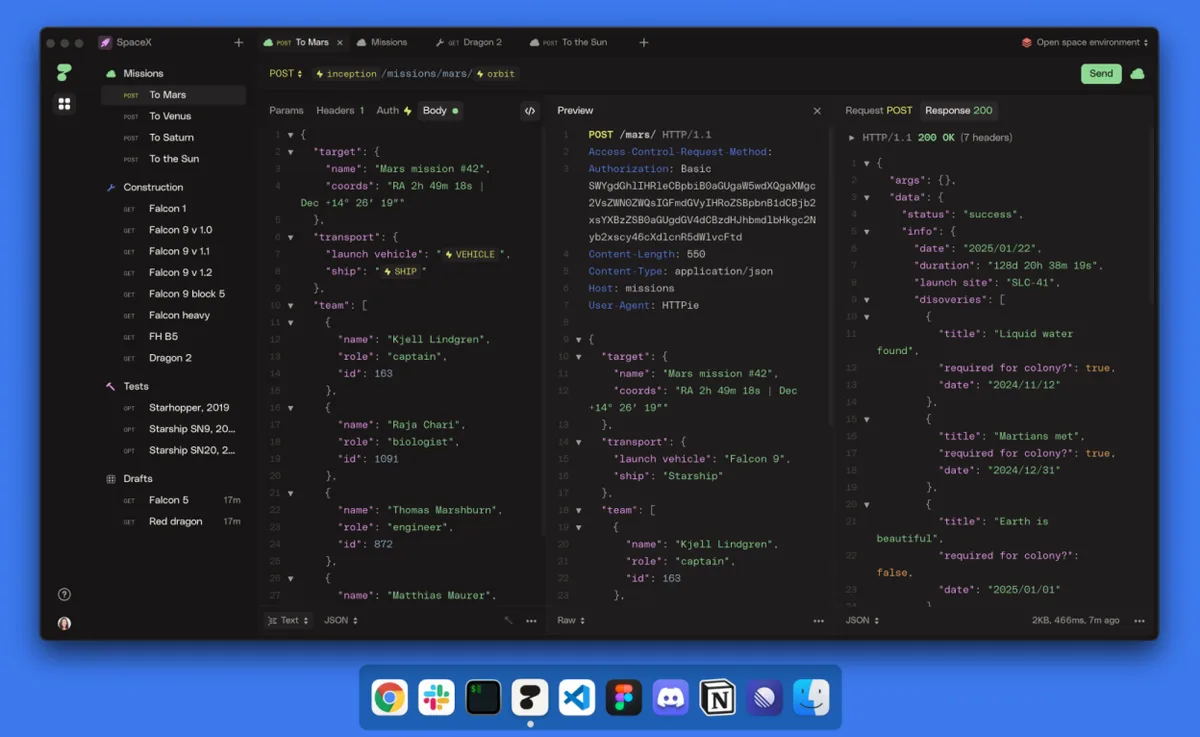
Screenshots of the Linux version, from Flathub.
Downloads
Windows 2025.2.0
Show SHA-256
17f0e0312ac813cd6517b271bff4c0af74d452822075e97bc26e420de0800ed5 Show SHA-256
17f0e0312ac813cd6517b271bff4c0af74d452822075e97bc26e420de0800ed5 Mac 2025.2.0
Show SHA-256
57f2fda42ac1ca41365338d606bf347b41da2433989487dc68831caf0bd7cf1b Show SHA-256
4c0c73f115f37729124601c3843a74a38b45bbc9f82db3901cc53a6eae377b05 Linux 2025.2.0
The publisher offers a 64-bit (x64) build for Intel or AMD PCs. The package data states no minimum Windows version, so check the publisher’s system requirements before installing on an older PC. Choose the Apple silicon (ARM64) build for Macs with an M-series chip and the Intel (x64) build for older Intel Macs. The Homebrew cask states no minimum macOS version, so check the publisher’s system requirements before installing on an older Mac. Choose the x64 (64-bit) download for Intel or AMD computers and the ARM64 download for ARM computers. The Flathub listing states no minimum Linux version or distribution, so check the publisher’s system requirements before installing.
Install with winget: winget install --id HTTPie.HTTPie --exact
Install with Homebrew: brew install --cask httpie-desktop
Install with Flatpak (Flathub): flatpak install flathub io.httpie.Httpie
Check a download: Get-FileHash .\<file> -Algorithm SHA256 (PowerShell) or shasum -a 256 ~/Downloads/<file> (Terminal) and compare it with the SHA-256 above.
Linux (Flatpak): Flathub publishes no file checksum; Flatpak checks the app against Flathub’s signed repository when it installs. The ownership of the io.httpie.Httpie app ID has not been verified and it may be a community package. App page on Flathub.
What the installer does
Windows
- Delivered as an NSIS (Nullsoft) setup program (.exe) for x64.
- Offers both a per-user and an all-users installer.
- No custom silent switch is declared; winget falls back to its default for this installer type (
/S). - Associates with the file type
.pie. - Upgrades install over the existing version.
PC requirements
- CPU architecture: x64 (64-bit)
Mac
- Delivered as a disk image (.dmg) for Intel (x64) and Apple silicon (ARM64).
- Installs the app
HTTPie.appinto the Applications folder. - A full “zap” removal also deletes up to 4 support, cache and preference locations in your home folder.
Mac requirements
- CPU architecture: Intel (x64), Apple silicon (ARM64)
Linux
- Delivered as a "flatpak" installer for x64 and ARM64.
- The manifest does not state an install scope.
- No silent-install switch is declared in the manifest.
Linux requirements
- Architectures: ARM64, x64 (64-bit)
- Download size: 102 MiB
- Installed size: 109 MiB
Description
All the user-friendliness of our Terminal version, now wrapped up in a sleek graphical interface.
- Interact painlessly with APIs
- Leverage the power of AI-assisted work
- Organize your work in spaces, collections, and tabs
- Parametrize requests with variables and environments
- Work across devices with auto-save and realtime sync
- Build and preview requests without sending them
- Use the app offline and without an account
Best for: Developers who know the HTTPie command line and want the same plain approach in a desktop API client, without signing up for anything to start.
Features
- Works without an account: Without signing in, the app runs in an incognito mode that keeps everything in local storage. Sign in later and that local data moves into your account.
- What an account adds: An account gives unlimited spaces, cloud backup, live sync across devices and the AI assistant, which the docs say is free with an account while it is in preview. Without one you cannot sync or create new spaces.
- Offline first: Requests, collections and environments keep working with no connection, and syncing resumes once you are back online. Environments can be marked local-only so their values never leave the device.
- Free, but not open source: The desktop app is closed-source freeware under HTTPie's own terms. The GitHub repository holds releases and the issue tracker, not the source code. The separate HTTPie command-line tool is a different product.
- Linux route: HTTPie publishes an AppImage and recommends AppImageLauncher to run it. The Flatpak listed here comes from Flathub, which does not mark it as verified by HTTPie.
- Slow release pace: The newest desktop release is 2025.2.0. The Windows listing keeps 10 versions; macOS and Linux list only the current release. The Windows installer can install per user or for all users.
HTTPie at a glance
| What it is | HTTPie for Web & Desktop — cross-platform API testing client for humans. Painlessly test REST, GraphQL, and HTTP APIs. |
|---|---|
| Latest version | Windows 2025.2.0 (March 14, 2025) Mac 2025.2.0 Linux 2025.2.0 (March 14, 2025) |
| Price | Freeware |
| Open source | No |
| License | Freeware |
| License type | Proprietary · Freeware |
| Copyright | Copyright © 2024 HTTPie |
| Made by | HTTPie |
| Category | API and database tools |
| Runs on | Windows, Mac, Linux |
| Official website | httpie.io |
| More links | Support · Bug tracker · Privacy policy · Release notes |
| Tags | api automation debug develop development graphql interface internet network request response rest restful |
| winget ID | HTTPie.HTTPie |
| Homebrew cask | httpie-desktop |
| Flathub | io.httpie.Httpie Unverified · community data from Flathub |
| Flathub verification | The ownership of the io.httpie.Httpie app ID has not been verified and it may be a community package. |
| License on Flathub | LicenseRef-proprietary=https://httpie.io/terms as listed on Flathub |
| Check your download | SHA-256 checksums in the download tables · Security scan |
What’s new in HTTPie 2025.2.0
✨ Enhancements - 📤 Export/Import — Backup, share, or publish your data as JSON. - 🗂️ Export a whole space — Transfer entire workspaces with all content. - 🔒 Export private items — Include drafts and local environments in exports. - 📂 Collection export — Share and back up request collections. - 🛫 Request export — Export with optional auth and variable embedding. - 🌍 Environment export — Share variables across teams and projects. - 📋 Clipboard export/import — Quick sharing without saving files. - 🔍 Export customization — Selectively include only what you need. - 📥 Import options — Choose between creating or updating spaces. - 🛠️ Export JSON format — Schema and TypeScript type support. - 📋 Copy as — Instantly generate CLI commands from requests. - 🔗 Path parameters — Parametrize URLs with /:param syntax. - ✨ Other enhancements — Fixed Postman import, etc.
Read the full release notes on the publisher’s site
Notes for older versions are inside each version below.
Is HTTPie safe?
Score result: No detections so far
None of the 53 security engines on VirusTotal flagged any of the 3 scanned files.
Covers 3 of 4 files. The rest have no VirusTotal report yet, so this result does not speak for them.
- 0 flagged in total
- 3 of 4 files scanned
- 53 engines
Scan info
- Last scan
- Scan provider
- VirusTotal · Full report
File integrity
| File | SHA-256 | Hash check | Signature | VirusTotal |
|---|---|---|---|---|
| HTTPie-Setup-2025.2.0.exeWindows · x64 (64-bit) | 17f0e0312ac813cd6517b271bff4c0af74d452822075e97bc26e420de0800ed5 |
Matches the manifest (re-computed) | Not signed | 0/53 flagged |
| HTTPie-2025.2.0.dmgMac · Intel (x64) | 57f2fda42ac1ca41365338d606bf347b41da2433989487dc68831caf0bd7cf1b |
Matches the manifest (re-computed) | Not signed | 0/59 flagged |
| HTTPie-2025.2.0-arm64.dmgMac · Apple silicon (ARM64) | 4c0c73f115f37729124601c3843a74a38b45bbc9f82db3901cc53a6eae377b05 |
Matches the manifest (re-computed) | Not signed | 0/61 flagged |
| io.httpie.Httpie.flatpakrefLinux · x64 (64-bit) | Not provided | Copied from the manifest, not re-computed | Not checked | — |
| Hash re-computed by Everyversion | 3 of 3 installers match. |
|---|---|
| Code signature checked | 0 valid, 3 unsigned. |
We host no installers. Every download link goes to the download location named in the package listing, normally the publisher’s own server. For this software we downloaded the files from that source ourselves, re-computed each checksum and checked the code signature where our tools could, as shown above. A passing check shows a file is the one that was published; it is not a guarantee it is free of problems. For more information, visit our Security and Trust Center.
Source and provenance
| Windows: source | microsoft/winget-pkgs |
|---|---|
| Windows: SHA-256 in upstream manifest | Yes |
| Windows: observed at commit | b14495759653 · retrieved 2026-11-16 |
| Mac: source | Homebrew/homebrew-cask |
| Mac: SHA-256 in upstream manifest | Yes |
| Mac: observed at commit | 9ee85620da80 · retrieved 2026-11-16 |
| Linux: source | Flathub · Flathub API · github.com/flathub/io.httpie.Httpie |
| Linux: checksum | None published. Flatpak checks the app against Flathub’s signed repository when it installs. |
| Linux: publisher verified | The ownership of the io.httpie.Httpie app ID has not been verified and it may be a community package. |
| Linux: data retrieved | 2026-11-16 · attribution: app data from Flathub, license listed there: LicenseRef-proprietary=https://httpie.io/terms |
Old versions
Windows versions
10 versions listed. Open a version for its installers, checksums and a command that pins it.
2025.2.0 latest · 2025-03-14 · 2 installers notes
| Architecture | Format | Scope | SHA-256 | Download |
|---|---|---|---|---|
| x64 (64-bit) | NSIS | All users | 17f0e0312ac813cd6517b271bff4c0af74d452822075e97bc26e420de0800ed5 |
Download |
| x64 (64-bit) | NSIS | Per user | 17f0e0312ac813cd6517b271bff4c0af74d452822075e97bc26e420de0800ed5 |
Download |
Pin this version: winget install --id HTTPie.HTTPie --version 2025.2.0 --exact
Release notes
✨ Enhancements - 📤 Export/Import — Backup, share, or publish your data as JSON. - 🗂️ Export a whole space — Transfer entire workspaces with all content. - 🔒 Export private items — Include drafts and local environments in exports. - 📂 Collection export — Share and back up request collections. - 🛫 Request export — Export with optional auth and variable embedding. - 🌍 Environment export — Share variables across teams and projects. - 📋 Clipboard export/import — Quick sharing without saving files. - 🔍 Export customization — Selectively include only what you need. - 📥 Import options — Choose between creating or updating spaces. - 🛠️ Export JSON format — Schema and TypeScript type support. - 📋 Copy as — Instantly generate CLI commands from requests. - 🔗 Path parameters — Parametrize URLs with /:param syntax. - ✨ Other enhancements — Fixed Postman import, etc.
Full release notes from the publisher
Manifest: manifests/h/HTTPie/HTTPie/2025.2.0
2025.1.0 · 2025-01-18 · 2 installers notes
| Architecture | Format | Scope | SHA-256 | Download |
|---|---|---|---|---|
| x64 (64-bit) | NSIS | All users | 1cc8405c648ec2a2be679cb16713d304453a05a379a4024dee7af18f6921ab38 |
Download |
| x64 (64-bit) | NSIS | Per user | 1cc8405c648ec2a2be679cb16713d304453a05a379a4024dee7af18f6921ab38 |
Download |
Pin this version: winget install --id HTTPie.HTTPie --version 2025.1.0 --exact
Release notes
Release Summary
Full release notes from the publisher
Manifest: manifests/h/HTTPie/HTTPie/2025.1.0
2024.1.2 · 2024-01-06 · 2 installers notes
| Architecture | Format | Scope | SHA-256 | Download |
|---|---|---|---|---|
| x64 (64-bit) | NSIS | All users | 289c48da7f5da79ad4ca4252594d2dd61568a5bd25a18ce2a648e496c1caac80 |
Download |
| x64 (64-bit) | NSIS | Per user | 289c48da7f5da79ad4ca4252594d2dd61568a5bd25a18ce2a648e496c1caac80 |
Download |
Pin this version: winget install --id HTTPie.HTTPie --version 2024.1.2 --exact
Release notes
🪲 Fixed a bug introduced in 2024.1.1 that led to Control-W on Linux and Windows unintentionally closing the app window instead of just the current tab.
Full release notes from the publisher
Manifest: manifests/h/HTTPie/HTTPie/2024.1.2
2024.1.1 · 2024-01-04 · 2 installers notes
| Architecture | Format | Scope | SHA-256 | Download |
|---|---|---|---|---|
| x64 (64-bit) | NSIS | All users | 99af38e3200dbba37d2e73bc0fea665c5228e65a2fc755d847661384d7f9ed70 |
Download |
| x64 (64-bit) | NSIS | Per user | 99af38e3200dbba37d2e73bc0fea665c5228e65a2fc755d847661384d7f9ed70 |
Download |
Pin this version: winget install --id HTTPie.HTTPie --version 2024.1.1 --exact
Release notes
✨ Enhancements - 📙 New documentation site — quickly access it via the Help menu (httpie.io/docs/desktop) - ♻️ New sync protocol — groundwork for upcoming multiplayer mode - 🚜 Selective field merging — changes are now applied on the field level, not doc level - ✌️ Conflict resolution — auto-merging of changes made across clients (same-field conflicts stay last-write-wins for now) - 🚀 Much faster initial sync — up to 20 times fewer requests - 💁♀️ Startup feedback — understand what the app is doing during longer operation - 🛫 ⌘R to send request — don’t fight your muscle memory (desktop-only, #36) 🪲 Bug fixes - Fixed search & filter keyboard shortcuts (⌘F and ⇧⌘F) to always focus the input field (#133) - Fixed cursor jumping in search, replace, and filter fields when typing from start/middle - Fixed search from selection - Fixed missing params in cURL and HTTPie export - Fixed Bearer auth token sent as param instead of header under some circumstances (#103) - Fixed inheriting API key from collection and passing as param (#93) - Fixed handling of unnamed headers to be treated as disabled instead of invalid - Fixed validation of URLs containing variables (#102) - Fixed repeat invocations of the “Check again” button inside the “Update HTTPie” dialog
Full release notes from the publisher
Manifest: manifests/h/HTTPie/HTTPie/2024.1.1
2023.3.6 · 2023-10-08 · 2 installers notes
| Architecture | Format | Scope | SHA-256 | Download |
|---|---|---|---|---|
| x64 (64-bit) | NSIS | All users | 2e88b2de152c905b94b252e2c209ca8c4aaf48290a11e0645470fd9b58cad05b |
Download |
| x64 (64-bit) | NSIS | Per user | 2e88b2de152c905b94b252e2c209ca8c4aaf48290a11e0645470fd9b58cad05b |
Download |
Pin this version: winget install --id HTTPie.HTTPie --version 2023.3.6 --exact
Release notes
- Fixed an infinite spinner on launch when the “No environment” option is selected in the environments selector. - Other stability improvements and minor bug fixes
Full release notes from the publisher
Manifest: manifests/h/HTTPie/HTTPie/2023.3.6
2023.3.5 · 2023-08-25 · 2 installers notes
| Architecture | Format | Scope | SHA-256 | Download |
|---|---|---|---|---|
| x64 (64-bit) | NSIS | All users | edd42f3754e91ff41d8013867a3ec28ba8941c784bcbd230448e6a96b4006eae |
Download |
| x64 (64-bit) | NSIS | Per user | edd42f3754e91ff41d8013867a3ec28ba8941c784bcbd230448e6a96b4006eae |
Download |
Pin this version: winget install --id HTTPie.HTTPie --version 2023.3.5 --exact
Release notes
- Fixed high CPU usage when a large request is open in the active tab - Fixed slow rendering of the space tab with many variables and environments - Other stability improvements and minor bug fixes
Full release notes from the publisher
Manifest: manifests/h/HTTPie/HTTPie/2023.3.5
2023.3.4 · 2023-08-15 · 2 installers notes
| Architecture | Format | Scope | SHA-256 | Download |
|---|---|---|---|---|
| x64 (64-bit) | NSIS | All users | 14a5589bca00859e619b77be14bb5498523b0e5d76a2ff7304b9f9903fa795fd |
Download |
| x64 (64-bit) | NSIS | Per user | 14a5589bca00859e619b77be14bb5498523b0e5d76a2ff7304b9f9903fa795fd |
Download |
Pin this version: winget install --id HTTPie.HTTPie --version 2023.3.4 --exact
Release notes
- Fixed slow typing in the variables table - Fixed slow typing when working on a GraphQL request with a large schema - Fixed validation false negatives when using variables in header names - Other stability improvements and minor bug fixes
Full release notes from the publisher
Manifest: manifests/h/HTTPie/HTTPie/2023.3.4
2023.3.3 · 2023-08-06 · 2 installers notes
| Architecture | Format | Scope | SHA-256 | Download |
|---|---|---|---|---|
| x64 (64-bit) | NSIS | All users | 14ffc19b4e20b2a768792ca1c0b71366028c501613dd83a134af838f36d00e4b |
Download |
| x64 (64-bit) | NSIS | Per user | 14ffc19b4e20b2a768792ca1c0b71366028c501613dd83a134af838f36d00e4b |
Download |
Pin this version: winget install --id HTTPie.HTTPie --version 2023.3.3 --exact
Release notes
- 👨👩👧👦 Preparations for upcoming multiplayer mode - 🪲 Stability improvements and bug fixes
Full release notes from the publisher
Manifest: manifests/h/HTTPie/HTTPie/2023.3.3
2023.3.2 · 2023-08-02 · 2 installers notes
| Architecture | Format | Scope | SHA-256 | Download |
|---|---|---|---|---|
| x64 (64-bit) | NSIS | All users | e824a2e2140ba0d3d7bd1238c0c93a41db77d528ab2581bdc543285b95dc59db |
Download |
| x64 (64-bit) | NSIS | Per user | e824a2e2140ba0d3d7bd1238c0c93a41db77d528ab2581bdc543285b95dc59db |
Download |
Pin this version: winget install --id HTTPie.HTTPie --version 2023.3.2 --exact
Release notes
- 🪲 Stability improvements and bug fixes
Full release notes from the publisher
Manifest: manifests/h/HTTPie/HTTPie/2023.3.2
2023.3.0 · 2023-05-29 · 2 installers notes
| Architecture | Format | Scope | SHA-256 | Download |
|---|---|---|---|---|
| x64 (64-bit) | NSIS | All users | 14246f1e491ef8dc3f78e5970726b1862f9b8db00825e78f00aae3d00109676a |
Download |
| x64 (64-bit) | NSIS | Per user | 14246f1e491ef8dc3f78e5970726b1862f9b8db00825e78f00aae3d00109676a |
Download |
Pin this version: winget install --id HTTPie.HTTPie --version 2023.3.0 --exact
Release notes
✨️ Improved variables and more - 🪆 Recursive variables — Keep your variables DRY and atomic. - ✏️ Inline name editing — Quickly rename requests and collections. - 💾 Save body as file — Save to file directly from the client. - 🔃 Re-order variables — Bring order to your variables. - 🖼 Re-order environments — And to your environments as well. - ✨ Other enhancements — Use longer collection & request names, etc.
Full release notes from the publisher
Manifest: manifests/h/HTTPie/HTTPie/2023.3.0
Mac versions
Homebrew casks list only the current release. Earlier builds appear in the cask’s history on GitHub, and Homebrew cannot install them directly.
2025.2.0 latest · 2 installers
| Architecture | Format | Requires | File & source | SHA-256 | Download |
|---|---|---|---|---|---|
| Intel (x64) | DMG | — | HTTPie-2025.2.0.dmggithub.com | 57f2fda42ac1ca41365338d606bf347b41da2433989487dc68831caf0bd7cf1b |
Download |
| Apple silicon (ARM64) | DMG | — | HTTPie-2025.2.0-arm64.dmggithub.com | 4c0c73f115f37729124601c3843a74a38b45bbc9f82db3901cc53a6eae377b05 |
Download |
Release notes
Linux versions
Flathub lists only the current release, and Flatpak installs the newest build; earlier versions cannot be chosen from the listing.
Alternatives to HTTPie
Similar apps in API and database tools on Everyversion. Each one links to the download location named in the publisher’s package data, with a SHA-256 checksum.


HTTPie FAQ
Is HTTPie safe to download from here?
We host no installers. Every download button goes to the download location named in the package listing, and the checks below were run on those files.
On 2026-11-16 we downloaded the latest 3 installers from those sources and re-computed the SHA-256 of each: 3 of 3 match the package catalog’s value. Code signatures: 0 valid, 3 not signed.
VirusTotal: none of its 53 security engines flagged any of the 3 scanned files.
Reports exist for 3 of 4 files, so the rating does not cover the rest.
Our rating: Safe so far. No check is a guarantee. See the security details above and our Security and Trust Center. Publisher’s website: HTTPie’s official website.
Does HTTPie update itself after I install an old version?
For Windows, we have no information on whether HTTPie updates itself, and for Mac, we have no confirmation that the app updates itself, although many apps check for updates and offer to install them. Look for an update setting in HTTPie (see HTTPie’s documentation) before you rely on an older version.
Does HTTPie cost anything?
No. HTTPie is freeware (license: Freeware).
Which versions of HTTPie are listed here, and how far back?
For Windows, we list 10 versions, from 2023.3.0 (2023-05-29) up to 2025.2.0, and for Mac, only the current release (2025.2.0) is listed, because older Mac builds are not kept in the package listing, and for Linux, we list 1 version, from 2025.2.0 (2025-03-14) up to 2025.2.0. This page shows all of the Windows versions.
Where do the download links go?
They go straight to the source named in the package catalog, with nothing added by us: for Windows, to github.com, and for Mac, to github.com, and for Linux, to dl.flathub.org. We host no files. Compare the SHA-256 shown next to each file with the one you compute after downloading. Publisher’s website: HTTPie’s official website.