
Download Spyder 6.1.8
Medium riskDeveloper: Spyder Project Contributors and others
Last updated: · Verified by  CristianBuilt Everyversion after working at Softonic. Runs the checks and answers for the results. ClaudeAnthropic’s AI. Runs the download, checksum and signature checks and reports every result. VirusTotalScans files with dozens of security engines. We look up each file by its SHA-256 only.
Scientific Python Development Environment similar to matlab
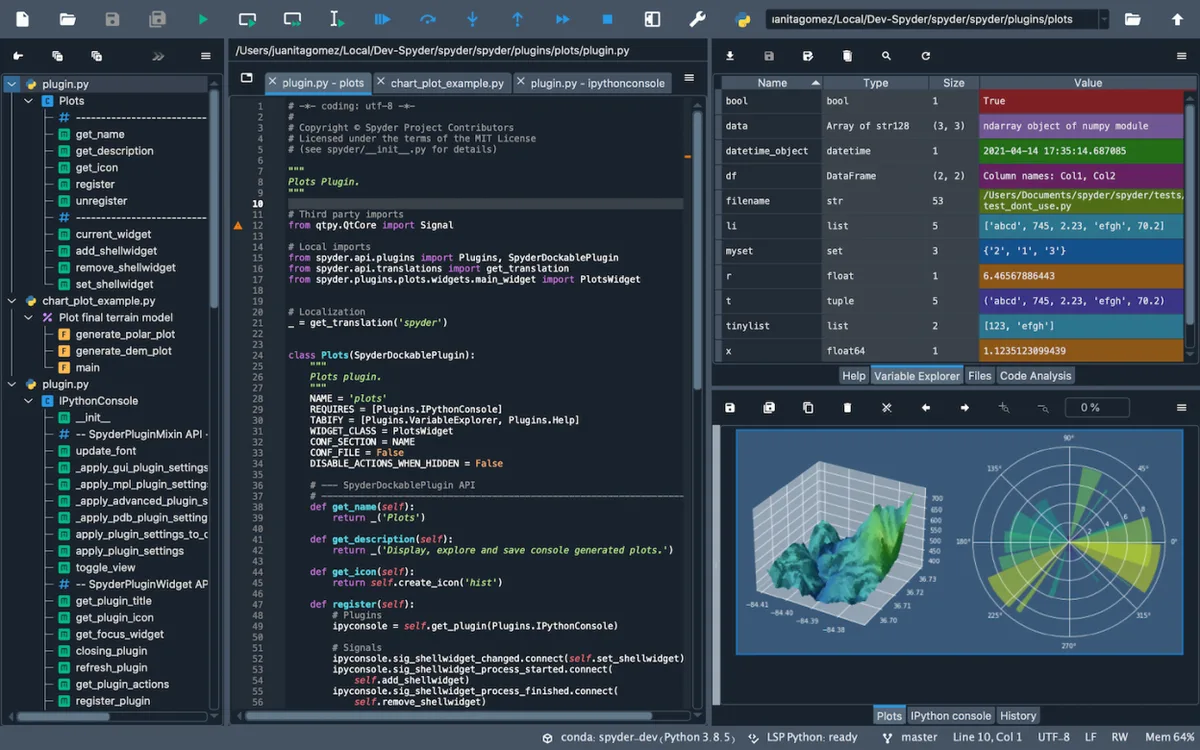
Screenshots of the Linux version, from Flathub.
Downloads
Windows 6.1.8
Show SHA-256
21d203fa1eeddb70a1a1db60c8a838ebf535f044b51c371dc148363eee28700b Show SHA-256
21d203fa1eeddb70a1a1db60c8a838ebf535f044b51c371dc148363eee28700b Mac 6.1.8
Show SHA-256
be8cbcce1b03fa1a66e126b3c07c0847699d1175b5dc89a93a4f44c946420e09 Show SHA-256
d65b90baee112c4b3b219787c9ec531e24328b47c7b5428cecdb978d66ca9293 Linux v6.1.6
The publisher offers a 64-bit (x64) build for Intel or AMD PCs. The package data states no minimum Windows version, so check the publisher’s system requirements before installing on an older PC. Choose the Apple silicon (ARM64) build for Macs with an M-series chip and the Intel (x64) build for older Intel Macs. The Homebrew cask states no minimum macOS version, so check the publisher’s system requirements before installing on an older Mac. Choose the x64 (64-bit) download for Intel or AMD computers and the ARM64 download for ARM computers. The Flathub listing states no minimum Linux version or distribution, so check the publisher’s system requirements before installing.
Install with winget: winget install --id Spyder.Spyder --exact
Install with Homebrew: brew install --cask spyder
Install with Flatpak (Flathub): flatpak install flathub org.spyder_ide.spyder
Check a download: Get-FileHash .\<file> -Algorithm SHA256 (PowerShell) or shasum -a 256 ~/Downloads/<file> (Terminal) and compare it with the SHA-256 above.
Linux (Flatpak): Flathub publishes no file checksum; Flatpak checks the app against Flathub’s signed repository when it installs. The ownership of the org.spyder_ide.spyder app ID has not been verified and it may be a community package. App page on Flathub.
What the installer does
Windows
- Delivered as an NSIS (Nullsoft) setup program (.exe) for x64.
- Offers both a per-user and an all-users installer.
- No custom silent switch is declared; winget falls back to its default for this installer type (
/S). - Declared install modes: interactive and silent.
- Associates with the file types
.bat,.c,.cc,.cfg,.cl,.cmd,.cpp,.css,.csv,.cxx,.dat, and.desktopand others. - Shows up in Windows “Installed apps” as “Spyder 6”.
- Upgrades install over the existing version.
PC requirements
- CPU architecture: x64 (64-bit)
Mac
- Delivered as a macOS installer package (.pkg) for Intel (x64) and Apple silicon (ARM64).
- Runs the installer package
Spyder-macOS-arm64.pkg; package installers usually ask for an administrator password and can place files anywhere on the system. - The app updates itself, so it may be newer than the version Homebrew lists.
- On uninstall, Homebrew asks the app to quit, forgets installer package receipts, and deletes 4 extra files.
- A full “zap” removal also deletes up to 4 support, cache and preference locations in your home folder.
Mac requirements
- CPU architecture: Intel (x64), Apple silicon (ARM64)
Linux
- Delivered as a "flatpak" installer for x64 and ARM64.
- The manifest does not state an install scope.
- No silent-install switch is declared in the manifest.
Linux requirements
- Architectures: ARM64, x64 (64-bit)
- Download size: 554 MiB
- Installed size: 1.7 GiB
Description
Scientific Python Development Environment similar to matlab
Best for: Scientists, analysts and students coming from MATLAB or RStudio who want to run Python line by line and inspect their data as they go.
Features
- Built for data work: An editor, IPython consoles, plots and a variable explorer sit side by side. You can open NumPy arrays and pandas tables in a grid to check them, much like a MATLAB workspace.
- Debugger and profiler included: Static analysis, an interactive debugger, a profiler, project support and find-in-files come with it, so you rarely need another tool.
- Free, MIT licensed: Spyder is free and open source under the MIT license, funded by donations and groups including NumFOCUS and the Chan Zuckerberg Initiative.
- Standalone installer has limits: The installers bundle Python with NumPy, SciPy, pandas and Matplotlib and update themselves. To use other packages, point Spyder at a separate Python. Third-party plugins and full Variable Explorer support for libraries like PyTorch need a Conda install.
- Conda is the safer route: The docs recommend installing Spyder into its own Conda environment through Miniforge, and warn that Anaconda's bundled copy is often out of date.
- A heavy Flatpak: The Flathub build is community-made and not verified by the Spyder team. It downloads about 580 MB and lags behind at 6.1.6 against 6.1.8 on Windows and Mac.
- Installers and versions: Windows offers per-user and machine-wide x64 installers, and the listing keeps 51 versions. Mac gets separate Intel and Apple silicon .pkg installers. macOS and Linux list only the current release.
Spyder at a glance
| What it is | Scientific Python Development Environment similar to matlab |
|---|---|
| Latest version | Windows 6.1.8 (October 24, 2026) Mac 6.1.8 Linux v6.1.6 (July 28, 2026) |
| Price | Free and open source |
| Open source | Yes |
| License | MIT |
| License type | Open source · Permissive Few conditions on reuse; the copyright notice has to stay. |
| Copyright | Copyright (c) Spyder Project Contributors and others |
| Made by | Spyder Project Contributors and others |
| Category | Code editors and IDEs |
| Runs on | Windows, Mac, Linux |
| Official website | spyder-ide.org |
| More links | Support · Bug tracker · Release notes |
| Source code | github.com/spyder-ide/spyder |
| Tags | developing development ide py python scientific |
| winget ID | Spyder.Spyder |
| Homebrew cask | spyder |
| Flathub | org.spyder_ide.spyder Unverified · community data from Flathub |
| Flathub verification | The ownership of the org.spyder_ide.spyder app ID has not been verified and it may be a community package. |
| License on Flathub | MIT as listed on Flathub |
| winget moniker | spyder-ide |
| Check your download | SHA-256 checksums in the download tables · Security scan |
What’s new in Spyder 6.1.8
Notes for the Windows release.
Simple installation The easiest way to start using Spyder is by downloading our own installers for Windows, macOS and Linux: - Windows (Windows 10+): Spyder-Windows-x86_64.exe - macOS - M1 (14.0+): Spyder-macOS-arm64.pkg - Intel (13.0+): Spyder-macOS-x86_64.pkg - Linux (CentOS 7+): Spyder-Linux-x86_64.sh Notes: - To use packages such as Scikit-learn or Seaborn with these installers, please read the following entry in our documentation FAQ. - To connect the installers to your current conda or pyenv environments, take a look at this other FAQ . Advanced installation Important Notes 1. If you are new to Python or the Scientific Python ecosystem, we recommend you to install and use Anaconda. It comes with Spyder and all its dependencies, along with the most important Python scientific libraries (i.e. Numpy, Pandas, Matplotlib, IPython, etc) in a single, easy to use environment. 2. We also support pip, but please be aware that pip installations are for advanced users with good knowledge of all Spyder dependencies. Because of that, all installation problems you encounter are expected to be solved by you. Anaconda You can easily install this version if you use Anaconda by closing Spyder and then running the following command in a system terminal (Anaconda Prompt on Windows, xterm on Linux or Terminal.app on macOS): conda create -n spyder-env -c conda-forge python=3.11 conda activate spyder-env conda install -c conda-forge spyder=6.1.8 Pip You can also use pip to update Spyder with…
Read the full release notes on the publisher’s site
Notes for older versions are inside each version below.
Is Spyder safe?
Score result: Some detections
Spyder-Windows-x86_64.exe was flagged by 2 of 48 engines. Open the full report before you run it.
Covers 3 of 4 files. The rest have no VirusTotal report yet, so this result does not speak for them.
- 2 flagged in total
- 3 of 4 files scanned
- 48 engines
Scan info
- Last scan
- Scan provider
- VirusTotal · Full report
File integrity
| File | SHA-256 | Hash check | Signature | VirusTotal |
|---|---|---|---|---|
| Spyder-Windows-x86_64.exeWindows · x64 (64-bit) | 21d203fa1eeddb70a1a1db60c8a838ebf535f044b51c371dc148363eee28700b |
Matches the manifest (re-computed) | Not signed | 2/48 flagged |
| Spyder-macOS-x86_64.pkgMac · Intel (x64) | be8cbcce1b03fa1a66e126b3c07c0847699d1175b5dc89a93a4f44c946420e09 |
Matches the manifest (re-computed) | Not signed | 0/53 flagged |
| Spyder-macOS-arm64.pkgMac · Apple silicon (ARM64) | d65b90baee112c4b3b219787c9ec531e24328b47c7b5428cecdb978d66ca9293 |
Matches the manifest (re-computed) | Not signed | 0/46 flagged |
| org.spyder_ide.spyder.flatpakrefLinux · x64 (64-bit) | Not provided | Copied from the manifest, not re-computed | Not checked | — |
| Hash re-computed by Everyversion | 3 of 3 installers match. |
|---|---|
| Code signature checked | 0 valid, 3 unsigned. |
Detections (2 from 1 file)
Spyder-Windows-x86_64.exe: flagged by 2 of 48 engines
| Engine | Type | Label |
|---|---|---|
| Sangfor | malicious | Trojan.Win32.Save.a |
| Trapmine | malicious | suspicious.low.ml.score |
Full VirusTotal report · scanned 2026-11-11
These are the security vendors’ own labels, shown exactly as VirusTotal reports them. We do not edit or interpret them. A detection does not by itself mean a file is malicious. Read the full report and see our Security and Trust Center.
We host no installers. Every download link goes to the download location named in the package listing, normally the publisher’s own server. For this software we downloaded the files from that source ourselves, re-computed each checksum and checked the code signature where our tools could, as shown above. A passing check shows a file is the one that was published; it is not a guarantee it is free of problems. For more information, visit our Security and Trust Center.
Source and provenance
| Windows: source | microsoft/winget-pkgs |
|---|---|
| Windows: SHA-256 in upstream manifest | Yes |
| Windows: observed at commit | 6581c2e6d123 · retrieved 2026-11-25 |
| Mac: source | Homebrew/homebrew-cask |
| Mac: SHA-256 in upstream manifest | Yes |
| Mac: observed at commit | 6b8a59b4e9b9 · retrieved 2026-11-11 |
| Linux: source | Flathub · Flathub API · github.com/flathub/org.spyder_ide.spyder |
| Linux: checksum | None published. Flatpak checks the app against Flathub’s signed repository when it installs. |
| Linux: publisher verified | The ownership of the org.spyder_ide.spyder app ID has not been verified and it may be a community package. |
| Linux: data retrieved | 2026-11-11 · attribution: app data from Flathub, license listed there: MIT |
Old versions
Windows versions
Showing the newest 20 of 51 versions (the JSON and Markdown versions list 51). Open a version for its installers, checksums and a command that pins it.
6.1.8 latest · 2026-10-24 · 2 installers notes
| Architecture | Format | Scope | SHA-256 | Download |
|---|---|---|---|---|
| x64 (64-bit) | NSIS | All usersen-US | 21d203fa1eeddb70a1a1db60c8a838ebf535f044b51c371dc148363eee28700b |
Download |
| x64 (64-bit) | NSIS | Per useren-US | 21d203fa1eeddb70a1a1db60c8a838ebf535f044b51c371dc148363eee28700b |
Download |
Pin this version: winget install --id Spyder.Spyder --version 6.1.8 --exact
Release notes
Simple installation The easiest way to start using Spyder is by downloading our own installers for Windows, macOS and Linux: - Windows (Windows 10+): Spyder-Windows-x86_64.exe - macOS - M1 (14.0+): Spyder-macOS-arm64.pkg - Intel (13.0+): Spyder-macOS-x86_64.pkg - Linux (CentOS 7+): Spyder-Linux-x86_64.sh Notes: - To use packages such as Scikit-learn or Seaborn with these installers, please read the following entry in our documentation FAQ. - To connect the installers to your current conda or pyenv environments, take a look at this other FAQ . Advanced installation Important Notes 1. If you are new to Python or the Scientific Python ecosystem, we recommend you to install and use Anaconda. It comes with Spyder and all its dependencies, along with the most important Python scientific libraries (i.e. Numpy, Pandas, Matplotlib, IPython, etc) in a single, easy to use environment. 2. We also support pip, but please be aware that pip installations are for advanced users with good knowledge of all Spyder dependencies. Because of that, all installation problems you encounter are expected to be solved by you. Anaconda You can easily install this version if you use Anaconda by closing Spyder and then running the following command in a system terminal (Anaconda Prompt on Windows, xterm on Linux or Terminal.app on macOS): conda create -n spyder-env -c conda-forge python=3.11 conda activate spyder-env conda install -c conda-forge spyder=6.1.8 Pip You can also use pip to update Spyder with…
Full release notes from the publisher
Manifest: manifests/s/Spyder/Spyder/6.1.8
6.1.7 · 2026-08-28 · 2 installers notes
| Architecture | Format | Scope | SHA-256 | Download |
|---|---|---|---|---|
| x64 (64-bit) | NSIS | All usersen-US | b1a643e499922c360bc782fc59dd6f0f5ffb5fb4aaa26113b08a0a4264d06acc |
Download |
| x64 (64-bit) | NSIS | Per useren-US | b1a643e499922c360bc782fc59dd6f0f5ffb5fb4aaa26113b08a0a4264d06acc |
Download |
Pin this version: winget install --id Spyder.Spyder --version 6.1.7 --exact
Release notes
Simple installation The easiest way to start using Spyder is by downloading our own installers for Windows, macOS and Linux: - Windows (Windows 10+): Spyder-Windows-x86_64.exe - macOS - M1 (14.0+): Spyder-macOS-arm64.pkg - Intel (13.0+): Spyder-macOS-x86_64.pkg - Linux (CentOS 7+): Spyder-Linux-x86_64.sh Notes: - To use packages such as Scikit-learn or Seaborn with these installers, please read the following entry in our documentation FAQ. - To connect the installers to your current conda or pyenv environments, take a look at this other FAQ . Advanced installation Important Notes 1. If you are new to Python or the Scientific Python ecosystem, we recommend you to install and use Anaconda. It comes with Spyder and all its dependencies, along with the most important Python scientific libraries (i.e. Numpy, Pandas, Matplotlib, IPython, etc) in a single, easy to use environment. 2. We also support pip, but please be aware that pip installations are for advanced users with good knowledge of all Spyder dependencies. Because of that, all installation problems you encounter are expected to be solved by you. Anaconda You can easily install this version if you use Anaconda by closing Spyder and then running the following command in a system terminal (Anaconda Prompt on Windows, xterm on Linux or Terminal.app on macOS): conda create -n spyder-env -c conda-forge python=3.11 conda activate spyder-env conda install -c conda-forge spyder=6.1.7 Pip You can also use pip to update Spyder with…
Full release notes from the publisher
Manifest: manifests/s/Spyder/Spyder/6.1.7
6.1.6 · 2026-07-29 · 2 installers notes
| Architecture | Format | Scope | SHA-256 | Download |
|---|---|---|---|---|
| x64 (64-bit) | NSIS | All usersen-US | 6e2f4abb7bfe4a6130fc8e053b571daad00289329af7ed135f46c82a9b325512 |
Download |
| x64 (64-bit) | NSIS | Per useren-US | 6e2f4abb7bfe4a6130fc8e053b571daad00289329af7ed135f46c82a9b325512 |
Download |
Pin this version: winget install --id Spyder.Spyder --version 6.1.6 --exact
Release notes
Simple installation The easiest way to start using Spyder is by downloading our own installers for Windows, macOS and Linux: - Windows (Windows 10+): Spyder-Windows-x86_64.exe - macOS - M1 (14.0+): Spyder-macOS-arm64.pkg - Intel (13.0+): Spyder-macOS-x86_64.pkg - Linux (CentOS 7+): Spyder-Linux-x86_64.sh Notes: - To use packages such as Scikit-learn or Seaborn with these installers, please read the following entry in our documentation FAQ. - To connect the installers to your current conda or pyenv environments, take a look at this other FAQ . Advanced installation Important Notes 1. If you are new to Python or the Scientific Python ecosystem, we recommend you to install and use Anaconda. It comes with Spyder and all its dependencies, along with the most important Python scientific libraries (i.e. Numpy, Pandas, Matplotlib, IPython, etc) in a single, easy to use environment. 2. We also support pip, but please be aware that pip installations are for advanced users with good knowledge of all Spyder dependencies. Because of that, all installation problems you encounter are expected to be solved by you. Anaconda You can easily install this version if you use Anaconda by closing Spyder and then running the following command in a system terminal (Anaconda Prompt on Windows, xterm on Linux or Terminal.app on macOS): conda create -n spyder-env -c conda-forge python=3.11 conda activate spyder-env conda install -c conda-forge spyder=6.1.6 Pip You can also use pip to update Spyder with…
Full release notes from the publisher
Manifest: manifests/s/Spyder/Spyder/6.1.6
6.1.5 · 2026-06-27 · 2 installers notes
| Architecture | Format | Scope | SHA-256 | Download |
|---|---|---|---|---|
| x64 (64-bit) | NSIS | All usersen-US | 92005331137502c199fb9926501d5aeaec0e940cc54a69f1e3d0908473176472 |
Download |
| x64 (64-bit) | NSIS | Per useren-US | 92005331137502c199fb9926501d5aeaec0e940cc54a69f1e3d0908473176472 |
Download |
Pin this version: winget install --id Spyder.Spyder --version 6.1.5 --exact
Release notes
Simple installation The easiest way to start using Spyder is by downloading our own installers for Windows, macOS and Linux: - Windows (Windows 10+): Spyder-Windows-x86_64.exe - macOS - M1 (14.0+): Spyder-macOS-arm64.pkg - Intel (13.0+): Spyder-macOS-x86_64.pkg - Linux (CentOS 7+): Spyder-Linux-x86_64.sh Notes: - To use packages such as Scikit-learn or Seaborn with these installers, please read the following entry in our documentation FAQ. - To connect the installers to your current conda or pyenv environments, take a look at this other FAQ . Advanced installation Important Notes 1. If you are new to Python or the Scientific Python ecosystem, we recommend you to install and use Anaconda. It comes with Spyder and all its dependencies, along with the most important Python scientific libraries (i.e. Numpy, Pandas, Matplotlib, IPython, etc) in a single, easy to use environment. 2. We also support pip, but please be aware that pip installations are for advanced users with good knowledge of all Spyder dependencies. Because of that, all installation problems you encounter are expected to be solved by you. Anaconda You can easily install this version if you use Anaconda by closing Spyder and then running the following command in a system terminal (Anaconda Prompt on Windows, xterm on Linux or Terminal.app on macOS): conda create -n spyder-env -c conda-forge python=3.11 conda activate spyder-env conda install -c conda-forge spyder=6.1.5 Pip You can also use pip to update Spyder with…
Full release notes from the publisher
Manifest: manifests/s/Spyder/Spyder/6.1.5
6.1.4 · 2026-04-07 · 2 installers notes
| Architecture | Format | Scope | SHA-256 | Download |
|---|---|---|---|---|
| x64 (64-bit) | NSIS | All usersen-US | 51e8142f1413688a33d76d5e197ee6c230780469577660a532dd50b0d55a0983 |
Download |
| x64 (64-bit) | NSIS | Per useren-US | 51e8142f1413688a33d76d5e197ee6c230780469577660a532dd50b0d55a0983 |
Download |
Pin this version: winget install --id Spyder.Spyder --version 6.1.4 --exact
Release notes
Simple installation The easiest way to start using Spyder is by downloading our own installers for Windows, macOS and Linux: - Windows (Windows 10+): Spyder-Windows-x86_64.exe - macOS - M1 (14.0+): Spyder-macOS-arm64.pkg - Intel (13.0+): Spyder-macOS-x86_64.pkg - Linux (CentOS 7+): Spyder-Linux-x86_64.sh Notes: - To use packages such as Scikit-learn or Seaborn with these installers, please read the following entry in our documentation FAQ. - To connect the installers to your current conda or pyenv environments, take a look at this other FAQ . Advanced installation Important Notes 1. If you are new to Python or the Scientific Python ecosystem, we recommend you to install and use Anaconda. It comes with Spyder and all its dependencies, along with the most important Python scientific libraries (i.e. Numpy, Pandas, Matplotlib, IPython, etc) in a single, easy to use environment. 2. We also support pip, but please be aware that pip installations are for advanced users with good knowledge of all Spyder dependencies. Because of that, all installation problems you encounter are expected to be solved by you. Anaconda You can easily install this version if you use Anaconda by closing Spyder and then running the following command in a system terminal (Anaconda Prompt on Windows, xterm on Linux or Terminal.app on macOS): conda create -n spyder-env -c conda-forge python=3.11 conda activate spyder-env conda install -c conda-forge spyder=6.1.4 Pip You can also use pip to update Spyder with…
Full release notes from the publisher
Manifest: manifests/s/Spyder/Spyder/6.1.4
6.1.3 · 2026-02-13 · 2 installers notes
| Architecture | Format | Scope | SHA-256 | Download |
|---|---|---|---|---|
| x64 (64-bit) | NSIS | All usersen-US | ea6bebb450540869c22ccdb330a754e5e246d613036edac6deca2470ae682757 |
Download |
| x64 (64-bit) | NSIS | Per useren-US | ea6bebb450540869c22ccdb330a754e5e246d613036edac6deca2470ae682757 |
Download |
Pin this version: winget install --id Spyder.Spyder --version 6.1.3 --exact
Release notes
Simple installation The easiest way to start using Spyder is by downloading our own installers for Windows, macOS and Linux: - Windows (Windows 10+): Spyder-Windows-x86_64.exe - macOS - M1 (14.0+): Spyder-macOS-arm64.pkg - Intel (13.0+): Spyder-macOS-x86_64.pkg - Linux (CentOS 7+): Spyder-Linux-x86_64.sh Notes: - To use packages such as Scikit-learn or Seaborn with these installers, please read the following entry in our documentation FAQ. - To connect the installers to your current conda or pyenv environments, take a look at this other FAQ . Advanced installation Important Notes 1. If you are new to Python or the Scientific Python ecosystem, we recommend you to install and use Anaconda. It comes with Spyder and all its dependencies, along with the most important Python scientific libraries (i.e. Numpy, Pandas, Matplotlib, IPython, etc) in a single, easy to use environment. 2. We also support pip, but please be aware that pip installations are for advanced users with good knowledge of all Spyder dependencies. Because of that, all installation problems you encounter are expected to be solved by you. Anaconda You can easily install this version if you use Anaconda by closing Spyder and then running the following command in a system terminal (Anaconda Prompt on Windows, xterm on Linux or Terminal.app on macOS): conda create -n spyder-env -c conda-forge python=3.11 conda activate spyder-env conda install -c conda-forge spyder=6.1.3 Pip You can also use pip to update Spyder with…
Full release notes from the publisher
Manifest: manifests/s/Spyder/Spyder/6.1.3
6.1.2 · 2025-12-18 · 2 installers notes
| Architecture | Format | Scope | SHA-256 | Download |
|---|---|---|---|---|
| x64 (64-bit) | NSIS | All usersen-US | e682b501cb26be8ddd08dcf8e1374c54ebbdf91e32557337629e43f3e5440cf6 |
Download |
| x64 (64-bit) | NSIS | Per useren-US | e682b501cb26be8ddd08dcf8e1374c54ebbdf91e32557337629e43f3e5440cf6 |
Download |
Pin this version: winget install --id Spyder.Spyder --version 6.1.2 --exact
Release notes
Simple installation The easiest way to start using Spyder is by downloading our own installers for Windows, macOS and Linux: - Windows (Windows 10+): Spyder-Windows-x86_64.exe - macOS - M1 (14.0+): Spyder-macOS-arm64.pkg - Intel (13.0+): Spyder-macOS-x86_64.pkg - Linux (CentOS 7+): Spyder-Linux-x86_64.sh Notes: - To use packages such as Scikit-learn or Seaborn with these installers, please read the following entry in our documentation FAQ. - To connect the installers to your current conda or pyenv environments, take a look at this other FAQ . Advanced installation Important Notes 1. If you are new to Python or the Scientific Python ecosystem, we recommend you to install and use Anaconda. It comes with Spyder and all its dependencies, along with the most important Python scientific libraries (i.e. Numpy, Pandas, Matplotlib, IPython, etc) in a single, easy to use environment. 2. We also support pip, but please be aware that pip installations are for advanced users with good knowledge of all Spyder dependencies. Because of that, all installation problems you encounter are expected to be solved by you. Anaconda You can easily install this version if you use Anaconda by closing Spyder and then running the following command in a system terminal (Anaconda Prompt on Windows, xterm on Linux or Terminal.app on macOS): conda create -n spyder-env -c conda-forge python=3.11 conda activate spyder-env conda install -c conda-forge spyder=6.1.2 Pip You can also use pip to update Spyder with…
Full release notes from the publisher
Manifest: manifests/s/Spyder/Spyder/6.1.2
6.1.1 · 2025-11-25 · 2 installers notes
| Architecture | Format | Scope | SHA-256 | Download |
|---|---|---|---|---|
| x64 (64-bit) | NSIS | All usersen-US | 99df439d68ddb3a4f829566814ac268d2776f958bbafcd3d3fc366c5b42718c4 |
Download |
| x64 (64-bit) | NSIS | Per useren-US | 99df439d68ddb3a4f829566814ac268d2776f958bbafcd3d3fc366c5b42718c4 |
Download |
Pin this version: winget install --id Spyder.Spyder --version 6.1.1 --exact
Release notes
Simple installation The easiest way to start using Spyder is by downloading our own installers for Windows, macOS and Linux: - Windows (Windows 10+): Spyder-Windows-x86_64.exe - macOS - M1 (14.0+): Spyder-macOS-arm64.pkg - Intel (13.0+): Spyder-macOS-x86_64.pkg - Linux (CentOS 7+): Spyder-Linux-x86_64.sh Notes: - To use packages such as Scikit-learn or Seaborn with these installers, please read the following entry in our documentation FAQ. - To connect the installers to your current conda or pyenv environments, take a look at this other FAQ . Advanced installation Important Notes 1. If you are new to Python or the Scientific Python ecosystem, we recommend you to install and use Anaconda. It comes with Spyder and all its dependencies, along with the most important Python scientific libraries (i.e. Numpy, Pandas, Matplotlib, IPython, etc) in a single, easy to use environment. 2. We also support pip, but please be aware that pip installations are for advanced users with good knowledge of all Spyder dependencies. Because of that, all installation problems you encounter are expected to be solved by you. Anaconda You can easily install this version if you use Anaconda by closing Spyder and then running the following command in a system terminal (Anaconda Prompt on Windows, xterm on Linux or Terminal.app on macOS): conda create -n spyder-env -c conda-forge python=3.11 conda activate spyder-env conda install -c conda-forge spyder=6.1.1 Pip You can also use pip to update Spyder with…
Full release notes from the publisher
Manifest: manifests/s/Spyder/Spyder/6.1.1
6.1.0 · 2025-10-02 · 2 installers notes
| Architecture | Format | Scope | SHA-256 | Download |
|---|---|---|---|---|
| x64 (64-bit) | NSIS | All usersen-US | f15e7c60f23cf37abdb25a9effc0fade1613b4efc20c0dd9b9870a9b1878a76a |
Download |
| x64 (64-bit) | NSIS | Per useren-US | f15e7c60f23cf37abdb25a9effc0fade1613b4efc20c0dd9b9870a9b1878a76a |
Download |
Pin this version: winget install --id Spyder.Spyder --version 6.1.0 --exact
Release notes
Simple installation The easiest way to start using Spyder is by downloading our own installers for Windows, macOS and Linux: - Windows (Windows 10+): Spyder-Windows-x86_64.exe - macOS - M1 (14.0+): Spyder-macOS-arm64.pkg - Intel (13.0+): Spyder-macOS-x86_64.pkg - Linux (CentOS 7+): Spyder-Linux-x86_64.sh Notes: - To use packages such as Scikit-learn or Seaborn with these installers, please read the following entry in our documentation FAQ. - To connect the installers to your current conda or pyenv environments, take a look at this other FAQ . Advanced installation Important Notes 1. If you are new to Python or the Scientific Python ecosystem, we recommend you to install and use Anaconda. It comes with Spyder and all its dependencies, along with the most important Python scientific libraries (i.e. Numpy, Pandas, Matplotlib, IPython, etc) in a single, easy to use environment. 2. We also support pip, but please be aware that pip installations are for advanced users with good knowledge of all Spyder dependencies. Because of that, all installation problems you encounter are expected to be solved by you. Anaconda You can easily install this version if you use Anaconda by closing Spyder and then running the following command in a system terminal (Anaconda Prompt on Windows, xterm on Linux or Terminal.app on macOS): conda create -n spyder-env -c conda-forge python=3.11 conda activate spyder-env conda install -c conda-forge spyder=6.1.0 Pip You can also use pip to update Spyder with…
Full release notes from the publisher
Manifest: manifests/s/Spyder/Spyder/6.1.0
6.0.8 · 2025-08-26 · 2 installers notes
| Architecture | Format | Scope | SHA-256 | Download |
|---|---|---|---|---|
| x64 (64-bit) | NSIS | All usersen-US | 8cdbac3eb8b8f6dba3646cf385208ce9d7cab2a581eb898bcee0055b78529c4b |
Download |
| x64 (64-bit) | NSIS | Per useren-US | 8cdbac3eb8b8f6dba3646cf385208ce9d7cab2a581eb898bcee0055b78529c4b |
Download |
Pin this version: winget install --id Spyder.Spyder --version 6.0.8 --exact
Release notes
Simple installation The easiest way to start using Spyder is by downloading our own installers for Windows, macOS and Linux: - Windows (Windows 10+): Spyder-Windows-x86_64.exe - macOS - M1 (14.0+): Spyder-macOS-arm64.pkg - Intel (13.0+): Spyder-macOS-x86_64.pkg - Linux (CentOS 7+): Spyder-Linux-x86_64.sh Notes: - To use packages such as Scikit-learn or Seaborn with these installers, please read the following entry in our documentation FAQ. - To connect the installers to your current conda or pyenv environments, take a look at this other FAQ . Advanced installation Important Notes 1. If you are new to Python or the Scientific Python ecosystem, we recommend you to install and use Anaconda. It comes with Spyder and all its dependencies, along with the most important Python scientific libraries (i.e. Numpy, Pandas, Matplotlib, IPython, etc) in a single, easy to use environment. 2. We also support pip, but please be aware that pip installations are for advanced users with good knowledge of all Spyder dependencies. Because of that, all installation problems you encounter are expected to be solved by you. Anaconda You can easily install this version if you use Anaconda by closing Spyder and then running the following command in a system terminal (Anaconda Prompt on Windows, xterm on Linux or Terminal.app on macOS): conda create -n spyder-env -c conda-forge python=3.11 conda activate spyder-env conda install -c conda-forge spyder=6.0.8 Pip You can also use pip to update Spyder with…
Full release notes from the publisher
Manifest: manifests/s/Spyder/Spyder/6.0.8
6.0.7 · 2025-05-22 · 2 installers notes
| Architecture | Format | Scope | SHA-256 | Download |
|---|---|---|---|---|
| x64 (64-bit) | NSIS | All usersen-US | 40c4bab88e3913d59a9fa3c6ac49816c336df1421cbe99605513b91cb7b46063 |
Download |
| x64 (64-bit) | NSIS | Per useren-US | 40c4bab88e3913d59a9fa3c6ac49816c336df1421cbe99605513b91cb7b46063 |
Download |
Pin this version: winget install --id Spyder.Spyder --version 6.0.7 --exact
Release notes
Simple installation The easiest way to start using Spyder is by downloading our own installers for Windows, macOS and Linux: - Windows (Windows 10+): Spyder-Windows-x86_64.exe - macOS - M1 (14.0+): Spyder-macOS-arm64.pkg - Intel (13.0+): Spyder-macOS-x86_64.pkg - Linux (CentOS 7+): Spyder-Linux-x86_64.sh Notes: - To use packages such as Scikit-learn or Seaborn with these installers, please read the following entry in our documentation FAQ. - To connect the installers to your current conda or pyenv environments, take a look at this other FAQ . Advanced installation Important Notes 1. If you are new to Python or the Scientific Python ecosystem, we strongly recommend you to install and use Anaconda. It comes with Spyder and all its dependencies, along with the most important Python scientific libraries (i.e. Numpy, Pandas, Matplotlib, IPython, etc) in a single, easy to use environment. 2. We also support pip, but please be aware that pip installations are for advanced users with good knowledge of all Spyder dependencies. Because of that, all installation problems you encounter are expected to be solved by you. Anaconda You can easily install this version if you use Anaconda by closing Spyder and then running the following command in a system terminal (Anaconda Prompt on Windows, xterm on Linux or Terminal.app on macOS): conda create -n spyder-env -c conda-forge python=3.11 conda activate spyder-env conda install -c conda-forge spyder=6.0.7 Pip You can also use pip to update…
Full release notes from the publisher
Manifest: manifests/s/Spyder/Spyder/6.0.7
6.0.6 · 2025-05-15 · 2 installers notes
| Architecture | Format | Scope | SHA-256 | Download |
|---|---|---|---|---|
| x64 (64-bit) | NSIS | All usersen-US | 475cfbbeaac10fc19a3bf1ed24b95d5d4d5fb5a77335d30f9df4e44099d19edf |
Download |
| x64 (64-bit) | NSIS | Per useren-US | 475cfbbeaac10fc19a3bf1ed24b95d5d4d5fb5a77335d30f9df4e44099d19edf |
Download |
Pin this version: winget install --id Spyder.Spyder --version 6.0.6 --exact
Release notes
Simple installation The easiest way to start using Spyder is by downloading our own installers for Windows, macOS and Linux: - Windows (Windows 10+): Spyder-Windows-x86_64.exe - macOS - M1 (14.0+): Spyder-macOS-arm64.pkg - Intel (13.0+): Spyder-macOS-x86_64.pkg - Linux (CentOS 7+): Spyder-Linux-x86_64.sh Notes: - To use packages such as Scikit-learn or Seaborn with these installers, please read the following entry in our documentation FAQ. - To connect the installers to your current conda or pyenv environments, take a look at this other FAQ . Advanced installation Important Notes 1. If you are new to Python or the Scientific Python ecosystem, we strongly recommend you to install and use Anaconda. It comes with Spyder and all its dependencies, along with the most important Python scientific libraries (i.e. Numpy, Pandas, Matplotlib, IPython, etc) in a single, easy to use environment. 2. We also support pip, but please be aware that pip installations are for advanced users with good knowledge of all Spyder dependencies. Because of that, all installation problems you encounter are expected to be solved by you. Anaconda You can easily install this version if you use Anaconda by closing Spyder and then running the following command in a system terminal (Anaconda Prompt on Windows, xterm on Linux or Terminal.app on macOS): conda create -n spyder-env -c conda-forge python=3.11 conda activate spyder-env conda install -c conda-forge spyder=6.0.6 Pip You can also use pip to update…
Full release notes from the publisher
Manifest: manifests/s/Spyder/Spyder/6.0.6
6.0.5 · 2025-03-27 · 2 installers notes
| Architecture | Format | Scope | SHA-256 | Download |
|---|---|---|---|---|
| x64 (64-bit) | NSIS | All usersen-US | f7b8ee003fb76ceb1785808d9ab3e7dbe08b2b738232b7e3b07e55280220c0b2 |
Download |
| x64 (64-bit) | NSIS | Per useren-US | f7b8ee003fb76ceb1785808d9ab3e7dbe08b2b738232b7e3b07e55280220c0b2 |
Download |
Pin this version: winget install --id Spyder.Spyder --version 6.0.5 --exact
Release notes
Simple installation The easiest way to start using Spyder is by downloading our own installers for Windows, macOS and Linux: - Windows (Windows 10+): Spyder-Windows-x86_64.exe - macOS - M1 (14.0+): Spyder-macOS-arm64.pkg - Intel (13.0+): Spyder-macOS-x86_64.pkg - Linux (CentOS 7+): Spyder-Linux-x86_64.sh Notes: - To use packages such as Scikit-learn or Seaborn with these installers, please read the following entry in our documentation FAQ. - To connect the installers to your current conda or pyenv environments, take a look at this other FAQ . Advanced installation Important Notes 1. If you are new to Python or the Scientific Python ecosystem, we strongly recommend you to install and use Anaconda. It comes with Spyder and all its dependencies, along with the most important Python scientific libraries (i.e. Numpy, Pandas, Matplotlib, IPython, etc) in a single, easy to use environment. 2. We also support pip, but please be aware that pip installations are for advanced users with good knowledge of all Spyder dependencies. Because of that, all installation problems you encounter are expected to be solved by you. Anaconda You can easily install this version if you use Anaconda by closing Spyder and then running the following command in a system terminal (Anaconda Prompt on Windows, xterm on Linux or Terminal.app on macOS): conda create -n spyder-env -c conda-forge python=3.11 conda activate spyder-env conda install -c conda-forge spyder=6.0.5 Pip You can also use pip to update…
Full release notes from the publisher
Manifest: manifests/s/Spyder/Spyder/6.0.5
6.0.4 · 2025-02-07 · 2 installers notes
| Architecture | Format | Scope | SHA-256 | Download |
|---|---|---|---|---|
| x64 (64-bit) | NSIS | All usersen-US | 09d56a2662ad49cff19ec6e6eb6bb79fe33ed85620def798d883e97e5e3083ab |
Download |
| x64 (64-bit) | NSIS | Per useren-US | 09d56a2662ad49cff19ec6e6eb6bb79fe33ed85620def798d883e97e5e3083ab |
Download |
Pin this version: winget install --id Spyder.Spyder --version 6.0.4 --exact
Release notes
Simple installation The easiest way to start using Spyder is by downloading our own installers for Windows, macOS and Linux: - Windows (Windows 10+): Spyder-Windows-x86_64.exe - macOS - M1 (14.0+): Spyder-macOS-arm64.pkg - Intel (13.0+): Spyder-macOS-x86_64.pkg - Linux (CentOS 7+): Spyder-Linux-x86_64.sh Notes: - To use packages such as Scikit-learn or Seaborn with these installers, please read the following entry in our documentation FAQ. - To connect the installers to your current conda or pyenv environments, take a look at this other FAQ . Advanced installation Important Notes 1. If you are new to Python or the Scientific Python ecosystem, we strongly recommend you to install and use Anaconda. It comes with Spyder and all its dependencies, along with the most important Python scientific libraries (i.e. Numpy, Pandas, Matplotlib, IPython, etc) in a single, easy to use environment. 2. We also support pip, but please be aware that pip installations are for advanced users with good knowledge of all Spyder dependencies. Because of that, all installation problems you encounter are expected to be solved by you. Anaconda You can easily install this version if you use Anaconda by closing Spyder and then running the following command in a system terminal (Anaconda Prompt on Windows, xterm on Linux or Terminal.app on macOS): conda create -n spyder-env -c conda-forge python=3.11 conda activate spyder-env conda install -c conda-forge spyder=6.0.4 Pip You can also use pip to update…
Full release notes from the publisher
Manifest: manifests/s/Spyder/Spyder/6.0.4
6.0.3 · 2024-12-11 · 2 installers notes
| Architecture | Format | Scope | SHA-256 | Download |
|---|---|---|---|---|
| x64 (64-bit) | NSIS | All usersen-US | 6e12d78ffd2224b65c47dec26ef5c5e5c35f5cbd2ac608c3398a56e557de5213 |
Download |
| x64 (64-bit) | NSIS | Per useren-US | 6e12d78ffd2224b65c47dec26ef5c5e5c35f5cbd2ac608c3398a56e557de5213 |
Download |
Pin this version: winget install --id Spyder.Spyder --version 6.0.3 --exact
Release notes
Simple installation The easiest way to start using Spyder is by downloading our own installers for Windows, macOS and Linux: - Windows (Windows 10+): Spyder-Windows-x86_64.exe - macOS - M1 (14.0+): Spyder-macOS-arm64.pkg - Intel (12.0+): Spyder-macOS-x86_64.pkg - Linux (CentOS 7+): Spyder-Linux-x86_64.sh Notes: - To use packages such as Scikit-learn or Seaborn with these installers, please read the following entry in our documentation FAQ. - To connect the installers to your current conda or pyenv environments, take a look at this other FAQ . Advanced installation Important Notes 1. If you are new to Python or the Scientific Python ecosystem, we strongly recommend you to install and use Anaconda. It comes with Spyder and all its dependencies, along with the most important Python scientific libraries (i.e. Numpy, Pandas, Matplotlib, IPython, etc) in a single, easy to use environment. 2. We also support pip, but please be aware that pip installations are for advanced users with good knowledge of all Spyder dependencies. Because of that, all installation problems you encounter are expected to be solved by you. Anaconda You can easily install this version if you use Anaconda by closing Spyder and then running the following command in a system terminal (Anaconda Prompt on Windows, xterm on Linux or Terminal.app on macOS): conda create -n spyder-env -c conda-forge python=3.11 conda activate spyder-env conda install -c conda-forge spyder=6.0.3 Pip You can also use pip to update…
Full release notes from the publisher
Manifest: manifests/s/Spyder/Spyder/6.0.3
6.0.2 · 2024-11-01 · 2 installers notes
| Architecture | Format | Scope | SHA-256 | Download |
|---|---|---|---|---|
| x64 (64-bit) | NSIS | All users | f563aac6f9f8fac500ef5a25498319d981134d07b79f9355494c2c9be973db53 |
Download |
| x64 (64-bit) | NSIS | Per user | f563aac6f9f8fac500ef5a25498319d981134d07b79f9355494c2c9be973db53 |
Download |
Pin this version: winget install --id Spyder.Spyder --version 6.0.2 --exact
Release notes
Simple installation The easiest way to start using Spyder is by downloading our own installers for Windows, macOS and Linux: - Windows (Windows 10+): Spyder-Windows-x86_64.exe - macOS - M1 (14.0+): Spyder-macOS-arm64.pkg - Intel (12.0+): Spyder-macOS-x86_64.pkg - Linux (CentOS 7+): Spyder-Linux-x86_64.sh Notes: - To use packages such as Scikit-learn or Seaborn with these installers, please read the following entry in our documentation FAQ. - To connect the installers to your current conda or pyenv environments, take a look at this other FAQ . Advanced installation Important Notes 1. If you are new to Python or the Scientific Python ecosystem, we strongly recommend you to install and use Anaconda. It comes with Spyder and all its dependencies, along with the most important Python scientific libraries (i.e. Numpy, Pandas, Matplotlib, IPython, etc) in a single, easy to use environment. 2. We also support pip, but please be aware that pip installations are for advanced users with good knowledge of all Spyder dependencies. Because of that, all installation problems you encounter are expected to be solved by you. Anaconda You can easily install this version if you use Anaconda by closing Spyder and then running the following command in a system terminal (Anaconda Prompt on Windows, xterm on Linux or Terminal.app on macOS): conda create -n spyder-env -c conda-forge python=3.11 conda activate spyder-env conda install -c conda-forge spyder=6.0.2 Pip You can also use pip to update…
Full release notes from the publisher
Manifest: manifests/s/Spyder/Spyder/6.0.2
5.5.6 · 2024-08-27 · 2 installers notes
| Architecture | Format | Scope | SHA-256 | Download |
|---|---|---|---|---|
| x64 (64-bit) | NSIS | All users | c0c5b36bb565d56eb26c656d4443e6a203429f32056afe66eafa1f7f192089f8 |
Download |
| x64 (64-bit) | NSIS | Per user | c0c5b36bb565d56eb26c656d4443e6a203429f32056afe66eafa1f7f192089f8 |
Download |
Pin this version: winget install --id Spyder.Spyder --version 5.5.6 --exact
Release notes
Simple installation The easiest way to start using Spyder is by downloading our own installers for Windows, macOS and Linux (experimental): - Windows (Windows 10+): Spyder_64bit_full.exe - macOS - M1 (14.0+): Spyder_arm64.dmg - Intel (12.0+): Spyder.dmg - Linux (CentOS 7+): Linux-x86_64.sh (Experimental) Advanced installation Important Notes 1. If you are new to Python or the Scientific Python ecosystem, we strongly recommend you to install and use Anaconda. It comes with Spyder and all its dependencies, along with the most important Python scientific libraries (i.e. Numpy, Pandas, Matplotlib, IPython, etc) in a single, easy to use environment. 2. We also support pip, but please be aware that pip installations are for advanced users with good knowledge of all Spyder dependencies. Because of that, all installation problems you encounter are expected to be solved by you. Anaconda You can easily install this version if you use Anaconda by closing Spyder and then running the following command in a system terminal (Anaconda Prompt on Windows, xterm on Linux or Terminal.app on macOS): conda install spyder=5.5.6 Notes: - It can take several months for a new Spyder version to be part of Anaconda. Please be patient until then and do not report it as a problem because we don't have any control over that. - If you installed Anaconda for the first time, you need to run the following command first: conda update anaconda before running the command above. Pip You can also use pip to…
Full release notes from the publisher
Manifest: manifests/s/Spyder/Spyder/5.5.6
5.5.5 · 2024-06-12 · 2 installers notes
| Architecture | Format | Scope | SHA-256 | Download |
|---|---|---|---|---|
| x64 (64-bit) | NSIS | All users | 53aa3d4c1394c57f9661f68edfd5167f78dfe0e08ac13938bec7430f9eaa064c |
Download |
| x64 (64-bit) | NSIS | Per user | 53aa3d4c1394c57f9661f68edfd5167f78dfe0e08ac13938bec7430f9eaa064c |
Download |
Pin this version: winget install --id Spyder.Spyder --version 5.5.5 --exact
Release notes
Simple installation The easiest way to start using Spyder is by downloading our own installers for Windows, macOS and Linux (experimental): - Windows (Windows 10+): Spyder_64bit_full.exe - macOS - M1 (14.0+): Spyder_arm64.dmg - Intel (12.0+): Spyder.dmg - Linux (CentOS 7+): Linux-x86_64.sh (Experimental) Advanced installation Important Notes 1. If you are new to Python or the Scientific Python ecosystem, we strongly recommend you to install and use Anaconda. It comes with Spyder and all its dependencies, along with the most important Python scientific libraries (i.e. Numpy, Pandas, Matplotlib, IPython, etc) in a single, easy to use environment. 2. We also support pip, but please be aware that pip installations are for advanced users with good knowledge of all Spyder dependencies. Because of that, all installation problems you encounter are expected to be solved by you. Anaconda You can easily install this version if you use Anaconda by closing Spyder and then running the following command in a system terminal (Anaconda Prompt on Windows, xterm on Linux or Terminal.app on macOS): conda install spyder=5.5.5 Notes: - It can take several months for a new Spyder version to be part of Anaconda. Please be patient until then and do not report it as a problem because we don't have any control over that. - If you installed Anaconda for the first time, you need to run the following command first: conda update anaconda before running the command above. Pip You can also use pip to…
Full release notes from the publisher
Manifest: manifests/s/Spyder/Spyder/5.5.5
5.5.4 · 2024-04-10 · 2 installers notes
| Architecture | Format | Scope | SHA-256 | Download |
|---|---|---|---|---|
| x64 (64-bit) | NSIS | All users | efd50ac37b75ea643fd95296c095133560fc7cdd5cba9ef39c50eea0268c2c70 |
Download |
| x64 (64-bit) | NSIS | Per user | efd50ac37b75ea643fd95296c095133560fc7cdd5cba9ef39c50eea0268c2c70 |
Download |
Pin this version: winget install --id Spyder.Spyder --version 5.5.4 --exact
Release notes
- Windows (Windows 10): Spyder_64bit_full.exe - macOS (11.0+): Spyder.dmg - Linux (CentOS 7+): Linux-x86_64.sh (Experimental) - To use packages such as Scikit-learn or Seaborn with these installers, please read the following entry in our documentation FAQ. - To connect the installers to your current conda or pyenv environments, take a look at this other FAQ . New Contributors - @kevinsmia1939 made their first contribution in #21169
Full release notes from the publisher
Manifest: manifests/s/Spyder/Spyder/5.5.4
5.5.0 · 2023-11-08 · 2 installers notes
| Architecture | Format | Scope | SHA-256 | Download |
|---|---|---|---|---|
| x64 (64-bit) | NSIS | All users | ee7d735d0f1afa2e80968236bd0ed185b777adee766404b302224265aeb678b9 |
Download |
| x64 (64-bit) | NSIS | Per user | ee7d735d0f1afa2e80968236bd0ed185b777adee766404b302224265aeb678b9 |
Download |
Pin this version: winget install --id Spyder.Spyder --version 5.5.0 --exact
Release notes
- Windows (Windows 10): Spyder_64bit_full.exe - macOS (11.0+): Spyder.dmg - Linux (CentOS 7+): Linux-x86_64.sh (Experimental) - To use packages such as Scikit-learn or Seaborn with these installers, please read the following entry in our documentation FAQ. - To connect the installers to your current conda or pyenv environments, take a look at this other FAQ . New Contributors - @kevinsmia1939 made their first contribution in #21169
Full release notes from the publisher
Manifest: manifests/s/Spyder/Spyder/5.5.0
All older versions: manifests/s/Spyder/Spyder
Mac versions
Homebrew casks list only the current release. Earlier builds appear in the cask’s history on GitHub, and Homebrew cannot install them directly.
6.1.8 latest · 2 installers
| Architecture | Format | Requires | File & source | SHA-256 | Download |
|---|---|---|---|---|---|
| Intel (x64) | PKG | — | Spyder-macOS-x86_64.pkggithub.com | be8cbcce1b03fa1a66e126b3c07c0847699d1175b5dc89a93a4f44c946420e09 |
Download |
| Apple silicon (ARM64) | PKG | — | Spyder-macOS-arm64.pkggithub.com | d65b90baee112c4b3b219787c9ec531e24328b47c7b5428cecdb978d66ca9293 |
Download |
Release notes
Linux versions
Flathub lists only the current release, and Flatpak installs the newest build; earlier versions cannot be chosen from the listing.
Alternatives to Spyder
Similar apps in Code editors and IDEs on Everyversion. Each one links to the download location named in the publisher’s package data, with a SHA-256 checksum.


Spyder FAQ
Is Spyder safe to download from here?
We host no installers. Every download button goes to the download location named in the package listing, and the checks below were run on those files.
On 2026-11-11 we downloaded the latest 3 installers from those sources and re-computed the SHA-256 of each: 3 of 3 match the package catalog’s value. Code signatures: 0 valid, 3 not signed.
VirusTotal: 2 of 48 engines flagged Spyder-Windows-x86_64.exe. Read the full report before you run it.
Reports exist for 3 of 4 files, so the rating does not cover the rest.
Our rating: Medium risk. No check is a guarantee. See the security details above and our Security and Trust Center. Publisher’s website: Spyder’s official website.
Does Spyder update itself after I install an old version?
For Windows, we have no information on whether Spyder updates itself, and for Mac, the app is listed as updating itself, so an older build will likely offer, or simply install, the newest release when you open it. To keep an old version, look for an automatic-update setting in Spyder (see Spyder’s documentation) and turn it off before you rely on it.
Does Spyder cost anything?
No. Spyder is free and open source (license: MIT).
Which versions of Spyder are listed here, and how far back?
For Windows, we list 51 versions, from 4.2.0 up to 6.1.8, and for Mac, only the current release (6.1.8) is listed, because older Mac builds are not kept in the package listing, and for Linux, we list 1 version, from v6.1.6 (2026-07-28) up to v6.1.6. This page shows the newest 20 Windows versions; the JSON and Markdown files for this app list all 51 Windows versions.
Where do the download links go?
They go straight to the source named in the package catalog, with nothing added by us: for Windows, to github.com, and for Mac, to github.com, and for Linux, to dl.flathub.org. We host no files. Compare the SHA-256 shown next to each file with the one you compute after downloading. Publisher’s website: Spyder’s official website.