
Download Okular 26.11.80
Safe so farDeveloper: KDE e.V.
Last updated: · Verified by  CristianBuilt Everyversion after working at Softonic. Runs the checks and answers for the results. ClaudeAnthropic’s AI. Runs the download, checksum and signature checks and reports every result. VirusTotalScans files with dozens of security engines. We look up each file by its SHA-256 only.
The Universal Document Viewer
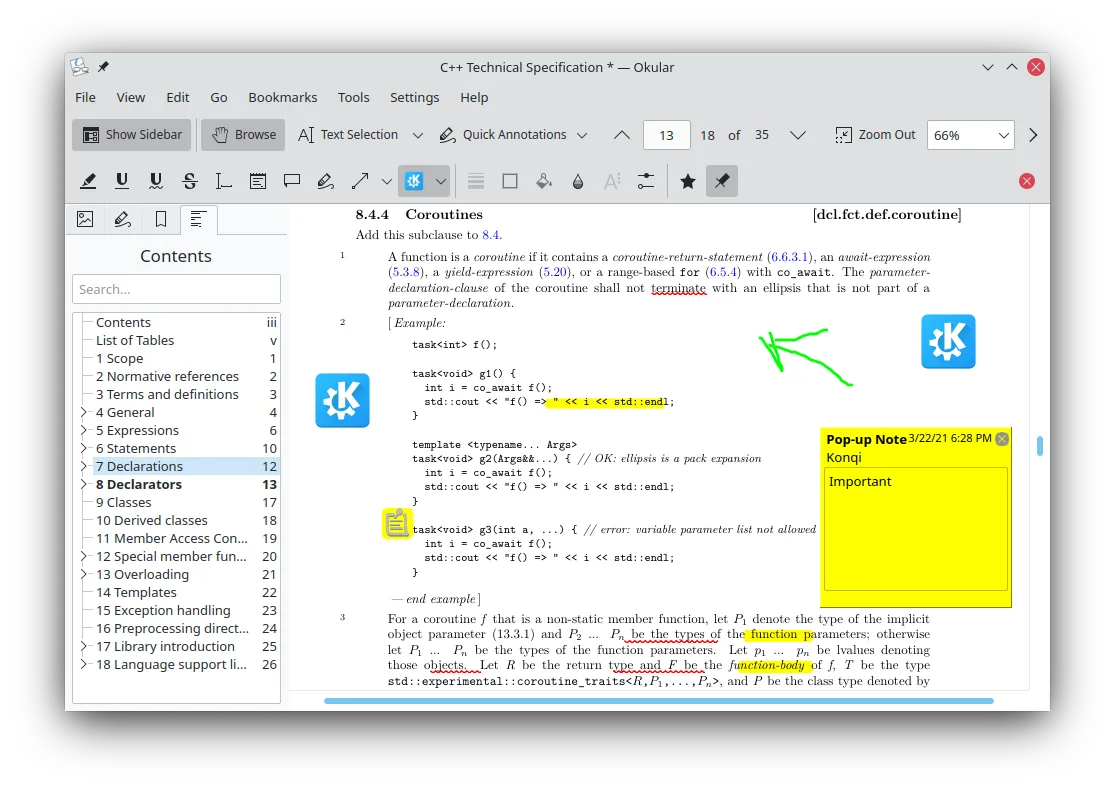
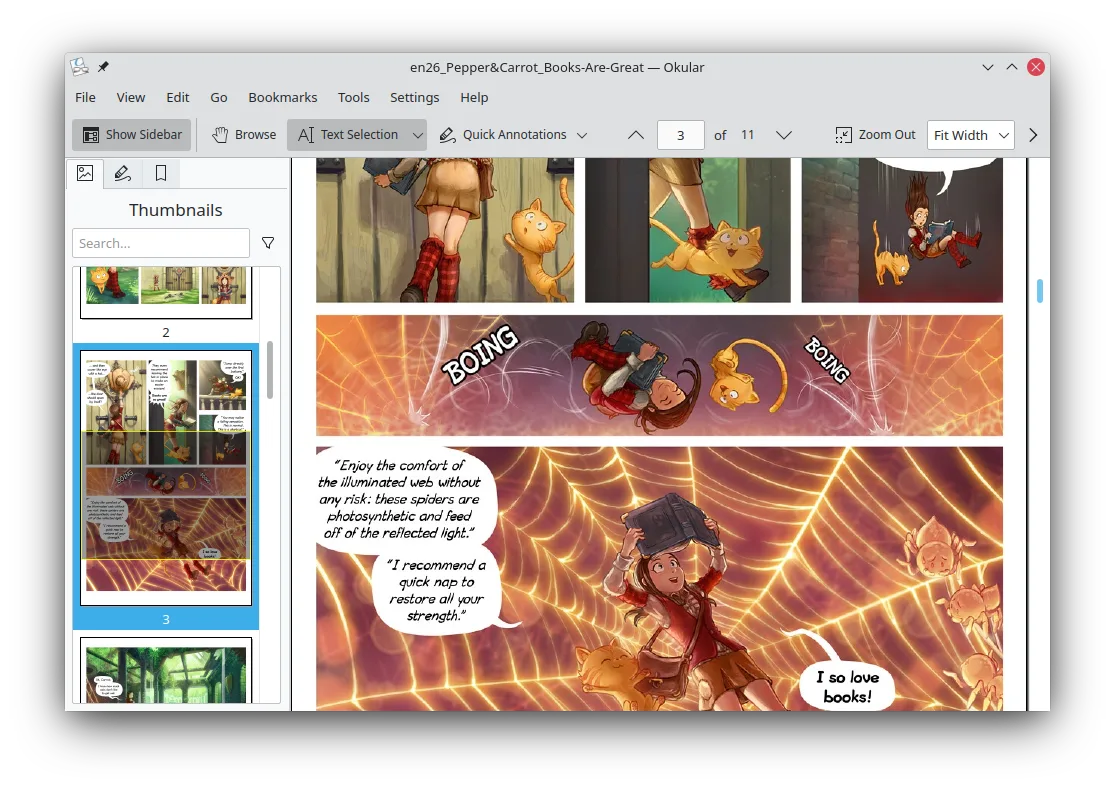
Screenshots of the Linux version, from Flathub.
Downloads
Windows 26.11.80
Show SHA-256
2b9659f05d9317b8cbeeddea741f23ea7cd103903d1994e5b7a57ad5017e9f33 Show SHA-256
2b9659f05d9317b8cbeeddea741f23ea7cd103903d1994e5b7a57ad5017e9f33 Linux 26.08.3
The publisher offers a 64-bit (x64) build for Intel or AMD PCs. The package data states no minimum Windows version, so check the publisher’s system requirements before installing on an older PC. Choose the x64 (64-bit) download for Intel or AMD computers and the ARM64 download for ARM computers. The Flathub listing states no minimum Linux version or distribution, so check the publisher’s system requirements before installing.
Install with winget: winget install --id KDE.Okular --exact
Install with Flatpak (Flathub): flatpak install flathub org.kde.okular
Check a download: Get-FileHash .\<file> -Algorithm SHA256 (PowerShell) and compare it with the SHA-256 above.
Linux (Flatpak): Flathub publishes no file checksum; Flatpak checks the app against Flathub’s signed repository when it installs. Flathub shows this app as publisher-verified. App page on Flathub.
What the installer does
Windows
- Delivered as an NSIS (Nullsoft) setup program (.exe) for x64.
- Offers both a per-user and an all-users installer.
- No custom silent switch is declared; winget falls back to its default for this installer type (
/S). - Associates with the file types
.asc,.bmp,.cb7,.cbr,.cbt,.cbz,.chm,.dds,.dib,.djv,.djvu, and.dviand others. - Upgrades install over the existing version.
PC requirements
- CPU architecture: x64 (64-bit)
Linux
- Delivered as a "flatpak" installer for x64 and ARM64.
- The manifest does not state an install scope.
- No silent-install switch is declared in the manifest.
Linux requirements
- Architectures: ARM64, x64 (64-bit)
- Download size: 39 MiB
- Installed size: 92 MiB
Description
Multi-platform, fast and packed with features, Okular allows you to read PDF documents, comics and EPub books, browse images, visualize Markdown documents, and much more.
Best for: Linux and Windows users who read PDFs, ebooks and comics in one viewer, and who want to mark up and sign PDFs without paying for an editor.
Features
- One viewer, many formats: Okular opens PDF, EPub, DjVu and Markdown files, images such as JPEG, PNG, TIFF and WebP, and CBR and CBZ comic archives.
- Notes, highlights and signatures: You can add inline and pop-up notes, highlight or underline text and type onto a page. It also checks the digital signatures in a PDF, shows whether a file changed after signing, and lets you sign PDFs yourself.
- Free software from KDE: Okular is part of KDE and released under GPLv2 or later. There is no paid edition.
- On Windows, KDE points to the Store: KDE recommends the Microsoft Store build because its developers test it and it updates itself; other Windows builds it offers are untested nightlies. The installers here are x64, per-user or for all users. The Windows listing shows 26.11.80 while the Flatpak shows 26.08.3.
- Linux: distro or Flathub: Most distributions package Okular. The Flathub build is marked verified for KDE, for x64 and Arm64. Ubuntu and Kubuntu packages are built without EPub support.
- No stable Mac release: KDE offers only untested nightly builds for Intel and Apple silicon Macs, so this page does not list macOS.
- Older versions on Windows: The Windows listing keeps 29 versions. Linux lists only the current Flatpak.
Okular at a glance
| What it is | The Universal Document Viewer |
|---|---|
| Latest version | Windows 26.11.80 (November 12, 2026) Linux 26.08.3 (November 5, 2026) |
| Price | Free and open source |
| Open source | Yes |
| License | GPL-2.0-or-later |
| License type | Open source · Strong copyleft Software built on it must be shared under the same license. |
| Copyright | (C) 2002 Wilco Greven, Christophe Devriese (C) 2004-2005 Enrico Ros (C) 2005 Piotr Szymanski (C) 2004-2017 Albert Astals Cid (C) 2006-2026 Pino Toscano |
| Made by | KDE e.V. |
| Category | Documents, PDF and e-books |
| Runs on | Windows, Linux |
| Official website | okular.kde.org |
| More links | Support · FAQ · Privacy policy · Release notes |
| Tags | annotate annotation comment ebook pdf read reader viewer |
| winget ID | KDE.Okular |
| Flathub | org.kde.okular Verified data from Flathub |
| Flathub verification | Publisher verified on Flathub through a kde login (teams/flathub), 2023-04-14 |
| License on Flathub | GPL-2.0+ and GFDL-1.3 as listed on Flathub |
| Check your download | SHA-256 checksums in the download tables · Security scan |
What’s new in Okular 26.11.80
Notes for the Windows release.
The publisher gives no notes text for this release.
Release notes on the publisher’s site
Notes for older versions are inside each version below.
Is Okular safe?
Score result: No detections so far
None of the 46 security engines on VirusTotal flagged the scanned file.
Covers 1 of 2 files. The rest have no VirusTotal report yet, so this result does not speak for them.
- 0 flagged in total
- 1 of 2 files scanned
- 46 engines
Scan info
- Last scan
- Scan provider
- VirusTotal · Full report
File integrity
| File | SHA-256 | Hash check | Signature | VirusTotal |
|---|---|---|---|---|
| okular-release_26.12-8286-windows-cl-msvc2022-x86_64.exeWindows · x64 (64-bit) | 2b9659f05d9317b8cbeeddea741f23ea7cd103903d1994e5b7a57ad5017e9f33 |
Matches the manifest (re-computed) | Valid | 0/46 flagged |
| org.kde.okular.flatpakrefLinux · x64 (64-bit) | Not provided | Copied from the manifest, not re-computed | Not checked | — |
| Hash re-computed by Everyversion | 1 of 1 installers match. |
|---|---|
| Code signature checked | 1 valid. |
We host no installers. Every download link goes to the download location named in the package listing, normally the publisher’s own server. For this software we downloaded the files from that source ourselves, re-computed each checksum and checked the code signature where our tools could, as shown above. A passing check shows a file is the one that was published; it is not a guarantee it is free of problems. For more information, visit our Security and Trust Center.
Source and provenance
| Windows: source | microsoft/winget-pkgs |
|---|---|
| Windows: SHA-256 in upstream manifest | Yes |
| Windows: observed at commit | bbed5ec1554c · retrieved 2026-11-20 |
| Linux: source | Flathub · Flathub API · github.com/flathub/org.kde.okular |
| Linux: checksum | None published. Flatpak checks the app against Flathub’s signed repository when it installs. |
| Linux: publisher verified | Publisher verified on Flathub through a kde login (teams/flathub), 2023-04-14 |
| Linux: data retrieved | 2026-11-14 · attribution: app data from Flathub, license listed there: GPL-2.0+ and GFDL-1.3 |
Old versions
Windows versions
Showing the newest 20 of 29 versions (the JSON and Markdown versions list 29). Open a version for its installers, checksums and a command that pins it.
26.11.80 latest · 2026-11-12 · 2 installers notes
| Architecture | Format | Scope | SHA-256 | Download |
|---|---|---|---|---|
| x64 (64-bit) | NSIS | All users | 2b9659f05d9317b8cbeeddea741f23ea7cd103903d1994e5b7a57ad5017e9f33 |
Download |
| x64 (64-bit) | NSIS | Per user | 2b9659f05d9317b8cbeeddea741f23ea7cd103903d1994e5b7a57ad5017e9f33 |
Download |
Pin this version: winget install --id KDE.Okular --version 26.11.80 --exact
Release notes
Read the release notes on the publisher’s site
Manifest: manifests/k/KDE/Okular/26.11.80
26.08.3 · 2026-11-03 · 2 installers notes
| Architecture | Format | Scope | SHA-256 | Download |
|---|---|---|---|---|
| x64 (64-bit) | NSIS | All users | 06be2a0ab6b6aa5c0027ade30cc88313f4c6f2ccedd44801dbc17326cb0123b5 |
Download |
| x64 (64-bit) | NSIS | Per user | 06be2a0ab6b6aa5c0027ade30cc88313f4c6f2ccedd44801dbc17326cb0123b5 |
Download |
Pin this version: winget install --id KDE.Okular --version 26.08.3 --exact
Release notes
Read the release notes on the publisher’s site
Manifest: manifests/k/KDE/Okular/26.08.3
26.08.1 · 2026-09-15 · 2 installers notes
| Architecture | Format | Scope | SHA-256 | Download |
|---|---|---|---|---|
| x64 (64-bit) | NSIS | All users | 6e8f216f3fff9ecfb94d6f2f812492af392f6fc1f6cc58768cd1a90c2aeece45 |
Link returns 404 |
| x64 (64-bit) | NSIS | Per user | 6e8f216f3fff9ecfb94d6f2f812492af392f6fc1f6cc58768cd1a90c2aeece45 |
Link returns 404 |
Pin this version: winget install --id KDE.Okular --version 26.08.1 --exact
Release notes
The 24.12 version of Okular has been released. This release includes several improvements in PDF form handling and Signature Creation as well as various other minor fixes and feature enhancements. You can check the full changelog at https://kde.org/announcements/changelogs/gear/24.12.0/#okular.
Full release notes from the publisher
Manifest: manifests/k/KDE/Okular/26.08.1
26.04.3 · 2 installers notes
| Architecture | Format | Scope | SHA-256 | Download |
|---|---|---|---|---|
| x64 (64-bit) | NSIS | All users | 052ac21324e2ddd32bc997b895184be92c7480e109f0d1e0347930627fe126f6 |
Download |
| x64 (64-bit) | NSIS | Per user | 052ac21324e2ddd32bc997b895184be92c7480e109f0d1e0347930627fe126f6 |
Download |
Pin this version: winget install --id KDE.Okular --version 26.04.3 --exact
Release notes
The 24.12 version of Okular has been released. This release includes several improvements in PDF form handling and Signature Creation as well as various other minor fixes and feature enhancements. You can check the full changelog at https://kde.org/announcements/changelogs/gear/24.12.0/#okular.
Full release notes from the publisher
Manifest: manifests/k/KDE/Okular/26.04.3
26.04.2 · 2 installers notes
| Architecture | Format | Scope | SHA-256 | Download |
|---|---|---|---|---|
| x64 (64-bit) | NSIS | All users | 1b348dd5eef0c8d6a681e540969292983b791ada16d1152f3e137619547516cf |
Link returns 404 |
| x64 (64-bit) | NSIS | Per user | 1b348dd5eef0c8d6a681e540969292983b791ada16d1152f3e137619547516cf |
Link returns 404 |
Pin this version: winget install --id KDE.Okular --version 26.04.2 --exact
Release notes
The 24.12 version of Okular has been released. This release includes several improvements in PDF form handling and Signature Creation as well as various other minor fixes and feature enhancements. You can check the full changelog at https://kde.org/announcements/changelogs/gear/24.12.0/#okular.
Full release notes from the publisher
Manifest: manifests/k/KDE/Okular/26.04.2
26.04.1 · 2 installers notes
| Architecture | Format | Scope | SHA-256 | Download |
|---|---|---|---|---|
| x64 (64-bit) | NSIS | All users | 3ae5d1210bd34c659de73160b172867aa2315d4b278ad918d9fe3f51aaf8c81a |
Link returns 404 |
| x64 (64-bit) | NSIS | Per user | 3ae5d1210bd34c659de73160b172867aa2315d4b278ad918d9fe3f51aaf8c81a |
Link returns 404 |
Pin this version: winget install --id KDE.Okular --version 26.04.1 --exact
Release notes
The 24.12 version of Okular has been released. This release includes several improvements in PDF form handling and Signature Creation as well as various other minor fixes and feature enhancements. You can check the full changelog at https://kde.org/announcements/changelogs/gear/24.12.0/#okular.
Full release notes from the publisher
Manifest: manifests/k/KDE/Okular/26.04.1
26.04.0 · 2 installers notes
| Architecture | Format | Scope | SHA-256 | Download |
|---|---|---|---|---|
| x64 (64-bit) | NSIS | All users | dfdb3f979d5bfae8a1312f7415203e77ab3ad1c9b2b5b62ce608a54769f63e7e |
Link returns 404 |
| x64 (64-bit) | NSIS | Per user | dfdb3f979d5bfae8a1312f7415203e77ab3ad1c9b2b5b62ce608a54769f63e7e |
Link returns 404 |
Pin this version: winget install --id KDE.Okular --version 26.04.0 --exact
Release notes
The 24.12 version of Okular has been released. This release includes several improvements in PDF form handling and Signature Creation as well as various other minor fixes and feature enhancements. You can check the full changelog at https://kde.org/announcements/changelogs/gear/24.12.0/#okular.
Full release notes from the publisher
Manifest: manifests/k/KDE/Okular/26.04.0
26.03.90 · 2 installers notes
| Architecture | Format | Scope | SHA-256 | Download |
|---|---|---|---|---|
| x64 (64-bit) | NSIS | All users | b5b48412faf8f765e209369474c75e6523a967e179d56ca332d96b039d84dd72 |
Link returns 404 |
| x64 (64-bit) | NSIS | Per user | b5b48412faf8f765e209369474c75e6523a967e179d56ca332d96b039d84dd72 |
Link returns 404 |
Pin this version: winget install --id KDE.Okular --version 26.03.90 --exact
Release notes
The 24.12 version of Okular has been released. This release includes several improvements in PDF form handling and Signature Creation as well as various other minor fixes and feature enhancements. You can check the full changelog at https://kde.org/announcements/changelogs/gear/24.12.0/#okular.
Full release notes from the publisher
Manifest: manifests/k/KDE/Okular/26.03.90
26.03.80 · 2 installers notes
| Architecture | Format | Scope | SHA-256 | Download |
|---|---|---|---|---|
| x64 (64-bit) | NSIS | All users | 7cc6332e49bf02cdca4d1c3b7bb64f15732b62365f705559784ffeee15e58403 |
Link returns 404 |
| x64 (64-bit) | NSIS | Per user | 7cc6332e49bf02cdca4d1c3b7bb64f15732b62365f705559784ffeee15e58403 |
Link returns 404 |
Pin this version: winget install --id KDE.Okular --version 26.03.80 --exact
Release notes
The 24.12 version of Okular has been released. This release includes several improvements in PDF form handling and Signature Creation as well as various other minor fixes and feature enhancements. You can check the full changelog at https://kde.org/announcements/changelogs/gear/24.12.0/#okular.
Full release notes from the publisher
Manifest: manifests/k/KDE/Okular/26.03.80
25.12.3 · 2 installers notes
| Architecture | Format | Scope | SHA-256 | Download |
|---|---|---|---|---|
| x64 (64-bit) | NSIS | All users | 2e52931c5d961734f3974ff85bddecb63fc14dc2783d6daa7b4c5bae5a335be9 |
Download |
| x64 (64-bit) | NSIS | Per user | 2e52931c5d961734f3974ff85bddecb63fc14dc2783d6daa7b4c5bae5a335be9 |
Download |
Pin this version: winget install --id KDE.Okular --version 25.12.3 --exact
Release notes
The 24.12 version of Okular has been released. This release includes several improvements in PDF form handling and Signature Creation as well as various other minor fixes and feature enhancements. You can check the full changelog at https://kde.org/announcements/changelogs/gear/24.12.0/#okular.
Full release notes from the publisher
Manifest: manifests/k/KDE/Okular/25.12.3
25.12.2 · 2 installers notes
| Architecture | Format | Scope | SHA-256 | Download |
|---|---|---|---|---|
| x64 (64-bit) | NSIS | All users | 03c9289e068b5f376fcc41b7dd4f9a0060dcf4b96616f4ce7727fcb691396c46 |
Link returns 404 |
| x64 (64-bit) | NSIS | Per user | 03c9289e068b5f376fcc41b7dd4f9a0060dcf4b96616f4ce7727fcb691396c46 |
Link returns 404 |
Pin this version: winget install --id KDE.Okular --version 25.12.2 --exact
Release notes
The 24.12 version of Okular has been released. This release includes several improvements in PDF form handling and Signature Creation as well as various other minor fixes and feature enhancements. You can check the full changelog at https://kde.org/announcements/changelogs/gear/24.12.0/#okular.
Full release notes from the publisher
Manifest: manifests/k/KDE/Okular/25.12.2
25.12.1 · 2 installers notes
| Architecture | Format | Scope | SHA-256 | Download |
|---|---|---|---|---|
| x64 (64-bit) | NSIS | All users | a6350c7583bf6db79d5bbeda4079b522cd4f4890d52b5be6861df1da7f07eb33 |
Link returns 404 |
| x64 (64-bit) | NSIS | Per user | a6350c7583bf6db79d5bbeda4079b522cd4f4890d52b5be6861df1da7f07eb33 |
Link returns 404 |
Pin this version: winget install --id KDE.Okular --version 25.12.1 --exact
Release notes
The 24.12 version of Okular has been released. This release includes several improvements in PDF form handling and Signature Creation as well as various other minor fixes and feature enhancements. You can check the full changelog at https://kde.org/announcements/changelogs/gear/24.12.0/#okular.
Full release notes from the publisher
Manifest: manifests/k/KDE/Okular/25.12.1
25.12.0 · 2 installers notes
| Architecture | Format | Scope | SHA-256 | Download |
|---|---|---|---|---|
| x64 (64-bit) | NSIS | All users | 302ca3458468c2fc2515f9bd7a954abe97ae77a1997d099ebb5d43bb9bd6f3df |
Link returns 404 |
| x64 (64-bit) | NSIS | Per user | 302ca3458468c2fc2515f9bd7a954abe97ae77a1997d099ebb5d43bb9bd6f3df |
Link returns 404 |
Pin this version: winget install --id KDE.Okular --version 25.12.0 --exact
Release notes
The 24.12 version of Okular has been released. This release includes several improvements in PDF form handling and Signature Creation as well as various other minor fixes and feature enhancements. You can check the full changelog at https://kde.org/announcements/changelogs/gear/24.12.0/#okular.
Full release notes from the publisher
Manifest: manifests/k/KDE/Okular/25.12.0
25.11.90 · 2 installers notes
| Architecture | Format | Scope | SHA-256 | Download |
|---|---|---|---|---|
| x64 (64-bit) | NSIS | All users | f7b1fbd49ce66c873067c804ef8dfd3b0f2a08cc562b64b3c891846231ec7f7f |
Link returns 404 |
| x64 (64-bit) | NSIS | Per user | f7b1fbd49ce66c873067c804ef8dfd3b0f2a08cc562b64b3c891846231ec7f7f |
Link returns 404 |
Pin this version: winget install --id KDE.Okular --version 25.11.90 --exact
Release notes
The 24.12 version of Okular has been released. This release includes several improvements in PDF form handling and Signature Creation as well as various other minor fixes and feature enhancements. You can check the full changelog at https://kde.org/announcements/changelogs/gear/24.12.0/#okular.
Full release notes from the publisher
Manifest: manifests/k/KDE/Okular/25.11.90
25.11.80 · 2 installers notes
| Architecture | Format | Scope | SHA-256 | Download |
|---|---|---|---|---|
| x64 (64-bit) | NSIS | All users | 74170a38713f2f8caa7d6eab23e1273b6e194d10f34fd577f4fc367d7fedd36d |
Link returns 404 |
| x64 (64-bit) | NSIS | Per user | 74170a38713f2f8caa7d6eab23e1273b6e194d10f34fd577f4fc367d7fedd36d |
Link returns 404 |
Pin this version: winget install --id KDE.Okular --version 25.11.80 --exact
Release notes
The 24.12 version of Okular has been released. This release includes several improvements in PDF form handling and Signature Creation as well as various other minor fixes and feature enhancements. You can check the full changelog at https://kde.org/announcements/changelogs/gear/24.12.0/#okular.
Full release notes from the publisher
Manifest: manifests/k/KDE/Okular/25.11.80
25.08.3 · 2 installers notes
| Architecture | Format | Scope | SHA-256 | Download |
|---|---|---|---|---|
| x64 (64-bit) | NSIS | All users | 40b49c629d1dded37458d60304df6efae21914bed5e33b7ed59a9198bcd20cde |
Link returns 404 |
| x64 (64-bit) | NSIS | Per user | 40b49c629d1dded37458d60304df6efae21914bed5e33b7ed59a9198bcd20cde |
Link returns 404 |
Pin this version: winget install --id KDE.Okular --version 25.08.3 --exact
Release notes
The 24.12 version of Okular has been released. This release includes several improvements in PDF form handling and Signature Creation as well as various other minor fixes and feature enhancements. You can check the full changelog at https://kde.org/announcements/changelogs/gear/24.12.0/#okular.
Full release notes from the publisher
Manifest: manifests/k/KDE/Okular/25.08.3
25.08.2 · 2 installers notes
| Architecture | Format | Scope | SHA-256 | Download |
|---|---|---|---|---|
| x64 (64-bit) | NSIS | All users | 2197492bbee52cf039d0e1c35d520521f0ec9fcfcc81a6baab9322e68ec9983c |
Link returns 404 |
| x64 (64-bit) | NSIS | Per user | 2197492bbee52cf039d0e1c35d520521f0ec9fcfcc81a6baab9322e68ec9983c |
Link returns 404 |
Pin this version: winget install --id KDE.Okular --version 25.08.2 --exact
Release notes
The 24.12 version of Okular has been released. This release includes several improvements in PDF form handling and Signature Creation as well as various other minor fixes and feature enhancements. You can check the full changelog at https://kde.org/announcements/changelogs/gear/24.12.0/#okular.
Full release notes from the publisher
Manifest: manifests/k/KDE/Okular/25.08.2
25.08.1 · 2 installers notes
| Architecture | Format | Scope | SHA-256 | Download |
|---|---|---|---|---|
| x64 (64-bit) | NSIS | All users | d823c9b946cdfc55cb85aa292ac0d4eda6156b0881b68f1100f589bb824a5a20 |
Link returns 404 |
| x64 (64-bit) | NSIS | Per user | d823c9b946cdfc55cb85aa292ac0d4eda6156b0881b68f1100f589bb824a5a20 |
Link returns 404 |
Pin this version: winget install --id KDE.Okular --version 25.08.1 --exact
Release notes
The 24.12 version of Okular has been released. This release includes several improvements in PDF form handling and Signature Creation as well as various other minor fixes and feature enhancements. You can check the full changelog at https://kde.org/announcements/changelogs/gear/24.12.0/#okular.
Full release notes from the publisher
Manifest: manifests/k/KDE/Okular/25.08.1
25.08.0 · 2 installers notes
| Architecture | Format | Scope | SHA-256 | Download |
|---|---|---|---|---|
| x64 (64-bit) | NSIS | All users | c9f14fb3682d2c8e0d35972045a1dd92c798f6780e6dcae7eaf909e17ebcadb5 |
Link returns 404 |
| x64 (64-bit) | NSIS | Per user | c9f14fb3682d2c8e0d35972045a1dd92c798f6780e6dcae7eaf909e17ebcadb5 |
Link returns 404 |
Pin this version: winget install --id KDE.Okular --version 25.08.0 --exact
Release notes
The 24.12 version of Okular has been released. This release includes several improvements in PDF form handling and Signature Creation as well as various other minor fixes and feature enhancements. You can check the full changelog at https://kde.org/announcements/changelogs/gear/24.12.0/#okular.
Full release notes from the publisher
Manifest: manifests/k/KDE/Okular/25.08.0
25.07.90 · 2 installers notes
| Architecture | Format | Scope | SHA-256 | Download |
|---|---|---|---|---|
| x64 (64-bit) | NSIS | All users | 2abb15e1f7833e3ff19d39bb4ae3f721de7faee32e0e916f758300e503ae191d |
Link returns 404 |
| x64 (64-bit) | NSIS | Per user | 2abb15e1f7833e3ff19d39bb4ae3f721de7faee32e0e916f758300e503ae191d |
Link returns 404 |
Pin this version: winget install --id KDE.Okular --version 25.07.90 --exact
Release notes
The 24.12 version of Okular has been released. This release includes several improvements in PDF form handling and Signature Creation as well as various other minor fixes and feature enhancements. You can check the full changelog at https://kde.org/announcements/changelogs/gear/24.12.0/#okular.
Full release notes from the publisher
Manifest: manifests/k/KDE/Okular/25.07.90
All older versions: manifests/k/KDE/Okular
Linux versions
Flathub lists only the current release, and Flatpak installs the newest build; earlier versions cannot be chosen from the listing.
Alternatives to Okular
Similar apps in Documents, PDF and e-books on Everyversion. Each one links to the download location named in the publisher’s package data, with a SHA-256 checksum.


Okular FAQ
Is Okular safe to download from here?
We host no installers. Every download button goes to the download location named in the package listing, and the checks below were run on those files.
On 2026-11-20 we downloaded the latest installer from those sources and re-computed the SHA-256: it matches the package catalog’s value. Code signatures: 1 valid.
VirusTotal: none of its 46 security engines flagged the scanned file.
Reports exist for 1 of 2 files, so the rating does not cover the rest.
Our rating: Safe so far. No check is a guarantee. See the security details above and our Security and Trust Center. Publisher’s website: Okular’s official website.
Does Okular update itself after I install an old version?
For Windows, we have no information on whether Okular updates itself, and for Mac, we have no confirmation that the app updates itself, although many apps check for updates and offer to install them. Look for an update setting in Okular (see Okular’s documentation) before you rely on an older version.
Does Okular cost anything?
No. Okular is free and open source (license: GPL-2.0-or-later).
Which versions of Okular are listed here, and how far back?
For Windows, we list 29 versions, from 22.12.1 up to 26.11.80, and for Linux, we list 1 version, from 26.08.3 (2026-11-05) up to 26.08.3. This page shows the newest 20 Windows versions; the JSON and Markdown files for this app list all 29 Windows versions.
Where do the download links go?
They go straight to the source named in the package catalog, with nothing added by us: for Windows, to cdn.kde.org, and for Linux, to dl.flathub.org. We host no files. Compare the SHA-256 shown next to each file with the one you compute after downloading. Publisher’s website: Okular’s official website.