
Download Koodo Reader 2.4.7
Safe so farDeveloper: App by Troye
Last updated: · Verified by  CristianBuilt Everyversion after working at Softonic. Runs the checks and answers for the results. ClaudeAnthropic’s AI. Runs the download, checksum and signature checks and reports every result. VirusTotalScans files with dozens of security engines. We look up each file by its SHA-256 only.
All-in-one ebook reader
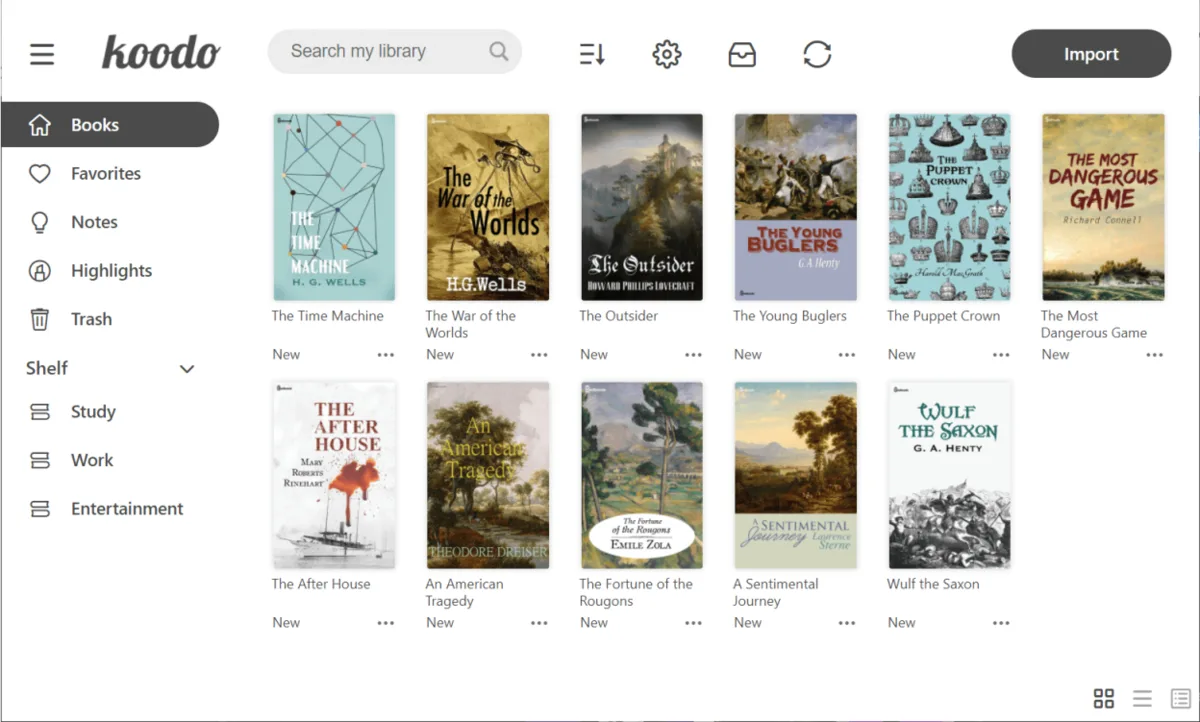
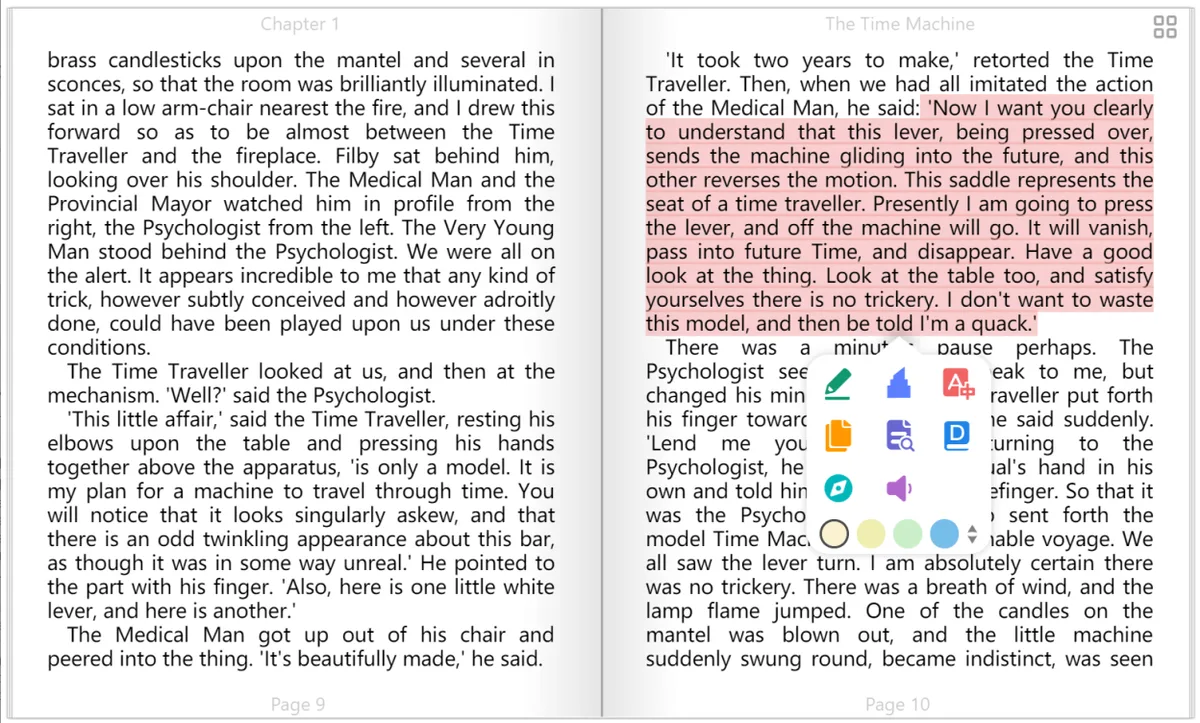
Screenshots of the Linux version, from Flathub.
Downloads
Windows 2.4.7
Show SHA-256
bb6e3835cb7b00274d1d51587bd1cf1da644e65e10bb49df51dac800214c0332 Show SHA-256
6a8b348f11aff412aeef15be10bf6b6a49ba32073f561b8b0172bb73ea86fffc Mac 2.4.7
brew install no longer works and macOS blocks the app when you try to open it. You can still download it below from the publisher, at your own judgement. Homebrew’s cask pageShow SHA-256
999ba1b90a7e3cdae49f14a133be0c5242c2b30efb568284e6cfa589345bcb24 Show SHA-256
e515c8f6314b81003b80e076c10f912f3f25b39a130323ae7402ba96b60dc7dc Linux 2.4.6
Choose the x64 (64-bit) installer for Intel or AMD PCs and the ARM64 installer for ARM PCs. The package data states no minimum Windows version, so check the publisher’s system requirements before installing on an older PC. Choose the Apple silicon (ARM64) build for Macs with an M-series chip and the Intel (x64) build for older Intel Macs. The Homebrew cask states no minimum macOS version, so check the publisher’s system requirements before installing on an older Mac. Choose the x64 (64-bit) download for Intel or AMD computers and the ARM64 download for ARM computers. The Flathub listing states no minimum Linux version or distribution, so check the publisher’s system requirements before installing.
Install with winget: winget install --id AppByTroye.KoodoReader --exact
Install with Flatpak (Flathub): flatpak install flathub io.github.troyeguo.koodo-reader
Check a download: Get-FileHash .\<file> -Algorithm SHA256 (PowerShell) or shasum -a 256 ~/Downloads/<file> (Terminal) and compare it with the SHA-256 above.
Linux (Flatpak): Flathub publishes no file checksum; Flatpak checks the app against Flathub’s signed repository when it installs. Flathub shows this app as publisher-verified. App page on Flathub.
What the installer does
Windows
- Delivered as an NSIS (Nullsoft) setup program (.exe) for x64 and ARM64.
- Installs for the current user only, so administrator rights are normally not needed.
- No custom silent switch is declared; winget falls back to its default for this installer type (
/S). - Associates with the file types
.azw,.azw3,.cb7,.cbr,.cbt,.cbz,.epub,.fb2,.mobi, and.pdf.
PC requirements
- CPU architecture: x64 (64-bit), ARM64
Mac
- Delivered as a disk image (.dmg) for Intel (x64) and Apple silicon (ARM64).
- Installs the app
Koodo Reader.appinto the Applications folder. - A full “zap” removal also deletes up to 4 support, cache and preference locations in your home folder.
Mac requirements
- CPU architecture: Intel (x64), Apple silicon (ARM64)
Linux
- Delivered as a "flatpak" installer for x64 and ARM64.
- The manifest does not state an install scope.
- No silent-install switch is declared in the manifest.
Linux requirements
- Architectures: ARM64, x64 (64-bit)
- Download size: 125 MiB
- Installed size: 350 MiB
Description
Koodo Reader is an all-in-one eBook reader for Windows, macOS, Linux, and the web, supporting over 15 formats.
Koodo Reader at a glance
| What it is | All-in-one ebook reader |
|---|---|
| Latest version | Windows 2.4.7 (November 8, 2026) Mac 2.4.7 Linux 2.4.6 (October 7, 2026) |
| Price | Free and open source |
| Open source | Yes |
| License | AGPL-3.0 |
| License type | Open source · Network copyleft Like the GPL, and it also applies when the software is offered over a network. |
| Copyright | © 2026 App by Troye. All rights reserved. |
| Made by | App by Troye |
| Category | Documents, PDF and e-books |
| Runs on | Windows, Mac, Linux |
| Official website | koodoreader.com |
| More links | Support · Document · Privacy policy · Release notes |
| Source code | github.com/koodo-reader/koodo-reader |
| Tags | ebook ebook-reader epub pdf reader |
| winget ID | AppByTroye.KoodoReader |
| Homebrew cask | koodo-reader |
| Flathub | io.github.troyeguo.koodo-reader Verified data from Flathub |
| Flathub verification | Publisher verified on Flathub through a github login (troyeguo), 2025-07-14 |
| License on Flathub | AGPL-3.0 as listed on Flathub |
| winget moniker | koodoreader |
| Check your download | SHA-256 checksums in the download tables · Security scan |
What’s new in Koodo Reader 2.4.7
Notes for the Windows release.
New Features - Added OCR plugin functionality; go to Settings > Plugins - Added support for the following file formats: caj, djvu, xps, chm, doc, rtf, pptx, ppt, ofd, djv, oxps, and ofd - The reading page now supports an immersive title bar, which automatically hides while reading - Reading options now support grouped display - Added book collections and grouping features, allowing you to combine and manage multiple books together - Support for adjusting page spacing in double-page view; go to Reading Options on the right > Layout - Support for right-to-left page turning; go to Reading Options on the right > Layout - Support for exporting book packages: Book files, along with notes, highlights, bookmarks, and dictionary history, are bundled into a single new file for easy sharing with others or importing onto new devices - Added a prompt asking whether to clear all data upon uninstallation - Support for parsing ISBN, publication date, modification date, language, and other information from book files - Optimized for comics in EPUB, MOBI, and AZW3 formats, with support for double-page mode and continuous scrolling - Added an auto-read feature that automatically scrolls pages at a specified speed; tap the “Assisted Reading” button in the top-right corner - Added options to clear temporary cache and TTS cache; go to Settings > Data - Added a pop-up prompt before opening external links - Support for hiding the built-in background in text-only PDFs - Support for clearing all…
Read the full release notes on the publisher’s site
Notes for older versions are inside each version below.
Is Koodo Reader safe?
Score result: No detections so far
None of the 49 security engines on VirusTotal flagged any of the 4 scanned files.
Covers 4 of 5 files. The rest have no VirusTotal report yet, so this result does not speak for them.
- 0 flagged in total
- 4 of 5 files scanned
- 49 engines
Scan info
- Last scan
- Scan provider
- VirusTotal · Full report
File integrity
| File | SHA-256 | Hash check | Signature | VirusTotal |
|---|---|---|---|---|
| Koodo-Reader-2.4.7-x64.exeWindows · x64 (64-bit) | bb6e3835cb7b00274d1d51587bd1cf1da644e65e10bb49df51dac800214c0332 |
Matches the manifest (re-computed) | Not signed | 0/49 flagged |
| Koodo-Reader-2.4.7-arm64.exeWindows · ARM64 | 6a8b348f11aff412aeef15be10bf6b6a49ba32073f561b8b0172bb73ea86fffc |
Matches the manifest (re-computed) | Not signed | 0/64 flagged |
| Koodo-Reader-2.4.7-x64.dmgMac · Intel (x64) | 999ba1b90a7e3cdae49f14a133be0c5242c2b30efb568284e6cfa589345bcb24 |
Matches the manifest (re-computed) | Not signed | 0/58 flagged |
| Koodo-Reader-2.4.7-arm64.dmgMac · Apple silicon (ARM64) | e515c8f6314b81003b80e076c10f912f3f25b39a130323ae7402ba96b60dc7dc |
Matches the manifest (re-computed) | Not signed | 0/56 flagged |
| io.github.troyeguo.koodo-reader.flatpakrefLinux · x64 (64-bit) | Not provided | Copied from the manifest, not re-computed | Not checked | — |
| Hash re-computed by Everyversion | 4 of 4 installers match. |
|---|---|
| Code signature checked | 0 valid, 4 unsigned. |
We host no installers. Every download link goes to the download location named in the package listing, normally the publisher’s own server. For this software we downloaded the files from that source ourselves, re-computed each checksum and checked the code signature where our tools could, as shown above. A passing check shows a file is the one that was published; it is not a guarantee it is free of problems. For more information, visit our Security and Trust Center.
Source and provenance
| Windows: source | microsoft/winget-pkgs |
|---|---|
| Windows: SHA-256 in upstream manifest | Yes |
| Windows: observed at commit | 13f03baeadf4 · retrieved 2026-11-24 |
| Mac: source | Homebrew/homebrew-cask |
| Mac: SHA-256 in upstream manifest | Yes |
| Mac: observed at commit | 4e66967e1884 · retrieved 2026-11-24 |
| Linux: source | Flathub · Flathub API · github.com/flathub/io.github.troyeguo.koodo-reader |
| Linux: checksum | None published. Flatpak checks the app against Flathub’s signed repository when it installs. |
| Linux: publisher verified | Publisher verified on Flathub through a github login (troyeguo), 2025-07-14 |
| Linux: data retrieved | 2026-11-24 · attribution: app data from Flathub, license listed there: AGPL-3.0 |
Old versions
Windows versions
5 versions listed. Open a version for its installers, checksums and a command that pins it.
2.4.7 latest · 2026-11-08 · 2 installers notes
| Architecture | Format | Scope | SHA-256 | Download |
|---|---|---|---|---|
| x64 (64-bit) | NSIS | Per user | bb6e3835cb7b00274d1d51587bd1cf1da644e65e10bb49df51dac800214c0332 |
Download |
| ARM64 | NSIS | Per user | 6a8b348f11aff412aeef15be10bf6b6a49ba32073f561b8b0172bb73ea86fffc |
Download |
Pin this version: winget install --id AppByTroye.KoodoReader --version 2.4.7 --exact
Release notes
New Features - Added OCR plugin functionality; go to Settings > Plugins - Added support for the following file formats: caj, djvu, xps, chm, doc, rtf, pptx, ppt, ofd, djv, oxps, and ofd - The reading page now supports an immersive title bar, which automatically hides while reading - Reading options now support grouped display - Added book collections and grouping features, allowing you to combine and manage multiple books together - Support for adjusting page spacing in double-page view; go to Reading Options on the right > Layout - Support for right-to-left page turning; go to Reading Options on the right > Layout - Support for exporting book packages: Book files, along with notes, highlights, bookmarks, and dictionary history, are bundled into a single new file for easy sharing with others or importing onto new devices - Added a prompt asking whether to clear all data upon uninstallation - Support for parsing ISBN, publication date, modification date, language, and other information from book files - Optimized for comics in EPUB, MOBI, and AZW3 formats, with support for double-page mode and continuous scrolling - Added an auto-read feature that automatically scrolls pages at a specified speed; tap the “Assisted Reading” button in the top-right corner - Added options to clear temporary cache and TTS cache; go to Settings > Data - Added a pop-up prompt before opening external links - Support for hiding the built-in background in text-only PDFs - Support for clearing all…
Full release notes from the publisher
Manifest: manifests/a/AppByTroye/KoodoReader/2.4.7
2.4.6 · 2026-10-07 · 2 installers notes
| Architecture | Format | Scope | SHA-256 | Download |
|---|---|---|---|---|
| x64 (64-bit) | NSIS | Per user | 706ce81ec8baf0e659bba722a343bce2bdd9be78c6ef5dbb061e9ef604733a0b |
Download |
| ARM64 | NSIS | Per user | 94562d9c8791307920a8ec3be7003a5860ab3927ac6163f397c79d88e4d5ad72 |
Download |
Pin this version: winget install --id AppByTroye.KoodoReader --version 2.4.6 --exact
Release notes
New Features - The table of content now displays the number of pages by default; there is no need to enable the “Total Pages” feature separately. - Software security has been optimized to address an arbitrary code execution vulnerability caused by metadata. - An additional confirmation step has been added when importing books via external links using the URL scheme to enhance security. - The “Ask AI” feature now supports the Ctrl + Enter shortcut for submitting questions. - Added an eraser tool to Doodle Mode - Added support for 7 languages on the official website - (Mobile) Added a feature to resync all book covers; go to Settings > Sync options - (Mobile) Optimized the smoothness of page-turning animations - (Mobile) Optimized the smoothness of certain app animations - (Mobile) Added an option to download images in CBZ comic mode Fixes - Fixed an issue where footnotes in some books did not appear in a pop-up window - Fixed an issue where reading progress could not be tracked for some books containing special styles - Fixed an issue where table of contents highlighting did not work after enabling “Total Pages” - Fixed an issue where page numbers were not displayed in the table of contents for some TXT books - (Mobile) Fixed an issue where authorization via the browser failed on older iOS versions, resulting in a blank page - (Mobile Version) Fixed abnormal slider behavior on iOS - (Mobile Version) Fixed an issue where swiping on an image triggered image preview in scroll…
Full release notes from the publisher
Manifest: manifests/a/AppByTroye/KoodoReader/2.4.6
2.4.5 · 2026-09-26 · 2 installers notes
| Architecture | Format | Scope | SHA-256 | Download |
|---|---|---|---|---|
| x64 (64-bit) | NSIS | Per user | 1d810c0462b9809eb8d9cab8084a10e05ea1d7d74f54b22db64994bb9a11e811 |
Link returns 404 |
| ARM64 | NSIS | Per user | d3c4d329745cca2c9184001c4a64975d1290b475d707ae8743edbb4d8a316a53 |
Link returns 404 |
Pin this version: winget install --id AppByTroye.KoodoReader --version 2.4.5 --exact
Release notes
New Features - Support for exporting notes, highlights, and new vocabulary in JSON format - Support for re-importing notes, highlights, and new vocabulary in JSON and CSV formats; go to Settings > Data - Optimized rendering speed when handling large numbers of notes and highlights; no more lag issues - Support for using AI to extract book titles and author names from filenames; right-click on a book and select “Edit Book” - Support for using AI to parse book titles and authors from filenames when importing books; go to Settings > General - Supports caching full-text translation and OCR results; books will load directly from the cache the next time they’re opened - Added Paragraph Mode, Reading Ruler, and Speed Reading Mode; enable them in the reading options panel on the right - Supports streaming parsing of CBZ and CBT books; no longer requires loading the entire book into memory, significantly improving book import and opening speeds - Online book metadata matching now includes publication date, ISBN, ratings, and other information - Copying text from books now preserves the original text formatting - Added 100 curated book and app background images; go to Settings > Background Images - Added 11 public domain dictionaries; go to Settings > Local Dictionaries - Added export progress tracking for batch book exports - Supports searching for books using a book key - Restored support for custom TTS plugins, with added security warnings - Experimental support for total page…
Full release notes from the publisher
Manifest: manifests/a/AppByTroye/KoodoReader/2.4.5
2.4.4 · 2026-09-03 · 2 installers notes
| Architecture | Format | Scope | SHA-256 | Download |
|---|---|---|---|---|
| x64 (64-bit) | NSIS | Per user | 733940273bca79ee8eb957edb61575c361f8c4c0845545ad69fe47ee7c76409a |
Link returns 404 |
| ARM64 | NSIS | Per user | 39be0e76586b87b1fc2dd72a727fcbe868ebfdba88beb8a63065a92048163ab0 |
Link returns 404 |
Pin this version: winget install --id AppByTroye.KoodoReader --version 2.4.4 --exact
Release notes
New Features - The bookmarks, notes, and highlights lists in the left panel now support searching and sorting by reading progress - Supports automatic import of books from local folders. Click the triangle next to the “Import” button. Each time the app launches, it will automatically scan the specified folder for new books and import them - Added the total number of search results to the in-book search feature - Added highlight rules to text rules, allowing you to highlight specific text within a book - Improved software security: Sandbox environment and context isolation are enabled by default, and the rendering process’s permissions to access and manipulate the local machine have been disabled. Due to this change, custom TTS plugins will no longer be supported - Optimized memory usage during book import - The Translation, Dictionary, Ask AI, and Notes popups can now be moved to any position or pinned to the right side to function as a sidebar - Support for clearing AI chat history - Support for configuring HTTP and SOCKS5 proxies; go to Settings > More Settings - Scanned PDFs now support more annotation styles, including highlighters, text, shapes, and more - Support for copying AI chat responses; tap the “Copy” button at the bottom of the response - Optimized the PDF TTS feature to support more natural sentence breaks - OPDS now supports downloading books in more formats - (Mobile) Optimized performance and frame rate for smooth and simulated page-turning animations…
Full release notes from the publisher
Manifest: manifests/a/AppByTroye/KoodoReader/2.4.4
2.4.3 · 2026-08-01 · 2 installers notes
| Architecture | Format | Scope | SHA-256 | Download |
|---|---|---|---|---|
| x64 (64-bit) | NSIS | Per user | bcf9e9192890df139ea392c10e2350201cafa3860fadcbfefbf8fd225dba7ac8 |
Link returns 404 |
| ARM64 | NSIS | Per user | a4188ed07e83fb2910d60f89b77c8a45217c4b25408ec6b43ab647b6bb228219 |
Link returns 404 |
Pin this version: winget install --id AppByTroye.KoodoReader --version 2.4.3 --exact
Release notes
New Features - The context length for custom AI models now retains approximately 5 messages by default to prevent the context from growing indefinitely - The keyboard shortcut for creating a note has been changed to Ctrl + Enter - Optimize the trigger area for the buttons around the book - Browser extension is now listed in the Chrome Web Store and Edge Addons Store - (Mobile) The context length for custom AI models now retains approximately 5 messages by default to prevent the context from growing indefinitely - (Mobile) Android version is now listed in the Google Play Store Fixes - Fixed an issue where backup files from the 1.7.4 stable release could not be restored - Fixed an issue where PDF reading progress was lost in the 1.7.4 stable release - Fixed an issue where the book list was not displayed after upgrading from the 1.7.4 stable release - Fixed compatibility issues with the Minimax audiobook plugin - (Mobile) Fixed a UI issue on the TTS voice page Note This version has been selected as the stable release candidate. It should work fine in most cases. If you have any concerns, please download the previous stable version Tip You can also download the installation package for this version from the our self-hosted mirror.
Full release notes from the publisher
Manifest: manifests/a/AppByTroye/KoodoReader/2.4.3
Mac versions
Homebrew casks list only the current release. Earlier builds appear in the cask’s history on GitHub, and Homebrew cannot install them directly.
2.4.7 latest · 2 installers
| Architecture | Format | Requires | File & source | SHA-256 | Download |
|---|---|---|---|---|---|
| Intel (x64) | DMG | — | Koodo-Reader-2.4.7-x64.dmggithub.com | 999ba1b90a7e3cdae49f14a133be0c5242c2b30efb568284e6cfa589345bcb24 |
Download |
| Apple silicon (ARM64) | DMG | — | Koodo-Reader-2.4.7-arm64.dmggithub.com | e515c8f6314b81003b80e076c10f912f3f25b39a130323ae7402ba96b60dc7dc |
Download |
Release notes
Linux versions
Flathub lists only the current release, and Flatpak installs the newest build; earlier versions cannot be chosen from the listing.
Alternatives to Koodo Reader
Similar apps in Documents, PDF and e-books on Everyversion. Each one links to the download location named in the publisher’s package data, with a SHA-256 checksum.


Koodo Reader FAQ
Is Koodo Reader safe to download from here?
We host no installers. Every download button goes to the download location named in the package listing, and the checks below were run on those files.
On 2026-11-24 we downloaded the latest 4 installers from those sources and re-computed the SHA-256 of each: 4 of 4 match the package catalog’s value. Code signatures: 0 valid, 4 not signed.
VirusTotal: none of its 49 security engines flagged any of the 4 scanned files.
Reports exist for 4 of 5 files, so the rating does not cover the rest.
Our rating: Safe so far. No check is a guarantee. See the security details above and our Security and Trust Center. Publisher’s website: Koodo Reader’s official website.
Does Koodo Reader update itself after I install an old version?
For Windows, we have no information on whether Koodo Reader updates itself, and for Mac, we have no confirmation that the app updates itself, although many apps check for updates and offer to install them. Look for an update setting in Koodo Reader (see Koodo Reader’s documentation) before you rely on an older version.
Does Koodo Reader cost anything?
No. Koodo Reader is free and open source (license: AGPL-3.0).
Which versions of Koodo Reader are listed here, and how far back?
For Windows, we list 5 versions, from 2.4.3 (2026-08-01) up to 2.4.7, and for Mac, only the current release (2.4.7) is listed, because older Mac builds are not kept in the package listing, and for Linux, we list 1 version, from 2.4.6 (2026-10-07) up to 2.4.6. This page shows all of the Windows versions.
Where do the download links go?
They go straight to the source named in the package catalog, with nothing added by us: for Windows, to dl.koodoreader.com, and for Mac, to github.com, and for Linux, to dl.flathub.org. We host no files. Compare the SHA-256 shown next to each file with the one you compute after downloading. Publisher’s website: Koodo Reader’s official website.