
Download Vesktop 1.7.0
Safe so farDeveloper: Vencord
Last updated: · Verified by  CristianBuilt Everyversion after working at Softonic. Runs the checks and answers for the results. ClaudeAnthropic’s AI. Runs the download, checksum and signature checks and reports every result. VirusTotalScans files with dozens of security engines. We look up each file by its SHA-256 only.
A cross platform electron-based desktop app aiming to give you a snappier Discord experience with Vencord pre-installed.
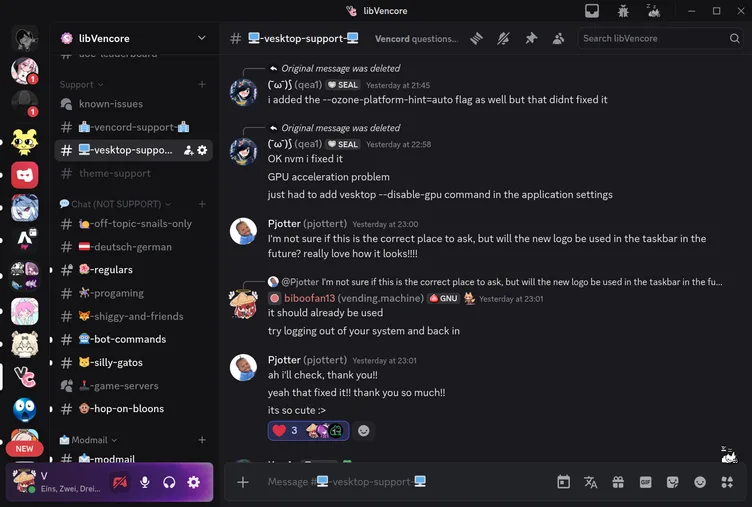
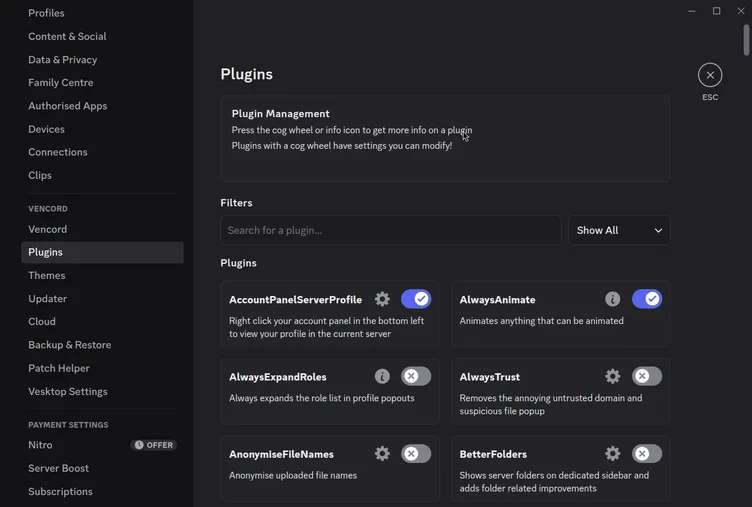
Screenshots of the Linux version, from Flathub.
Downloads
Windows 1.7.0
Show SHA-256
74c48a16ee8b0ef312542dca1fb99355d2010477e44c5a3594b5bfd04a059924 Mac 1.7.0
Show SHA-256
8d669765c890642fa52d565ce5c8161cc5f1519fe0e68a3384a0bd327bee2236 Linux 1.7.0
The publisher offers a 64-bit (x64) build for Intel or AMD PCs. The package data states no minimum Windows version, so check the publisher’s system requirements before installing on an older PC. The Universal build runs on both Intel and Apple silicon Macs. This build needs macOS 13 Ventura or later. Choose the x64 (64-bit) download for Intel or AMD computers and the ARM64 download for ARM computers. The Flathub listing states no minimum Linux version or distribution, so check the publisher’s system requirements before installing.
Install with winget: winget install --id Vencord.Vesktop --exact
Install with Homebrew: brew install --cask vesktop
Install with Flatpak (Flathub): flatpak install flathub dev.vencord.Vesktop
Check a download: Get-FileHash .\<file> -Algorithm SHA256 (PowerShell) or shasum -a 256 ~/Downloads/<file> (Terminal) and compare it with the SHA-256 above.
Linux (Flatpak): Flathub publishes no file checksum; Flatpak checks the app against Flathub’s signed repository when it installs. Flathub shows this app as publisher-verified. App page on Flathub.
What the installer does
Windows
- Delivered as an NSIS (Nullsoft) setup program (.exe) for x64.
- The manifest does not state an install scope.
- No custom silent switch is declared; winget falls back to its default for this installer type (
/S). - Shows up in Windows “Installed apps” as “Vesktop 1.7.0”.
PC requirements
- CPU architecture: x64 (64-bit)
Mac
- Delivered as a disk image (.dmg) for Apple silicon and Intel.
- Installs the app
vesktop.appinto the Applications folder. - The app updates itself, so it may be newer than the version Homebrew lists.
- A full “zap” removal also deletes up to 7 support, cache and preference locations in your home folder.
Mac requirements
- Minimum macOS version: macOS 13 or later
- CPU architecture: Universal (Apple silicon + Intel)
Linux
- Delivered as a "flatpak" installer for x64 and ARM64.
- The manifest does not state an install scope.
- No silent-install switch is declared in the manifest.
Linux requirements
- Architectures: ARM64, x64 (64-bit)
- Download size: 125 MiB
- Installed size: 287 MiB
Description
A cross platform electron-based desktop app aiming to give you a snappier Discord experience with Vencord pre-installed.
Best for: Discord users on Linux, especially on Wayland, who want screen sharing with sound and Vencord plugins, and accept that Discord does not endorse client mods.
Features
- Screen share with audio on Linux: Screen sharing with sound works on Wayland. Global shortcuts such as push-to-talk work on Windows and X11, need Accessibility permission on macOS, and need a desktop with the GlobalShortcuts portal, such as GNOME or KDE, on Wayland.
- Vencord comes built in: Vesktop is an unofficial Discord app with Vencord's plugins preinstalled; you switch on the ones you want. The project says it is lighter than the official app and gives Discord less access to your system.
- Client mods break Discord's terms: Vencord's own FAQ says client modifications are against Discord's Terms of Service. It also says there are no known bans for using them and that the built-in plugins are safe. If your account matters a lot, the FAQ suggests not using mods.
- Native packages beat the Flatpak: The Flathub build is verified as published by the Vencord team, in x64 and ARM64. Vesktop's Linux guide still prefers its .deb, .rpm, AUR or AppImage builds, because in the Flatpak rich presence does not work well and drag-and-drop needs access to all files.
- Free and open source: It is GPL-3.0 licensed, with no paid tier. Only vencord.dev and vesktop.dev are official, and the FAQ warns that other sites claiming to be official are likely malicious.
- Rolling back on Windows: The Windows listing keeps 26 versions of the 64-bit installer. macOS (universal, macOS 13 or later) and Linux list only the current release, so downgrades there need another source.
Vesktop at a glance
| What it is | A cross platform electron-based desktop app aiming to give you a snappier Discord experience with Vencord pre-installed. |
|---|---|
| Latest version | Windows 1.7.0 (November 19, 2026) Mac 1.7.0 Linux 1.7.0 (November 19, 2026) |
| Price | Free and open source |
| Open source | Yes |
| License | GPL-3.0 |
| License type | Open source · Strong copyleft Software built on it must be shared under the same license. |
| Copyright | Copyright © 2023 Vendicated |
| Made by | Vencord |
| Category | Chat and video meetings |
| Runs on | Windows, Mac, Linux |
| Official website | github.com |
| More links | Support · Bug tracker · Release notes |
| Source code | github.com/Vencord/Vesktop |
| winget ID | Vencord.Vesktop |
| Homebrew cask | vesktop |
| Flathub | dev.vencord.Vesktop Verified data from Flathub |
| Flathub verification | Publisher verified on Flathub by proving control of vencord.dev, 2023-12-04 |
| License on Flathub | GPL-3.0-or-later as listed on Flathub |
| Check your download | SHA-256 checksums in the download tables · Security scan |
What’s new in Vesktop 1.7.0
What's Changed - Added global shortcuts/keybinds - Fixed spellcheck - Now starts on friends page again instead of quests Full Changelog: v1.6.9...v1.7.0
Read the full release notes on the publisher’s site
Notes for older versions are inside each version below.
Is Vesktop safe?
Score result: No detections so far
None of the 67 security engines on VirusTotal flagged the scanned file.
Covers 1 of 3 files. The rest have no VirusTotal report yet, so this result does not speak for them.
- 0 flagged in total
- 1 of 3 files scanned
- 67 engines
Scan info
- Last scan
- Scan provider
- VirusTotal · Full report
File integrity
| File | SHA-256 | Hash check | Signature | VirusTotal |
|---|---|---|---|---|
| Vesktop-Setup-1.7.0.exeWindows · x64 (64-bit) | 74c48a16ee8b0ef312542dca1fb99355d2010477e44c5a3594b5bfd04a059924 |
Matches the manifest (re-computed) | Not signed | 0/67 flagged |
| Vesktop-1.7.0-universal.dmgMac · Universal (Apple silicon + Intel) | 8d669765c890642fa52d565ce5c8161cc5f1519fe0e68a3384a0bd327bee2236 |
Matches the manifest (re-computed) | Not signed | Open not on VirusTotal |
| dev.vencord.Vesktop.flatpakrefLinux · x64 (64-bit) | Not provided | Copied from the manifest, not re-computed | Not checked | — |
| Hash re-computed by Everyversion | 2 of 2 installers match. |
|---|---|
| Code signature checked | 0 valid, 2 unsigned. |
We host no installers. Every download link goes to the download location named in the package listing, normally the publisher’s own server. For this software we downloaded the files from that source ourselves, re-computed each checksum and checked the code signature where our tools could, as shown above. A passing check shows a file is the one that was published; it is not a guarantee it is free of problems. For more information, visit our Security and Trust Center.
Source and provenance
| Windows: source | microsoft/winget-pkgs |
|---|---|
| Windows: SHA-256 in upstream manifest | Yes |
| Windows: observed at commit | bbed5ec1554c · retrieved 2026-11-20 |
| Mac: source | Homebrew/homebrew-cask |
| Mac: SHA-256 in upstream manifest | Yes |
| Mac: observed at commit | a1abea2c78e8 · retrieved 2026-11-20 |
| Linux: source | Flathub · Flathub API · github.com/flathub/dev.vencord.Vesktop |
| Linux: checksum | None published. Flatpak checks the app against Flathub’s signed repository when it installs. |
| Linux: publisher verified | Publisher verified on Flathub by proving control of vencord.dev, 2023-12-04 |
| Linux: data retrieved | 2026-11-20 · attribution: app data from Flathub, license listed there: GPL-3.0-or-later |
Old versions
Windows versions
Showing the newest 20 of 26 versions (the JSON and Markdown versions list 26). Open a version for its installers, checksums and a command that pins it.
1.7.0 latest · 2026-11-19 · 1 installer notes
| Architecture | Format | Scope | SHA-256 | Download |
|---|---|---|---|---|
| x64 (64-bit) | NSIS | —en-US | 74c48a16ee8b0ef312542dca1fb99355d2010477e44c5a3594b5bfd04a059924 |
Download |
Pin this version: winget install --id Vencord.Vesktop --version 1.7.0 --exact
Release notes
What's Changed - Added global shortcuts/keybinds - Fixed spellcheck - Now starts on friends page again instead of quests Full Changelog: v1.6.9...v1.7.0
Full release notes from the publisher
Manifest: manifests/v/Vencord/Vesktop/1.7.0
1.6.9 · 2026-11-05 · 1 installer notes
| Architecture | Format | Scope | SHA-256 | Download |
|---|---|---|---|---|
| x64 (64-bit) | NSIS | —en-US | e099dc2df1f9810424d2d27006b50179106359f276bdc34bfc524094a5b4460d |
Download |
Pin this version: winget install --id Vencord.Vesktop --version 1.6.9 --exact
Release notes
What's Changed - Considerably improved Rich Presence. Now much faster and should detect way more games. Also supports full Discord RPC now, which means apps like Discord Streamkit Overlay should now work with Vesktop - fixed the Discord titlebar having no close/maximise/minimise buttons - fixed various Linux screenshare audio issues - KDE: fixed tray icon not working when using autostart - modernised the screenshare implementation - fixed popout windows having no titlebar - fixed an issue where portable Windows installs may be updated to the Setup version - now better handles errors when Vencord fails to load & offers to Repair Full Changelog: v1.6.8...v1.6.9
Full release notes from the publisher
Manifest: manifests/v/Vencord/Vesktop/1.6.9
1.6.8 · 2026-10-21 · 1 installer notes
| Architecture | Format | Scope | SHA-256 | Download |
|---|---|---|---|---|
| x64 (64-bit) | NSIS | —en-US | 2b46707c2c9e780e7d41d376fe810687a6252a65a320c6e1e3deb63966702ea5 |
Download |
Pin this version: winget install --id Vencord.Vesktop --version 1.6.8 --exact
Release notes
What's Changed This update contains an important security fix. We strongly recommend you update as soon as possible! - Updated Electron to address the recent eMudhra certificate authority security issue which undermines trust in affected certificates. This does not mean Vesktop was compromised, but updating is strongly recommended. - Windows Screenshare: fixed stream containing other participants' voices - Fixed various issues related to screenshare with system audio on Linux - Improved the Native titlebar setting - Fixed not being able to zoom with Numpad +/- - Fixed various titlebar issues - AppImage: stop using dead fuse2 Full Changelog: v1.6.7...v1.6.8
Full release notes from the publisher
Manifest: manifests/v/Vencord/Vesktop/1.6.8
1.6.7 · 2026-08-18 · 3 installers notes
| Architecture | Format | Scope | SHA-256 | Download |
|---|---|---|---|---|
| x64 (64-bit) | NSIS | —en-US | 4516f9128d4328984cc40445d3c63313f0f84fa9a8fc0431ed1ee63e55f8b465 |
Download |
| x64 (64-bit) | ZIPin Portable | —en-US | ff733d40835a603239a43ec79d53131749dcebd8611b72d301f30cfb9b1fbfa3 |
Download |
| ARM64 | ZIPin Portable | —en-US | 4f25ece24a431139817744a457dde7bc42fee17e889cdf7f62ba4914e5360103 |
Download |
Pin this version: winget install --id Vencord.Vesktop --version 1.6.7 --exact
Release notes
Hotfix for 1.6.6 - Fixes tray icon being broken - Fixes "C++ library is too old" error Also read the 1.6.6 changelog for other changes: https://github.com/Vencord/Vesktop/releases/tag/v1.6.6
Full release notes from the publisher
Manifest: manifests/v/Vencord/Vesktop/1.6.7
1.6.6 · 2026-08-17 · 1 installer notes
| Architecture | Format | Scope | SHA-256 | Download |
|---|---|---|---|---|
| x64 (64-bit) | NSIS | —en-US | 3a3bff829d876a1be937dde73114254d0115f5c66e4a4ad9704c1e6ac8ca365f |
Download |
Pin this version: winget install --id Vencord.Vesktop --version 1.6.6 --exact
Release notes
What's Changed - Streamer Mode: fixed constantly re-enabling itself if OBS is open & fixed "Automatically enable Streamer Mode" toggle not showing in Discord appearance settings - Added a setting to work around Voice Chat not working when using VPNs like Tailscale - Fixed various issues related to screenshare with system audio on Linux - Upgraded to Electron43 which brings many fixes and improvements - Fixed an issue where the auto-start toggle would not accurately reflect its actual state on Windows - Added a --repair command line flag to quickly update Vencord to the latest version Notable Electron changes - On Linux, when using the custom Discord titlebar, Vesktop will now have rounded corners & shadow by default. You can disable this behaviour in Vesktop settings - On Linux, Vesktop will now show up as "Vesktop" instead of as "Chromium" in Audio mixers For Linux users: It is now recommended to run Vesktop in native Wayland over legacy X11 for the best experience. You may run into graphical glitches when running on X11 Full Changelog: v1.6.5...v1.6.6
Full release notes from the publisher
Manifest: manifests/v/Vencord/Vesktop/1.6.6
1.6.5 · 2026-02-12 · 1 installer notes
| Architecture | Format | Scope | SHA-256 | Download |
|---|---|---|---|---|
| x86 (32-bit) | NSIS | —en-US | e9199c6721daf51ff6493889ab1cf39858fb0ab1ae9fe7543c6a2a6dee1292d6 |
Download |
Pin this version: winget install --id Vencord.Vesktop --version 1.6.5 --exact
Release notes
What's New - Fixed spellcheck entries missing - Fixed window control buttons (close, maximise, minimise) being offset - Should fix oversatured colours on Linux
Full release notes from the publisher
Manifest: manifests/v/Vencord/Vesktop/1.6.5
1.6.4 · 2026-01-24 · 1 installer notes
| Architecture | Format | Scope | SHA-256 | Download |
|---|---|---|---|---|
| x86 (32-bit) | NSIS | —en-US | 6b2991d2cc64c29efd2008e2a5892e301f005c81a25dbc88a80efb7ef7c2419b |
Download |
Pin this version: winget install --id Vencord.Vesktop --version 1.6.4 --exact
Release notes
What's new - Fixed window controls (close, maximise, minimise) not showing Full Changelog: v1.6.3...v1.6.4
Full release notes from the publisher
Manifest: manifests/v/Vencord/Vesktop/1.6.4
1.6.3 · 2025-12-25 · 1 installer notes
| Architecture | Format | Scope | SHA-256 | Download |
|---|---|---|---|---|
| x86 (32-bit) | NSIS | —en-US | f6716a48986745f375e441e6c841f1a50405dbbe988760951545966cc9fbe6d5 |
Download |
Pin this version: winget install --id Vencord.Vesktop --version 1.6.3 --exact
Release notes
This is a hotfix that adresses one bug introduced in v1.6.2 (released 4 hours prior): - Fixes Screenshare with audio not starting Also see what's new in v1.6.2 (full release)
Full release notes from the publisher
Manifest: manifests/v/Vencord/Vesktop/1.6.3
1.6.2 · 2025-12-24 · 1 installer notes
| Architecture | Format | Scope | SHA-256 | Download |
|---|---|---|---|---|
| x86 (32-bit) | NSIS | —en-US | b978071a1920f9a338419dc919f7359600233ba7bc7d13418055d89ef3d29808 |
Download |
Pin this version: winget install --id Vencord.Vesktop --version 1.6.2 --exact
Release notes
What's Changed - Added taskbar flashing on new notifications - Fixed some issues with camera/virtual camera sharing - Fixed Screenshare UI black text - Fixed macOS vibrancy feature not working - Fixed a text rendering issue in Vesktop windows (About, etc) - Fixed start minimised not working when Splash is disabled - Upgraded to Electron 39.2.7, bringing in various Electron/Chromium fixes - Hardened Security by enabling strict Sandboxing and tweaking Electron fuses Full Changelog: v1.6.1...v1.6.2
Full release notes from the publisher
Manifest: manifests/v/Vencord/Vesktop/1.6.2
1.6.1 · 2025-10-28 · 1 installer notes
| Architecture | Format | Scope | SHA-256 | Download |
|---|---|---|---|---|
| x86 (32-bit) | NSIS | —en-US | efd29c5af12dd2650b000a0e2f493fd5950b2570075560a0c90738273920b564 |
Download |
Pin this version: winget install --id Vencord.Vesktop --version 1.6.1 --exact
Release notes
This is a small interim update to address some bugs What's Changed - Added proper Vesktop splash animation, made by @khcrysalis - Added option to use nearest neighbour scaling (for pixel art) to the splash optimisation - Fixed Vesktop not correctly remembering its position on some multi-monitor Windows systems - Fixed missing Notification icon on Windows - Fixed auto-start minimized not working - Fixed an edge case where on some systems text wouldn't render correctly - Fixed the first command line argument being ignored - Now runs in Wayland on Linux by default Full Changelog: v1.6.0...v1.6.1
Full release notes from the publisher
Manifest: manifests/v/Vencord/Vesktop/1.6.1
1.6.0 · 2025-10-19 · 1 installer notes
| Architecture | Format | Scope | SHA-256 | Download |
|---|---|---|---|---|
| x86 (32-bit) | NSIS | —en-US | c16f056bbec506249cfc1df5f7086bdac114019d0e3bc77a6781f54d49e35009 |
Download |
Pin this version: winget install --id Vencord.Vesktop --version 1.6.0 --exact
Release notes
This is a pretty big update that brings a change to the look of the app What's Changed - Vesktop now has a new icon, including a Liquid Glass icon for MacOS - You can now customise the splash animation and tray icon (#1179) - Added the option to auto start the app minimised - Added autostart support to the Vesktop flatpak - The ping count badge should now show more reliably on Linux - Vesktop updates are no longer forced. From now on, they will open an Update notice popup with the changelog and options to update now, remind later, or ignore an update entirely (not recommended) - Fixed Vesktop registering itself as the default app for HTML files (this is actually an Ubuntu bug) - Added cli options to spoof Vesktop's user agent, useful for bypassing Discord's recent VPN Linux block Icon Credit - Base icon created by @wingio - macOS icon created by @khcrysalis - New tray icon created by @Covkie Full Changelog: v1.5.8...v1.6.0
Full release notes from the publisher
Manifest: manifests/v/Vencord/Vesktop/1.6.0
1.5.8 · 2025-07-08 · 1 installer notes
| Architecture | Format | Scope | SHA-256 | Download |
|---|---|---|---|---|
| x86 (32-bit) | NSIS | —en-US | c7898c2f7e69ecb0cee5a026eaaaf9beb43474a7400a6e75fbfdd95bf293b8b5 |
Download |
Pin this version: winget install --id Vencord.Vesktop --version 1.5.8 --exact
Release notes
What's Changed - Fixed spellcheck by @Covkie - Moved arrpc server into a worker thread to fix small stutters - Fixed Video Hardware Acceleration setting sometimes being wrongly disabled - Fixed random Discord logouts - Updated Electron & Chromium - should fix various graphical glitches Full Changelog: v1.5.7...v1.5.8
Full release notes from the publisher
Manifest: manifests/v/Vencord/Vesktop/1.5.8
1.5.7 · 2025-06-08 · 1 installer notes
| Architecture | Format | Scope | SHA-256 | Download |
|---|---|---|---|---|
| x64 (64-bit) | NSIS | —en-US | f1424d699d2aa65a5bba3ecb8f87852bd2f64fa5affe3003f1259570bb6d6d30 |
Download |
Pin this version: winget install --id Vencord.Vesktop --version 1.5.7 --exact
Release notes
What's Changed - Starting a screenshare on Windows will no longer mute system audio - Fixed showing "Invalid URL" errors in some edge cases (spotty network) - Now respects your Autogain preference - Improved the flow for linking third party accounts - Fixed issue that would cause the AppImage to have no icon and be unpinnable - Added the ability to screenshare with stereo audio - Added Video Hardware Acceleration switch - Used to always be enabled. Now it is opt-in (disabled by default) to fix graphical glitches that were affecting many users - Fixed Discord titlebar buttons - Fixed "Object has been destroyed" error in some edge cases Full Changelog: v1.5.6...v1.5.7
Full release notes from the publisher
Manifest: manifests/v/Vencord/Vesktop/1.5.7
1.5.6 · 2025-04-13 · 1 installer notes
| Architecture | Format | Scope | SHA-256 | Download |
|---|---|---|---|---|
| x64 (64-bit) | NSIS | —en-US | 3cd0b7ebdc6e6aac72ba5cd6de4640b31d88f1a65d62d54f756b197950a267e4 |
Download |
Pin this version: winget install --id Vencord.Vesktop --version 1.5.6 --exact
Release notes
What's Changed - Fixes the new Discord titlebar @Sqaaakoi - Fixes Clipboard copy actions not working - Should now properly hide the "Download Apps" button again - No longer responds to Browser Tab shortcuts like Ctrl+W by @rushiiMachine - DevTools keybind should now work properly on Mac @ryanccn - Should no longer throw Sandbox errors on Ubuntu Full Changelog: v1.5.5...v1.5.6
Full release notes from the publisher
Manifest: manifests/v/Vencord/Vesktop/1.5.6
1.5.5 · 2025-02-06 · 1 installer notes
| Architecture | Format | Scope | SHA-256 | Download |
|---|---|---|---|---|
| x64 (64-bit) | NSIS | —en-US | 428a7a80cf4c15ca2a13dd860f3abfda3cfd345746ee608820fb6b010eaf9f55 |
Download |
Pin this version: winget install --id Vencord.Vesktop --version 1.5.5 --exact
Release notes
What's Changed - Now remembers your previous Screenshare resolution & FPS - You can now disable the splash screen in Vesktop Settings - Now supports deep links (opening Discord Message Links in Vesktop) by @Covkie in #1016 - Now supports discord:// uri scheme, allowing it to open things like invites from your Browser even while closed by @Covkie in #813 - Added 4k resolution to screenshare by @makindotcc in #1024 - Fixed some performance issues caused by a recent Discord update - Updated Electron to v34 & chromium to v132, bringing new features and fixes New Contributors - @makindotcc made their first contribution in #1024 - @RSKYS made their first contribution in #1056 - @BlurOne-GIT made their first contribution in #1078 Full Changelog: v1.5.4...v1.5.5
Full release notes from the publisher
Manifest: manifests/v/Vencord/Vesktop/1.5.5
1.5.4 · 2024-12-05 · 1 installer notes
| Architecture | Format | Scope | SHA-256 | Download |
|---|---|---|---|---|
| x86 (32-bit) | NSIS | —en-US | 882257ba58485d72ad4234ded6b624db6357d1fb1ca984c228d5373dae38cf82 |
Download |
Pin this version: winget install --id Vencord.Vesktop --version 1.5.4 --exact
Release notes
What's Changed - Upgraded electron to version 33 which brings many improvements and bug fixes - AudioShare: add even more granular selection, Allow device sharing by @Curve in #750 - Enable speech-dispatcher support for TTS on linux by @adryd325 in #874 - fixed screenshare picker window subtitle alignment by @ryawaa in #875 - fixed splash corners by @Covkie in #937 Full Changelog: https://github.com/Vencord/Vesktop/compare/v1.5.3...v1.5.4
Full release notes from the publisher
Manifest: manifests/v/Vencord/Vesktop/1.5.4
1.5.3 · 2024-07-04 · 1 installer notes
| Architecture | Format | Scope | SHA-256 | Download |
|---|---|---|---|---|
| x64 (64-bit) | NSIS | — | 490370994452fc1859ec76f423ad8d59db5a514123c11e3f0198ab1418939f19 |
Download |
Pin this version: winget install --id Vencord.Vesktop --version 1.5.3 --exact
Release notes
⚠️ WARNING If the "Download Update" button doesn't work, download manuallyFeatures - added arm64 Windows support - windows & macOS builds are now universal - added option to configure spellcheck languages - will auto-update from now on - updated electron to 31 & Chromium to 126 - macOS: Added customized dmg background by @khcrysalis - Windows Portable: store settings in portable folder by @MrGarlic1 - linux audioshare: added granular selection, more options, better ui by @Curve - changed default screen-sharing quality to 720p 30 FPS by @Tiagoquix Fixes - macOS: Added workaround for making things in draggable area clickable by @HAHALOSAH - fixed Screenshare UI for non-linux systems by @PolisanTheEasyNick - fixed opening on screen that was disconnected by @MrGarlic1 - mac: hide native window controls with custom titlebar enabled by @MrGarlic1 - fixed some broken patches by @D3SOX - fixed framerate in constraints by @kittykel - fixed some first launch switches not applying - fixed potential sandbox escape via custom vencord location Full Changelog: https://github.com/Vencord/Vesktop/compare/v1.5.2...v1.5.3
Full release notes from the publisher
Manifest: manifests/v/Vencord/Vesktop/1.5.3
1.5.2 · 2024-05-01 · 1 installer notes
| Architecture | Format | Scope | SHA-256 | Download |
|---|---|---|---|---|
| x64 (64-bit) | NSIS | — | 6a065dd11808453afb05bfd4e668386a14bc0b55d5a105b6b14918ae8593b84e |
Download |
Pin this version: winget install --id Vencord.Vesktop --version 1.5.2 --exact
Release notes
What's Changed - Fixed scrollbars looking wrong (actually Discord's fault) - Tray: Added left click hide/show feature by @0bCdian in #404 - MacOS: Fixed the app not properly requesting microphone permissions by @ssalggnikool in #533 - Linux: Various fixed related to audio screenshare by @Curve - Linux: Overhauled & improved screenshare with better framerate by @kaitlynkittyy in #489 - Users can now pass --enable/disable-features command line flags by @takase1121 in #527 Full Changelog: https://github.com/Vencord/Vesktop/compare/v1.5.1...v1.5.2
Full release notes from the publisher
Manifest: manifests/v/Vencord/Vesktop/1.5.2
1.5.1 · 2024-03-12 · 1 installer notes
| Architecture | Format | Scope | SHA-256 | Download |
|---|---|---|---|---|
| x64 (64-bit) | NSIS | — | 147203f26c82657c17393230142901d92618a433731d66ba76c3f7b5faf220ee |
Download |
Pin this version: winget install --id Vencord.Vesktop --version 1.5.1 --exact
Release notes
New Features - Added categories to Vesktop settings to reduce visual clutter by @justin13888 in #379 - Added support for Vencord's transparent window options Fixes - Fixed ugly error popups when starting Vesktop without working internet connection - Fixed popout title bars on Windows - Fixed spellcheck entries - Fixed screenshare audio using microphone on debian, by @Curve in #360 - Fixed a bug where autostart on Linux won't preserve command line flags
Full release notes from the publisher
Manifest: manifests/v/Vencord/Vesktop/1.5.1
1.5.0 · 2024-01-16 · 1 installer notes
| Architecture | Format | Scope | SHA-256 | Download |
|---|---|---|---|---|
| x64 (64-bit) | NSIS | — | e79161439441a98f654e3f8dbb914e53cb5615f8a208225dc06cc858f9dbd44f |
Download |
Pin this version: winget install --id Vencord.Vesktop --version 1.5.0 --exact
Release notes
What's Changed - fully renamed to Vesktop. You will have to login to Discord again. You might have to re-create your vesktop shortcut - added option to disable smooth scrolling by @ZirixCZ in #255 - added setting to disable hardware acceleration by @zt64 in #315 - fixed adding connections - fixed / improved discord popouts - you can now use the custom discord titlebar on linux/mac - the splash window is now draggable - now signed on mac
Full release notes from the publisher
Manifest: manifests/v/Vencord/Vesktop/1.5.0
All older versions: manifests/v/Vencord/Vesktop
Mac versions
Homebrew casks list only the current release. Earlier builds appear in the cask’s history on GitHub, and Homebrew cannot install them directly.
1.7.0 latest · 1 installer
| Architecture | Format | Requires | File & source | SHA-256 | Download |
|---|---|---|---|---|---|
| Universal (Apple silicon + Intel) | DMG | macOS 13+ | Vesktop-1.7.0-universal.dmggithub.com | 8d669765c890642fa52d565ce5c8161cc5f1519fe0e68a3384a0bd327bee2236 |
Download |
Release notes
Linux versions
Flathub lists only the current release, and Flatpak installs the newest build; earlier versions cannot be chosen from the listing.
Alternatives to Vesktop
Similar apps in Chat and video meetings on Everyversion. Each one links to the download location named in the publisher’s package data, with a SHA-256 checksum.


Vesktop FAQ
Is Vesktop safe to download from here?
We host no installers. Every download button goes to the download location named in the package listing, and the checks below were run on those files.
On 2026-11-20 we downloaded the latest 2 installers from those sources and re-computed the SHA-256 of each: 2 of 2 match the package catalog’s value. Code signatures: 0 valid, 2 not signed.
VirusTotal: none of its 67 security engines flagged the scanned file.
Reports exist for 1 of 3 files, so the rating does not cover the rest.
Our rating: Safe so far. No check is a guarantee. See the security details above and our Security and Trust Center. Publisher’s website: Vesktop’s official website.
Does Vesktop update itself after I install an old version?
For Windows, we have no information on whether Vesktop updates itself, and for Mac, the app is listed as updating itself, so an older build will likely offer, or simply install, the newest release when you open it. To keep an old version, look for an automatic-update setting in Vesktop (see Vesktop’s documentation) and turn it off before you rely on it.
Does Vesktop cost anything?
No. Vesktop is free and open source (license: GPL-3.0).
Which versions of Vesktop are listed here, and how far back?
For Windows, we list 26 versions, from 0.3.0 up to 1.7.0, and for Mac, only the current release (1.7.0) is listed, because older Mac builds are not kept in the package listing, and for Linux, we list 1 version, from 1.7.0 (2026-11-19) up to 1.7.0. This page shows the newest 20 Windows versions; the JSON and Markdown files for this app list all 26 Windows versions.
Where do the download links go?
They go straight to the source named in the package catalog, with nothing added by us: for Windows, to github.com, and for Mac, to github.com, and for Linux, to dl.flathub.org. We host no files. Compare the SHA-256 shown next to each file with the one you compute after downloading. Publisher’s website: Vesktop’s official website.