
Download Scratch 3.32.1
Safe so farDeveloper: Scratch Foundation
Last updated: · Verified by  CristianBuilt Everyversion after working at Softonic. Runs the checks and answers for the results. ClaudeAnthropic’s AI. Runs the download, checksum and signature checks and reports every result. VirusTotalScans files with dozens of security engines. We look up each file by its SHA-256 only.
Discover apps from Scratch and our friends at the MIT Media Lab to create and share projects, code with the newest learners, try experimental Scratch blocks, and beyond.
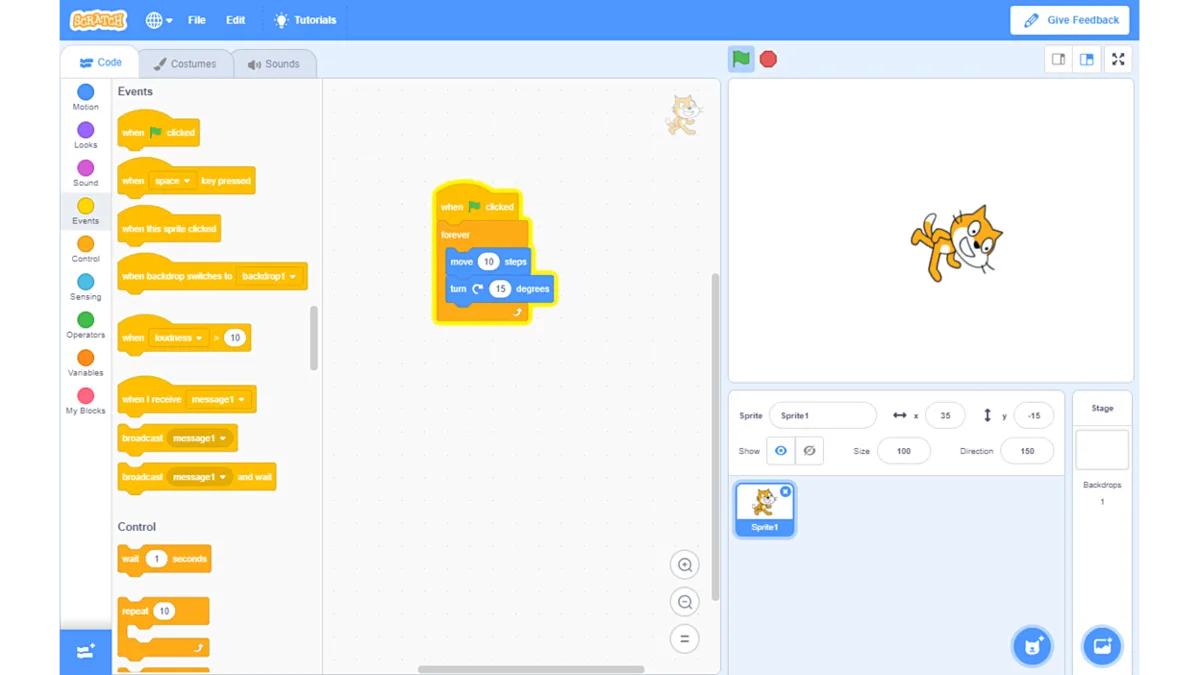
Screenshots of the Linux version, from Flathub.
Downloads
Windows 3.32.1
Show SHA-256
7099efbcf059f880c4f48a5b2238f6f30482a8e75d0aa0c5424dda95f4a61924 Show SHA-256
7099efbcf059f880c4f48a5b2238f6f30482a8e75d0aa0c5424dda95f4a61924 Mac 3.32.1
Show SHA-256
a0184df50e26ba3fbffd665b972108dfa3f0d7ce07b3fa7096a7c6749af3ff29 Linux 3.10.1
The publisher offers only a 32-bit (x86) build. The package data states no minimum Windows version, so check the publisher’s system requirements before installing on an older PC. The Universal build runs on both Intel and Apple silicon Macs. This build needs macOS 12 Monterey or later. Choose the x64 (64-bit) download for Intel or AMD computers and the ARM64 download for ARM computers. The Flathub listing states no minimum Linux version or distribution, so check the publisher’s system requirements before installing.
Install with winget: winget install --id MITMediaLab.Scratch.3 --exact
Install with Homebrew: brew install --cask scratch
Install with Flatpak (Flathub): flatpak install flathub edu.mit.Scratch
Check a download: Get-FileHash .\<file> -Algorithm SHA256 (PowerShell) or shasum -a 256 ~/Downloads/<file> (Terminal) and compare it with the SHA-256 above.
Linux (Flatpak): Flathub publishes no file checksum; Flatpak checks the app against Flathub’s signed repository when it installs. The ownership of the edu.mit.Scratch app ID has not been verified and it may be a community package. App page on Flathub.
What the installer does
Windows
- Delivered as an NSIS (Nullsoft) setup program (.exe) for x86.
- Offers both a per-user and an all-users installer.
- No custom silent switch is declared; winget falls back to its default for this installer type (
/S). - Associates with the file types
.sb,.sb2, and.sb3.
PC requirements
- CPU architecture: x86 (32-bit)
Mac
- Delivered as a disk image (.dmg) for Apple silicon and Intel.
- Installs the app
Scratch 3.appinto the Applications folder. - A full “zap” removal also deletes up to 2 support, cache and preference locations in your home folder.
Mac requirements
- Minimum macOS version: macOS 12 or later
- CPU architecture: Universal (Apple silicon + Intel)
Linux
- Delivered as a "flatpak" installer for x64 and ARM64.
- The manifest does not state an install scope.
- No silent-install switch is declared in the manifest.
Linux requirements
- Architectures: ARM64, x64 (64-bit)
- Download size: 210 MiB
- Installed size: 421 MiB
Description
Scratch is the world’s largest coding community for children and a coding language with a simple visual interface that allows young people to create digital stories, games, and animations. Scratch is designed, developed, and moderated by the Scratch Foundation, a nonprofit organization. Scratch promotes computational thinking and problem solving skills; creative teaching and learning; self-expression and collaboration; and equity in computing. Scratch is always free and is available in more than 70 languages.
Best for: Kids, parents and teachers who want to build Scratch projects on a Windows PC or Mac without an internet connection, such as on a classroom laptop with unreliable Wi-Fi.
Features
- The web editor without the web: The Scratch app lets you create and save projects offline. It is free, and you can also keep using Scratch in the browser at the same time.
- No sharing from the app: You cannot share to the Scratch community from the app. Save the project file, upload it to your Scratch account on the website, and share it there.
- Hardware without Scratch Link: The app connects to extensions such as micro:bit and LEGO Boost directly, so you do not need Scratch Link running.
- Linux is unofficial: The Scratch team says Linux is not supported. The Flatpak listed here is a community build that Flathub does not mark as verified, and it is still on 3.10.1 while Windows and macOS are on 3.32.1.
- Windows: 32-bit installer: The Windows build is a 32-bit installer that can install per user or for all users. The Scratch site currently points Windows users to the Microsoft Store while its direct download is paused.
- Older versions: The Windows listing keeps 8 versions. macOS needs version 12 or later and lists only the current universal build.
Scratch at a glance
| What it is | Discover apps from Scratch and our friends at the MIT Media Lab to create and share projects, code with the newest learners, try experimental Scratch blocks, and beyond. |
|---|---|
| Latest version | Windows 3.32.1 (August 12, 2026) Mac 3.32.1 Linux 3.10.1 (March 30, 2020) |
| Price | Freeware |
| Open source | No |
| License | Freeware |
| License type | Proprietary · Freeware |
| Copyright | © 2026 Scratch Foundation |
| Made by | Scratch Foundation |
| Category | Productivity and study tools |
| Runs on | Windows, Mac, Linux |
| Official website | scratch.mit.edu |
| More links | Support · Wiki · FAQ · Privacy policy |
| Tags | coding-practice-for-kids educational-tool games mit-media-lab scratch-foundation scratchfoundation videogame |
| winget ID | MITMediaLab.Scratch.3 |
| Homebrew cask | scratch |
| Flathub | edu.mit.Scratch Unverified · community data from Flathub |
| Flathub verification | The ownership of the edu.mit.Scratch app ID has not been verified and it may be a community package. |
| License on Flathub | BSD-3-Clause as listed on Flathub |
| winget moniker | scratch3 |
| Check your download | SHA-256 checksums in the download tables · Security scan |
Is Scratch safe?
Score result: No detections so far
None of the 61 security engines on VirusTotal flagged any of the 2 scanned files.
Covers 2 of 3 files. The rest have no VirusTotal report yet, so this result does not speak for them.
- 0 flagged in total
- 2 of 3 files scanned
- 61 engines
Scan info
- Last scan
- Scan provider
- VirusTotal · Full report
File integrity
| File | SHA-256 | Hash check | Signature | VirusTotal |
|---|---|---|---|---|
| Scratch 3.32.1 Setup.exeWindows · x86 (32-bit) | 7099efbcf059f880c4f48a5b2238f6f30482a8e75d0aa0c5424dda95f4a61924 |
Matches the manifest (re-computed) | Valid | 0/61 flagged |
| Scratch 3.32.1.dmgMac · Universal (Apple silicon + Intel) | a0184df50e26ba3fbffd665b972108dfa3f0d7ce07b3fa7096a7c6749af3ff29 |
Matches the manifest (re-computed) | Not signed | 0/59 flagged |
| edu.mit.Scratch.flatpakrefLinux · x64 (64-bit) | Not provided | Copied from the manifest, not re-computed | Not checked | — |
| Hash re-computed by Everyversion | 2 of 2 installers match. |
|---|---|
| Code signature checked | 1 valid, 1 unsigned. |
We host no installers. Every download link goes to the download location named in the package listing, normally the publisher’s own server. For this software we downloaded the files from that source ourselves, re-computed each checksum and checked the code signature where our tools could, as shown above. A passing check shows a file is the one that was published; it is not a guarantee it is free of problems. For more information, visit our Security and Trust Center.
Source and provenance
| Windows: source | microsoft/winget-pkgs |
|---|---|
| Windows: SHA-256 in upstream manifest | Yes |
| Windows: observed at commit | df9cc21aefcf · retrieved 2026-11-12 |
| Mac: source | Homebrew/homebrew-cask |
| Mac: SHA-256 in upstream manifest | Yes |
| Mac: observed at commit | 13c9a1d8f501 · retrieved 2026-11-12 |
| Linux: source | Flathub · Flathub API · github.com/flathub/edu.mit.Scratch |
| Linux: checksum | None published. Flatpak checks the app against Flathub’s signed repository when it installs. |
| Linux: publisher verified | The ownership of the edu.mit.Scratch app ID has not been verified and it may be a community package. |
| Linux: data retrieved | 2026-11-12 · attribution: app data from Flathub, license listed there: BSD-3-Clause |
Old versions
Windows versions
8 versions listed. Open a version for its installers, checksums and a command that pins it.
3.32.1 latest · 2026-08-12 · 2 installers
| Architecture | Format | Scope | SHA-256 | Download |
|---|---|---|---|---|
| x86 (32-bit) | NSIS | All users | 7099efbcf059f880c4f48a5b2238f6f30482a8e75d0aa0c5424dda95f4a61924 |
Download |
| x86 (32-bit) | NSIS | Per user | 7099efbcf059f880c4f48a5b2238f6f30482a8e75d0aa0c5424dda95f4a61924 |
Download |
Pin this version: winget install --id MITMediaLab.Scratch.3 --version 3.32.1 --exact
Manifest: manifests/m/MITMediaLab/Scratch/3/3.32.1
3.29.1 · 2 installers
| Architecture | Format | Scope | SHA-256 | Download |
|---|---|---|---|---|
| x86 (32-bit) | NSIS | All users | dfca2f1a842aea69a2b0a22ca66fa7852f86259e3da4f576f8ae7fa16f1e9134 |
Link returns 404 |
| x86 (32-bit) | NSIS | Per user | dfca2f1a842aea69a2b0a22ca66fa7852f86259e3da4f576f8ae7fa16f1e9134 |
Link returns 404 |
Pin this version: winget install --id MITMediaLab.Scratch.3 --version 3.29.1 --exact
Manifest: manifests/m/MITMediaLab/Scratch/3/3.29.1
3.28.0 · 2 installers
| Architecture | Format | Scope | SHA-256 | Download |
|---|---|---|---|---|
| x86 (32-bit) | NSIS | All usersen-US | 03037e3e4c5227c496dfc9d905e59bb3308c8ce82aec11d545cdd75145da18a2 |
Link returns 404 |
| x86 (32-bit) | NSIS | Per useren-US | 03037e3e4c5227c496dfc9d905e59bb3308c8ce82aec11d545cdd75145da18a2 |
Link returns 404 |
Pin this version: winget install --id MITMediaLab.Scratch.3 --version 3.28.0 --exact
Manifest: manifests/m/MITMediaLab/Scratch/3/3.28.0
3.27.0 · 2 installers
| Architecture | Format | Scope | SHA-256 | Download |
|---|---|---|---|---|
| x86 (32-bit) | NSIS | All usersen-US | 343135e697db089a7ce6e8736950c4693b418d7cbc41151e33a45cac4ecc89db |
Link returns 404 |
| x86 (32-bit) | NSIS | Per useren-US | 343135e697db089a7ce6e8736950c4693b418d7cbc41151e33a45cac4ecc89db |
Link returns 404 |
Pin this version: winget install --id MITMediaLab.Scratch.3 --version 3.27.0 --exact
Manifest: manifests/m/MITMediaLab/Scratch/3/3.27.0
3.26.0 · 2 installers
| Architecture | Format | Scope | SHA-256 | Download |
|---|---|---|---|---|
| x86 (32-bit) | NSIS | All usersen-US | 7ecbd1ea6561601574b2a8bca71a145b4ee98f8983e37193dabaa4c5e48b5725 |
Link returns 404 |
| x86 (32-bit) | NSIS | Per useren-US | 7ecbd1ea6561601574b2a8bca71a145b4ee98f8983e37193dabaa4c5e48b5725 |
Link returns 404 |
Pin this version: winget install --id MITMediaLab.Scratch.3 --version 3.26.0 --exact
Manifest: manifests/m/MITMediaLab/Scratch/3/3.26.0
3.25.0 · 2 installers
| Architecture | Format | Scope | SHA-256 | Download |
|---|---|---|---|---|
| x86 (32-bit) | NSIS | All usersen-US | a3e6402c35504c2d9be6f55ddd3664ba9c51b4af81447e183cb0289fdff63958 |
Link returns 404 |
| x86 (32-bit) | NSIS | Per useren-US | a3e6402c35504c2d9be6f55ddd3664ba9c51b4af81447e183cb0289fdff63958 |
Link returns 404 |
Pin this version: winget install --id MITMediaLab.Scratch.3 --version 3.25.0 --exact
Manifest: manifests/m/MITMediaLab/Scratch/3/3.25.0
3.24.0 · 2 installers
| Architecture | Format | Scope | SHA-256 | Download |
|---|---|---|---|---|
| x64 (64-bit) | NSIS | All usersen-US | 985f33f2b87c059cf05c3517dfcb0905b1a8385fc327c82fb1282ad22486b191 |
Link returns 404 |
| x64 (64-bit) | NSIS | Per useren-US | 985f33f2b87c059cf05c3517dfcb0905b1a8385fc327c82fb1282ad22486b191 |
Link returns 404 |
Pin this version: winget install --id MITMediaLab.Scratch.3 --version 3.24.0 --exact
Manifest: manifests/m/MITMediaLab/Scratch/3/3.24.0
3.23.1 · 2 installers
| Architecture | Format | Scope | SHA-256 | Download |
|---|---|---|---|---|
| x64 (64-bit) | NSIS | All usersen-US | 646b6d8939808e0080581b28f2680cf50fec86a3796ee9924a78886169484e4d |
Link returns 404 |
| x64 (64-bit) | NSIS | Per useren-US | 646b6d8939808e0080581b28f2680cf50fec86a3796ee9924a78886169484e4d |
Link returns 404 |
Pin this version: winget install --id MITMediaLab.Scratch.3 --version 3.23.1 --exact
Manifest: manifests/m/MITMediaLab/Scratch/3/3.23.1
Mac versions
Homebrew casks list only the current release. Earlier builds appear in the cask’s history on GitHub, and Homebrew cannot install them directly.
3.32.1 latest · 1 installer
| Architecture | Format | Requires | File & source | SHA-256 | Download |
|---|---|---|---|---|---|
| Universal (Apple silicon + Intel) | DMG | macOS 12+ | Scratch 3.32.1.dmgdownloads.scratch.mit.edu | a0184df50e26ba3fbffd665b972108dfa3f0d7ce07b3fa7096a7c6749af3ff29 |
Download |
Linux versions
Flathub lists only the current release, and Flatpak installs the newest build; earlier versions cannot be chosen from the listing.
Alternatives to Scratch
Similar apps in Productivity and study tools on Everyversion. Each one links to the download location named in the publisher’s package data, with a SHA-256 checksum.


Scratch FAQ
Is Scratch safe to download from here?
We host no installers. Every download button goes to the download location named in the package listing, and the checks below were run on those files.
On 2026-11-12 we downloaded the latest 2 installers from those sources and re-computed the SHA-256 of each: 2 of 2 match the package catalog’s value. Code signatures: 1 valid, 1 not signed.
VirusTotal: none of its 61 security engines flagged any of the 2 scanned files.
Reports exist for 2 of 3 files, so the rating does not cover the rest.
Our rating: Safe so far. No check is a guarantee. See the security details above and our Security and Trust Center. Publisher’s website: Scratch’s official website.
Does Scratch update itself after I install an old version?
For Windows, we have no information on whether Scratch updates itself, and for Mac, we have no confirmation that the app updates itself, although many apps check for updates and offer to install them. Look for an update setting in Scratch (see Scratch’s documentation) before you rely on an older version.
Does Scratch cost anything?
No. Scratch is freeware (license: Freeware).
Which versions of Scratch are listed here, and how far back?
For Windows, we list 8 versions, from 3.23.1 up to 3.32.1, and for Mac, only the current release (3.32.1) is listed, because older Mac builds are not kept in the package listing, and for Linux, we list 1 version, from 3.10.1 (2020-03-30) up to 3.10.1. This page shows all of the Windows versions.
Where do the download links go?
They go straight to the source named in the package catalog, with nothing added by us: for Windows, to downloads.scratch.mit.edu, and for Mac, to downloads.scratch.mit.edu, and for Linux, to dl.flathub.org. We host no files. Compare the SHA-256 shown next to each file with the one you compute after downloading. Publisher’s website: Scratch’s official website.