
Download Trilium Notes 0.107.0
Safe so farDeveloper: TriliumNext Notes Team
Last updated: · Verified by  CristianBuilt Everyversion after working at Softonic. Runs the checks and answers for the results. ClaudeAnthropic’s AI. Runs the download, checksum and signature checks and reports every result. VirusTotalScans files with dozens of security engines. We look up each file by its SHA-256 only.
Build your personal knowledge base with TriliumNext Notes
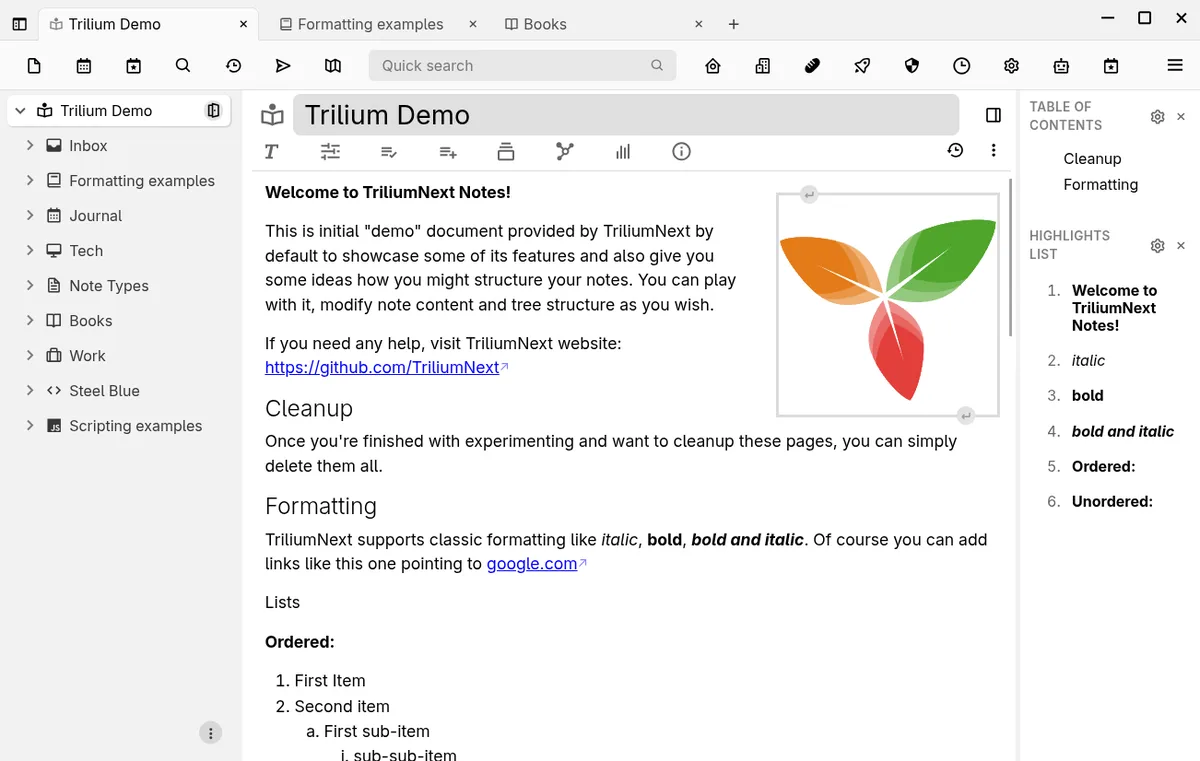
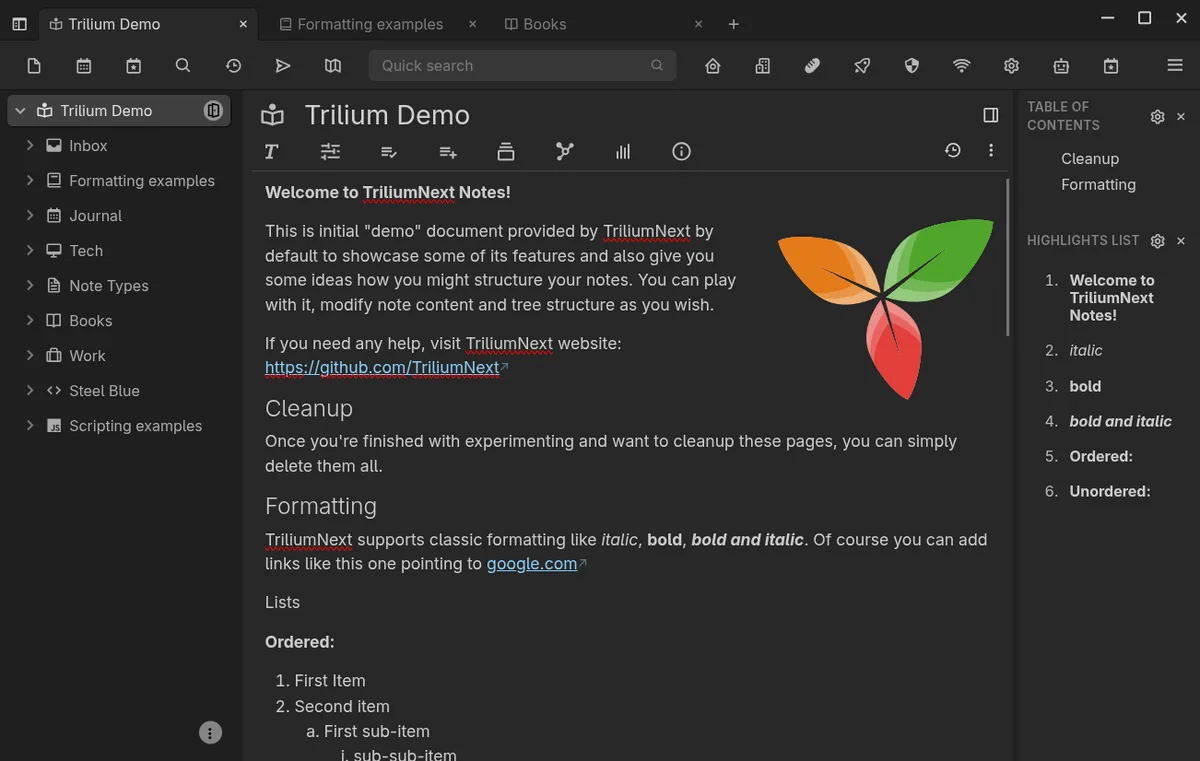
Screenshots of the Linux version, from Flathub.
Downloads
Windows 0.107.0
Show SHA-256
218b444138b52b212f914daa1f032221ecb30f83b579f43c19bc2de55e231129 Show SHA-256
b8734a09a7a5b87bc28af395be96b2913593770078812efadd9db382691132ea Mac 0.107.0
Show SHA-256
93331bd8c05a8229a468cae38c612575e87a2a6074c86a8d36c19faaa14bf6d7 Show SHA-256
e3bda6547213396bd497bd680f33b0d0b12ed9dff410a10b3998cdaf72d9a231 Linux 0.107.0
Choose the x64 (64-bit) installer for Intel or AMD PCs and the ARM64 installer for ARM PCs. The package data states no minimum Windows version, so check the publisher’s system requirements before installing on an older PC. Choose the Apple silicon (ARM64) build for Macs with an M-series chip and the Intel (x64) build for older Intel Macs. Every build needs macOS 13 Ventura or later. Choose the x64 (64-bit) download for Intel or AMD computers and the ARM64 download for ARM computers. The Flathub listing states no minimum Linux version or distribution, so check the publisher’s system requirements before installing.
Install with winget: winget install --id TriliumNext.Notes --exact
Install with Homebrew: brew install --cask trilium-notes
Install with Flatpak (Flathub): flatpak install flathub org.triliumnotes.Trilium
Check a download: Get-FileHash .\<file> -Algorithm SHA256 (PowerShell) or shasum -a 256 ~/Downloads/<file> (Terminal) and compare it with the SHA-256 above.
Linux (Flatpak): Flathub publishes no file checksum; Flatpak checks the app against Flathub’s signed repository when it installs. Flathub shows this app as publisher-verified. App page on Flathub.
What the installer does
Windows
- Delivered as a standalone setup program (.exe) for x64 and ARM64.
- Installs for the current user only, so administrator rights are normally not needed.
- Supports unattended install with
--silent. - Declared install modes: interactive and silent.
- Shows up in Windows “Installed apps” as “Trilium Notes”.
- Upgrades install over the existing version.
PC requirements
- CPU architecture: x64 (64-bit), ARM64
Mac
- Delivered as a disk image (.dmg) for Intel (x64) and Apple silicon (ARM64).
- Installs the app
Trilium Notes.appinto the Applications folder. - A full “zap” removal also deletes up to 6 support, cache and preference locations in your home folder.
Mac requirements
- Minimum macOS version: macOS 13 or later
- CPU architecture: Intel (x64), Apple silicon (ARM64)
Linux
- Delivered as a "flatpak" installer for x64 and ARM64.
- The manifest does not state an install scope.
- No silent-install switch is declared in the manifest.
Linux requirements
- Architectures: ARM64, x64 (64-bit)
- Download size: 197 MiB
- Installed size: 447 MiB
Description
TriliumNext Notes is an open-source, cross-platform hierarchical note taking application with focus on building large personal knowledge bases.
Best for: People building a large personal wiki who want nested notes, scripting and their own sync server instead of a hosted notes service.
Features
- Free and self-hosted: Trilium is open source under AGPL-3.0, with no paid plan. To sync between computers you run your own Trilium server, for example from the Docker image.
- A tree that scales: Notes sit in a deep tree, and one note can appear in several places through cloning. The project says it handles over 100,000 notes.
- More than text notes: Besides a rich editor with tables and math, it has code notes, Excalidraw canvases, mind maps, note maps and geo maps. Attributes, scripting and a REST API let you automate it.
- No official phone app: On a phone you use the mobile web view of your server. Native apps for Android and iOS exist, but they come from third parties.
- Now run by TriliumNext: The original author handed the project to the TriliumNext community. Your old database still works, but versions after 0.90.4 cannot sync with zadam's 0.63.7 or older.
- Install details: The Windows installer is per-user, for x64 and Arm64. Mac builds need macOS 13 or later. The Flathub package is verified for the Trilium Notes Team, for x64 and Arm64.
- Downgrades on Windows: The Windows listing keeps 33 versions. macOS and Linux list only the current release, so going back there needs another source.
Trilium Notes at a glance
| What it is | Build your personal knowledge base with TriliumNext Notes |
|---|---|
| Latest version | Windows 0.107.0 (November 8, 2026) Mac 0.107.0 Linux 0.107.0 (November 8, 2026) |
| Price | Free and open source |
| Open source | Yes |
| License | AGPL-3.0 |
| License type | Open source · Network copyleft Like the GPL, and it also applies when the software is offered over a network. |
| Copyright | Copyright © 2024 TriliumNext Notes Team |
| Made by | TriliumNext Notes Team |
| Category | Notes and writing |
| Runs on | Windows, Mac, Linux |
| Official website | github.com |
| More links | Support · Release notes |
| Source code | github.com/TriliumNext/Trilium |
| Tags | documentation-tool electron knowledge-graph knowledgebase local-first markdown note-managment note-taking-app notebook notes personal-wiki scriptable self-hosted self-hosting wiki wysiwyg |
| winget ID | TriliumNext.Notes |
| Homebrew cask | trilium-notes |
| Flathub | org.triliumnotes.Trilium Verified data from Flathub |
| Flathub verification | Publisher verified on Flathub by proving control of triliumnotes.org, 2026-09-02 |
| License on Flathub | AGPL-3.0-or-later as listed on Flathub |
| winget moniker | trilium |
| Check your download | SHA-256 checksums in the download tables · Security scan |
What’s new in Trilium Notes 0.107.0
v0.107.0 Note If you enjoyed this release, consider showing a token of appreciation by: - Pressing the “Star” button on GitHub (top-right). - Considering a one-time or recurrent donation to the lead developer via GitHub Sponsors or PayPal. Tip For Linux users: Trilium is now available on Flathub! This is the release where a text note stops being a single document. Notes can be embedded, quoted and referenced inside other notes and edited where they appear, laid out in columns and tabs, and mixed with drawings, attached files and video. Tables in text notes get the tools they had been missing, from merged cells to sorting, and the old layout is gone, a year after the new one replaced it. Around the editor, the parts of the app that everyone touches were rebuilt: the context menus and the note autocomplete, the full search and the jump dialog, the launch bar and the tree. Shared pages look like the app again and render collections with their own views, and the calendar and geo map collections get the properties dialogs the board already had. The AI integration becomes something to trust with a real database: every tool call asks before it reads or changes a note, a ChatGPT Codex subscription can stand in for an API key, and local models get web search through a search engine of your choice. On phones, iOS has a new layout and both apps navigate without a sidebar. 💡 Key highlights The text editor became a block editor A text note used to be a document: one body of rich text…
Read the full release notes on the publisher’s site
Notes for older versions are inside each version below.
Is Trilium Notes safe?
Score result: No detections so far
None of the 67 security engines on VirusTotal flagged any of the 2 scanned files.
Covers 2 of 5 files. The rest have no VirusTotal report yet, so this result does not speak for them.
- 0 flagged in total
- 2 of 5 files scanned
- 67 engines
Scan info
- Last scan
- Scan provider
- VirusTotal · Full report
File integrity
| File | SHA-256 | Hash check | Signature | VirusTotal |
|---|---|---|---|---|
| TriliumNotes-v0.107.0-windows-x64.exeWindows · x64 (64-bit) | 218b444138b52b212f914daa1f032221ecb30f83b579f43c19bc2de55e231129 |
Matches the manifest (re-computed) | Valid | 0/67 flagged |
| TriliumNotes-v0.107.0-windows-arm64.exeWindows · ARM64 | b8734a09a7a5b87bc28af395be96b2913593770078812efadd9db382691132ea |
Matches the manifest (re-computed) | Valid | Open not on VirusTotal |
| TriliumNotes-v0.107.0-macos-x64.dmgMac · Intel (x64) | 93331bd8c05a8229a468cae38c612575e87a2a6074c86a8d36c19faaa14bf6d7 |
Matches the manifest (re-computed) | Not signed | Open not on VirusTotal |
| TriliumNotes-v0.107.0-macos-arm64.dmgMac · Apple silicon (ARM64) | e3bda6547213396bd497bd680f33b0d0b12ed9dff410a10b3998cdaf72d9a231 |
Matches the manifest (re-computed) | Not signed | 0/61 flagged |
| org.triliumnotes.Trilium.flatpakrefLinux · x64 (64-bit) | Not provided | Copied from the manifest, not re-computed | Not checked | — |
| Hash re-computed by Everyversion | 4 of 4 installers match. |
|---|---|
| Code signature checked | 2 valid, 2 unsigned. |
We host no installers. Every download link goes to the download location named in the package listing, normally the publisher’s own server. For this software we downloaded the files from that source ourselves, re-computed each checksum and checked the code signature where our tools could, as shown above. A passing check shows a file is the one that was published; it is not a guarantee it is free of problems. For more information, visit our Security and Trust Center.
Source and provenance
| Windows: source | microsoft/winget-pkgs |
|---|---|
| Windows: SHA-256 in upstream manifest | Yes |
| Windows: observed at commit | f6b3861bc0b6 · retrieved 2026-11-17 |
| Mac: source | Homebrew/homebrew-cask |
| Mac: SHA-256 in upstream manifest | Yes |
| Mac: observed at commit | 912fe9186809 · retrieved 2026-11-17 |
| Linux: source | Flathub · Flathub API · github.com/flathub/org.triliumnotes.Trilium |
| Linux: checksum | None published. Flatpak checks the app against Flathub’s signed repository when it installs. |
| Linux: publisher verified | Publisher verified on Flathub by proving control of triliumnotes.org, 2026-09-02 |
| Linux: data retrieved | 2026-11-17 · attribution: app data from Flathub, license listed there: AGPL-3.0-or-later |
Old versions
Windows versions
Showing the newest 20 of 33 versions (the JSON and Markdown versions list 33). Open a version for its installers, checksums and a command that pins it.
0.107.0 latest · 2026-11-08 · 2 installers notes
| Architecture | Format | Scope | SHA-256 | Download |
|---|---|---|---|---|
| x64 (64-bit) | EXE | Per user | 218b444138b52b212f914daa1f032221ecb30f83b579f43c19bc2de55e231129 |
Download |
| ARM64 | EXE | Per user | b8734a09a7a5b87bc28af395be96b2913593770078812efadd9db382691132ea |
Download |
Pin this version: winget install --id TriliumNext.Notes --version 0.107.0 --exact
Release notes
v0.107.0 Note If you enjoyed this release, consider showing a token of appreciation by: - Pressing the “Star” button on GitHub (top-right). - Considering a one-time or recurrent donation to the lead developer via GitHub Sponsors or PayPal. Tip For Linux users: Trilium is now available on Flathub! This is the release where a text note stops being a single document. Notes can be embedded, quoted and referenced inside other notes and edited where they appear, laid out in columns and tabs, and mixed with drawings, attached files and video. Tables in text notes get the tools they had been missing, from merged cells to sorting, and the old layout is gone, a year after the new one replaced it. Around the editor, the parts of the app that everyone touches were rebuilt: the context menus and the note autocomplete, the full search and the jump dialog, the launch bar and the tree. Shared pages look like the app again and render collections with their own views, and the calendar and geo map collections get the properties dialogs the board already had. The AI integration becomes something to trust with a real database: every tool call asks before it reads or changes a note, a ChatGPT Codex subscription can stand in for an API key, and local models get web search through a search engine of your choice. On phones, iOS has a new layout and both apps navigate without a sidebar. 💡 Key highlights The text editor became a block editor A text note used to be a document: one body of rich text…
Full release notes from the publisher
Manifest: manifests/t/TriliumNext/Notes/0.107.0
0.106.0 · 2026-09-25 · 2 installers notes
| Architecture | Format | Scope | SHA-256 | Download |
|---|---|---|---|---|
| x64 (64-bit) | EXE | Per user | c4a91b0e539222a2701c4e4b676ac303d36805a5a39d843e246c1cba8d7db880 |
Download |
| ARM64 | EXE | Per user | de57000d630fa68e248ab6ba7a8b89924b80d31c306b331147d3cd175a1b6634 |
Download |
Pin this version: winget install --id TriliumNext.Notes --version 0.106.0 --exact
Release notes
v0.106.0 Note If you enjoyed this release, consider showing a token of appreciation by: - Pressing the “Star” button on GitHub (top-right). - Considering a one-time or recurrent donation to the lead developer via GitHub Sponsors or PayPal. Tip For Linux users: Trilium is now available on Flathub! 💡 Key highlights 📋 Kanban board overhaul by @adoriandoran The board has been rebuilt to handle real projects. Give each column an icon, a color or a card limit, collapse the columns you're not working on, and archive them once they're done. New notes that don't belong to a column yet land in an optional Inbox column. Cards can be created from a template (e.g. a Bug template for a bug tracker), and Board properties controls which attributes the cards show and in what order. You can also switch the attribute the board is grouped by at any time, and each grouping keeps its own columns. As a board grows, sort columns automatically by title, date or any attribute, and narrow the board with the filter box in the header, which accepts the full search syntax. Select several cards with Ctrl/Shift+click to move, edit or delete them together. Use Copy reference to link to a card or column from any note. The whole board works from the keyboard (Alt+F1 lists the shortcuts) and by touch on mobile, and a column with thousands of cards now stays smooth. This concludes the phase two of the board collection, more features to come. 🔎 Significant improvements to search 1. Matching by @perfectra1n…
Full release notes from the publisher
Manifest: manifests/t/TriliumNext/Notes/0.106.0
0.105.0 · 2026-08-19 · 2 installers notes
| Architecture | Format | Scope | SHA-256 | Download |
|---|---|---|---|---|
| x64 (64-bit) | EXE | Per user | d24b025ffb9e7171803feed46fae9d73e8de0d229b6a5a3d7fb25a63f68cdfc5 |
Download |
| ARM64 | EXE | Per user | e4d64b491e542016ccc18176673d07d94e43c19f77221cf02378aac819a1b6a3 |
Download |
Pin this version: winget install --id TriliumNext.Notes --version 0.105.0 --exact
Release notes
v0.105.0 Important If you enjoyed this release, consider showing a token of appreciation by: - Pressing the “Star” button on GitHub (top-right). - Considering a one-time or recurrent donation to the lead developer via GitHub Sponsors or PayPal. The release that makes Trilium lighter, more visual and easier to organise: images shrink themselves, attributes get a home of their own, and your backups can finally be restored. 🚨 For ARM64 Docker users The arm64 image is now based on Debian 13 "trixie", as Debian 11 reaches end of life on 2026-08-31. Your host needs a libseccomp new enough to know the clone3 syscall (roughly 2.5+), or the container will fail to start. If it does, add: services: trilium: security_opt: - seccomp:unconfined Updating Docker itself will not help since runc links the host's libseccomp. The 32-bit linux/arm/v7 and linux/arm/v8 images and the native ARM builds are unaffected. Warning Before you upgrade. This release contains changes that can break an existing setup. 1. MCP now requires authentication and can optionally be accessed over the network. → Reconfigure your existing MCP clients with credentials. 2. General HTML support in text notes is now disabled by default. This makes copy-paste from websites behave well, without grabbing unwanted tags such as input boxes. → Re-enable via Options → Text notes → Preserve unsupported HTML tags. 3. **<div>**s in text notes are now unwrapped instead of being preserved as-is, regardless of settings. This prevents…
Full release notes from the publisher
Manifest: manifests/t/TriliumNext/Notes/0.105.0
0.104.1 · 2026-07-25 · 2 installers notes
| Architecture | Format | Scope | SHA-256 | Download |
|---|---|---|---|---|
| x64 (64-bit) | EXE | Per user | 90f51b14e2702cb0e620201dd4c3714c1723d4e8267e20a12f32afe831885686 |
Download |
| ARM64 | EXE | Per user | 7f670ebd9658cedf45ecc200ee7d60112cc031240fb9a844f7aa813c527d288c |
Download |
Pin this version: winget install --id TriliumNext.Notes --version 0.104.1 --exact
Release notes
v0.104.1 Note If you enjoyed this release, consider showing a token of appreciation by: - Pressing the “Star” button on GitHub (top-right). - Considering a one-time or recurrent donation to the lead developer via GitHub Sponsors or PayPal. 💡 Key highlights 1. Significant improvements to the OneNote import: 1. Survive sustained Graph throttling by @perfectra1n 2. Handle 504 errors instead of crashing. 3. Skip pages that could not be downloaded and report them. 4. Add device-code flow to allow imports from the web app (not just from desktop). 5. Refresh token so multi-hour imports are possible. 6. Better support for screen clippings, table sizing and backgrounds, drawings with light/dark theme support, improved creation date processing. 7. Preserve newNotesOnTop. 8. Improved selector for notebooks. 9. Creation dates are now preserved better by taking into account the meta-information, not just the creation date returned by the API. 10. Encrypted sections are properly tolerated and reported. 2. Improvements to the LLM 1. LLM model selection has been redesigned: instead of having a fixed list of models, the models are dynamically retrieved from the provider (ChatGPT, Gemini) and the list of models can now be customized. 1. If you are migrating from a previous version, the list of models will appear as empty. Simply press the Edit button corresponding to your provider in the model dropdown. 2. The LLM can now read the user guide that comes bundled in with the application and…
Full release notes from the publisher
Manifest: manifests/t/TriliumNext/Notes/0.104.1
0.104.0 · 2026-07-18 · 2 installers notes
| Architecture | Format | Scope | SHA-256 | Download |
|---|---|---|---|---|
| x64 (64-bit) | EXE | Per user | a0db73328f7f9d5e9d6c2b3ac5e7a038e6fe4091464fdb6b2bb8cd2a1145a434 |
Download |
| ARM64 | EXE | Per user | ff7bced84148fefb2839c5d32ab89ed406a92fc25455d8311d8cd5a30fe62079 |
Download |
Pin this version: winget install --id TriliumNext.Notes --version 0.104.0 --exact
Release notes
v0.104.0 Note If you enjoyed this release, consider showing a token of appreciation by: - Pressing the “Star” button on GitHub (top-right). - Considering a one-time or recurrent donation to the lead developer via GitHub Sponsors or PayPal. This release is the largest in Trilium's history, built around two big themes: security and interoperability. The attack surface has been dramatically reduced across the desktop app, the server, and shared notes — with 16 dedicated security fixes and a few deliberate breaking changes (backend scripting and the SQL console are now disabled by default), so please review the Breaking changes section before upgrading. Getting notes in and out of Trilium is also much easier: new importers for OneNote, Notion, Google Keep, Anytype and Obsidian join a faster, more memory-efficient import/export pipeline and Spreadsheet now has XLSX and CSV import & export. On top of that come a redesigned setup and login experience, better AI integration (including being able to use your Claude Code subscription), richer text editing (multi-state TODO lists, collapsible blocks, link previews), dashboard collections, and a huge wave of polish — roughly 86 bugfixes and 68 smaller improvements touching nearly every corner of the app. The sections below have the full details. 💡 Key highlights 1. Setup was redesigned from scratch to be more modern (see details below). 2. The LLM integration can now use your Claude Code subscription, without the need of an API key or…
Full release notes from the publisher
Manifest: manifests/t/TriliumNext/Notes/0.104.0
0.103.0 · 2026-05-13 · 2 installers notes
| Architecture | Format | Scope | SHA-256 | Download |
|---|---|---|---|---|
| x64 (64-bit) | EXE | Per user | b8e871aa250eaf3045b10472ee44ef656d75fa4255a0d2b2bcdf0c986e0e3731 |
Download |
| ARM64 | EXE | Per user | 2ee04ada75f1072b44d11aec4f419411cdc48e3574ed882d2a8c7f5970f0048f |
Download |
Pin this version: winget install --id TriliumNext.Notes --version 0.103.0 --exact
Release notes
v0.103.0 Note If you enjoyed this release, consider showing a token of appreciation by: - Pressing the “Star” button on GitHub (top-right). - Considering a one-time or recurrent donation to the lead developer via GitHub Sponsors or PayPal. Important Due to the introduction of new note types (spreadsheet) and the OCR feature, the database and sync versions have been increased. This means that both the desktop and the server need an upgrade in order to continue syncing. Warning The Windows binary has received a certificate upgrade which means that you might get SmartScreen warnings depending on how you install the application. This is already a known issue, the workaround is to right click the installer → Properties and check the security box at the bottom of the window. 💡 Key highlights 1. A long-awaited note type is now supported: Spreadsheets, allowing for a familiar (Excel-like) editing experience with formulas, powered by Univer Sheets. - Support for it is considered beta and it might face some changes along the way. - See the documentation for important aspects to consider when using spreadsheets. 2. Basic Markdown support with preview and sync scrolling. 3. Built-in OCR support for images, but also PDF and Office (Word, PowerPoint, Spreadsheet) text extraction which integrates with the search function. See the Media page in Options for configuration. 4. Custom dictionary is now synchronized across instances 5. New deployment for Linux under test: AppImage 6. Bookmarks…
Full release notes from the publisher
Manifest: manifests/t/TriliumNext/Notes/0.103.0
0.102.2 · 2026-04-05 · 2 installers notes
| Architecture | Format | Scope | SHA-256 | Download |
|---|---|---|---|---|
| x64 (64-bit) | EXE | Per user | c32ab1def8ed5ce162f5a6f961028b9833093a0cda2c73e65c53b4e4d3d348f2 |
Download |
| ARM64 | EXE | Per user | 083030d375e798d825215e644956975af9f5649e6cb01327ef341a4b68da420f |
Download |
Pin this version: winget install --id TriliumNext.Notes --version 0.102.2 --exact
Release notes
v0.102.2 Important This release contains important security fixes. All users are strongly encouraged to update immediately. Several vulnerabilities affecting content handling and the desktop application have been addressed. We recommend upgrading before the next scheduled release to ensure your installation is protected. Note If you enjoyed this release, consider showing a token of appreciation by: - Pressing the “Star” button on GitHub (top-right). - Considering a one-time or recurrent donation to the lead developer via GitHub Sponsors or PayPal. - If you are interested in an official mobile application (#7447) or multi-user support (#4956), consider offering financial support via IssueHunt (see links). 🔒️ Security improvements - Content Handling - Improved request handling for SVG content in share routes - Improved request handling for SVG content in the main API - Enhanced content rendering in the Mermaid diagram editor - Fixed toast notifications to properly escape content - Added validation for the docName attribute in the document renderer - Marked docName as a sensitive attribute in the commons module - Desktop Application (Electron) - Added Electron fuses to harden the desktop application against external abuse - Improved application integrity checks - API & Import - Added MIME type validation for image uploads via ETAPI - Aligned attachment upload validation with note upload validation - Import no longer preserves named note IDs to prevent potential conflicts…
Full release notes from the publisher
Manifest: manifests/t/TriliumNext/Notes/0.102.2
0.102.1 · 2026-03-08 · 2 installers notes
| Architecture | Format | Scope | SHA-256 | Download |
|---|---|---|---|---|
| x64 (64-bit) | EXE | — | c4c502896429e4c5519833edeb0972b234735884710d4c444b66fd9a505395a7 |
Download |
| ARM64 | EXE | — | dec25bcf14b884524cc446c95ff1de3442580b415dc7163a7010edcbc117006e |
Download |
Pin this version: winget install --id TriliumNext.Notes --version 0.102.1 --exact
Release notes
v0.102.1 Note If you enjoyed this release, consider showing a token of appreciation by: - Pressing the “Star” button on GitHub (top-right). - Considering a one-time or recurrent donation to the lead developer via GitHub Sponsors or PayPal. - If you are interested in an official mobile application (#7447) or multi-user support (#4956), consider offering financial support via IssueHunt (see links). Important This is a hotfix of v0.102.0, addressing some blocking issues. For more information about the previous major version, see v0.102.0 changelog. 🐞 Bugfixes - Mind Map feature breaks rendering in v0.102.0 - Fixes for the PDF viewer: - PDF view is '403 Forbidden' on Nginx Proxy Manager - PDF: address some layout issues by @adoriandoran - Cache not properly invalidated across versions. 🛠️ Technical updates - Rework Docker infrastructure to use crane by @perfectra1n
Full release notes from the publisher
Manifest: manifests/t/TriliumNext/Notes/0.102.1
0.102.0 · 2026-03-01 · 2 installers notes
| Architecture | Format | Scope | SHA-256 | Download |
|---|---|---|---|---|
| x64 (64-bit) | EXE | — | 65663f987300914819feb17e81068d265b7b34447582f09203c56f06fb3edf2f |
Download |
| ARM64 | EXE | — | 75c0d05ef627cc3318d1bba496c0b8fa0cd052b6baaa5daed7e58766ff0ff667 |
Download |
Pin this version: winget install --id TriliumNext.Notes --version 0.102.0 --exact
Release notes
v0.102.0 Important LLM integration was removed due to the complexity of maintaining this feature. For more information, see #8797. This means that the database needs migration (downgrades will not be possible without restoring from backup), but it will not affect the sync with the server. Note If you enjoyed this release, consider showing a token of appreciation by: - Pressing the “Star” button on GitHub (top-right). - Considering a one-time or recurrent donation to the lead developer via GitHub Sponsors or PayPal. - If you are interested in an official mobile application (#7447) or multi-user support (#4956), consider offering financial support via IssueHunt (see links). 💡 Key highlights - Trilium now has support for custom icon packs that can be used for note icons. See Icon Packs - User Guide for more info and a list of official icon packs. - New layout now provides a save indicator near the note title. - Trilium now uses its own PDF renderer (based on PDF.js viewer from Mozilla). This allows for more features such as annotations, search (within the current file), filling forms as well as remembering last reading position. See documentation for more info. - Some Collections will hide their children in the note tree by default. See the documentation for details. - jQuery has been updated to v4.0.0 which introduces breaking changes that could potentially affect your scripts. - Desktop app: background effects (Vibrancy) are now available for macOS. 📱 Mobile improvements…
Full release notes from the publisher
Manifest: manifests/t/TriliumNext/Notes/0.102.0
0.101.3 · 2026-01-08 · 2 installers notes
| Architecture | Format | Scope | SHA-256 | Download |
|---|---|---|---|---|
| x64 (64-bit) | EXE | — | 5899caf699b9891b6b5b898f89f63364c794463bb7d3e0ff4394298e6af554ae |
Download |
| ARM64 | EXE | — | de706a3672e94a6b49b403843f3cafbd13dc3e8605122829a684946009895156 |
Download |
Pin this version: winget install --id TriliumNext.Notes --version 0.101.3 --exact
Release notes
v0.101.3 Note If you are interested in an official mobile application (#7447) or multi-user support (#4956), consider offering financial support via IssueHunt (see links). Important If you enjoyed this release, consider showing a token of appreciation by: - Pressing the “Star” button on GitHub (top-right). - Considering a one-time or recurrent donation to the lead developer via GitHub Sponsors or PayPal. This is a re-release of v0.101.2, which had a cache invalidation issue. 🐞 Bugfixes - SQL Console: cannot copy table data by @SiriusXT - Title is not selected when creating a note via the launcher by @SiriusXT - Popup editor closing after inserting a note link by @SiriusXT - New Mermaid diagrams do not save content by @lzinga - Can't scroll mermaid diagram code - Max content width is not respected when switching between note types in the same tab - Crash When a Note Includes Itself - Severe Performance Degradation and Crash Issues Due to Recursive Inclusion in Included Notes - is not a launcher even though it's in the launcher subtree - Archived subnotes of direct children appear in grid view without #includeArchived
Full release notes from the publisher
Manifest: manifests/t/TriliumNext/Notes/0.101.3
0.101.1 · 2025-12-26 · 2 installers notes
| Architecture | Format | Scope | SHA-256 | Download |
|---|---|---|---|---|
| x64 (64-bit) | EXE | — | f00ef36ad412fc04b65609d27c8b03bf0262293a5489498c20d51c7ac55d0be3 |
Download |
| ARM64 | EXE | — | 03fd38a3c1e3051585a7ecda1ccfe9fc75c78e9a62f6618f9420bc01aec32643 |
Download |
Pin this version: winget install --id TriliumNext.Notes --version 0.101.1 --exact
Release notes
v0.101.1 Note This is a hotfix for yesterday's release, which marked the 8-year anniversary of Trilium, celebrating its first public release on December 25th, 2017. Important If you enjoyed this release, consider showing a token of appreciation by: - Pressing the “Star” button on GitHub (top-right). - Considering a one-time or recurrent donation to the lead developer via GitHub Sponsors or PayPal. 💡 Key highlights - A new layout was introduced which heavily changes both existing UI elements, as well as adds some new ones (by @eliandoran and @adoriandoran, with special thanks for @rom1dep for the valuable suggestions). - The goal of this new layout is to modernize the application and to make it more intuitive but at the same time to reduce clutter. - See documentation of the changes and the new UI elements. - Notes can be more easily navigated across the hierarchy using the breadcrumbs displayed underneath the tab bar. - The old layout can still be used, for now. Feedback is welcome. - Near the tab bar now there are built-in buttons to go the previous or the next note in history (only if the back/forward buttons are not already placed in the launch bar). - Scripting overhaul: Custom widgets and Render note can now be written in Preact using JSX instead of the legacy format (jQuery + custom component framework). For more information, see documentation on Preact in Trilium. 🐞 New bugfixes in v0.101.1 - Right pane toggle missing on macOS vertical layout - Launchpad Note…
Full release notes from the publisher
Manifest: manifests/t/TriliumNext/Notes/0.101.1
0.101.0 · 2025-12-25 · 2 installers notes
| Architecture | Format | Scope | SHA-256 | Download |
|---|---|---|---|---|
| x64 (64-bit) | EXE | — | 2b27dac3cc06b44ccbabdb17de863f9c4b60098545103a90fb55712b80b86b3e |
Download |
| ARM64 | EXE | — | a3354fee82478963176b61cbdac312a81f4e42f904c9c5fc6045d31cc170f208 |
Download |
Pin this version: winget install --id TriliumNext.Notes --version 0.101.0 --exact
Release notes
v0.101.0 Note This release marks the 8-year anniversary of Trilium, celebrating its first public release on December 25th, 2017. Important If you enjoyed this release, consider showing a token of appreciation by: - Pressing the “Star” button on GitHub (top-right). - Considering a one-time or recurrent donation to the lead developer via GitHub Sponsors or PayPal. 💡 Key highlights - A new layout was introduced which heavily changes both existing UI elements, as well as adds some new ones (by @eliandoran and @adoriandoran, with special thanks for @rom1dep for the valuable suggestions). - The goal of this new layout is to modernize the application and to make it more intuitive but at the same time to reduce clutter. - See documentation of the changes and the new UI elements. - Notes can be more easily navigated across the hierarchy using the breadcrumbs displayed underneath the tab bar. - The old layout can still be used, for now. Feedback is welcome. - Near the tab bar now there are built-in buttons to go the previous or the next note in history (only if the back/forward buttons are not already placed in the launch bar). - Scripting overhaul: Custom widgets and Render note can now be written in Preact using JSX instead of the legacy format (jQuery + custom component framework). For more information, see documentation on Preact in Trilium. 🐞 Bugfixes - Ctrl+F when a dialog is open opens different search dialog - Toast: Icon missing for error messages - Launch bar calendar…
Full release notes from the publisher
Manifest: manifests/t/TriliumNext/Notes/0.101.0
0.100.0 · 2025-12-05 · 2 installers notes
| Architecture | Format | Scope | SHA-256 | Download |
|---|---|---|---|---|
| x64 (64-bit) | EXE | — | ea887753262b276aa781350e674aea7dfe76581bae52d09565f6ae7369400833 |
Download |
| ARM64 | EXE | — | c227d17f3958b07891a071e157066606526620fa30e5591481397cc644c0f999 |
Download |
Pin this version: winget install --id TriliumNext.Notes --version 0.100.0 --exact
Release notes
v0.100.0 Note If you are interested in an official mobile application (#7447) or multi-user support (#4956), consider offering financial support via IssueHunt (see links). Important If you enjoyed this release, consider showing a token of appreciation by: - Pressing the “Star” button on GitHub (top-right). - Considering a one-time or recurrent donation to the lead developer via GitHub Sponsors or PayPal. 💡 Key highlights - Allow changing note color from tree by @adoriandoran - More Collection types can now be printed or exported to PDF: - List collections which will render in a book-like fashion with all its children and preserving the note hierarchy, with functional table of contents and links (for PDFs). - Table collections will now render a printable table. - See documentation for more info. - Board view improvements - The number of items in each column is now displayed. - Attributes (labels & relations) can now be displayed for each note using promoted attributes, consult the documentation for information on how to do so. - Mobile now has basic support for splits (maximum of two), laid out vertically for smartphones. - Breaking change: #calendar:color was completely removed in favor of the global #color attribute. 🐞 Bugfixes - Advanced search may return more results by @perfectra1n - Fix enex import stores wrong format in database for dateCreated, dateModified by @contributor - Custom Global Shortcut for Toggle System Tray Icon Fails to Show Window by @contributor…
Full release notes from the publisher
Manifest: manifests/t/TriliumNext/Notes/0.100.0
0.99.5 · 2025-11-11 · 2 installers notes
| Architecture | Format | Scope | SHA-256 | Download |
|---|---|---|---|---|
| x64 (64-bit) | EXE | — | cac9dabc1fc0f5e89b231a4a7ac7b5910f453a190bd253c5dc76bb66f906b2e0 |
Download |
| ARM64 | EXE | — | 645a95a34aacdce2ccbe3b9d185642c9d4270fa5b4dd3ec7266725a9b497c835 |
Download |
Pin this version: winget install --id TriliumNext.Notes --version 0.99.5 --exact
Release notes
v0.99.5 Note If you are interested in an official mobile application (#7447) or multi-user support (#4956), consider offering financial support via IssueHunt (see links). Important If you enjoyed this release, consider showing a token of appreciation by: - Pressing the “Star” button on GitHub (top-right). - Considering a one-time or recurrent donation to the lead developer via GitHub Sponsors or PayPal. 🐞 Bugfixes - List view: weird animation + hard to toggle collapse/expand deeper nested subnotes by @adoriandoran - Code block “Copy to clipboard button” visible while printing. - Packaged server .zip build not working due to wrong Node.js version. - Not all changed notes are displayed in day note by @contributor - Calendar view drag-and-drop issue - "Open attribute list" shortcut does not focus the attribute list - Global shortcuts and system tray icon sometimes not shown under Wayland in Flatpak - Quick edit text drag indicator missing ✨ Improvements - Show collections grid and list views in zen mode by @adoriandoran
Full release notes from the publisher
Manifest: manifests/t/TriliumNext/Notes/0.99.5
0.99.4 · 2025-11-09 · 2 installers notes
| Architecture | Format | Scope | SHA-256 | Download |
|---|---|---|---|---|
| x64 (64-bit) | EXE | — | f36743b69b52a076efb19a1ef120e6a948f76e69cb6ff6f31190a1dd88506587 |
Download |
| ARM64 | EXE | — | 009b4225d38c6ee5ea4d9cb3c2d83ee1d191f7ab8649996374dc3fb388ae7080 |
Download |
Pin this version: winget install --id TriliumNext.Notes --version 0.99.4 --exact
Release notes
v0.99.4 Note If you are interested in an official mobile application (#7447) or multi-user support (#4956), consider offering financial support via IssueHunt (see links). Important If you enjoyed this release, consider showing a token of appreciation by: - Pressing the “Star” button on GitHub (top-right). - Considering a one-time or recurrent donation to the lead developer via GitHub Sponsors or PayPal. 💡 Key highlights - The triliumnotes.org website now has multi-language support. Consider contributing translations over on Weblate. - docs.triliumnotes.org has switched from mkdocs to our own export to static website solution based on the Share functionality. - Developer documentation is now available at docs.triliumnotes.org/developer-guide/. 🐞 Bugfixes - Excessive spacing in expanded empty children of a collection list view - Share: headings with CJK characters had incorrect URLs. - Share: headings were displayed in ToC with their HTML tags escaped. - Import/export was enabled in note context menu for help notes. - Image colors become muted on a canvas note when dark theme is enabled - Edited notes list automatic updates to Hidden Notes - Calendar tooltip is not correctly positioned - Some images not displayed properly when printing or exporting to PDF. - New tab in a freshly opened window does not show recent notes by @SiriusXT - Overlapping note map button & fixed toolbar not shown in Zen Mode by @SiriusXT - "Markdown import from clipboard" not working in "Quick edit"…
Full release notes from the publisher
Manifest: manifests/t/TriliumNext/Notes/0.99.4
0.99.3 · 2025-10-22 · 2 installers notes
| Architecture | Format | Scope | SHA-256 | Download |
|---|---|---|---|---|
| x64 (64-bit) | EXE | — | 74c94ca6c4924b26382cab94513a3f5a3d132c7a7d368d7d8924b2359c7298fe |
Download |
| ARM64 | EXE | — | f131bb57efdd867fcb5db09bbfa820c7e50c76f0396ce7945ed026804b6127fb |
Download |
Pin this version: winget install --id TriliumNext.Notes --version 0.99.3 --exact
Release notes
v0.99.3 Note If you are interested in an official mobile application (#7447) or multi-user support (#4956), consider offering financial support via IssueHunt (see links). Important If you enjoyed this release, consider showing a token of appreciation by: - Pressing the “Star” button on GitHub (top-right). - Considering a one-time or recurrent donation to the lead developer via GitHub Sponsors or PayPal. 🐞 Bugfixes - Issues with the ribbon and some about dialogs when formatting locale is set to Chinese - Incorrect date format for Chinese. - Development locale appearing in production. - Split reverted on right-to-left languages - Fixes for the Flatpak installation method: - Flatpak Data Access Issue on install/update : permission issue - flatpak doesn't launch after install, needs no-sandbox - Icon missing in Flatpak shortcut. - Trilium does not unlock after autolock by @perfectra1n - Note color not taken into consideration for reference links by @adoriandoran - Board view doesn't respond to Color tags by @adoriandoran 📖 Documentation - Improve links & starting page in demo note by @tredondo 🌍 Internationalization - Added support for Italian - Various translation improvements. 🛠️ Technical updates - Various dependency updates.
Full release notes from the publisher
Manifest: manifests/t/TriliumNext/Notes/0.99.3
0.99.2 · 2025-10-21 · 2 installers notes
| Architecture | Format | Scope | SHA-256 | Download |
|---|---|---|---|---|
| x64 (64-bit) | EXE | — | e320f38f2a11cd0573a001d84def222bee87d55d6efff11909bffebca6e94229 |
Download |
| ARM64 | EXE | — | db581ac1267dc2e596764fa924b79f51ecec7e60739a7ebea9f86553b63e7c83 |
Download |
Pin this version: winget install --id TriliumNext.Notes --version 0.99.2 --exact
Release notes
v0.99.2 Important If you enjoyed this release, consider showing a token of appreciation by: - Pressing the “Star” button on GitHub (top-right). - Considering a one-time or recurrent donation to the lead developer via GitHub Sponsors or PayPal. 💡 Key highlights - Presentations can now be created directly from within Trilium, including being able to present in full screen. - Presentations are a new type of collections. - For more information, consult the in-app documentation or the online documentation. - The whole printing mechanism was redesigned from ground up. - This should translate to more stable printing or exporting to PDF across note types. - The new Presentation collection can also be exported as PDF. - For more information, consult the documentation. 🐞 Bugfixes - Relation map: floating buttons stuck when showing source. - Mobile formatting toolbar appears cut off. - Table View Max nesting depth not working - Expand and Collapse buttons only work on refresh - Enter not working on Quick Search. - Modifying an equation would reset its size, foreground color and background color. - Instances of Built-in Templates inherit #excludeFromNoteMap - Background effects on Windows 11 were affected by custom title bar selection. - When creating a new note in the calendar view, the default name is not selected by default - Wrong focus in protected session dialog - Title bar buttons not centered on macOS - Notes with children in collection list view are displayed twice - The…
Full release notes from the publisher
Manifest: manifests/t/TriliumNext/Notes/0.99.2
0.99.1 · 2025-10-05 · 2 installers notes
| Architecture | Format | Scope | SHA-256 | Download |
|---|---|---|---|---|
| x64 (64-bit) | EXE | — | 8928ec5ddda4c05bcdda060c15400fa6760d6016c388a9039a2b94fae7e5084b |
Download |
| ARM64 | EXE | — | c0336b815a7e2501fa7404d9d826847e0b2346bb904ef3c8a1ce27779959be19 |
Download |
Pin this version: winget install --id TriliumNext.Notes --version 0.99.1 --exact
Release notes
v0.99.1 Important If you enjoyed this release, consider showing a token of appreciation by: - Pressing the “Star” button on GitHub (top-right). - Considering a one-time or recurrent donation to the lead developer via GitHub Sponsors or PayPal. 💡 Key highlights - Trilium now has an official homepage: https://triliumnotes.org/. Suggestions and bug reports are welcome. 🐞 Bugfixes - Zen mode: note buttons visible in zen mode. - Deleting a bulk action would execute all bulk actions - Focus resets to start of note after adding inline link - Zen mode doesn't increase web view size by @Papierkorb2292 - Shortcut keys without modifiers affecting normal usage - Missing ribbon widgets section in Appearance - Split button visible while printing - Unable to search in read-only code notes - LLM chat: conversation not visible on Firefox - Mind map affecting the use of the space bar in the entire app ✨ Improvements - Make splits resizable while in Zen Mode - Use number sorting for number columns in Table view by @Mystler - Improvements to the display of the toast notifications. - Websocket connection errors are now displayed as a toast. - Math equations can be customised, in text size, text color and background color. 🛠️ Technical updates - Update Electron to v38 - Fixed an event leak in modals. - Replace jsdom with node-html-parser
Full release notes from the publisher
Manifest: manifests/t/TriliumNext/Notes/0.99.1
0.99.0 · 2025-09-24 · 2 installers notes
| Architecture | Format | Scope | SHA-256 | Download |
|---|---|---|---|---|
| x64 (64-bit) | EXE | — | 05efe1caff1ad655a51122e903b549006ad90c37615bee9f1f2ceaee08f2dfce |
Download |
| ARM64 | EXE | — | f697e63a5310f3a03ff2dc28b865e56ece3b42096746ea627a2a621247f9f0b3 |
Download |
Pin this version: winget install --id TriliumNext.Notes --version 0.99.0 --exact
Release notes
v0.99.0 Important If you enjoyed this release, consider showing a token of appreciation by: - Pressing the “Star” button on GitHub (top-right). - Considering a one-time or recurrent donation to the lead developer via GitHub Sponsors or PayPal. 💡 Key highlights - The documentation is now available at docs.triliumnotes.org. (by @perfectra1n). 🐞 Bugfixes - Revisions show the wrong note. - Revision list exiting out of bounds. - Various minor fixes to settings & modals following the porting to React. - Newly created child note may not show-up when the tree has sorting overrides by @rom1dep - The context menu of history navigation buttons (back/next) for the desktop application didn't work. - Background effects causing black background on Windows 10. - #cssClass isn't applied to note content in mobile layout by @Papierkorb2292 - Hotkeys interfering with IME composition by @perfectra1n - Right-clicking the note tree buttons triggered their action instead of context menu by @SiriusXT - Include note size not taken into account - Shrink images is always displayed when importing notes - Redirect bare domain not working properly when two-factor authentication is on by @EnBandit - Importing files doesn't update collections - Background effects breaking if native title bar is enabled. - Promoting the note source tab to a new window, brings the note editor instead. - PDF preview card: “Download” and “Open” buttons would also open the note instead of just doing their action. - “Geo Map”…
Full release notes from the publisher
Manifest: manifests/t/TriliumNext/Notes/0.99.0
0.98.1 · 2025-08-26 · 2 installers notes
| Architecture | Format | Scope | SHA-256 | Download |
|---|---|---|---|---|
| x64 (64-bit) | EXE | — | 1c6548766fe9c6e5a27ac498842c6800dd5c4cb4d7ec0cb4cb02b21f927b6809 |
Download |
| ARM64 | EXE | — | 7e23ad8cf3378f35761506529930fe30e3067e314c24c48484bd137433181d31 |
Download |
Pin this version: winget install --id TriliumNext.Notes --version 0.98.1 --exact
Release notes
v0.98.1 Important If you enjoyed this release, consider showing a token of appreciation by: - Pressing the “Star” button on GitHub (top-right). - Considering a one-time or recurrent donation to the lead developer via GitHub Sponsors or PayPal. 🐞 Bugfixes - Keyboard shortcut catches QWERTY keys instead of owner's - `-character doesn't work in shortcuts - Quick search: attribute search no longer working - Settings not fitting well on mobile. - Attributes/tags not showing up in search results - Note links always follow note title ✨ Improvements - Quick search: format multi-line results better - Add UI performance-related settings by @adoriandoran - Reduce or disable search animation by @adoriandoran - Fuzzy search should have a "non fuzzy" option by @perfectra1n 📖 Documentation - Swagger UI for the internal API by @perfectra1n - Improve documentation on environment variables by @perfectra1n 🌍 Internationalization - Thanks to our contributors on Weblate: - Added support for the Ukrainian language. - Increased coverage for most of the languages. 🛠️ Technical updates - Mermaid diagrams: patch for CVE-2025-54880 - The settings were ported to React. If you notice any issues with the settings, let us know and we'll promptly fix them. - Improve management for settings INI by @perfectra1n - Log same error message on API 401 as on login error to allow fail2ban blocking by @hulmgulm
Full release notes from the publisher
Manifest: manifests/t/TriliumNext/Notes/0.98.1
All older versions: manifests/t/TriliumNext/Notes
Mac versions
Homebrew casks list only the current release. Earlier builds appear in the cask’s history on GitHub, and Homebrew cannot install them directly.
0.107.0 latest · 2 installers
| Architecture | Format | Requires | File & source | SHA-256 | Download |
|---|---|---|---|---|---|
| Intel (x64) | DMG | macOS 13+ | TriliumNotes-v0.107.0-macos-x64.dmggithub.com | 93331bd8c05a8229a468cae38c612575e87a2a6074c86a8d36c19faaa14bf6d7 |
Download |
| Apple silicon (ARM64) | DMG | macOS 13+ | TriliumNotes-v0.107.0-macos-arm64.dmggithub.com | e3bda6547213396bd497bd680f33b0d0b12ed9dff410a10b3998cdaf72d9a231 |
Download |
Release notes
Linux versions
Flathub lists only the current release, and Flatpak installs the newest build; earlier versions cannot be chosen from the listing.
Alternatives to Trilium Notes
Similar apps in Notes and writing on Everyversion. Each one links to the download location named in the publisher’s package data, with a SHA-256 checksum.


Trilium Notes FAQ
Is Trilium Notes safe to download from here?
We host no installers. Every download button goes to the download location named in the package listing, and the checks below were run on those files.
On 2026-11-17 we downloaded the latest 4 installers from those sources and re-computed the SHA-256 of each: 4 of 4 match the package catalog’s value. Code signatures: 2 valid, 2 not signed.
VirusTotal: none of its 67 security engines flagged any of the 2 scanned files.
Reports exist for 2 of 5 files, so the rating does not cover the rest.
Our rating: Safe so far. No check is a guarantee. See the security details above and our Security and Trust Center. Publisher’s website: Trilium Notes’s official website.
Does Trilium Notes update itself after I install an old version?
For Windows, we have no information on whether Trilium Notes updates itself, and for Mac, we have no confirmation that the app updates itself, although many apps check for updates and offer to install them. Look for an update setting in Trilium Notes (see Trilium Notes’s documentation) before you rely on an older version.
Does Trilium Notes cost anything?
No. Trilium Notes is free and open source (license: AGPL-3.0).
Which versions of Trilium Notes are listed here, and how far back?
For Windows, we list 33 versions, from 0.90.12 (2024-11-24) up to 0.107.0, and for Mac, only the current release (0.107.0) is listed, because older Mac builds are not kept in the package listing, and for Linux, we list 1 version, from 0.107.0 (2026-11-08) up to 0.107.0. This page shows the newest 20 Windows versions; the JSON and Markdown files for this app list all 33 Windows versions.
Where do the download links go?
They go straight to the source named in the package catalog, with nothing added by us: for Windows, to github.com, and for Mac, to github.com, and for Linux, to dl.flathub.org. We host no files. Compare the SHA-256 shown next to each file with the one you compute after downloading. Publisher’s website: Trilium Notes’s official website.