
Download Super Productivity 20.1.0
Safe so farDeveloper: Johannes Millan
Last updated: · Verified by  CristianBuilt Everyversion after working at Softonic. Runs the checks and answers for the results. ClaudeAnthropic’s AI. Runs the download, checksum and signature checks and reports every result. VirusTotalScans files with dozens of security engines. We look up each file by its SHA-256 only.
Personal Task Management App to help you with your daily struggle with JIRA etc.
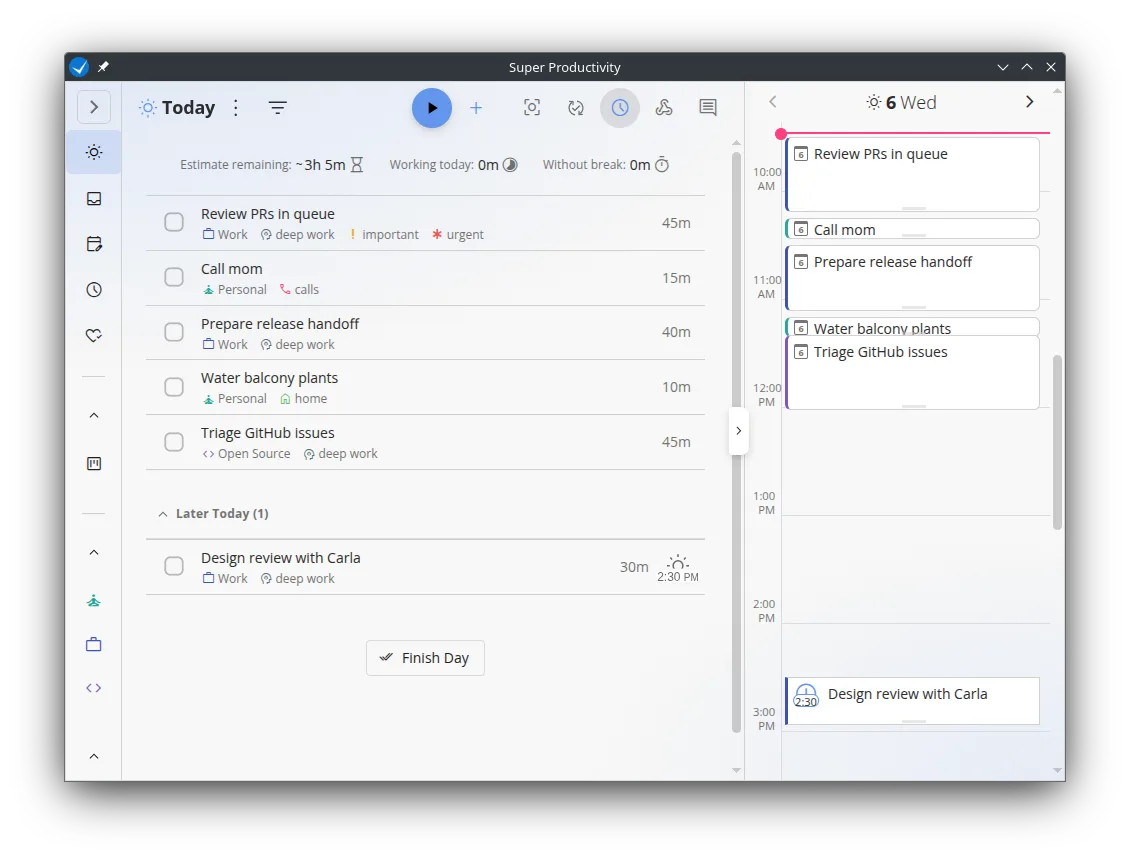
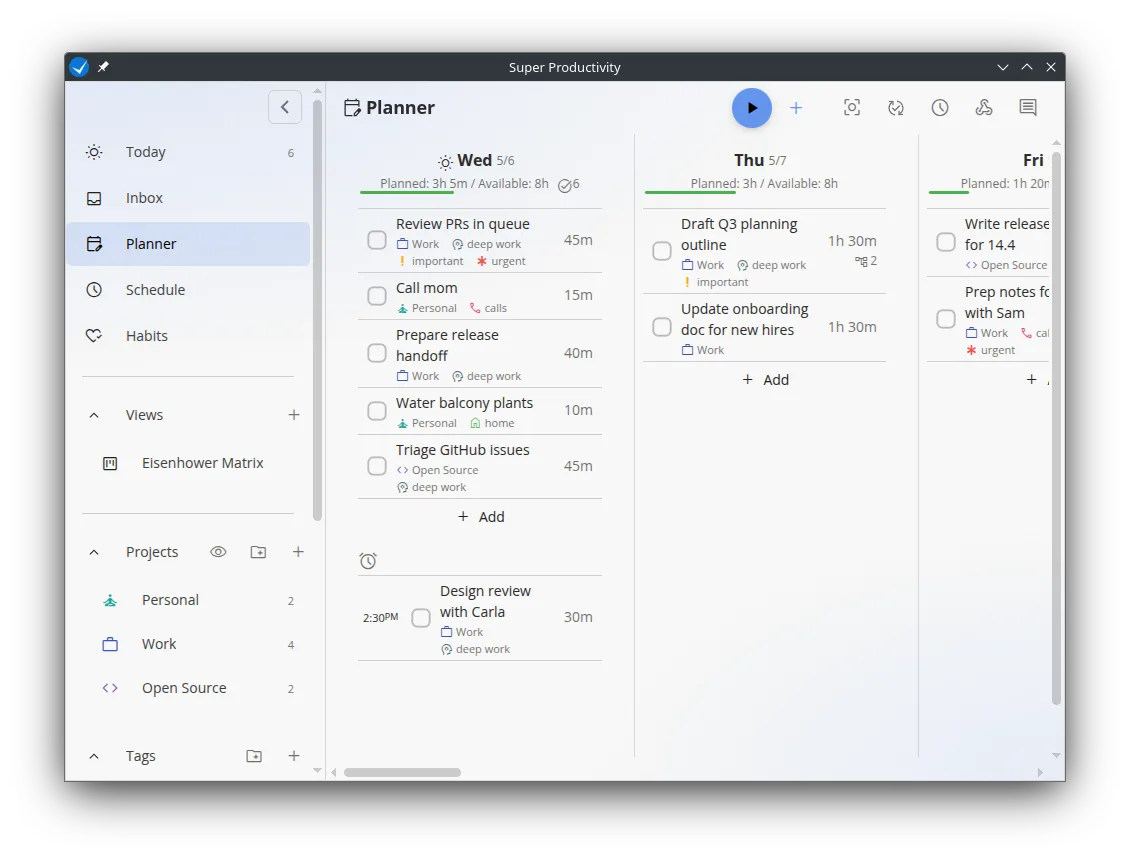
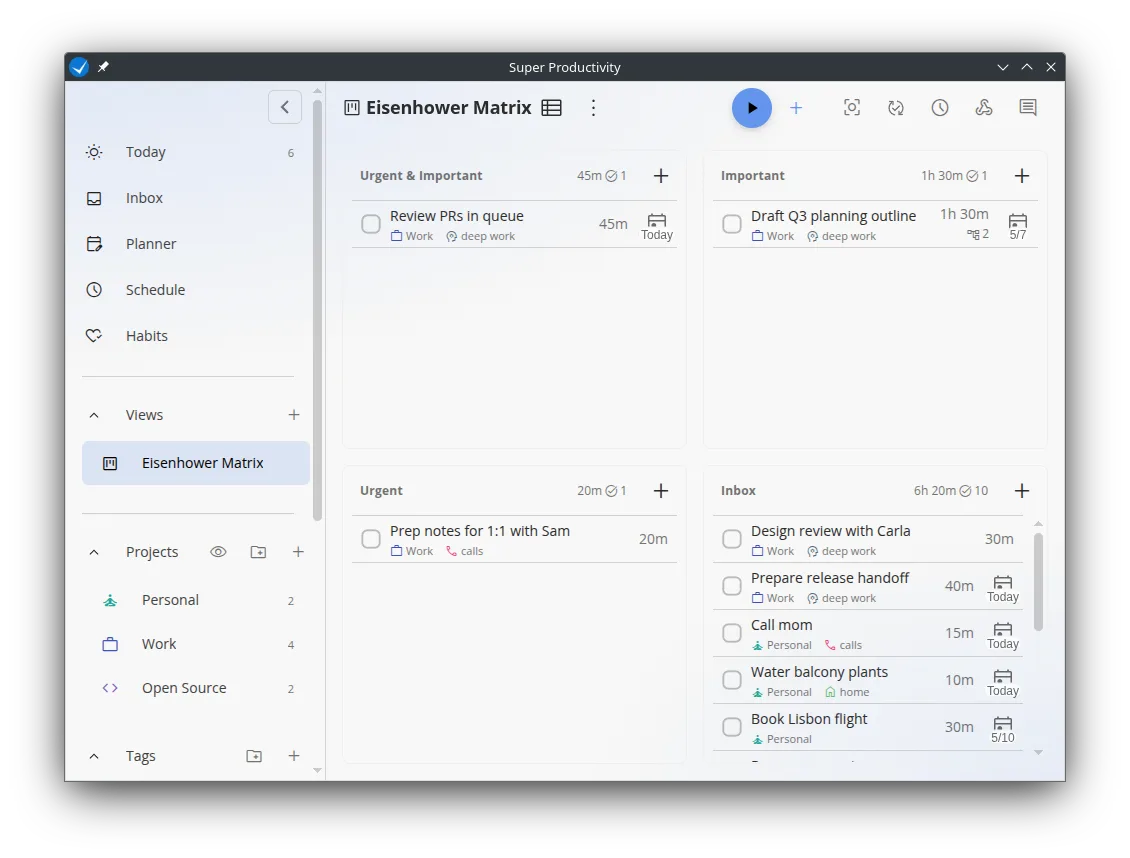
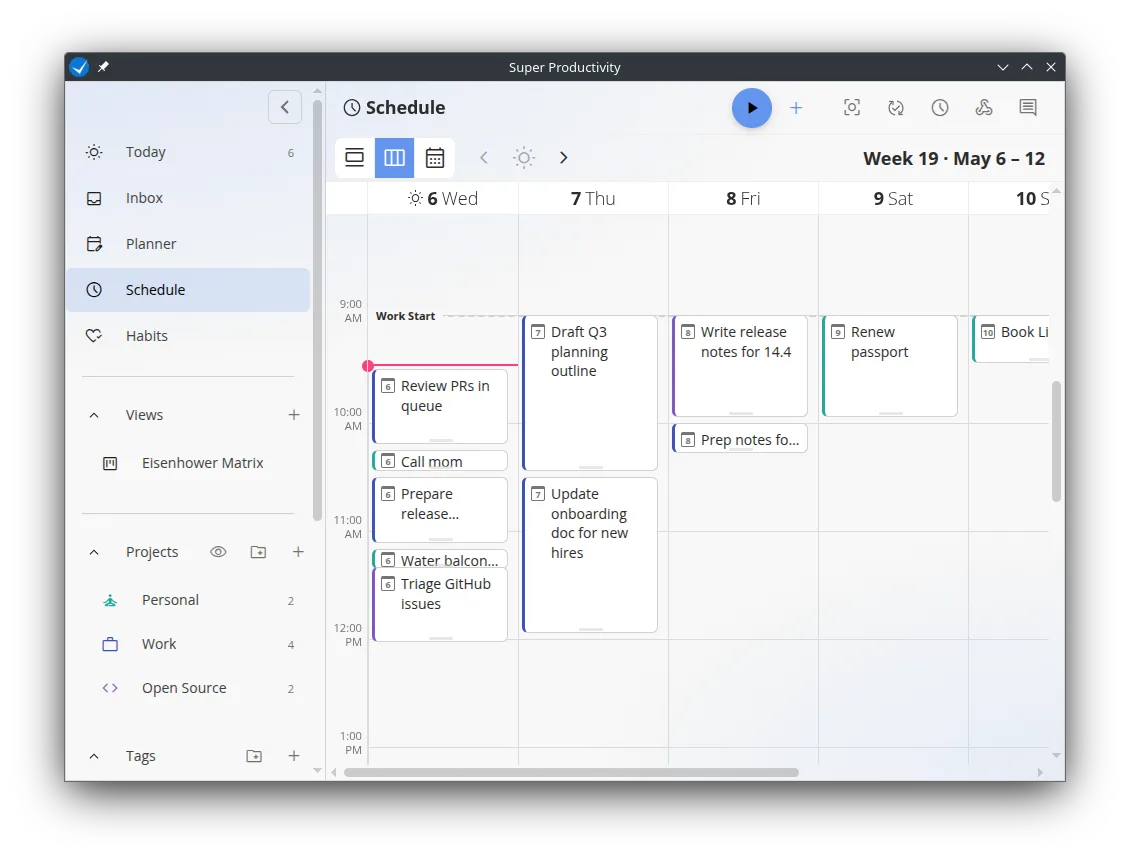
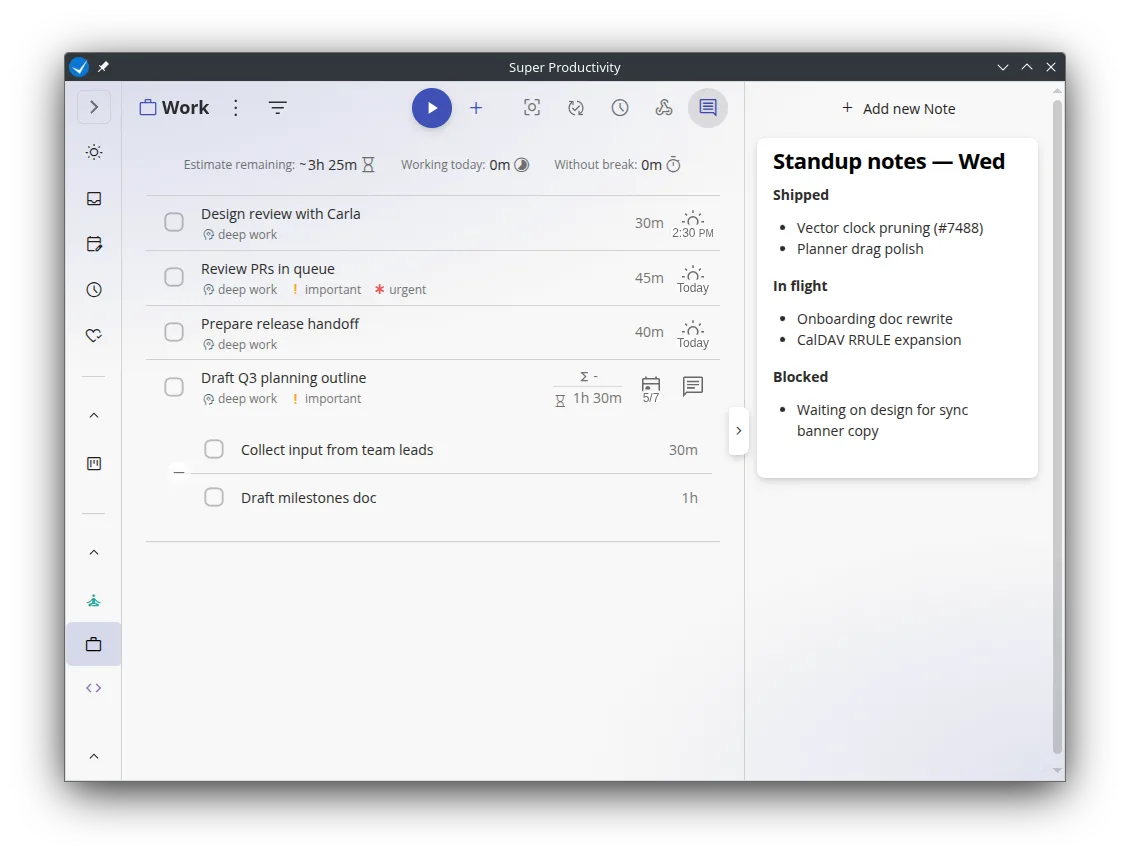
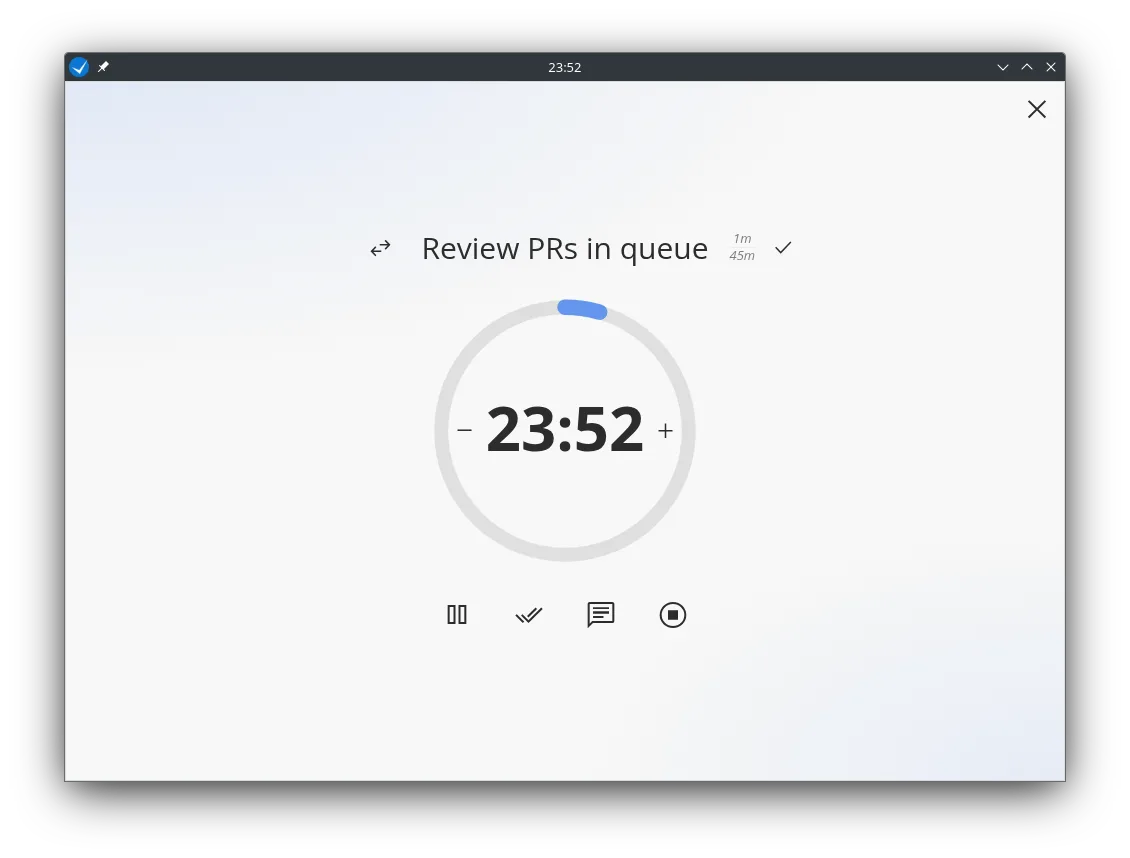
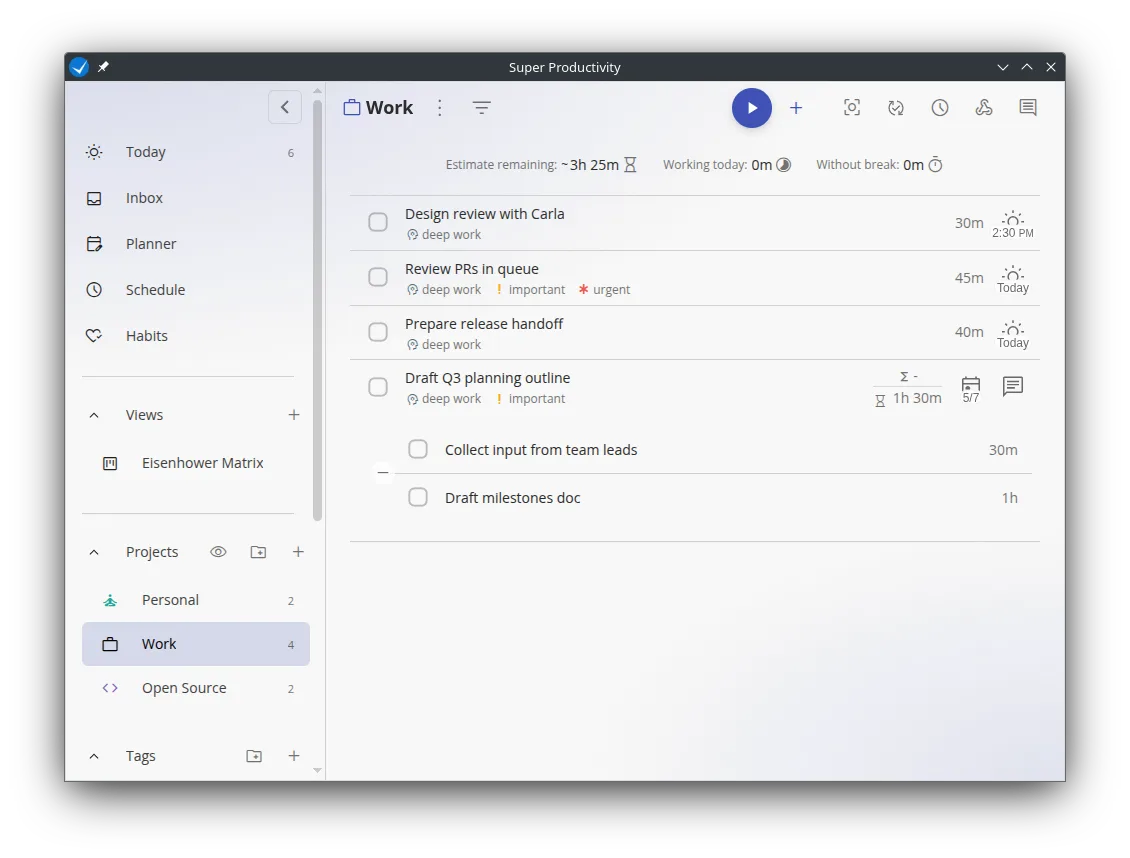
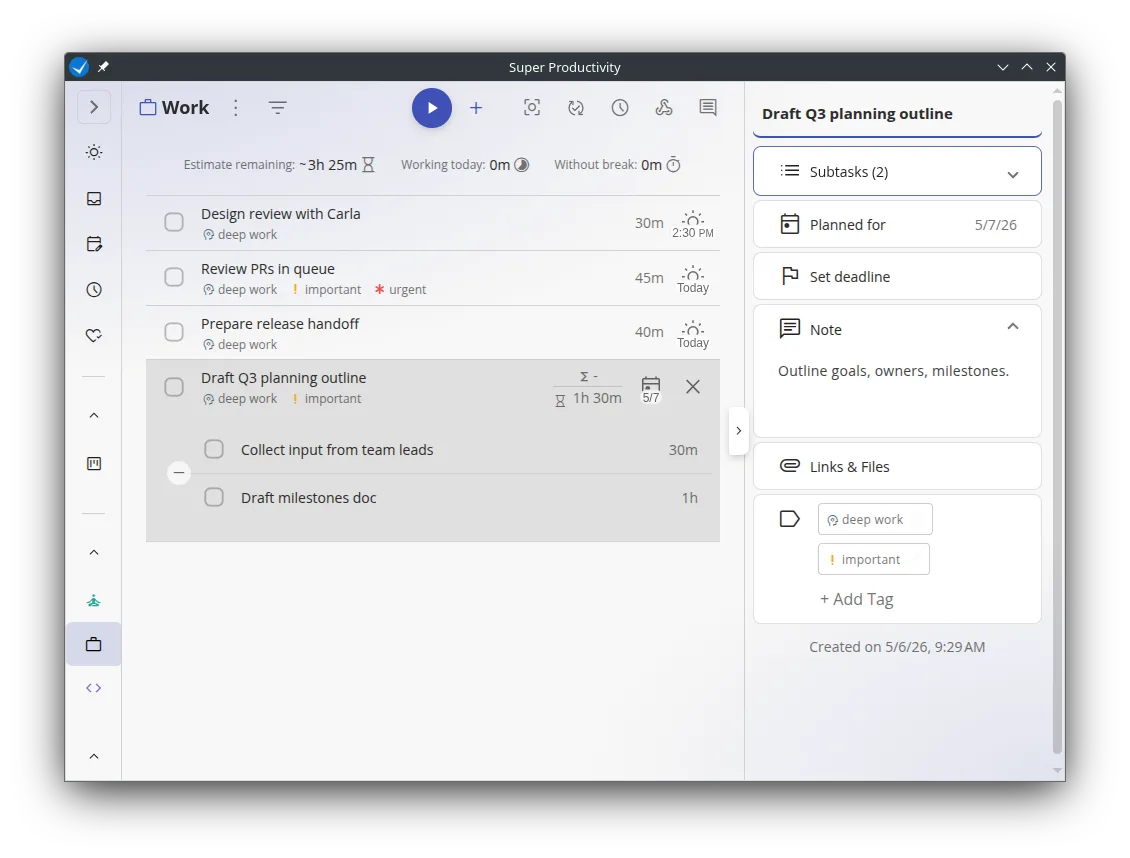
Screenshots of the Linux version, from Flathub.
Downloads
Windows 20.1.0
Show SHA-256
0996fb9696c5180c6e48be422ebdd19431de5e8778a2a0e0888ec922eeec5bbd Show SHA-256
0996fb9696c5180c6e48be422ebdd19431de5e8778a2a0e0888ec922eeec5bbd Mac 20.1.0
Show SHA-256
12d97a4b9d283789ce5dc4a268d88737a7d41b973ffd557b9a5954f86ec22fb6 Show SHA-256
fdfb1625603537f0935209b609ba18fba587057ab01139dfe7098968c9a9748c Linux v20.1.0
Choose the x64 (64-bit) installer for Intel or AMD PCs and the ARM64 installer for ARM PCs. The package data states no minimum Windows version, so check the publisher’s system requirements before installing on an older PC. Choose the Apple silicon (ARM64) build for Macs with an M-series chip and the Intel (x64) build for older Intel Macs. Every build needs macOS 13 Ventura or later. The publisher offers a 64-bit (x64) build for Intel or AMD computers. The Flathub listing states no minimum Linux version or distribution, so check the publisher’s system requirements before installing.
Install with winget: winget install --id JohannesMillan.superProductivity --exact
Install with Homebrew: brew install --cask super-productivity
Install with Flatpak (Flathub): flatpak install flathub com.super_productivity.SuperProductivity
Check a download: Get-FileHash .\<file> -Algorithm SHA256 (PowerShell) or shasum -a 256 ~/Downloads/<file> (Terminal) and compare it with the SHA-256 above.
Linux (Flatpak): Flathub publishes no file checksum; Flatpak checks the app against Flathub’s signed repository when it installs. Flathub shows this app as publisher-verified. App page on Flathub.
What the installer does
Windows
- Delivered as an NSIS (Nullsoft) setup program (.exe) for x64 and ARM64.
- The manifest does not state an install scope.
- No custom silent switch is declared; winget falls back to its default for this installer type (
/S). - Shows up in Windows “Installed apps” as “Super Productivity 20.1.0”.
PC requirements
- CPU architecture: x64 (64-bit), ARM64
Mac
- Delivered as a disk image (.dmg) for Intel (x64) and Apple silicon (ARM64).
- Installs the app
Super Productivity.appinto the Applications folder. - The app updates itself, so it may be newer than the version Homebrew lists.
- A full “zap” removal also deletes up to 5 support, cache and preference locations in your home folder.
Mac requirements
- Minimum macOS version: macOS 13 or later
- CPU architecture: Intel (x64), Apple silicon (ARM64)
Linux
- Delivered as a "flatpak" installer for x64.
- The manifest does not state an install scope.
- No silent-install switch is declared in the manifest.
Linux requirements
- Architectures: x64 (64-bit)
- Download size: 144 MiB
- Installed size: 353 MiB
Description
Features
- Keep organized and focused!
Plan and categorize your tasks using sub-tasks, projects and tags and color code them as needed.
- Use timeboxing and track your time.
Create time sheets and work summaries in a breeze to easily export them to your company's time tracking system.
- Helps you to establish healthy & productive habits:
A break reminder reminds you when it's time to step away. The anti-procrastination feature helps you gain perspective when you really need to. Need some extra focus? A Pomodoro timer is also always at hand. Collect personal metrics to see, which of your work routines need adjustments.
- Integrate with Jira, GitHub, GitLab, and OpenProject.
Auto import tasks assigned to you, plan the details locally, automatically create work logs, and get notified immediately, when something changes.
- Attach context information to tasks and projects.
Create notes, attach files or create project-level bookmarks for links, files, and even commands.
- Super Productivity respects your privacy and does NOT collect any data and there are no user accounts or registration.
You decide where you store your data!
- It's free and open source and always will be.
Best for: Developers and freelancers who track time against Jira, GitHub or GitLab tickets and want a to-do list with timers that keeps data on their own machine.
Features
- No account, no paid tier: All features are free on all platforms, with no premium tier. It needs no account and works offline.
- Time tracking is built in: Each task can run a timer, with a Pomodoro mode, timesheets and reports. Tasks show as lists, a Kanban board or an Eisenhower matrix, and a schedule planner can import your calendar.
- Pulls tickets from your tracker: It can import issues assigned to you from Jira, GitHub, GitLab, Gitea, Trello, Linear, ClickUp, OpenProject, Redmine, Nextcloud Deck and Azure DevOps. Time logged can go back to Jira, GitLab, OpenProject and Redmine as worklogs.
- Sync is opt-in: Data stays on your device unless you turn on sync. Options are SuperSync, which is end-to-end encrypted and can be self-hosted, Dropbox or WebDAV. The project says the app collects no data.
- Mac needs macOS 13: The Mac disk images, for Intel and Apple Silicon, need macOS 13 or later. Windows gets x64 and ARM64 installers.
- Linux Flatpak is x64 only: Flathub marks the Flatpak as verified, published by Johannes Millan, but it is built for x64 only; a Snap is also offered. The Windows listing keeps 138 versions; macOS and Linux list only the current release.
Super Productivity at a glance
| What it is | Personal Task Management App to help you with your daily struggle with JIRA etc. |
|---|---|
| Latest version | Windows 20.1.0 (November 21, 2026) Mac 20.1.0 Linux v20.1.0 (November 21, 2026) |
| Price | Free and open source |
| Open source | Yes |
| License | MIT |
| License type | Open source · Permissive Few conditions on reuse; the copyright notice has to stay. |
| Copyright | Copyright © 2023 Johannes Millan |
| Made by | Johannes Millan |
| Category | Productivity and study tools |
| Runs on | Windows, Mac, Linux |
| Official website | super-productivity.com |
| More links | Support · How to use it · Release notes |
| Source code | github.com/super-productivity/super-productivity |
| Tags | productivity task-manager time-tracker timeboxing timetracking to-do-list todo |
| winget ID | JohannesMillan.superProductivity |
| Homebrew cask | super-productivity |
| Flathub | com.super_productivity.SuperProductivity Verified data from Flathub |
| Flathub verification | Publisher verified on Flathub by proving control of super-productivity.com, 2024-12-08 |
| License on Flathub | MIT as listed on Flathub |
| winget moniker | advanced-todo-list-app |
| Check your download | SHA-256 checksums in the download tables · Security scan |
What’s new in Super Productivity 20.1.0
Notes for the Windows release.
For all current downloads, package links, and platform-specific notes: see the docs. Planning and tasks - Drag selected tasks together in Today, tag views and the planner. - Set recurring deadlines or turn a future repeating occurrence into a normal task. - Use the schedule's new tray mode for tasks without a time, and see overdue tasks in the day panel. - See deadlines on board cards and open tasks from planner deadline cards. - Add tasks from section and group headers, and search by attached link URLs. - Hide sidebar task counts with a new option. Boards is now called Views. - Fixed drops into empty sections, multi-select shortcuts, Markdown checklist pasting and Escape to cancel dragging. Time tracking and focus - Optionally bring the window forward when a focus session or break ends. - See an indicator on the play button when another device is tracking time. - View time per project in the worklog export dialog. - Fixed tracked-time saving when hiding the page, quitting the desktop app or choosing “finish day and close.” - Fixed lost time around sleep and backward clock changes; desktop sleep now counts as a break for break reminders. - Improved duration parsing for spaces, spelled-out units and decimal commas. Sync and integrations - See local changes in the sync import conflict dialog, a distinct syncing icon and clearer error guidance. - Fixed cases where concurrent edits, task completion, notes or tracked time could be lost during sync. - Manual-only sync no longer…
Read the full release notes on the publisher’s site
Notes for older versions are inside each version below.
Is Super Productivity safe?
Score result: No detections so far
None of the 63 security engines on VirusTotal flagged any of the 3 scanned files.
Covers 3 of 5 files. The rest have no VirusTotal report yet, so this result does not speak for them.
- 0 flagged in total
- 3 of 5 files scanned
- 63 engines
Scan info
- Last scan
- Scan provider
- VirusTotal · Full report
File integrity
| File | SHA-256 | Hash check | Signature | VirusTotal |
|---|---|---|---|---|
| Super-Productivity-Setup-x64.exeWindows · x64 (64-bit) | 0996fb9696c5180c6e48be422ebdd19431de5e8778a2a0e0888ec922eeec5bbd |
Matches the manifest (re-computed) | Valid | 0/63 flagged |
| Super-Productivity-Setup-arm64.exeWindows · ARM64 | 0996fb9696c5180c6e48be422ebdd19431de5e8778a2a0e0888ec922eeec5bbd |
Matches the manifest (re-computed) | Valid | 0/63 flagged |
| superProductivity-x64.dmgMac · Intel (x64) | 12d97a4b9d283789ce5dc4a268d88737a7d41b973ffd557b9a5954f86ec22fb6 |
Matches the manifest (re-computed) | Valid | Open not on VirusTotal |
| superProductivity-arm64.dmgMac · Apple silicon (ARM64) | fdfb1625603537f0935209b609ba18fba587057ab01139dfe7098968c9a9748c |
Matches the manifest (re-computed) | Valid | 0/61 flagged |
| com.super_productivity.SuperProductivity.flatpakrefLinux · x64 (64-bit) | Not provided | Copied from the manifest, not re-computed | Not checked | — |
| Hash re-computed by Everyversion | 4 of 4 installers match. |
|---|---|
| Code signature checked | 4 valid. |
We host no installers. Every download link goes to the download location named in the package listing, normally the publisher’s own server. For this software we downloaded the files from that source ourselves, re-computed each checksum and checked the code signature where our tools could, as shown above. A passing check shows a file is the one that was published; it is not a guarantee it is free of problems. For more information, visit our Security and Trust Center.
Source and provenance
| Windows: source | microsoft/winget-pkgs |
|---|---|
| Windows: SHA-256 in upstream manifest | Yes |
| Windows: observed at commit | 6581c2e6d123 · retrieved 2026-11-25 |
| Mac: source | Homebrew/homebrew-cask |
| Mac: SHA-256 in upstream manifest | Yes |
| Mac: observed at commit | 567a59339a60 · retrieved 2026-11-22 |
| Linux: source | Flathub · Flathub API · github.com/flathub/com.super_productivity.SuperProductivity |
| Linux: checksum | None published. Flatpak checks the app against Flathub’s signed repository when it installs. |
| Linux: publisher verified | Publisher verified on Flathub by proving control of super-productivity.com, 2024-12-08 |
| Linux: data retrieved | 2026-11-24 · attribution: app data from Flathub, license listed there: MIT |
Old versions
Windows versions
Showing the newest 20 of 139 versions (the JSON and Markdown versions list 100). Open a version for its installers, checksums and a command that pins it.
20.1.0 latest · 2026-11-21 · 2 installers notes
| Architecture | Format | Scope | SHA-256 | Download |
|---|---|---|---|---|
| x64 (64-bit) | NSIS | —en-US | 0996fb9696c5180c6e48be422ebdd19431de5e8778a2a0e0888ec922eeec5bbd |
Download |
| ARM64 | NSIS | —en-US | 0996fb9696c5180c6e48be422ebdd19431de5e8778a2a0e0888ec922eeec5bbd |
Download |
Pin this version: winget install --id JohannesMillan.superProductivity --version 20.1.0 --exact
Release notes
For all current downloads, package links, and platform-specific notes: see the docs. Planning and tasks - Drag selected tasks together in Today, tag views and the planner. - Set recurring deadlines or turn a future repeating occurrence into a normal task. - Use the schedule's new tray mode for tasks without a time, and see overdue tasks in the day panel. - See deadlines on board cards and open tasks from planner deadline cards. - Add tasks from section and group headers, and search by attached link URLs. - Hide sidebar task counts with a new option. Boards is now called Views. - Fixed drops into empty sections, multi-select shortcuts, Markdown checklist pasting and Escape to cancel dragging. Time tracking and focus - Optionally bring the window forward when a focus session or break ends. - See an indicator on the play button when another device is tracking time. - View time per project in the worklog export dialog. - Fixed tracked-time saving when hiding the page, quitting the desktop app or choosing “finish day and close.” - Fixed lost time around sleep and backward clock changes; desktop sleep now counts as a break for break reminders. - Improved duration parsing for spaces, spelled-out units and decimal commas. Sync and integrations - See local changes in the sync import conflict dialog, a distinct syncing icon and clearer error guidance. - Fixed cases where concurrent edits, task completion, notes or tracked time could be lost during sync. - Manual-only sync no longer…
Full release notes from the publisher
Manifest: manifests/j/JohannesMillan/superProductivity/20.1.0
20.0.0 · 2026-11-06 · 2 installers notes
| Architecture | Format | Scope | SHA-256 | Download |
|---|---|---|---|---|
| x64 (64-bit) | NSIS | —en-US | 246b5e0ab1b2aa495353e2bcbeadb763747ecec90ae007f6273d24a5f0346350 |
Download |
| ARM64 | NSIS | —en-US | 246b5e0ab1b2aa495353e2bcbeadb763747ecec90ae007f6273d24a5f0346350 |
Download |
Pin this version: winget install --id JohannesMillan.superProductivity --version 20.0.0 --exact
Release notes
Added Smart Lists, multi-tag filtering, and a redesigned view editor with pinned views and improved mobile layouts. Improved task management, deadlines, recurring tasks, and cross-project search. Added new AI-assisted plugin features and expanded integrations. Improved time tracking, worklog exports, calendar logging, and focus notifications. Simplified SuperSync setup and improved synchronization reliability. Added Android task creation from the home-screen widget and improved background reminders. Improved desktop performance, startup speed, keyboard interactions, and accessibility.
Full release notes from the publisher
Manifest: manifests/j/JohannesMillan/superProductivity/20.0.0
19.3.1 · 2026-10-25 · 2 installers notes
| Architecture | Format | Scope | SHA-256 | Download |
|---|---|---|---|---|
| x64 (64-bit) | NSIS | —en-US | 9f44405f4e5cbddcedd5554114d47831909e6f565b50c08a8585f4ad7d202500 |
Download |
| ARM64 | NSIS | —en-US | 9f44405f4e5cbddcedd5554114d47831909e6f565b50c08a8585f4ad7d202500 |
Download |
Pin this version: winget install --id JohannesMillan.superProductivity --version 19.3.1 --exact
Release notes
For all current downloads, package links, and platform-specific notes: check the wiki. Improvements - Collapse project task tables in the daily summary. - Open the download page directly from the update banner. - Subtler due badges, mobile play button, and planner calendar colors. Fixes - Ask for confirmation before loading remote sync data when it is missing your previous uploads. - Show an exact-alarm hint in reminder settings. - Use locale-correct leading zeros in short dates. - Allow touch scrolling over recurring task rows. - Pause issue and calendar polling while offline and catch up on reconnect. - Keep planner calendar colors up to date. Desktop fixes - Run pending shutdown work when quitting from the tray. - Prevent two Snap revisions from opening the same local database. Contributors Thanks to everyone who contributed to this release: @johannesjo Full Changelog: v19.3.0...v19.3.1
Full release notes from the publisher
Manifest: manifests/j/JohannesMillan/superProductivity/19.3.1
19.3.0 · 2026-10-23 · 2 installers notes
| Architecture | Format | Scope | SHA-256 | Download |
|---|---|---|---|---|
| x64 (64-bit) | NSIS | —en-US | af5112574a6359594acd5a8cc2bf281a6601b4f307779d7fdc20f97128f12b25 |
Download |
| ARM64 | NSIS | —en-US | af5112574a6359594acd5a8cc2bf281a6601b4f307779d7fdc20f97128f12b25 |
Download |
Pin this version: winget install --id JohannesMillan.superProductivity --version 19.3.0 --exact
Release notes
For all current downloads, package links, and platform-specific notes: check the wiki. 19.3.0 Tasks and focus - Restore deleted tasks from Recently deleted, or finish tasks as “won’t do.” - Set priorities with p1/p2/p3, use nth-weekday short syntax, and enter @ dates in your UI language and date order. - See completed/total counts on collapsed subtasks and archived projects in the sidebar. - Start focus mode with one click and adjust focus sound volume. - Productivity and sustainability scores have been removed; Upcoming is now an overview in the Recurring panel. Scheduling and reminders - View deadlines in Schedule, calendar colors in Planner, and plugin calendars in Schedule filters. - Navigate days from the Schedule day panel and open Planner with a keyboard shortcut. - Set optional repeat end dates, with clearer controls for completion-based repeats, falling behind, pausing, and rule summaries. - Set reminders 1 day, 3 days, or 1 week ahead. Upcoming recurring alarms are now scheduled in advance. - Fixed monthly repeats skipping short months, yearly repeats on leap days, and recurring task priority retention. Integrations and assistants - Sign up for and connect Plainspace inside the app, hand tasks to others, and share tasks by moving them into shared projects. - Plainspace now syncs titles and scheduled times both ways and pushes offline edits. Fixed pending edits during handoffs and syncing cleared times across devices. - Optionally create and delete corresponding…
Full release notes from the publisher
Manifest: manifests/j/JohannesMillan/superProductivity/19.3.0
19.2.0 · 2026-10-11 · 2 installers notes
| Architecture | Format | Scope | SHA-256 | Download |
|---|---|---|---|---|
| x64 (64-bit) | NSIS | —en-US | 0acd52da7f75d4d65b81c5c850e1c92641f25238df33153d4c07847a14960a1b |
Download |
| ARM64 | NSIS | —en-US | 0acd52da7f75d4d65b81c5c850e1c92641f25238df33153d4c07847a14960a1b |
Download |
Pin this version: winget install --id JohannesMillan.superProductivity --version 19.2.0 --exact
Release notes
For all current downloads, package links, and platform-specific notes: check the wiki. New features - Set numeric task priorities with icon presets. - Drag selected tasks between sections and projects, and select multiple tasks in the mobile planner. - Find projects and tags in search. - Undo task unscheduling and preview the next recurring task and inherited subtasks. - Added App Auto Track and TickTick CSV import plugins, plus Caffeine Tracker to the community plugin list. - Moved Redmine and Nextcloud Deck integrations to plugins. - Simplified first-run setup with an offer to track your first task. - Custom styles.css changes now reload automatically. Mobile and reminders - Android: receive native deadline reminders up to one week ahead; reminders are rescheduled as exact alarms when permission is granted. - Android: fixed double-counted time, lost time after app termination or restart, background Pomodoro tracking, and missing focus notifications. - iOS: share links and text to your inbox, and recover focus sessions after a web view restart. - Session endings no longer steal focus; Windows reminders bring the window forward without taking focus. Sync and backups - Fixed sync issues that could lose tracked time or overwrite concurrent task edits. - Fixed conflicts involving task restores and bulk archiving, note deletions, habit edits, and list reordering. - Improved concurrent OneDrive writes, WebDAV upload handling, and recovery from interrupted mobile sync downloads…
Full release notes from the publisher
Manifest: manifests/j/JohannesMillan/superProductivity/19.2.0
19.0.1 · 2026-09-12 · 2 installers notes
| Architecture | Format | Scope | SHA-256 | Download |
|---|---|---|---|---|
| x64 (64-bit) | NSIS | —en-US | bb85ae595ef8cc5a1ed16b72e3c3181926be90c84b268836109e3e4194a1d884 |
Download |
| ARM64 | NSIS | —en-US | bb85ae595ef8cc5a1ed16b72e3c3181926be90c84b268836109e3e4194a1d884 |
Download |
Pin this version: winget install --id JohannesMillan.superProductivity --version 19.0.1 --exact
Release notes
For all current downloads, package links, and platform-specific notes: check the wiki. This release collects everything since v18.21.1, including the 18.21.2, 18.22.0 and 19.0.0 changes that were never published. Highlights - Notes are now edited directly with live Markdown — no more switching between edit and preview mode. - Select multiple tasks and apply bulk actions with desktop, keyboard, or touch controls. - Duplicate tasks with a keyboard shortcut, and trigger automations with shortcuts. - Copy the focused task and its subtasks as a Markdown checklist, and convert selected text into Markdown checklist items. - Double-click projects, tags, and folders in the navigation to rename them. - Local recovery points protect against full-state data loss and are preserved through restores. - The currently tracked task is shown in the browser tab title. - Added URL-scheme task actions on Android. - Tasks opened from search are now clearly highlighted. Tasks, planning, and UI - Date-only scheduled tasks are ordered after timed tasks, and the date-only heading in the Schedule is clearer. - Long task titles stay reachable while editing. - Completed habits can be unchecked again. - Started or tracked appointments stay in the main task list instead of moving to "Later Today". - Task notes open directly from the notes icon, and the empty Subtasks panel no longer shows a misleading "(0)". - Pressing Escape properly leaves the plain-text notes field, and task details no longer steal…
Full release notes from the publisher
Manifest: manifests/j/JohannesMillan/superProductivity/19.0.1
18.21.2 · 2026-08-31 · 2 installers notes
| Architecture | Format | Scope | SHA-256 | Download |
|---|---|---|---|---|
| x64 (64-bit) | NSIS | —en-US | 75954cd1cfaf3246e2a708e032f13548b68333b141e591bd199a62d58da8d9ac |
Link returns 404 |
| ARM64 | NSIS | —en-US | 75954cd1cfaf3246e2a708e032f13548b68333b141e591bd199a62d58da8d9ac |
Link returns 404 |
Pin this version: winget install --id JohannesMillan.superProductivity --version 18.21.2 --exact
Release notes
For all current downloads, package links, and platform-specific notes: check the wiki. Features - Show the currently tracked task in the browser tab title (#9306) - Add URL-scheme task actions on Android (#9792) - Update the Turkish translation (#9797) Fixes - Migrate legacy data missing newer model sections (#9808) - Prevent touch swipes from moving or resizing schedule events (#9807) - Stop the iOS add-task bar from jumping when the keyboard layout changes (#9779, #9809) - Ensure reminders no longer block overdue repeating-task cleanup (#9802) - Improve sync repair reliability and privacy hardening (#9795) Performance - Improve SuperSync processing and maintenance of older operations (#9791, #9801) Contributors Thanks to everyone who contributed to this release: @Cyber-Syntax @johannesjo @KamilDev @MarkQuach12 Full Changelog: v18.21.1...v18.21.2
Full release notes from the publisher
Manifest: manifests/j/JohannesMillan/superProductivity/18.21.2
v18.19.0 · 2026-08-07 · 1 installer notes
| Architecture | Format | Scope | SHA-256 | Download |
|---|---|---|---|---|
| x64 (64-bit) | NSIS | —en-US | 31c2c5779f0c138be1d5d9ed0aaadc1662a272fd3924717ba573fdd5c36891b5 |
Download |
Pin this version: winget install --id JohannesMillan.superProductivity --version v18.19.0 --exact
Release notes
For all current downloads, package links, and platform-specific notes: check the wiki. Highlights - Added search to global settings and a ? keyboard shortcut cheat sheet (#9302, #9318). - Added crash-safe local drafts for project notes (#8982). - Added interval recurrence phrases such as @every 2 weeks and @every 2 fridays (#9328). - Added URL scheme actions for creating and completing tasks (#9121). - Completed translations across all locales (#9360). Security and sync - Enforced encrypted-only SuperSync uploads when E2EE is required and stopped clients from accepting plaintext downloads when encrypted sync is expected (GHSA-vrc7-775g-ggqc, #8903, #9457). - Added diagnostics and recovery guidance for encrypted-operation integrity failures (#9331, #9439, #9444). - Prevented stale-key uploads after server state replacements (#8730, #9330). - Resolved Plan for Today bulk conflicts and preserved Planner placement during Today conflicts (#9442, #9454). - Improved section conflict replay, older-client compatibility, first-sync overwrite confirmation, and blocked-action reporting (#9326, #9334, #9373, #9412). - Fixed a multi-tab operation-log race that could skip replaying a concurrent operation (#8337, #9158). - The local REST API now requires a bearer token for every request except GET /health. The token can be viewed or regenerated under Settings → Misc → Access Token (#9155). - Sanitized plugin dialog HTML and SVG icons (#9440, #9445). Tasks, planning, and focus - Improved…
Full release notes from the publisher
Manifest: manifests/j/JohannesMillan/superProductivity/v18.19.0
18.15.1 · 2026-07-17 · 3 installers notes
| Architecture | Format | Scope | SHA-256 | Download |
|---|---|---|---|---|
| x64 (64-bit) | NSIS | —en-US | a0a813cf1fb693c828ddaaf4c48b64b4efe5c7e768307a42319414e57054968b |
Download |
| ARM64 | NSIS | —en-US | 4330cd28383acd80af23ba334e6cea9bc4054363e1e805dbb885a46f4fc0a401 |
Download |
| x86 (32-bit) | NSIS | —en-US | bc775c47925e75b4a58e8f2da086f1994d04123713afcdcef0207f5a193c5db2 |
Download |
Pin this version: winget install --id JohannesMillan.superProductivity --version 18.15.1 --exact
Release notes
For all current downloads, package links, and platform-specific notes: [check the wiki](https://github.com/super-productivity/super-productivity/wiki/2.01-Downloads-and-Install). ### Features - **schedule:** add a single-day view to the Schedule tab (#9058) - **work-view:** show custom section task counts #9068 (#9109) - **sync:** add one background full-sync scheduler (#9078) - suppress idle dialog during active work sessions (#8965) - **sync:** conflict journal + disjoint-field auto-merge + review UI (#8874) - **work-view:** show break time today (#8909) - **tasks:** navigate from empty add-subtask input (#8916) - add Home Assistant Bridge to community plugins (#8891) ### Fixes - **supersync:** prevent migrator advisory-lock leak on deploy timeout (#9126) - **sync:** heal missing idle config field on schema-migration upgrade (#9124) - **supersync:** make interrupted CONCURRENTLY migrations recoverable - **android:** stop the widget labelling a stale list as Today (#9098) (#9118) - **sync:** keep import author in client-side clock pruning (#9096) (#9102) - **sync:** unfreeze the disjoint-field merge to stop data loss (#9095) (#9101) - **sync:** dedupe surgical-sync retries and keep the import author through pruning (#9089) - **sync:** fence in-flight sync cycles across destructive config changes (#9088) - **locale:** consolidate textLocale, fix planner month label, enforce via lint (#8987) (#9065) - **sync:** guard snapshots against unpersisted state changes (#8751)…
Full release notes from the publisher
Manifest: manifests/j/JohannesMillan/superProductivity/18.15.1
18.14.0 · 2026-07-10 · 3 installers notes
| Architecture | Format | Scope | SHA-256 | Download |
|---|---|---|---|---|
| x64 (64-bit) | NSIS | —en-US | 722d1229dbf8493203016978dfa3a99d08fbf66c76ffdecbcd60602e0b4197f2 |
Download |
| ARM64 | NSIS | —en-US | c350f0c7b453006078c24c81695ee0800ed31e82f3006fbb146a9aa249e27087 |
Download |
| x86 (32-bit) | NSIS | —en-US | 6355467b5e8e3334c79491ac1a6ff41c0f67d3012d8c9f2c966925f76f3901d8 |
Download |
Pin this version: winget install --id JohannesMillan.superProductivity --version 18.14.0 --exact
Release notes
For all current downloads, package links, and platform-specific notes: [check the wiki](https://github.com/super-productivity/super-productivity/wiki/2.01-Downloads-and-Install). ## Super Productivity 18.14.0 ### Highlights - Added a Todoist import plugin to the Import/Export launcher. - Create tasks by dropping links or EML files onto the app, with hardened EML importing. - Added an Android home-screen widget for today’s tasks. - Redesigned the add-task bar with improved toggles, notes, layout, and accessibility. - Added file-tree actions for creating subfolders and items within folders. - Added optional sorting of completed tasks by completion date. ### Tasks and planning - New everyday recurring tasks now skip overdue occurrences by default. - Fixed selecting day-of-month recurrence. - Shift+T now schedules overdue tasks for today more reliably. - Improved subtask creation on touch devices and during IME composition. - Collapsed subtask state now persists across restarts. - Project sections are now retained when duplicating a project. - Fixed navigation from search for tasks without a project or tag. - Unified Due, Deadline, Planned, and Scheduled labels. ### Sync and data safety - Added an opt-in split-file sync format for delta-based syncing. - Avoids full downloads when the remote revision has not changed. - Improved atomic file writes, backup recovery, and encrypted file-sync safety. - Reduced false conflict dialogs and corrected displayed conflict-change counts…
Full release notes from the publisher
Manifest: manifests/j/JohannesMillan/superProductivity/18.14.0
18.13.1 · 2026-07-02 · 3 installers notes
| Architecture | Format | Scope | SHA-256 | Download |
|---|---|---|---|---|
| x64 (64-bit) | NSIS | —en-US | d161a9d0546eab9931bfb7d5085810677726504f50d1bbdb75050b1348b8fb10 |
Download |
| ARM64 | NSIS | —en-US | 837a74a413bd049e8335ca1c43aaa4a1ad5db97ed245a6cd7f0bf42d16075322 |
Download |
| x86 (32-bit) | NSIS | —en-US | c718507c9b835a79d59b15bcc5a79e9e9634d3999b110d87261431b93d03853e |
Download |
Pin this version: winget install --id JohannesMillan.superProductivity --version 18.13.1 --exact
Release notes
For all current downloads, package links, and platform-specific notes: [check the wiki](https://github.com/super-productivity/super-productivity/wiki/2.01-Downloads-and-Install). ## Features - Added global wallpapers with per-context overrides. - Expanded Plainspace collaboration: create tasks directly, discover and connect more easily, open shared projects in Plainspace, and poll for new tasks by default. - Desktop users can now be notified about new releases. - Added ISO 8601 date formatting and updated Swedish and Romanian translations. - Focus Mode preparation is now optional, with smoother starts and a repeating break-end sound. - Added clearer overdue and scheduling-conflict indicators, reminder actions, and Later Today calendar details. - Added plugin OAuth hooks, local-only secret storage, persistent execution consent, and issue-panel integration. - Added global shortcut triggers through `superproductivity://` URLs. ## Fixes - Improved sync safety, encryption prompts, conflict notices, upload verification, and OneDrive and Nextcloud setup feedback. - Fixed task schedules being lost when moving between the backlog and regular list. - Fixed adding subtasks from the Planner and parsing short syntax for inline subtasks. - Fixed dismissed reminders reopening repeatedly and improved notification-action handling. - Fixed task notes briefly showing raw Markdown and duplicate note views in Focus Mode. - Fixed CalDAV WebDAV requests on Android and several Android keyboard and…
Full release notes from the publisher
Manifest: manifests/j/JohannesMillan/superProductivity/18.13.1
18.12.0 · 2026-06-20 · 3 installers notes
| Architecture | Format | Scope | SHA-256 | Download |
|---|---|---|---|---|
| x64 (64-bit) | NSIS | —en-US | f417e74a0e10c61198bb66055c9da0389fa0edb72fdcb69e0c94f23bc389da91 |
Download |
| ARM64 | NSIS | —en-US | e882753091faa0c44f3856d9fadc9487881b691c43228334374ba7cd8a14607b |
Download |
| x86 (32-bit) | NSIS | —en-US | 148ba6552e620b22e6b16561d9f441b0af752f9bac602cb1706d141d7c5ce68c |
Download |
Pin this version: winget install --id JohannesMillan.superProductivity --version 18.12.0 --exact
Release notes
For all current downloads, package links, and platform-specific notes: [check the wiki](https://github.com/super-productivity/super-productivity/wiki/2.01-Downloads-and-Install). ### Features - Migrated Azure DevOps and Trello issue providers to plugins. - Added Plainspace integration for shared projects. - Focus Mode now shows session completion and sends a notification when a countdown finishes. - Kept the subtask input open after adding a subtask. - Clicking the issue-updated toggle now clears its badge. - Moved the collaboration option before the backlog option in the project creation dialog. ### Fixes - Improved Android keyboard inset handling and removed the keyboard-related white flash. - Clarified Nextcloud 404 errors caused by an incorrect user ID. - Preserved background overlay and blur settings after removing a background image. - Preserved sections during legacy backup migration. - Preserved manual task order within tags when sorting by tag. - Completing a task no longer automatically schedules it for today. - Unknown issue-provider keys are no longer reported as sync corruption. - Preserved Flowtime break settings when switching focus modes. - Improved the Linux tray icon and restored the custom title bar on GNOME X11. - Added Vikunja project discovery through CalDAV. - Corrected the Plainspace claim-list link icon color. ### Documentation - Added a guide for using Proton Drive through rclone and WebDAV. ### Contributors Thanks to everyone who contributed to…
Full release notes from the publisher
Manifest: manifests/j/JohannesMillan/superProductivity/18.12.0
18.11.0 · 2026-06-19 · 3 installers notes
| Architecture | Format | Scope | SHA-256 | Download |
|---|---|---|---|---|
| x64 (64-bit) | NSIS | —en-US | 96f486f4a95d6f70e33112408d2cbd2c6bb567f9226a06169b13a8b62dca89bc |
Download |
| ARM64 | NSIS | —en-US | 8e2bd136184c361160151a1ba33a0642bea09fe4dda1cb7317472a9fb0c789ab |
Download |
| x86 (32-bit) | NSIS | —en-US | 8203ea6bcea3c175fb041fbdf8327440a110e53666a3571fcd4841dd51f5587d |
Download |
Pin this version: winget install --id JohannesMillan.superProductivity --version 18.11.0 --exact
Release notes
For all current downloads, package links, and platform-specific notes: [check the wiki](https://github.com/super-productivity/super-productivity/wiki/2.01-Downloads-and-Install). ### Features - Add notes directly from the add-task bar. - Added the built-in Plainspace theme and refreshed the Rainbow theme. - Project and tag dropdowns now follow their tree order. - Focus Mode is enabled in the time-tracker onboarding preset. - Updated Ukrainian translations. ### Fixes - Improved sync reliability, conflict handling, retries, encryption operations, and lost-update protection. - Fullscreen note edits now persist when navigating, resizing, or ending a Focus Mode session. - Improved mobile backup restoration and durability, including large Android backups and iOS read failures. - Restored desktop plugin rendering, prevented empty side panels, and exposed the focused-task API to iframe plugins. - Fixed Windows tray icons, macOS shortcut layouts, and Meta/OS modifier recording. - Fixed Android keyboard positioning, status-bar spacing, and background battery drain. - Added support for app deep links such as `obsidian://`. - Fixed Daily Summary opening from the before-close dialog. - Fixed several task, Focus Mode, schedule, and idle-button visual issues. - Redacted provider credentials and WebSocket tokens from exportable logs. - Fixed Nextcloud Deck completion values and rejected negative counter values. ### Performance - Improved sync performance by caching the latest full-state…
Full release notes from the publisher
Manifest: manifests/j/JohannesMillan/superProductivity/18.11.0
18.10.0 · 2026-06-12 · 3 installers notes
| Architecture | Format | Scope | SHA-256 | Download |
|---|---|---|---|---|
| x64 (64-bit) | NSIS | —en-US | 4b03e305a2b1dc2bb02621a78c516acff8ce52c9d179d169b0f95eed72d1dd94 |
Download |
| ARM64 | NSIS | —en-US | df4550fad063f16da6315c7fecc26dc56365228324c78d05028463dc2c817800 |
Download |
| x86 (32-bit) | NSIS | —en-US | 40dd7050c37991e8cb8bec91a7316535b11c00b7945f287a833d977665124afb |
Download |
Pin this version: winget install --id JohannesMillan.superProductivity --version 18.10.0 --exact
Release notes
For all current downloads, package links, and platform-specific notes: [check the wiki](https://github.com/super-productivity/super-productivity/wiki/2.01-Downloads-and-Install). ### Highlights - Redesigned the idle dialog with a choice-first flow. - Overhauled the Focus Mode screen UX. - Added checklist progress, bulk actions, and notes editor UX improvements for tasks. - Added a project completion experience. - Improved boards project selection with multi-select and sidebar support. ### Search, Notes & Shortcuts - Added a completed-task filter to search. - Included note content in global search and improved folder search support. - Added keyboard shortcuts to the fullscreen note editor. - Added optional shortcuts for scheduling and a shortcut to set task deadlines. - Improved long-word wrapping, soft line breaks, and checklist labels in markdown notes. ### Calendar, Planning & Reminders - Improved calendar design and recurrent task calendar design. - Allowed writable plugin calendar events to be rescheduled from Schedule. - Fixed overlapping same-time tasks in Schedule. - Fixed recurring tasks being double-counted in Today and planner views. - Added hover tooltips to reminder popups and restored imported legacy task reminders. - Made recurring CalDAV plugin occurrence edits and deletes safer and quieter. ### Sync, Backup & Data Safety - Improved CalDAV calendar discovery and handling of missing DAV response headers. - Preserved entity order during sync data repair. - Made…
Full release notes from the publisher
Manifest: manifests/j/JohannesMillan/superProductivity/18.10.0
18.9.1 · 2026-06-05 · 3 installers notes
| Architecture | Format | Scope | SHA-256 | Download |
|---|---|---|---|---|
| x64 (64-bit) | NSIS | —en-US | d8370d259cb757f01a9e3e4aa8c37867ad02c58c047c74050443930367f4ae13 |
Download |
| ARM64 | NSIS | —en-US | 09b6e4fd1ce938f01a8be6300c8f1f52d7e83e5d3f32812d9461eb53b2ebafca |
Download |
| x86 (32-bit) | NSIS | —en-US | 84071873bdfd1ea1c67b92fbc875c0b039c8c5bfe881994b0b34d7fceb6ee0f6 |
Download |
Pin this version: winget install --id JohannesMillan.superProductivity --version 18.9.1 --exact
Release notes
For all current downloads, package links, and platform-specific notes: [check the wiki](https://github.com/super-productivity/super-productivity/wiki/2.01-Downloads-and-Install). ### Features - Unified Quick History and Worklog into one History view (#8033) - Show parent folder context for projects and tags in the menu tree (#7988) ### Improvements - Fixed visual inconsistencies in icons (#7989) - Hide global metric charts outside Today (#8019) ### Fixes - Keep custom weekdays interactive in repeat settings (#8034) - Apply project primary colors to icons in the visibility menu (#8030) - Clear the selected task when a customizer filter hides it (#8024) - Hide archived event banners in the calendar - Stop linked events from creating due banners in the calendar - Use the browser's regional locale for the default date format (#8023) - Show board tasks from projects hidden in the sidebar (#8021) - Fix frequency translations (#8000) - Preserve user edits across sync, repeat cleanup, and deadline parsing (#8001) **Full Changelog**: https://github.com/super-productivity/super-productivity/compare/v18.8.0...v18.9.1
Full release notes from the publisher
Manifest: manifests/j/JohannesMillan/superProductivity/18.9.1
18.8.0 · 2026-05-30 · 3 installers notes
| Architecture | Format | Scope | SHA-256 | Download |
|---|---|---|---|---|
| x64 (64-bit) | NSIS | —en-US | a120e8d337844ee7cc169d71b6234245eabacc8b78a4ef56e34199696baff829 |
Download |
| ARM64 | NSIS | —en-US | cef09e3412f82dab0b369a520bc0191f9ad10d4e8454b46d1f6041dcec493e7d |
Download |
| x86 (32-bit) | NSIS | —en-US | de50c55bc29d6d9b0a09e643edfab920a461a1e5b1c49bef0bbcc10b284a68ae |
Download |
Pin this version: winget install --id JohannesMillan.superProductivity --version 18.8.0 --exact
Release notes
For all current downloads, package links, and platform-specific notes: [check the wiki](https://github.com/super-productivity/super-productivity/wiki/2.01-Downloads-and-Install). ### Features - Added OneDrive as a sync provider and marked it as desktop/mobile-only. - Improved the project archive flow. - Added a Start break action to break reminders. - Improved the task swipe menu appearance. - Improved the task attachment dialog and URL handling. - Delayed rating prompts for 30 days after crashes or data damage. - Added plugin persistence improvements, persisted-data change hooks, and support for multiple handlers per plugin hook. - Improved plugin sync data size. ### Fixes - Fixed Android edge-to-edge, keyboard inset, startup overlay, and dark-theme keyboard resize issues. - Improved Android recovery from transient WebView startup failures. - Kept Android foreground services alive when the app task is removed. - Fixed iOS time tracking and focus mode state after app resume. - Restored iOS local notifications and fixed notification timing after the permission dialog. - Prevented the iOS tag picker from opening automatically when opening tasks in portrait mode. - Fixed macOS app quit behavior. - Updated search results immediately when a task is marked done. - Guarded the schedule dialog against malformed time input. - Retried transient client-side network GET failures once. - Hardened OneDrive sync follow-ups and encrypted sync retry handling. - Fixed recurring task cases…
Full release notes from the publisher
Manifest: manifests/j/JohannesMillan/superProductivity/18.8.0
18.7.0 · 2026-05-23 · 3 installers notes
| Architecture | Format | Scope | SHA-256 | Download |
|---|---|---|---|---|
| x64 (64-bit) | NSIS | —en-US | 5ba50ec084b2612bbd9ec668155c0e04907e0336c8e9e6328ebfcba4c3d2348d |
Download |
| ARM64 | NSIS | —en-US | 1f83fddc654d5eb6efa37635ae8daf0c0ccd05f4936434226cc78332d1065d17 |
Download |
| x86 (32-bit) | NSIS | —en-US | cb978873260f6a7aca8045a3cdf6d46ce4a9e4286927c7c9d708ccdab516cf2a |
Download |
Pin this version: winget install --id JohannesMillan.superProductivity --version 18.7.0 --exact
Release notes
For all current downloads, package links, and platform-specific notes: [check the wiki](https://github.com/super-productivity/super-productivity/wiki/2.01-Downloads-and-Install). ### Highlights - Tasks with deadlines today can now be added to the Today view automatically. - Added Ctrl/Cmd+C to copy the focused task title. - Focus Mode can auto-start breaks after manual session completion and show Flowtime/countdown timers in the browser tab. - Added a keyboard shortcut to toggle the sidebar between compact and full mode. - Schedule time inputs now support Shift/Ctrl+Arrow minute stepping. - Specific-day habit streaks now grey out non-selected days. - Self-hosted Jira instances can be used without the web extension. ### Sync & SuperSync - SuperSync selection now surfaces mandatory client-side encryption. - Improved SuperSync reconnect handling and reduced reconnect storm logging. - Fixed sync status wording to distinguish newly synced data from already-synced data. - Added support for a separate Nextcloud login name. - Fixed sync fallback lock recovery after timeout and database version-change handling. - Added a SuperSync server user-recovery script. ### Fixes - Fixed backups continuing after automatic backups were disabled. - Fixed calendar auto-import timing and serialized auto time-block writes. - Fixed planner budget calculations for 24-hour calendar events. - Fixed task creation messages for untitled tasks, deleted-task short syntax handling, task panel toggling, and…
Full release notes from the publisher
Manifest: manifests/j/JohannesMillan/superProductivity/18.7.0
18.6.0 · 2026-05-16 · 3 installers notes
| Architecture | Format | Scope | SHA-256 | Download |
|---|---|---|---|---|
| x64 (64-bit) | NSIS | —en-US | 6a19c6a14814cd523a34844f8acd1480c0973c338bf23b4ba52be1411eab2cdf |
Download |
| ARM64 | NSIS | —en-US | 345072b444d91294c87dcbacbdc16318d65f62555410264d5ae802c087a520c7 |
Download |
| x86 (32-bit) | NSIS | —en-US | ce3b9e1a2abcb5eda8a41e0cdba517305b9b2f71bb791f10fba8a04de34fdb9c |
Download |
Pin this version: winget install --id JohannesMillan.superProductivity --version 18.6.0 --exact
Release notes
For all current downloads, package links, and platform-specific notes: [check the wiki](https://github.com/super-productivity/super-productivity/wiki/2.01-Downloads-and-Install). ## Super Productivity 18.6.0 ### Highlights - Added scheduling warnings for overlapping tasks and tasks outside work hours (#7559). - Added repeat-after-completion for repeating tasks (#7524). - Added configurable dynamic breaks for Flowtime (#7402). - Added an image picker for choosing background images (#7564). - Added per-provider include/exclude regex filters for iCal calendars (#7528). ### Tasks, Focus & UI - Show the Pomodoro timer in the browser tab title (#7579). - Added a notes panel shortcut. - Prevented task creation during IME conversion (#7557). - Persist collapsed sections across project switches (#7600). - Restored ArrowRight focus into the task detail panel. - Format add-task-bar times using the user's locale (#7563). - Improved UI consistency, wording capitalization, task done-toggle styling, plugin dialog backgrounds, and Velvet/liquid-glass theme details. ### Calendar & Worklog - Prevent Google time-block sync from hitting write rate limits. - Request verified Google OAuth scopes. - Harden iCal regex filters against ReDoS. - Reload worklog on context changes so metrics stay per project. ### Sync & SuperSync - Improved SuperSync server speed and correctness (#7621), faster uploads, and optimized status/conflict checks. - Fixed WebSocket reconnect storms caused by shared client…
Full release notes from the publisher
Manifest: manifests/j/JohannesMillan/superProductivity/18.6.0
18.5.0 · 2026-05-09 · 3 installers notes
| Architecture | Format | Scope | SHA-256 | Download |
|---|---|---|---|---|
| x64 (64-bit) | NSIS | —en-US | 343301e5503561c274095fe4fb218a9bc988fb1cac13df58f771fffc2739ce80 |
Download |
| ARM64 | NSIS | —en-US | fc0f4b40ee9f5d54e3f960523cdb4d560bcd284bb9152e5ffbcfaef6e66f00cf |
Download |
| x86 (32-bit) | NSIS | —en-US | 81c6cfe5f5b7de942d93787cd07f70b3cccba7ca3c13c99766e2295162292711 |
Download |
Pin this version: winget install --id JohannesMillan.superProductivity --version 18.5.0 --exact
Release notes
For all current downloads, package links, and platform-specific notes: [check the wiki](https://github.com/super-productivity/super-productivity/wiki/2.01-Downloads-and-Install). ## Highlights This release includes a major rework of Focus Mode, improvements to the scheduler and calendar/planner views, new task shortcuts, better filtering behavior, and several UI fixes. It also adds an AI Assistant community plugin and includes multiple translation updates. ## New Features ### Focus Mode * Reworked Focus Mode with a new interaction model and updated behavior by @johannesjo in https://github.com/super-productivity/super-productivity/pull/7411 ### Tasks * Added `Ctrl+Enter` and `Escape` shortcuts for task interactions by @Hetsavani in https://github.com/super-productivity/super-productivity/pull/7472 * Improved subtask title focus behavior by @johannesjo in https://github.com/super-productivity/super-productivity/pull/7516 ### Planning, Calendar & Scheduling * Added estimated time to iCal/ICS planner entries by @loviuz in https://github.com/super-productivity/super-productivity/pull/7421 * Improved the scheduler view with reference calendar and work log events by @baflo in https://github.com/super-productivity/super-productivity/pull/7497 * Added week view scaling to the schedule view by @davidvornholt in https://github.com/super-productivity/super-productivity/pull/7530 * Improved task selector project filtering by @davidvornholt in…
Full release notes from the publisher
Manifest: manifests/j/JohannesMillan/superProductivity/18.5.0
18.2.8 · 2026-04-22 · 3 installers notes
| Architecture | Format | Scope | SHA-256 | Download |
|---|---|---|---|---|
| x64 (64-bit) | NSIS | —en-US | ce8e856d5a83f9092deda2c30d0b9f001c5ea5ebdc1ae917df66ca66b86c7554 |
Download |
| ARM64 | NSIS | —en-US | ff37e36fc0e3bb557ff24db3a7e697c8c49b54887d52b8081fedeb1eaa5efd6f |
Download |
| x86 (32-bit) | NSIS | —en-US | 98f2fd1e455e03b0f5f3f09a389a53a5828d246f1b43651f10c0960fcd3db2bc |
Download |
Pin this version: winget install --id JohannesMillan.superProductivity --version 18.2.8 --exact
Release notes
For all current downloads, package links, and platform-specific notes: check the wiki. Full Changelog: v18.2.7...v18.2.8
Full release notes from the publisher
Manifest: manifests/j/JohannesMillan/superProductivity/18.2.8
All older versions: manifests/j/JohannesMillan/superProductivity
Mac versions
Homebrew casks list only the current release. Earlier builds appear in the cask’s history on GitHub, and Homebrew cannot install them directly.
20.1.0 latest · 2 installers
| Architecture | Format | Requires | File & source | SHA-256 | Download |
|---|---|---|---|---|---|
| Intel (x64) | DMG | macOS 13+ | superProductivity-x64.dmggithub.com | 12d97a4b9d283789ce5dc4a268d88737a7d41b973ffd557b9a5954f86ec22fb6 |
Download |
| Apple silicon (ARM64) | DMG | macOS 13+ | superProductivity-arm64.dmggithub.com | fdfb1625603537f0935209b609ba18fba587057ab01139dfe7098968c9a9748c |
Download |
Release notes
Linux versions
Flathub lists only the current release, and Flatpak installs the newest build; earlier versions cannot be chosen from the listing.
v20.1.0 latest · 2026-11-21 · 1 installer
| Architecture | Format | Scope | SHA-256 | Download |
|---|---|---|---|---|
| x64 (64-bit) | Flatpak | — | Not provided | Download |
Release notes
Alternatives to Super Productivity
Similar apps in Productivity and study tools on Everyversion. Each one links to the download location named in the publisher’s package data, with a SHA-256 checksum.


Super Productivity FAQ
Is Super Productivity safe to download from here?
We host no installers. Every download button goes to the download location named in the package listing, and the checks below were run on those files.
On 2026-11-24 we downloaded the latest 4 installers from those sources and re-computed the SHA-256 of each: 4 of 4 match the package catalog’s value. Code signatures: 4 valid.
VirusTotal: none of its 63 security engines flagged any of the 3 scanned files.
Reports exist for 3 of 5 files, so the rating does not cover the rest.
Our rating: Safe so far. No check is a guarantee. See the security details above and our Security and Trust Center. Publisher’s website: Super Productivity’s official website.
Does Super Productivity update itself after I install an old version?
For Windows, we have no information on whether Super Productivity updates itself, and for Mac, the app is listed as updating itself, so an older build will likely offer, or simply install, the newest release when you open it. To keep an old version, look for an automatic-update setting in Super Productivity (see Super Productivity’s documentation) and turn it off before you rely on it.
Does Super Productivity cost anything?
No. Super Productivity is free and open source (license: MIT).
Which versions of Super Productivity are listed here, and how far back?
For Windows, we list 100 versions, from 13.0.0 (2025-05-13) up to 20.1.0 (the catalog has 139, and we keep the newest 100), and for Mac, only the current release (20.1.0) is listed, because older Mac builds are not kept in the package listing, and for Linux, we list 1 version, from v20.1.0 (2026-11-21) up to v20.1.0. This page shows the newest 20 Windows versions; the JSON and Markdown files for this app list all 100 Windows versions.
Where do the download links go?
They go straight to the source named in the package catalog, with nothing added by us: for Windows, to github.com, and for Mac, to github.com, and for Linux, to dl.flathub.org. We host no files. Compare the SHA-256 shown next to each file with the one you compute after downloading. Publisher’s website: Super Productivity’s official website.