
Download SpeedCrunch 1.2.0
Safe so farDeveloper: SpeedCrunch
Last updated: · Verified by  CristianBuilt Everyversion after working at Softonic. Runs the checks and answers for the results. ClaudeAnthropic’s AI. Runs the download, checksum and signature checks and reports every result. VirusTotalScans files with dozens of security engines. We look up each file by its SHA-256 only.
A high-precision scientific calculator featuring a fast, keyboard-driven user interface.
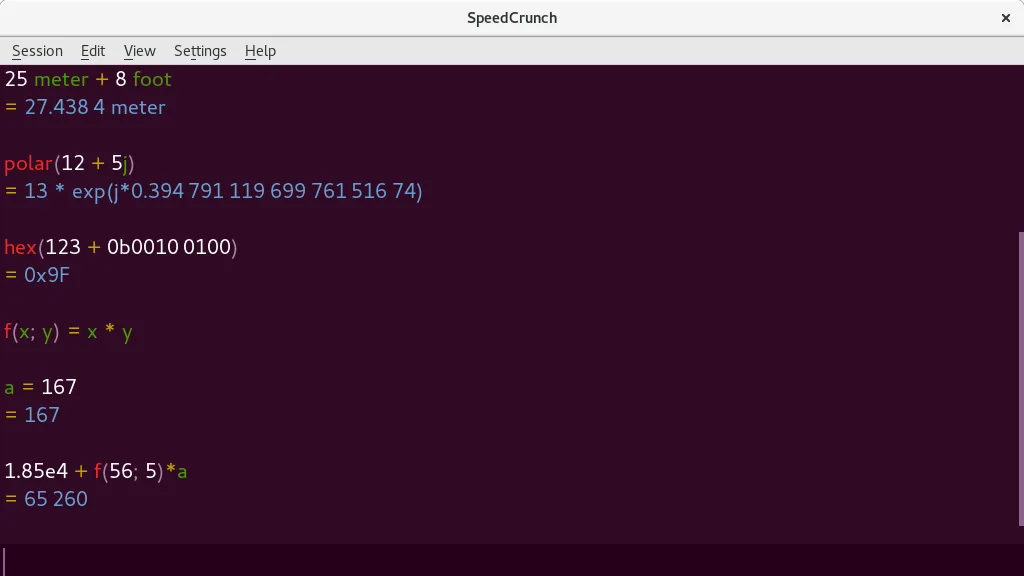
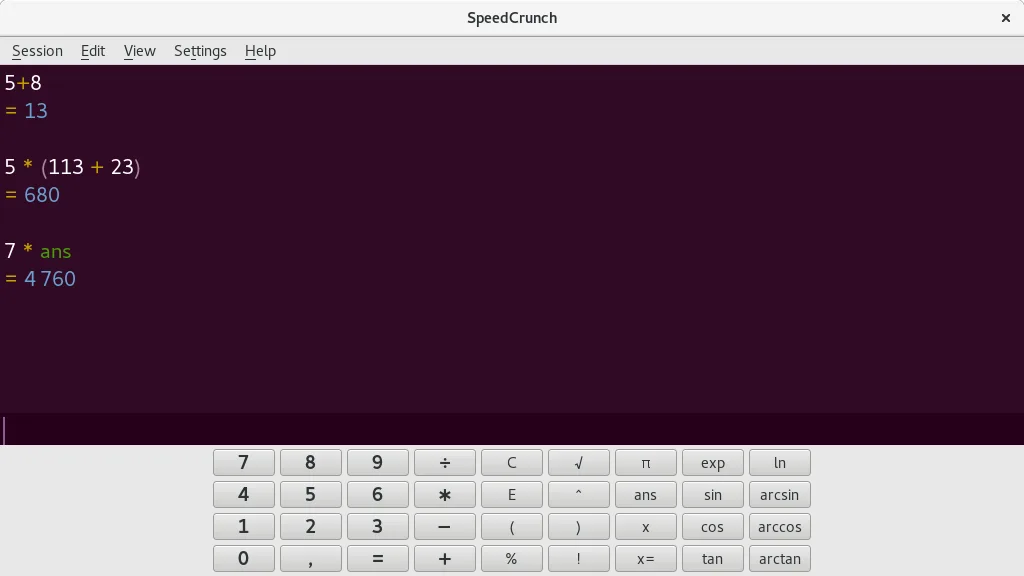
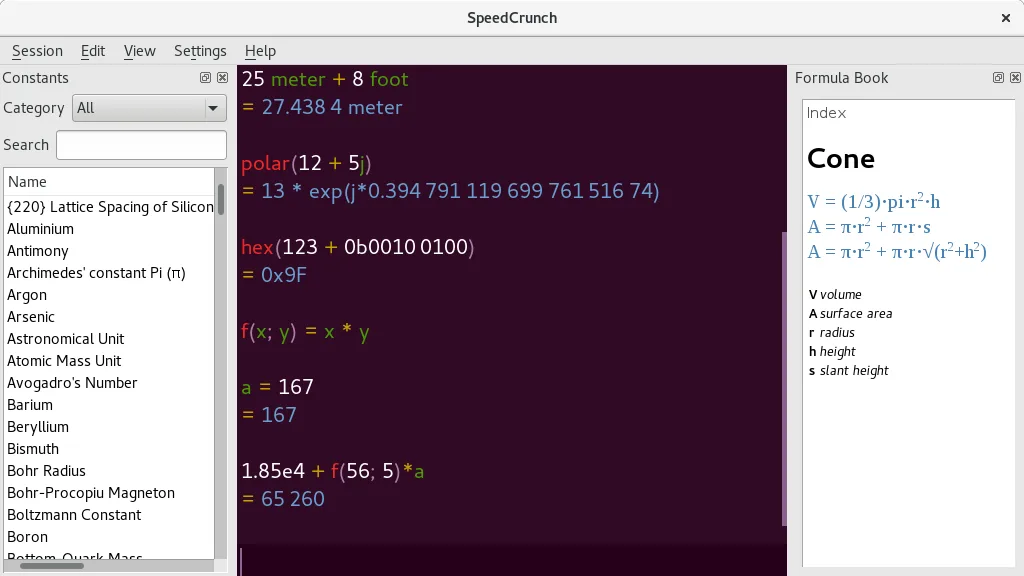
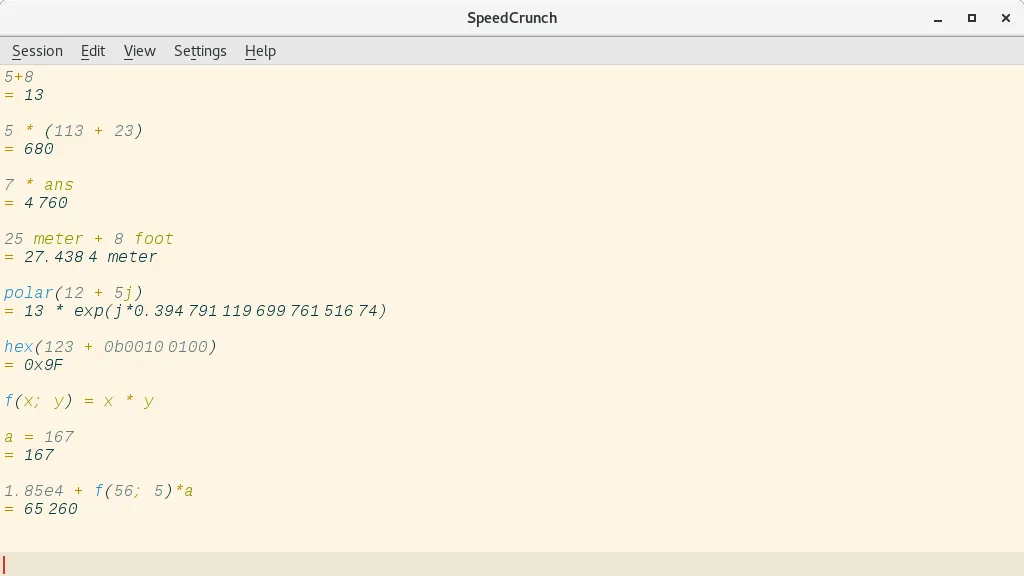
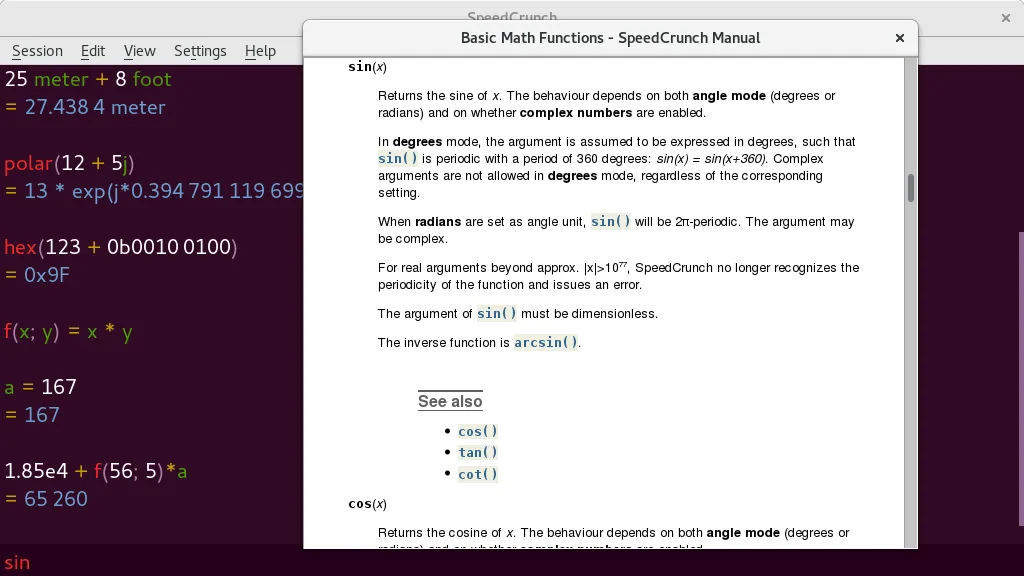
Screenshots of the Linux version, from Flathub.
Downloads
Windows 1.2.0
Show SHA-256
3220ca6294e0307c75398169df51872a083cb64838e307d608586dd0990119d7 Mac 1.2.0
Show SHA-256
63eec4217498234dd5bc240ec0c08a3359ede110e1af0afc7fc0d577921fc44c Linux 1.2.0
The publisher offers a 64-bit (x64) build for Intel or AMD PCs. The package data states no minimum Windows version, so check the publisher’s system requirements before installing on an older PC. The publisher offers only an Apple silicon (ARM64) build, for Macs with an M-series chip. This build needs macOS 14 Sonoma or later. Choose the x64 (64-bit) download for Intel or AMD computers and the ARM64 download for ARM computers. The Flathub listing states no minimum Linux version or distribution, so check the publisher’s system requirements before installing.
Install with winget: winget install --id SpeedCrunch.SpeedCrunch --exact
Install with Homebrew: brew install --cask speedcrunch
Install with Flatpak (Flathub): flatpak install flathub org.speedcrunch.SpeedCrunch
Check a download: Get-FileHash .\<file> -Algorithm SHA256 (PowerShell) or shasum -a 256 ~/Downloads/<file> (Terminal) and compare it with the SHA-256 above.
Linux (Flatpak): Flathub publishes no file checksum; Flatpak checks the app against Flathub’s signed repository when it installs. Flathub shows this app as publisher-verified. App page on Flathub.
What the installer does
Windows
- Delivered as an NSIS (Nullsoft) setup program (.exe) for x64.
- Installs for all users on the PC, which normally requires administrator rights.
- No custom silent switch is declared; winget falls back to its default for this installer type (
/S). - Declared install modes: interactive, silent, and silentWithProgress.
- Associates with the file type
.json. - Upgrades install over the existing version.
PC requirements
- CPU architecture: x64 (64-bit)
Mac
- Delivered as a disk image (.dmg) for Apple silicon (ARM64).
- Installs the app
SpeedCrunch.appinto the Applications folder. - On uninstall, Homebrew asks the app to quit.
- A full “zap” removal also deletes up to 5 support, cache and preference locations in your home folder.
Mac requirements
- Minimum macOS version: macOS 14 or later
- CPU architecture: Apple silicon (ARM64)
Linux
- Delivered as a "flatpak" installer for x64 and ARM64.
- The manifest does not state an install scope.
- No silent-install switch is declared in the manifest.
Linux requirements
- Architectures: ARM64, x64 (64-bit)
- Download size: 5 MiB
- Installed size: 9 MiB
Description
SpeedCrunch is a high-precision scientific calculator. It features a syntax-highlighted scrollable display and is designed to be fully used via keyboard. Some distinctive features are auto-completion of functions and variables, a formula book, and quick insertion of constants from various fields of knowledge. It is available for Windows, OS X, and Linux in a number of languages.
Best for: Engineers, students and programmers who type calculations faster than they click buttons and want precise results with a running history.
Features
- Answers as you type: Results and autocomplete appear while you type the expression, so you rarely press equals. Each pane keeps its own history you can scroll back through.
- Fifty digits of precision: It calculates to 50 digits and ships with over 140 functions and 390 constants, plus units and your own variables and functions.
- Handy for programmers: Hex, binary and octal, bitwise operators, IEEE 754 tools and a bitfield tool make it useful for low-level work.
- What 1.2 changed: Version 1.2.0 starts much faster on Windows, lets you set your own keyboard shortcuts, adds style presets and a system light or dark mode, and makes number formats follow your chosen decimal and grouping marks.
- Intel Macs are left out: The macOS build listed here is for Apple silicon only and needs macOS 14 or later. Windows gets a machine-wide x64 installer.
- Free, open source, verified Flatpak: SpeedCrunch is free under the GPL. The Flathub build is verified as published by the project and runs on x64 and Arm64. The Windows listing keeps 4 versions; macOS and Linux list only the current release.
SpeedCrunch at a glance
| What it is | A high-precision scientific calculator featuring a fast, keyboard-driven user interface. |
|---|---|
| Latest version | Windows 1.2.0 (November 17, 2026) Mac 1.2.0 Linux 1.2.0 (November 17, 2026) |
| Price | Free and open source |
| Open source | Yes |
| License | GPL-2.0 |
| License type | Open source · Strong copyleft Software built on it must be shared under the same license. |
| Made by | SpeedCrunch |
| Category | Productivity and study tools |
| Runs on | Windows, Mac, Linux |
| Official website | speedcrunch.org |
| More links | Support · Privacy policy · Release notes |
| Source code | github.com/heldercorreia/speedcrunch |
| Tags | calculator scientific calculator speedcrunch |
| winget ID | SpeedCrunch.SpeedCrunch |
| Homebrew cask | speedcrunch |
| Flathub | org.speedcrunch.SpeedCrunch Verified data from Flathub |
| Flathub verification | Publisher verified on Flathub by proving control of speedcrunch.org, 2026-10-22 |
| License on Flathub | GPL-2.0+ as listed on Flathub |
| winget moniker | speedcrunch |
| Check your download | SHA-256 checksums in the download tables · Security scan |
What’s new in SpeedCrunch 1.2.0
Highlights - SpeedCrunch starts much faster on Windows, even with many saved tabs. - Set your own keyboard shortcuts for common actions. - Change the app's look in one step with the Classic, Modern, and Hybrid presets. - Choose what happens when you launch SpeedCrunch while it's already running. Bring an open window forward, open a new window, or add a tab. - Find answers to common questions in the new FAQ. What's new in 1.2 - Constants and units - Input - Results - Sessions and settings - Appearance and panels - Keypad - Other improvements Constants and units - Search constants with Ctrl+K (Cmd+K on macOS) by default. - Correct the values shown when multiplying or dividing quantities with prefixed units, including angular rates. - Fix unit grouping in division when the first value has a unit. For example, 299792458[m/s] / 10[MHz] gives 29.9792458 m. This also works when the first value comes from a variable or function. - Cancel matching units correctly and display durations in time units. For example, 1[J] / 1[W] gives 1 s. - Preserve the case of unit symbols, so kT (kilotesla) and kt (knot) stay distinct. Input - Read decimal and grouping marks according to the selected number format, even when grouping is off for display. - Preserve commas and dots when you type or paste numbers, and fix grouped hexadecimal input such as 0xAB CD. - Report an error for invalid digit groups such as 1,2,3 or 1,,234. - Allow negative numbers after +, ×, and /. 3--2 now gives 5. The…
Read the full release notes on the publisher’s site
Notes for older versions are inside each version below.
Is SpeedCrunch safe?
Score result: Mostly clean
SpeedCrunch-1.2.0-windows-x64.exe was flagged by 1 of 67 engines. One engine alone does not change the rating, and its label is listed under Detections.
Covers 1 of 3 files. The rest have no VirusTotal report yet, so this result does not speak for them.
- 1 flagged in total
- 1 of 3 files scanned
- 67 engines
Scan info
- Last scan
- Scan provider
- VirusTotal · Full report
File integrity
| File | SHA-256 | Hash check | Signature | VirusTotal |
|---|---|---|---|---|
| SpeedCrunch-1.2.0-windows-x64.exeWindows · x64 (64-bit) | 3220ca6294e0307c75398169df51872a083cb64838e307d608586dd0990119d7 |
Matches the manifest (re-computed) | Valid | 1/67 flagged |
| SpeedCrunch-1.2.0-macos-arm64.dmgMac · Apple silicon (ARM64) | 63eec4217498234dd5bc240ec0c08a3359ede110e1af0afc7fc0d577921fc44c |
Matches the manifest (re-computed) | Valid | Open not on VirusTotal |
| org.speedcrunch.SpeedCrunch.flatpakrefLinux · x64 (64-bit) | Not provided | Copied from the manifest, not re-computed | Not checked | — |
| Hash re-computed by Everyversion | 2 of 2 installers match. |
|---|---|
| Code signature checked | 2 valid. |
Detections (1 from 1 file)
SpeedCrunch-1.2.0-windows-x64.exe: flagged by 1 of 67 engines
| Engine | Type | Label |
|---|---|---|
| Fortinet | malicious | NSIS/Injector.E1CD!tr |
Full VirusTotal report · scanned 2026-11-19
These are the security vendors’ own labels, shown exactly as VirusTotal reports them. We do not edit or interpret them. A detection does not by itself mean a file is malicious. Read the full report and see our Security and Trust Center.
We host no installers. Every download link goes to the download location named in the package listing, normally the publisher’s own server. For this software we downloaded the files from that source ourselves, re-computed each checksum and checked the code signature where our tools could, as shown above. A passing check shows a file is the one that was published; it is not a guarantee it is free of problems. For more information, visit our Security and Trust Center.
Source and provenance
| Windows: source | microsoft/winget-pkgs |
|---|---|
| Windows: SHA-256 in upstream manifest | Yes |
| Windows: observed at commit | c45680c8bf65 · retrieved 2026-11-21 |
| Mac: source | Homebrew/homebrew-cask |
| Mac: SHA-256 in upstream manifest | Yes |
| Mac: observed at commit | 80d0140d66da · retrieved 2026-11-21 |
| Linux: source | Flathub · Flathub API · github.com/flathub/org.speedcrunch.SpeedCrunch |
| Linux: checksum | None published. Flatpak checks the app against Flathub’s signed repository when it installs. |
| Linux: publisher verified | Publisher verified on Flathub by proving control of speedcrunch.org, 2026-10-22 |
| Linux: data retrieved | 2026-11-21 · attribution: app data from Flathub, license listed there: GPL-2.0+ |
Old versions
Windows versions
4 versions listed. Open a version for its installers, checksums and a command that pins it.
1.2.0 latest · 2026-11-17 · 1 installer notes
| Architecture | Format | Scope | SHA-256 | Download |
|---|---|---|---|---|
| x64 (64-bit) | NSIS | All usersen-US | 3220ca6294e0307c75398169df51872a083cb64838e307d608586dd0990119d7 |
Download |
Pin this version: winget install --id SpeedCrunch.SpeedCrunch --version 1.2.0 --exact
Release notes
Highlights - SpeedCrunch starts much faster on Windows, even with many saved tabs. - Set your own keyboard shortcuts for common actions. - Change the app's look in one step with the Classic, Modern, and Hybrid presets. - Choose what happens when you launch SpeedCrunch while it's already running. Bring an open window forward, open a new window, or add a tab. - Find answers to common questions in the new FAQ. What's new in 1.2 - Constants and units - Input - Results - Sessions and settings - Appearance and panels - Keypad - Other improvements Constants and units - Search constants with Ctrl+K (Cmd+K on macOS) by default. - Correct the values shown when multiplying or dividing quantities with prefixed units, including angular rates. - Fix unit grouping in division when the first value has a unit. For example, 299792458[m/s] / 10[MHz] gives 29.9792458 m. This also works when the first value comes from a variable or function. - Cancel matching units correctly and display durations in time units. For example, 1[J] / 1[W] gives 1 s. - Preserve the case of unit symbols, so kT (kilotesla) and kt (knot) stay distinct. Input - Read decimal and grouping marks according to the selected number format, even when grouping is off for display. - Preserve commas and dots when you type or paste numbers, and fix grouped hexadecimal input such as 0xAB CD. - Report an error for invalid digit groups such as 1,2,3 or 1,,234. - Allow negative numbers after +, ×, and /. 3--2 now gives 5. The…
1.1 · 2026-10-20 · 1 installer notes
| Architecture | Format | Scope | SHA-256 | Download |
|---|---|---|---|---|
| x64 (64-bit) | NSIS | All usersen-US | d616461439702703e6600b50d06b30de93e94201a40257cb7739c54a2ed1b0d5 |
Download |
Pin this version: winget install --id SpeedCrunch.SpeedCrunch --version 1.1 --exact
Release notes
What's new in 1.1 - Functions - Constants and units - Input - Results - Sessions and settings - Appearance and panels - Keypad - Other improvements Functions - Add root(n; x) for nth roots, including negative values and quantities with units. For example, root(5; -32) returns -2. - Fix factorials in user-defined functions, such as f(n) = n!. Constants and units - Search constants by name or unit with Ctrl+Space. Select a result with the arrow keys and insert it with Enter, Tab, or a click. - Improve searching and keyboard selection in the Constants panel. - Correct the units of the muon, proton, and neutron energy equivalents. - Allow powers of grouped quantities, such as (2[m])^2. - Correct results shown in J/m² and J/m³ when using prefixed units. Input - Fix undo and redo, and copy and paste. - Fix clipped text and excess space in wrapped input with different fonts. - Fix crashes when typing operators in long, wrapped expressions. - Restore digit grouping while typing, following the selected number format. - Add an option to turn off automatic input adjustments, such as operator replacements and closing brackets. - Add optional Enter-to-accept autocomplete and Escape-to-clear behavior. - Add an option to use a steady cursor instead of a blinking one. - Preserve comments as written and prevent them from affecting result formatting. - Improve recalling expressions from history and focus the editor after startup. - Remove the empty-history hint. Results - Restore free…
Full release notes from the publisher
Manifest: manifests/s/SpeedCrunch/SpeedCrunch/1.1
1.0 · 2026-10-04 · 1 installer notes
| Architecture | Format | Scope | SHA-256 | Download |
|---|---|---|---|---|
| x64 (64-bit) | NSIS | All usersen-US | 3d90b2a90cd209e21ad06b300d3f15025eb5c4f73e1dfb51e68f9aa10ace8453 |
Download |
Pin this version: winget install --id SpeedCrunch.SpeedCrunch --version 1.0 --exact
Release notes
What's new in 1.0 - Workspace and history - Expressions and editing - Results and formatting - New functions - Units - Appearance and settings Workspace and history - Work in tabs and split panes to keep several calculations open side by side. - Save calculation history between launches and set a history size limit. - Load your own functions and variables at startup. - Choose a keypad preset or build a custom keypad. - Show or hide the main menu. The result display now has a right-click context menu with an entry for the main menu. - Re-edit an earlier expression and recalculate all the expressions below it. - Check for updates from within the app. Expressions and editing - Use lists and matrices in expressions. - See the interpreted expression alongside the result, with implicit multiplication made explicit. - Write integer powers with superscript digits. - Use √, ∛, Σ (summation), and π as aliases. The ~ operator is an alias for not(). - More symbol aliases are accepted for addition, subtraction, multiplication, and division. - Autocomplete suggestions now show category icons. - Pasted numbers are automatically formatted to match the global Number Format setting. - Insert constants and formula book entries with their units included. Results and formatting - Show a calculation in several result formats at once. Number-format choices include Indian 3-2-2 digit grouping. - Show rational results as fractions, or use sexagesimal notation for angles and time. - Show angles as…
Full release notes from the publisher
Manifest: manifests/s/SpeedCrunch/SpeedCrunch/1.0
0.12 · 2016-11-28 · 1 installer
| Architecture | Format | Scope | SHA-256 | Download |
|---|---|---|---|---|
| x86 (32-bit) | NSIS | All usersen-US | 702c362c9a02c3a79d018a4d68428dc80fad311adad506cc47b69927e47dbf89 |
Download |
Pin this version: winget install --id SpeedCrunch.SpeedCrunch --version 0.12 --exact
Release notes
Manifest: manifests/s/SpeedCrunch/SpeedCrunch/0.12
Mac versions
Homebrew casks list only the current release. Earlier builds appear in the cask’s history on GitHub, and Homebrew cannot install them directly.
1.2.0 latest · 1 installer
| Architecture | Format | Requires | File & source | SHA-256 | Download |
|---|---|---|---|---|---|
| Apple silicon (ARM64) | DMG | macOS 14+ | SpeedCrunch-1.2.0-macos-arm64.dmggithub.com | 63eec4217498234dd5bc240ec0c08a3359ede110e1af0afc7fc0d577921fc44c |
Download |
Release notes
Linux versions
Flathub lists only the current release, and Flatpak installs the newest build; earlier versions cannot be chosen from the listing.
Alternatives to SpeedCrunch
Similar apps in Productivity and study tools on Everyversion. Each one links to the download location named in the publisher’s package data, with a SHA-256 checksum.


SpeedCrunch FAQ
Is SpeedCrunch safe to download from here?
We host no installers. Every download button goes to the download location named in the package listing, and the checks below were run on those files.
On 2026-11-21 we downloaded the latest 2 installers from those sources and re-computed the SHA-256 of each: 2 of 2 match the package catalog’s value. Code signatures: 2 valid.
VirusTotal: one engine out of 67 flagged SpeedCrunch-1.2.0-windows-x64.exe. A single flag among that many engines is usually a false alarm. We still list it under Detections.
Reports exist for 1 of 3 files, so the rating does not cover the rest.
Our rating: Safe so far. No check is a guarantee. See the security details above and our Security and Trust Center. Publisher’s website: SpeedCrunch’s official website.
Does SpeedCrunch update itself after I install an old version?
For Windows, we have no information on whether SpeedCrunch updates itself, and for Mac, we have no confirmation that the app updates itself, although many apps check for updates and offer to install them. Look for an update setting in SpeedCrunch (see SpeedCrunch’s documentation) before you rely on an older version.
Does SpeedCrunch cost anything?
No. SpeedCrunch is free and open source (license: GPL-2.0).
Which versions of SpeedCrunch are listed here, and how far back?
For Windows, we list 4 versions, from 0.12 (2016-11-28) up to 1.2.0, and for Mac, only the current release (1.2.0) is listed, because older Mac builds are not kept in the package listing, and for Linux, we list 1 version, from 1.2.0 (2026-11-17) up to 1.2.0. This page shows all of the Windows versions.
Where do the download links go?
They go straight to the source named in the package catalog, with nothing added by us: for Windows, to github.com, and for Mac, to github.com, and for Linux, to dl.flathub.org. We host no files. Compare the SHA-256 shown next to each file with the one you compute after downloading. Publisher’s website: SpeedCrunch’s official website.