
Download QOwnNotes 26.11.6
Safe so farDeveloper: pbek
Last updated: · Verified by  CristianBuilt Everyversion after working at Softonic. Runs the checks and answers for the results. ClaudeAnthropic’s AI. Runs the download, checksum and signature checks and reports every result. VirusTotalScans files with dozens of security engines. We look up each file by its SHA-256 only.
QOwnNotes is the open source notepad with markdown support and todo list manager
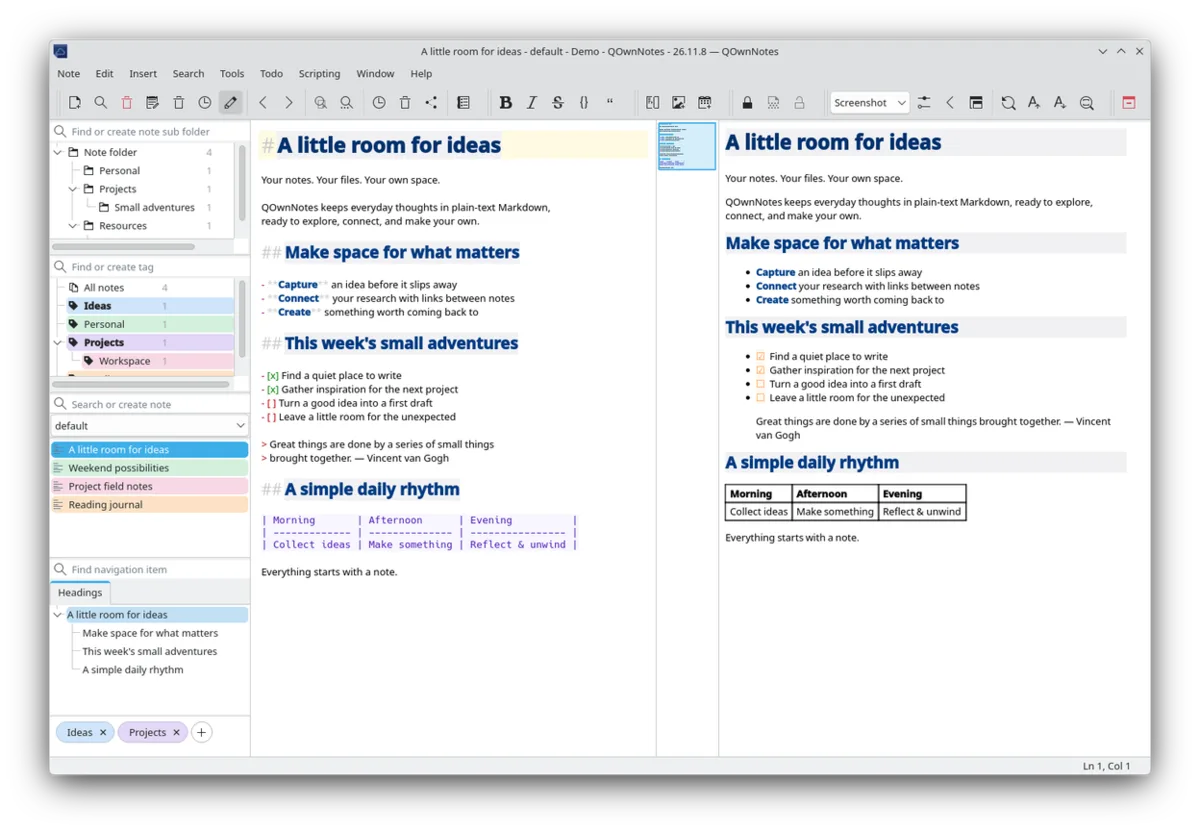
Screenshots of the Linux version, from Flathub.
Downloads
Windows 26.11.6
Show SHA-256
0e9fc42fdae0011c3bcc3ab367ce7ae1c26c5529cde89c8e2306b4d6a84537cb Show SHA-256
1a6391d0382a7f7771d1d54c77c732b3c031fe0c8a153fbb53d864090cb83e6d Mac 26.9.0
brew install no longer works and macOS blocks the app when you try to open it. You can still download it below from the publisher, at your own judgement. Homebrew’s cask pageShow SHA-256
2fe30b0aa2ddd7652204ad265f79e370b1cb7d9bd93e0c66b41e41b391ecb967 Linux 26.11.15
The package data states no minimum Windows version, so check the publisher’s system requirements before installing on an older PC. The Universal build runs on both Intel and Apple silicon Macs. This build needs macOS 13 Ventura or later. Choose the x64 (64-bit) download for Intel or AMD computers and the ARM64 download for ARM computers. The Flathub listing states no minimum Linux version or distribution, so check the publisher’s system requirements before installing.
Install with winget: winget install --id pbek.QOwnNotes --exact
Install with Flatpak (Flathub): flatpak install flathub org.qownnotes.QOwnNotes
Check a download: Get-FileHash .\<file> -Algorithm SHA256 (PowerShell) or shasum -a 256 ~/Downloads/<file> (Terminal) and compare it with the SHA-256 above.
Linux (Flatpak): Flathub publishes no file checksum; Flatpak checks the app against Flathub’s signed repository when it installs. Flathub shows this app as publisher-verified. App page on Flathub.
What the installer does
Windows
- Delivered as a Windows Installer package built with WiX (.msi) for any architecture and a ZIP archive that is unpacked containing a portable program that runs without being installed for any architecture.
- The manifest does not state an install scope.
PC requirements
- CPU architecture: Any
Mac
- Delivered as a disk image (.dmg) for Apple silicon and Intel.
- Installs the app
QOwnNotes.appinto the Applications folder. - The app updates itself, so it may be newer than the version Homebrew lists.
- On uninstall, Homebrew asks the app to quit.
- A full “zap” removal also deletes up to 2 support, cache and preference locations in your home folder.
Mac requirements
- Minimum macOS version: macOS 13 or later
- CPU architecture: Universal (Apple silicon + Intel)
Linux
- Delivered as a "flatpak" installer for x64 and ARM64.
- The manifest does not state an install scope.
- No silent-install switch is declared in the manifest.
Linux requirements
- Architectures: ARM64, x64 (64-bit)
- Download size: 29 MiB
- Installed size: 73 MiB
Description
QOwnNotes is the open source notepad with markdown support and todo list manager
Best for: Nextcloud or ownCloud users who want their notes as plain Markdown files on disk, with old versions, sharing and to-do lists handled by their own server.
Features
- Your notes stay plain files: Each note is a Markdown text file in a folder you choose. Any editor or sync tool can open it, so leaving QOwnNotes later means nothing to export.
- Built around your own server: A sync tool such as the Nextcloud client moves the files. With your Nextcloud or ownCloud server connected, the app can restore older versions and trashed notes, share notes, and manage to-dos through Nextcloud Tasks or another CalDAV server.
- Encryption and scripts: Single notes can be locked with built-in AES-256 encryption, or with PGP or Keybase through example scripts. A script repository inside the app adds features with a click.
- Phones get companions, not a twin: The desktop app is the main product. Android has a separate QOwnNotes app on F-Droid that works with local note folders, a Nextcloud app shows notes in the browser, and a web app sends photos from your phone into the open desktop note.
- Free under the GPL: QOwnNotes is free and open source under GPL-2.0, made by Patrizio Bekerle, with an optional donation.
- Mac: expect a Gatekeeper warning: The macOS download is a universal disk image for macOS 13 or later. On first launch macOS says the developer cannot be verified, and you open it through right-click or Security settings. The Homebrew cask is disabled because it fails Apple's Gatekeeper check, and the Mac listing here is at 26.9.0 while Windows has 26.11.6.
- Versions kept: The Windows listing keeps 230 versions, as an MSI installer or a zip. macOS and Linux list only the current release, so downgrades there need the GitHub releases page. The Linux Flatpak, for x64 and Arm64, is marked verified by Flathub as published by the developer.
QOwnNotes at a glance
| What it is | QOwnNotes is the open source notepad with markdown support and todo list manager |
|---|---|
| Latest version | Windows 26.11.6 (November 7, 2026) Mac 26.9.0 Linux 26.11.15 (November 24, 2026) |
| Price | Free and open source |
| Open source | Yes |
| License | GPL-2.0 |
| License type | Open source · Strong copyleft Software built on it must be shared under the same license. |
| Made by | pbek |
| Category | Notes and writing |
| Runs on | Windows, Mac, Linux |
| Official website | github.com |
| More links | Support · Bug tracker · Release notes |
| Source code | github.com/pbek/QOwnNotes |
| Tags | markdown notes notetaking qownnotes todo |
| winget ID | pbek.QOwnNotes |
| Homebrew cask | qownnotes |
| Flathub | org.qownnotes.QOwnNotes Verified data from Flathub |
| Flathub verification | Publisher verified on Flathub by proving control of qownnotes.org, 2024-07-03 |
| License on Flathub | GPL-2.0+ as listed on Flathub |
| Check your download | SHA-256 checksums in the download tables · Security scan |
What’s new in QOwnNotes 26.11.6
Notes for the Windows release.
26.11.6 - Fixed the text of the tag list of the Nextcloud Deck dialog and the Note tags panel being cut off when the interface font size is overridden (for #3834) - Fixed external changes of the current note getting overwritten by the automatic note saving while the dialog about the external modification was still open, so that Reload from disk loaded the overwritten text instead of the external changes (for #3838, #3842, thank you, @myukitty) - This affects the default setup with note checksum checks turned off Released files - QOwnNotes-x86_64.AppImage: Portable Linux AppImage build with Qt 6 - QOwnNotes-x86_64.AppImage.sha256sum: SHA-256 checksum for the AppImage - QOwnNotes-amd64.snap: Linux Snap build with Qt 6 - QOwnNotes-amd64.snap.sha256sum: SHA-256 checksum for the Qt 6 Snap package - QOwnNotes.zip: Windows ZIP package built with Qt 6 - QOwnNotes.zip.sha256: SHA-256 checksum for the Qt 6 Windows ZIP package - QOwnNotes.zip.sha256sum: Alternative SHA-256 checksum file for the Qt 6 Windows ZIP package - QOwnNotes.msi: Windows installer built with Qt 6 - QOwnNotes.msi.sha256sum: SHA-256 checksum for the Qt 6 Windows installer - QOwnNotes.dmg: macOS disk image built with Qt 6 - QOwnNotesQt5.dmg: macOS disk image built with Qt 5 for older systems
Read the full release notes on the publisher’s site
Notes for older versions are inside each version below.
Is QOwnNotes safe?
Score result: No detections so far
None of the 61 security engines on VirusTotal flagged any of the 3 scanned files.
Covers 3 of 4 files. The rest have no VirusTotal report yet, so this result does not speak for them.
- 0 flagged in total
- 3 of 4 files scanned
- 61 engines
Scan info
- Last scan
- Scan provider
- VirusTotal · Full report
File integrity
| File | SHA-256 | Hash check | Signature | VirusTotal |
|---|---|---|---|---|
| QOwnNotes.msiWindows · Any | 0e9fc42fdae0011c3bcc3ab367ce7ae1c26c5529cde89c8e2306b4d6a84537cb |
Matches the manifest (re-computed) | Not signed | 0/61 flagged |
| QOwnNotes.zipWindows · Any | 1a6391d0382a7f7771d1d54c77c732b3c031fe0c8a153fbb53d864090cb83e6d |
Matches the manifest (re-computed) | Not applicable | 0/67 flagged |
| QOwnNotes.dmgMac · Universal (Apple silicon + Intel) | 2fe30b0aa2ddd7652204ad265f79e370b1cb7d9bd93e0c66b41e41b391ecb967 |
Matches the manifest (re-computed) | Not signed | 0/60 flagged |
| org.qownnotes.QOwnNotes.flatpakrefLinux · x64 (64-bit) | Not provided | Copied from the manifest, not re-computed | Not checked | — |
| Hash re-computed by Everyversion | 3 of 3 installers match. |
|---|---|
| Code signature checked | 0 valid, 2 unsigned, 1 not signable (ZIP/portable). |
We host no installers. Every download link goes to the download location named in the package listing, normally the publisher’s own server. For this software we downloaded the files from that source ourselves, re-computed each checksum and checked the code signature where our tools could, as shown above. A passing check shows a file is the one that was published; it is not a guarantee it is free of problems. For more information, visit our Security and Trust Center.
Source and provenance
| Windows: source | microsoft/winget-pkgs |
|---|---|
| Windows: SHA-256 in upstream manifest | Yes |
| Windows: observed at commit | 6581c2e6d123 · retrieved 2026-11-25 |
| Mac: source | Homebrew/homebrew-cask |
| Mac: SHA-256 in upstream manifest | Yes |
| Mac: observed at commit | 9ee85620da80 · retrieved 2026-11-16 |
| Linux: source | Flathub · Flathub API · github.com/flathub/org.qownnotes.QOwnNotes |
| Linux: checksum | None published. Flatpak checks the app against Flathub’s signed repository when it installs. |
| Linux: publisher verified | Publisher verified on Flathub by proving control of qownnotes.org, 2024-07-03 |
| Linux: data retrieved | 2026-11-25 · attribution: app data from Flathub, license listed there: GPL-2.0+ |
Old versions
Windows versions
Showing the newest 20 of 230 versions (the JSON and Markdown versions list 100). Open a version for its installers, checksums and a command that pins it.
26.11.6 latest · 2026-11-07 · 2 installers notes
| Architecture | Format | Scope | SHA-256 | Download |
|---|---|---|---|---|
| Any | MSI (WiX) | — | 0e9fc42fdae0011c3bcc3ab367ce7ae1c26c5529cde89c8e2306b4d6a84537cb |
Download |
| Any | ZIPin Portable | — | 1a6391d0382a7f7771d1d54c77c732b3c031fe0c8a153fbb53d864090cb83e6d |
Download |
Pin this version: winget install --id pbek.QOwnNotes --version 26.11.6 --exact
Release notes
26.11.6 - Fixed the text of the tag list of the Nextcloud Deck dialog and the Note tags panel being cut off when the interface font size is overridden (for #3834) - Fixed external changes of the current note getting overwritten by the automatic note saving while the dialog about the external modification was still open, so that Reload from disk loaded the overwritten text instead of the external changes (for #3838, #3842, thank you, @myukitty) - This affects the default setup with note checksum checks turned off Released files - QOwnNotes-x86_64.AppImage: Portable Linux AppImage build with Qt 6 - QOwnNotes-x86_64.AppImage.sha256sum: SHA-256 checksum for the AppImage - QOwnNotes-amd64.snap: Linux Snap build with Qt 6 - QOwnNotes-amd64.snap.sha256sum: SHA-256 checksum for the Qt 6 Snap package - QOwnNotes.zip: Windows ZIP package built with Qt 6 - QOwnNotes.zip.sha256: SHA-256 checksum for the Qt 6 Windows ZIP package - QOwnNotes.zip.sha256sum: Alternative SHA-256 checksum file for the Qt 6 Windows ZIP package - QOwnNotes.msi: Windows installer built with Qt 6 - QOwnNotes.msi.sha256sum: SHA-256 checksum for the Qt 6 Windows installer - QOwnNotes.dmg: macOS disk image built with Qt 6 - QOwnNotesQt5.dmg: macOS disk image built with Qt 5 for older systems
Full release notes from the publisher
Manifest: manifests/p/pbek/QOwnNotes/26.11.6
26.11.5 · 2026-11-05 · 1 installer notes
| Architecture | Format | Scope | SHA-256 | Download |
|---|---|---|---|---|
| Any | ZIPin Portable | — | a1a942911ea6a34e286ecf9a855d2e5af51011eb210b3c64e0e5336e6ca4df9e |
Download |
Pin this version: winget install --id pbek.QOwnNotes --version 26.11.5 --exact
Release notes
26.11.5 - Raised the minimum supported Qt 5 version to 5.13, matching the oldest retained CI build, and removed the Qt 5.9 build job (related to #3752) - qmake and CMake now reject older Qt 5 versions during configuration - Added Ubuntu 27.04 Tenacious T-Rex to the Qt6 Launchpad build script - Line ending markers (¶) in the note editor now use the Whitespace marker color of the editor color scheme, like the markers for spaces and tabs (for #3840) - Added tag support to the Nextcloud Deck dialog (for #3834) - Tags of the cards are shown as colored pills in the new Tags column of the card list, and the search also finds cards by their tags - The tags of a card are shown as colored chips in the card editor and can be removed with a click - Tags can be added via the Add tag button or Ctrl + T, which opens a searchable tag list of the board - New tags can be created right from the tag list, with a choice of the Deck tag colors - The Note tags panel got a new look (for #3841) - Tags are shown as rounded chips in their tag color, and can be removed via their ✕ button - Clicking a tag shows all notes with that tag in the Tags panel - Tags wrap onto more lines instead of needing a horizontal scrollbar - Add tag opens a searchable list of all tags, nested tags are shown with their parent tags, tags can be toggled and new tags can be created right from the list - With multiple notes selected, tags that are only on some of the notes are shown faded with a dashed border, and adding them…
Full release notes from the publisher
Manifest: manifests/p/pbek/QOwnNotes/26.11.5
26.11.4 · 2026-11-03 · 1 installer notes
| Architecture | Format | Scope | SHA-256 | Download |
|---|---|---|---|---|
| Any | ZIPin Portable | — | ba5d822648fa8080fc4dc1c929ef008d8664234f50319ec205186a10382f108b |
Download |
Pin this version: winget install --id pbek.QOwnNotes --version 26.11.4 --exact
Release notes
26.11.4 - The link dialog now opens immediately when a URL is in the clipboard or selected, and fetches the title of the webpage in the background - A slim progress bar shows which website the title is fetched from, and the fetch can be cancelled - The download stops as soon as the title is found, so big webpages are much faster - Typing a URL no longer starts a request for every keystroke, and typing a link name stops the title fetch - Errors, like timeouts after 15 seconds, are shown briefly below the URL Released files - QOwnNotes-x86_64.AppImage: Portable Linux AppImage build with Qt 6 - QOwnNotes-x86_64.AppImage.sha256sum: SHA-256 checksum for the AppImage - QOwnNotes-amd64.snap: Linux Snap build with Qt 6 - QOwnNotes-amd64.snap.sha256sum: SHA-256 checksum for the Qt 6 Snap package - QOwnNotes.zip: Windows ZIP package built with Qt 6 - QOwnNotes.zip.sha256: SHA-256 checksum for the Qt 6 Windows ZIP package - QOwnNotes.zip.sha256sum: Alternative SHA-256 checksum file for the Qt 6 Windows ZIP package - QOwnNotes.msi: Windows installer built with Qt 6 - QOwnNotes.msi.sha256sum: SHA-256 checksum for the Qt 6 Windows installer - QOwnNotes.dmg: macOS disk image built with Qt 6 - QOwnNotesQt5.dmg: macOS disk image built with Qt 5 for older systems
Full release notes from the publisher
Manifest: manifests/p/pbek/QOwnNotes/26.11.4
26.11.3 · 2026-11-02 · 1 installer notes
| Architecture | Format | Scope | SHA-256 | Download |
|---|---|---|---|---|
| Any | ZIPin Portable | — | c1b687c05d973d546b60bc86af4d21fcfbae593a3625b8f92c5f6eca579d85cb |
Download |
Pin this version: winget install --id pbek.QOwnNotes --version 26.11.3 --exact
Release notes
26.11.3 - Fixed PDF exports adding extra margins beyond those selected in page setup, for both single notes and selected notes (for #3837) - Fixed unsafe media and attachment paths being followed when copying, moving, or exporting notes (thank you, r3vpwnx) (for GHSA-fmqx-8x8h-gf76) - Hardened file and folder names from notes, imports, the local trash and remote data, so they can no longer lead to files outside their folders being read, written or deleted (for #3836) - The Files navigation panel ignores media and attachment links that escape their folders - Note files, including notes created from wiki links or server data, are never stored outside the note folder - The Joplin import skips folder names and resource file extensions that point outside their folders - Trashed notes, and scripts from the script repository, are only used with plain file names - Exporting a note as HTML with embedded images only embeds files that are real images - Path-containment checks resolve symlinks while preserving symlinked root directories - Filename cleanup preserves new titles containing path punctuation without touching files at their original, unsafe paths - Media and attachment transfers reject symlink escapes while preserving links within their folders - Image filename extensions alone are not trusted when exporting HTML; extensionless images and long-header SVGs remain supported - Joplin imports reject folder and resource symlinks that escape the import or note folder - Local trash…
Full release notes from the publisher
Manifest: manifests/p/pbek/QOwnNotes/26.11.3
26.11.2 · 2026-11-01 · 1 installer notes
| Architecture | Format | Scope | SHA-256 | Download |
|---|---|---|---|---|
| Any | ZIPin Portable | — | f8577d2878cfa59a942c691f1b8c0ff8d3dafd3a68cc7ac87063870ec7a08f8c |
Download |
Pin this version: winget install --id pbek.QOwnNotes --version 26.11.2 --exact
Release notes
26.11.2 - Fixed regular expression replacements losing surrounding text context, so lookarounds and word-boundary checks work correctly, while preserving capture references and case sensitivity (for #3831) - Added an Enable font ligatures option in the editor font settings for regular text and code (requires Qt 6.7 or newer and a ligature-capable font; restart required) (for #3830) - Added built-in OpenRouter AI support, listed first in the AI settings with encrypted API-key storage and a connection test (for #3829) - Includes the free-only openrouter/free router and free Gemma 4 and Liquid LFM 2.5 models for summarizing, rewriting and organizing notes - Free model availability and rate limits can change; no paid fallback is configured - Changed the default Groq AI model to openai/gpt-oss-20b for users without a saved model selection, replacing the retired llama-3.1-8b-instant (thank you, Agustin Torres) (for #3813) - Fixed AI connection tests changing the selected backend or saved model, and made them work even when AI features are disabled - The Groq test now uses openai/gpt-oss-20b instead of displaying a retired model name while testing the saved model - Fixed the stored attachments and stored images dialogs allowing links to be inserted into the current note in read-only mode - Double-clicking a file in the stored attachments and stored images dialogs now opens it externally instead of inserting a link into the current note Released files - QOwnNotes-x86_64.AppImage…
Full release notes from the publisher
Manifest: manifests/p/pbek/QOwnNotes/26.11.2
26.11.1 · 2026-10-31 · 1 installer notes
| Architecture | Format | Scope | SHA-256 | Download |
|---|---|---|---|---|
| Any | ZIPin Portable | — | 86c9a5e53f158cbd44ff7cc681fe9e6c10c9612d32efa6a23dc7fd7f5953628c |
Download |
Pin this version: winget install --id pbek.QOwnNotes --version 26.11.1 --exact
Release notes
26.11.1 - Added a release deployment safeguard that checks the local and remote versions, published GitHub release, and release tag commit before uploading source archives Released files - QOwnNotes-x86_64.AppImage: Portable Linux AppImage build with Qt 6 - QOwnNotes-x86_64.AppImage.sha256sum: SHA-256 checksum for the AppImage - QOwnNotes-amd64.snap: Linux Snap build with Qt 6 - QOwnNotes-amd64.snap.sha256sum: SHA-256 checksum for the Qt 6 Snap package - QOwnNotes.zip: Windows ZIP package built with Qt 6 - QOwnNotes.zip.sha256: SHA-256 checksum for the Qt 6 Windows ZIP package - QOwnNotes.zip.sha256sum: Alternative SHA-256 checksum file for the Qt 6 Windows ZIP package - QOwnNotes.msi: Windows installer built with Qt 6 - QOwnNotes.msi.sha256sum: SHA-256 checksum for the Qt 6 Windows installer - QOwnNotes.dmg: macOS disk image built with Qt 6 - QOwnNotesQt5.dmg: macOS disk image built with Qt 5 for older systems
Full release notes from the publisher
Manifest: manifests/p/pbek/QOwnNotes/26.11.1
26.10.15 · 2026-10-30 · 1 installer notes
| Architecture | Format | Scope | SHA-256 | Download |
|---|---|---|---|---|
| Any | ZIPin Portable | — | d72b81e5656870ce9803b316905766fe411a411d5c43f443a0ece28f505d6f8d |
Download |
Pin this version: winget install --id pbek.QOwnNotes --version 26.10.15 --exact
Release notes
26.10.15 - Extended the search field in the local and Nextcloud / ownCloud note trash dialogs to search note text as well as note names, ignoring case (for #3823) - Selecting a match shows its note text; clearing the search shows all trashed notes again - The in-note search bar opens with the same query to highlight and navigate text matches - Retired the legacy Qt 5-named Snap jobs from stable and continuous GitHub releases (for #3752) - Use the Qt 6 snap from the Snap Store - The final genuine Qt 5 AMD64 snap, QOwnNotes-Qt5-amd64.snap, remains available in the 26.10.6 release - Later artifacts with that filename already used Qt 6; Qt 5 macOS builds and source compatibility remain supported for now - Added an editor setting Do not insert a space after autocompletion to suppress the trailing space for script and language server completions (for #3781, #3819, thank you, @sciurius) - Added case-insensitive text search across all loaded versions in the Nextcloud / ownCloud and Git note version dialogs (for #3822) - The search field above the version list filters versions by their note text - Matches are highlighted with the regular search bar in the Note text tab - There was a new release of QOwnNotes for Android, v1.8.0 - Search text across all note versions in the note versions dialog, filtering the list to matching versions with match counts and highlighted excerpts - The version preview highlights all matches and lets you step between them Released files…
Full release notes from the publisher
Manifest: manifests/p/pbek/QOwnNotes/26.10.15
26.10.14 · 2026-10-29 · 1 installer notes
| Architecture | Format | Scope | SHA-256 | Download |
|---|---|---|---|---|
| Any | ZIPin Portable | — | d8c2087fc7eec61972b4863607e513012a1eec83af98596fa0f85abc0365706f |
Download |
Pin this version: winget install --id pbek.QOwnNotes --version 26.10.14 --exact
Release notes
26.10.14 - Added export of selected notes to individual PDFs from the note list context menu (for #994, #3821, thank you, @serebryakov02) - Choose the destination folder and page settings once for all selected notes - Existing PDFs are preserved by using numbered filenames - Added clickable <details> / <summary> sections to both note preview backends, including nested sections and initially expanded sections with open (for #3818) - Expansion state is preserved while editing the current note - HTML exports keep native disclosure markup; printing and PDF export include all content - Failed CalDAV task saves now show an error and leave the cached task unchanged, instead of making rejected edits appear saved after refreshing the task list (for #3815) - Apply the same protection to new tasks, completion changes, and task moves - Only close the task dialog after a successful save - Save and insert only inserts the task link after the save succeeds - Added a Windows installer QOwnNotes.msi to the releases, next to the QOwnNotes.zip archive, so QOwnNotes can be installed without unzipping - It installs QOwnNotes for the current user, without administration permissions, adds a start menu shortcut and keeps the automatic updater working - There was a new release of the QOwnNotes Web Companion browser extension 2026.10.0 - Context-menu actions now open the setup popup when user data consent or the security token is missing (for #122) - The popup now has a minimum height so dialogs…
Full release notes from the publisher
Manifest: manifests/p/pbek/QOwnNotes/26.10.14
26.10.13 · 2026-10-27 · 1 installer notes
| Architecture | Format | Scope | SHA-256 | Download |
|---|---|---|---|---|
| Any | ZIPin Portable | — | 8678cdfa3048d4dc12388deb31a429490142303d6e96c9b98748cea91634bc34 |
Download |
Pin this version: winget install --id pbek.QOwnNotes --version 26.10.13 --exact
Release notes
26.10.13 - Fixed nix run github:pbek/qownnotes failing to build because GitHub flake archives omit the required Git submodules - Added icons to the note list context menu and its folder and tag submenus (for #2589, thank you, @serebryakov02) - Raised the CMake compatibility minimum to 3.10 to avoid deprecation warnings with recent CMake versions, including for bundled dependencies - Switched translation source updates to CMake, removing the deprecated qmake input to lupdate and preserving existing edits to other languages - Include library strings across platforms and optional build features - Reorganized menus for easier discovery (for #3811) - Added top-level Insert and Search menus, moved note deletion, version history, and encryption into Note, and flattened Edit → Edit - Added a Tools menu for spelling, grammar, dictionaries, AI, stored images and attachments, and sending the clipboard, so Edit only contains editing actions - Replaced Extra with a Copy submenu and directly accessible editing actions, renamed Note text edit to Editor context menu, and moved Activate context menu and Allow all note editing into Edit - Combined layout selection and management under Window → Layout - Adjusted menu access keys so they don't conflict with each other or existing shortcuts - Keyboard shortcuts are unchanged - Added more French, German, Russian, Chinese Simplified, Italian, Portuguese, Brazilian, Polish, Spanish, Japanese translation (thank you, jd-develop, pbek, spamcutters)…
Full release notes from the publisher
Manifest: manifests/p/pbek/QOwnNotes/26.10.13
26.10.12 · 2026-10-25 · 1 installer notes
| Architecture | Format | Scope | SHA-256 | Download |
|---|---|---|---|---|
| Any | ZIPin Portable | — | 06b932f00d9dbf1fab851343c3bffe7fdfaac4cf3b4f3ab02ba11f9e0abf6904 |
Download |
Pin this version: winget install --id pbek.QOwnNotes --version 26.10.12 --exact
Release notes
26.10.12 - Moved Add tag to note directly into the Edit menu and removed the Tag menu; Insert Nextcloud Deck card link is now only in Edit → Insert, not also in Todo (for #3803) - Remember the last-used Diff or Note text tab in the Git and Nextcloud/ownCloud note version dialogs (for #3809) - Enabled the built-in Git version viewer in the Qt6 AppImage, Windows, macOS, Snap, Launchpad, OBS, and Slackware release builds with CMake and libgit2 support (for #3802) - Fixed the secure credential store migration notice appearing on every startup when keychain writes fail; the notice is now only shown until acknowledged, while migration continues to retry and secrets remain in legacy-encrypted storage until it succeeds (for #3801) Released files - QOwnNotes-x86_64.AppImage: Portable Linux AppImage build with Qt 6 - QOwnNotes-x86_64.AppImage.sha256sum: SHA-256 checksum for the AppImage - QOwnNotes-amd64.snap: Linux Snap build with Qt 6 - QOwnNotes-amd64.snap.sha256sum: SHA-256 checksum for the Qt 6 Snap package - QOwnNotes-Qt5-amd64.snap: Linux Snap build with Qt 5 for older environments - QOwnNotes-Qt5-amd64.snap.sha256sum: SHA-256 checksum for the Qt 5 Snap package - QOwnNotes.zip: Windows ZIP package built with Qt 6 - QOwnNotes.zip.sha256: SHA-256 checksum for the Qt 6 Windows ZIP package - QOwnNotes.zip.sha256sum: Alternative SHA-256 checksum file for the Qt 6 Windows ZIP package - QOwnNotes.dmg: macOS disk image built with Qt 6 - QOwnNotesQt5.dmg: macOS disk image built with Qt…
Full release notes from the publisher
Manifest: manifests/p/pbek/QOwnNotes/26.10.12
26.10.11 · 2026-10-24 · 1 installer notes
| Architecture | Format | Scope | SHA-256 | Download |
|---|---|---|---|---|
| Any | ZIPin Portable | — | 8bb892bf340fba6d2a9db5b35bfe61b8ef4af93f85f90b319ef05e70e7ef5b2a |
Download |
Pin this version: winget install --id pbek.QOwnNotes --version 26.10.11 --exact
Release notes
26.10.11 - Fixed command injection through note filenames in the external Git version viewer (CWE-78, reported by Dilanka Kaushal Hewage / r3vpwnx) - External Git log commands now run directly without an implicit shell; %notePath% must be a separate argument. Configurations using shell syntax need a wrapper script that accepts the note path as an argument - Security advisory: GHSA-jp2h-69pm-p69c - QOwnNotes for Android is now available on F-Droid - There was a new release of QOwnNotes for Android, v1.6.0 - Copy notes to an existing or new subfolder, or duplicate them in the same folder; move and copy also support multiple selected notes, with folder actions available when Use subfolders is enabled for the account - Share notes through public Nextcloud links, optionally with password protection and editing permission; links can be copied, sent, or opened, and passwords changed or removed later - Reorder checkbox list items in the note preview by dragging their grip handles, moving nested items with their parent within the same list and scrolling automatically near the note's edges - There was a new release of QOwnNotes TUI, v1.3.2 - Updated rustls, rustls-webpki, and webpki-roots to address six security advisories in the HTTPS dependencies - There was a new release of QOwnNotes TUI, v1.3.1 - Fixed Windows-style line endings and embedded ASCII control characters disrupting note rendering and leaving text from previous notes visible in the viewer and editor - The 26.10.2…
Full release notes from the publisher
Manifest: manifests/p/pbek/QOwnNotes/26.10.11
26.10.10 · 2026-10-22 · 1 installer notes
| Architecture | Format | Scope | SHA-256 | Download |
|---|---|---|---|---|
| Any | ZIPin Portable | — | f90b63509ee970de3214ada3cf864f244f0a09b301335a759fe72978de784bcb |
Download |
Pin this version: winget install --id pbek.QOwnNotes --version 26.10.10 --exact
Release notes
26.10.10 - Added a lightweight Nextcloud Deck link picker using the existing Deck dialog, with search, board/stack selection, and insertion of links for multiple selected cards (for #3790) - Insert Nextcloud Deck card link now opens the picker, while Manage Nextcloud Deck cards keeps the full editing interface - Added touchscreen drag-to-scroll with kinetic scrolling in the note editor and both preview backends, while keeping mouse text selection unchanged (for #3800) - Fixed in-note searches with no results moving the cursor and scrolling to the start or end of the document, in both the editor and preview (for #3799) Released files - QOwnNotes-x86_64.AppImage: Portable Linux AppImage build with Qt 6 - QOwnNotes-x86_64.AppImage.sha256sum: SHA-256 checksum for the AppImage - QOwnNotes-amd64.snap: Linux Snap build with Qt 6 - QOwnNotes-amd64.snap.sha256sum: SHA-256 checksum for the Qt 6 Snap package - QOwnNotes-Qt5-amd64.snap: Linux Snap build with Qt 5 for older environments - QOwnNotes-Qt5-amd64.snap.sha256sum: SHA-256 checksum for the Qt 5 Snap package - QOwnNotes.zip: Windows ZIP package built with Qt 6 - QOwnNotes.zip.sha256: SHA-256 checksum for the Qt 6 Windows ZIP package - QOwnNotes.zip.sha256sum: Alternative SHA-256 checksum file for the Qt 6 Windows ZIP package - QOwnNotes.dmg: macOS disk image built with Qt 6 - QOwnNotesQt5.dmg: macOS disk image built with Qt 5 for older systems
Full release notes from the publisher
Manifest: manifests/p/pbek/QOwnNotes/26.10.10
26.10.9 · 2026-10-20 · 1 installer notes
| Architecture | Format | Scope | SHA-256 | Download |
|---|---|---|---|---|
| Any | ZIPin Portable | — | 8113d560b301fe79e3d2ca3e9f4746925dbad62ce34423b404284c37eb000a3b |
Download |
Pin this version: winget install --id pbek.QOwnNotes --version 26.10.9 --exact
Release notes
26.10.9 - The 26.10.3 release of QOwnNotes for Nextcloud adds more editor actions to the web interface - Link dialog with web page title fetching and a searchable Link to note tab, inserting relative note links compatible with QOwnNotes Desktop (Ctrl+L, or Ctrl+Shift+L for note links) - Insert inline code or fenced code blocks, including wrapping selected text (Ctrl+Shift+C) - Toggle checkbox list formatting on the current line or selected lines, preserving list markers and indentation (Alt+L) - These actions are also available in the note's "…" menu; use Cmd instead of Ctrl on macOS - Fixed saved task list selections being cleared when accepting settings without changes (for #3798) - Added an optional Linux Qt6 CMake build with KDE Frameworks application metadata (QON_KDE_INTEGRATION), a qownnotes-qt6-kde Nix flake package, and build diagnostics (for #3796) - just build / just nix-build now select the KDE variant on Linux; plain Qt6 and macOS builds remain available without KDE dependencies - KDE builds initialize KCrash for GUI startup, with DrKonqi support when the reporter and system crash-reporting setup are available - KDE builds use native Plasma global shortcuts when its service is available, preserving Plasma-side changes and retaining the portal/QHotkey backends on other desktops - All actions are offered in the Plasma shortcut settings, so global shortcuts can also be assigned there, and they are shown with their menu path (e.g. Note → New note) - KDE builds send…
Full release notes from the publisher
Manifest: manifests/p/pbek/QOwnNotes/26.10.9
26.10.2 · 1 installer
| Architecture | Format | Scope | SHA-256 | Download |
|---|---|---|---|---|
| Any | ZIPin Portable | — | 867d24a387374870440ba0db8ac86d4cfa6b35f12dc59509580b1830cbb6f6a6 |
Download |
Pin this version: winget install --id pbek.QOwnNotes --version 26.10.2 --exact
Release notes
Manifest: manifests/p/pbek/QOwnNotes/26.10.2
26.10.0 · 2026-10-01 · 1 installer notes
| Architecture | Format | Scope | SHA-256 | Download |
|---|---|---|---|---|
| Any | ZIPin Portable | — | a988142eff1e370dcb25e625ded9089434f8919413c90b42b81f8a29e0e7c591 |
Download |
Pin this version: winget install --id pbek.QOwnNotes --version 26.10.0 --exact
Release notes
26.10.0 - Changes to the note-folder database notes.sqlite made outside QOwnNotes now refresh note tags and the tag tree (for #3764) - On Windows, the Font rendering interface setting is no longer reset to Automatic when the settings dialog is closed (for #3757) - On Windows, italic text in fonts without a real italic face, like Tahoma, is now also rendered without font smoothing when Windows font smoothing is disabled (for #3757) - If the setting to ask for a note name when creating a new note with Ctrl + N is enabled, the dialog is now prefilled with the default note name including the current date and time, which is selected so it can be overwritten right away, and the setting and dialog now talk about a note name instead of a headline (for #3765) - The Secure password storage dialog doesn't show up on every start anymore if there is no system keychain, like GNOME Keyring or KWallet, available on Linux; in that case passwords and API keys stay in the legacy storage (for #3766) - There was a new release of QOwnNotes for Android, v1.0.0 - Note tags are shared with QOwnNotes desktop through the notes.sqlite file in the notes folder, and notes can be filtered and tagged, even offline - Opening a note while searching the note list opens Find in note with the same text - A new Ask for name of new notes setting asks for the name of a new note before creating it - Nextcloud Deck cards can be created from the editor toolbar, and card links open in the Nextcloud Deck Android app…
Full release notes from the publisher
Manifest: manifests/p/pbek/QOwnNotes/26.10.0
26.9.14 · 2026-09-29 · 1 installer notes
| Architecture | Format | Scope | SHA-256 | Download |
|---|---|---|---|---|
| Any | ZIPin Portable | — | 08cf57599b32364bc3a6b26c67676e9b924658d6d18a40a007b8adeb7f687b53 |
Download |
Pin this version: winget install --id pbek.QOwnNotes --version 26.9.14 --exact
Release notes
26.9.14 - Due dates in the past are now highlighted in the card list of the Nextcloud Deck dialog (for #3761) - On Windows, automatically use legacy GDI font rendering when system font smoothing is disabled, with a new interface setting to choose automatic, DirectWrite, or GDI rendering (for #3757) - Fixed editor highlighting for indented code block lines that start with a list marker like -, * or + (for #3749) - A new opt-in setting Ignore accents in search in the Panels settings lets searches without accented letters also find text with accented letters, for example avion also finds Avión (for #3128) - It works for the note search, including the highlighting in the note editor and preview, and for the filters of the tag, note subfolder and navigation panels - Searches with accented letters still only find exact matches, so schön doesn't find schon - Only Latin letters are affected, characters of other scripts are always matched exactly - The scripting methods script.fetchNoteIdsByNoteTextPart and script.searchTagsByName got a new optional ignoreAccents parameter - The scripting documentation now explains how to format dates and times with Qt.formatDateTime and the scripting examples use it instead of formatting dates by hand (for scripts#298) - See Formatting dates and times - There was a new release of QOwnNotes for Android, v0.9.0 - Search text can be turned into a new note named after the query in the selected category - The Markdown editor toolbar can insert the local…
Full release notes from the publisher
Manifest: manifests/p/pbek/QOwnNotes/26.9.14
26.9.13 · 2026-09-27 · 1 installer notes
| Architecture | Format | Scope | SHA-256 | Download |
|---|---|---|---|---|
| Any | ZIPin Portable | — | 4a45559ededf8a61cde349a6692801794e6f2f0bcbc9ebabb9bdecc10b3061b9 |
Download |
Pin this version: winget install --id pbek.QOwnNotes --version 26.9.13 --exact
Release notes
26.9.13 - Fixed a startup crash when restoring the layout of a maximized or fullscreen window (for #3758) - Fixed the Secure password storage dialog appearing on every startup when a legacy password or API key contains an encrypted empty string (for #3756) - Fixed duplicate taskbar icons in KDE Plasma on Wayland for the Flatpak package by matching the application's desktop identity to its exported launcher (for #3755) - Existing custom window rules matching the old Flatpak identity PBE.QOwnNotes may need updating, and stale taskbar pins may need re-pinning Released files - QOwnNotes-x86_64.AppImage: Portable Linux AppImage build with Qt 6 - QOwnNotes-x86_64.AppImage.sha256sum: SHA-256 checksum for the AppImage - QOwnNotes-amd64.snap: Linux Snap build with Qt 6 - QOwnNotes-amd64.snap.sha256sum: SHA-256 checksum for the Qt 6 Snap package - QOwnNotes-Qt5-amd64.snap: Linux Snap build with Qt 5 for older environments - QOwnNotes-Qt5-amd64.snap.sha256sum: SHA-256 checksum for the Qt 5 Snap package - QOwnNotes.zip: Windows ZIP package built with Qt 6 - QOwnNotes.zip.sha256: SHA-256 checksum for the Qt 6 Windows ZIP package - QOwnNotes.zip.sha256sum: Alternative SHA-256 checksum file for the Qt 6 Windows ZIP package - QOwnNotes.dmg: macOS disk image built with Qt 6 - QOwnNotesQt5.dmg: macOS disk image built with Qt 5 for older systems
Full release notes from the publisher
Manifest: manifests/p/pbek/QOwnNotes/26.9.13
26.9.12 · 2026-09-26 · 1 installer notes
| Architecture | Format | Scope | SHA-256 | Download |
|---|---|---|---|---|
| Any | ZIPin Portable | — | 3bd890cd3203388f90d8a399eee6c493a0300bdf986b8363b9fafeb02be0a090 |
Download |
Pin this version: winget install --id pbek.QOwnNotes --version 26.9.12 --exact
Release notes
26.9.12 - Fixed scripts installed from the script repository no longer being found after a Snap package update (for #3753) Released files - QOwnNotes-x86_64.AppImage: Portable Linux AppImage build with Qt 6 - QOwnNotes-x86_64.AppImage.sha256sum: SHA-256 checksum for the AppImage - QOwnNotes-amd64.snap: Linux Snap build with Qt 6 - QOwnNotes-amd64.snap.sha256sum: SHA-256 checksum for the Qt 6 Snap package - QOwnNotes-Qt5-amd64.snap: Linux Snap build with Qt 5 for older environments - QOwnNotes-Qt5-amd64.snap.sha256sum: SHA-256 checksum for the Qt 5 Snap package - QOwnNotes.zip: Windows ZIP package built with Qt 6 - QOwnNotes.zip.sha256: SHA-256 checksum for the Qt 6 Windows ZIP package - QOwnNotes.zip.sha256sum: Alternative SHA-256 checksum file for the Qt 6 Windows ZIP package - QOwnNotes.dmg: macOS disk image built with Qt 6 - QOwnNotesQt5.dmg: macOS disk image built with Qt 5 for older systems
Full release notes from the publisher
Manifest: manifests/p/pbek/QOwnNotes/26.9.12
26.9.11 · 2026-09-25 · 1 installer notes
| Architecture | Format | Scope | SHA-256 | Download |
|---|---|---|---|---|
| Any | ZIPin Portable | — | d22534293e8f3d4980d66a7898b949ac11e2a42780dea675d9c4171334676f67 |
Download |
Pin this version: winget install --id pbek.QOwnNotes --version 26.9.11 --exact
Release notes
26.9.11 - Deprecated the non-GitHub Qt 5 release packages by removing the legacy Ubuntu Launchpad and OBS deployments from the release process, while retaining the Qt 5 artifacts built by the GitHub release workflow (for #3752) - Added more French translation (thank you, jd-develop) Released files - QOwnNotes-x86_64.AppImage: Portable Linux AppImage build with Qt 6 - QOwnNotes-x86_64.AppImage.sha256sum: SHA-256 checksum for the AppImage - QOwnNotes-amd64.snap: Linux Snap build with Qt 6 - QOwnNotes-amd64.snap.sha256sum: SHA-256 checksum for the Qt 6 Snap package - QOwnNotes-Qt5-amd64.snap: Linux Snap build with Qt 5 for older environments - QOwnNotes-Qt5-amd64.snap.sha256sum: SHA-256 checksum for the Qt 5 Snap package - QOwnNotes.zip: Windows ZIP package built with Qt 6 - QOwnNotes.zip.sha256: SHA-256 checksum for the Qt 6 Windows ZIP package - QOwnNotes.zip.sha256sum: Alternative SHA-256 checksum file for the Qt 6 Windows ZIP package - QOwnNotes.dmg: macOS disk image built with Qt 6 - QOwnNotesQt5.dmg: macOS disk image built with Qt 5 for older systems
Full release notes from the publisher
Manifest: manifests/p/pbek/QOwnNotes/26.9.11
26.9.10 · 2026-09-24 · 1 installer notes
| Architecture | Format | Scope | SHA-256 | Download |
|---|---|---|---|---|
| Any | ZIPin Portable | — | f1c15c6ecad02a11933cd07eb8e5483612f25ee3810fdec2f3d0bffe28bf987e |
Download |
Pin this version: winget install --id pbek.QOwnNotes --version 26.9.10 --exact
Release notes
26.9.10 - Migrated the Slackware 15.0 build system to Qt 6 and retired the Slackware 14.x release targets (for #3751) - Fixed the first line of code blocks being offset to the right in the Markdown preview (for #3750) - Fixed editor highlighting for indented code block lines that start with a digit (for #3749) - Fixed stale packages in the Arch Linux OBS repository by explicitly unpublishing artifacts from the retired build target (for #3743) - Fixed a second application instance and a second system tray icon being able to start after the application was restarted from the settings while the single app instance mode was enabled (for #3746) - The application is now restarted after the current instance released its single app instance lock, so the new instance can register itself again - A notice is now shown before stored passwords and API keys are migrated to the operating system keychain, explaining the system password prompts that may follow (for #3597) Released files - QOwnNotes-x86_64.AppImage: Portable Linux AppImage build with Qt 6 - QOwnNotes-x86_64.AppImage.sha256sum: SHA-256 checksum for the AppImage - QOwnNotes-amd64.snap: Linux Snap build with Qt 6 - QOwnNotes-amd64.snap.sha256sum: SHA-256 checksum for the Qt 6 Snap package - QOwnNotes-Qt5-amd64.snap: Linux Snap build with Qt 5 for older environments - QOwnNotes-Qt5-amd64.snap.sha256sum: SHA-256 checksum for the Qt 5 Snap package - QOwnNotes.zip: Windows ZIP package built with Qt 6 - QOwnNotes.zip.sha256: SHA-256…
Full release notes from the publisher
Manifest: manifests/p/pbek/QOwnNotes/26.9.10
All older versions: manifests/p/pbek/QOwnNotes
Mac versions
Homebrew casks list only the current release. Earlier builds appear in the cask’s history on GitHub, and Homebrew cannot install them directly.
26.9.0 latest · 1 installer
| Architecture | Format | Requires | File & source | SHA-256 | Download |
|---|---|---|---|---|---|
| Universal (Apple silicon + Intel) | DMG | macOS 13+ | QOwnNotes.dmggithub.com | 2fe30b0aa2ddd7652204ad265f79e370b1cb7d9bd93e0c66b41e41b391ecb967 |
Download |
Release notes
Linux versions
Flathub lists only the current release, and Flatpak installs the newest build; earlier versions cannot be chosen from the listing.
Alternatives to QOwnNotes
Similar apps in Notes and writing on Everyversion. Each one links to the download location named in the publisher’s package data, with a SHA-256 checksum.


QOwnNotes FAQ
Is QOwnNotes safe to download from here?
We host no installers. Every download button goes to the download location named in the package listing, and the checks below were run on those files.
On 2026-11-16 we downloaded the latest 3 installers from those sources and re-computed the SHA-256 of each: 3 of 3 match the package catalog’s value. Code signatures: 0 valid, 2 not signed, 1 not applicable (archives and similar).
VirusTotal: none of its 61 security engines flagged any of the 3 scanned files.
Reports exist for 3 of 4 files, so the rating does not cover the rest.
Our rating: Safe so far. No check is a guarantee. See the security details above and our Security and Trust Center. Publisher’s website: QOwnNotes’s official website.
Does QOwnNotes update itself after I install an old version?
For Windows, we have no information on whether QOwnNotes updates itself, and for Mac, the app is listed as updating itself, so an older build will likely offer, or simply install, the newest release when you open it. To keep an old version, look for an automatic-update setting in QOwnNotes (see QOwnNotes’s documentation) and turn it off before you rely on it.
Does QOwnNotes cost anything?
No. QOwnNotes is free and open source (license: GPL-2.0).
Which versions of QOwnNotes are listed here, and how far back?
For Windows, we list 100 versions, from 26.4.6 (2026-04-06) up to 26.11.6 (the catalog has 230, and we keep the newest 100), and for Mac, only the current release (26.9.0) is listed, because older Mac builds are not kept in the package listing, and for Linux, we list 1 version, from 26.11.15 (2026-11-24) up to 26.11.15. This page shows the newest 20 Windows versions; the JSON and Markdown files for this app list all 100 Windows versions.
Where do the download links go?
They go straight to the source named in the package catalog, with nothing added by us: for Windows, to github.com, and for Mac, to github.com, and for Linux, to dl.flathub.org. We host no files. Compare the SHA-256 shown next to each file with the one you compute after downloading. Publisher’s website: QOwnNotes’s official website.