
Download Modrinth App 0.23.4
Safe so farDeveloper: Modrinth
Last updated: · Verified by  CristianBuilt Everyversion after working at Softonic. Runs the checks and answers for the results. ClaudeAnthropic’s AI. Runs the download, checksum and signature checks and reports every result. VirusTotalScans files with dozens of security engines. We look up each file by its SHA-256 only.
The Modrinth App is a unique, open source Minecraft launcher that allows you to play your favorite mods, and keep them up to date, all in one neat little package.
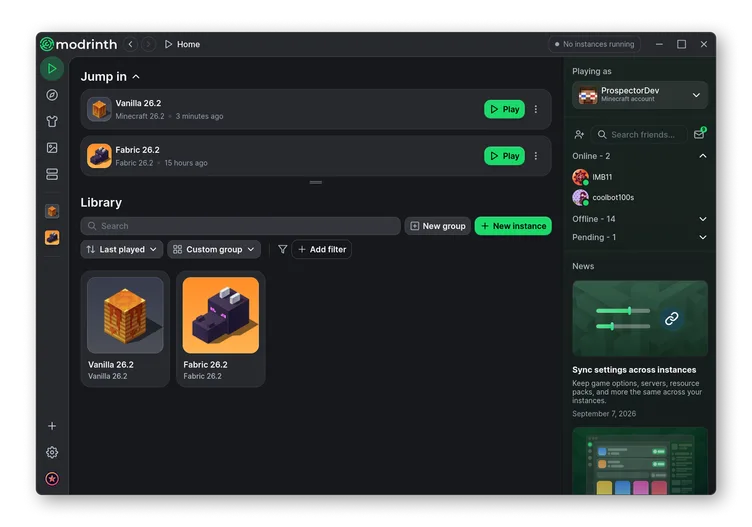
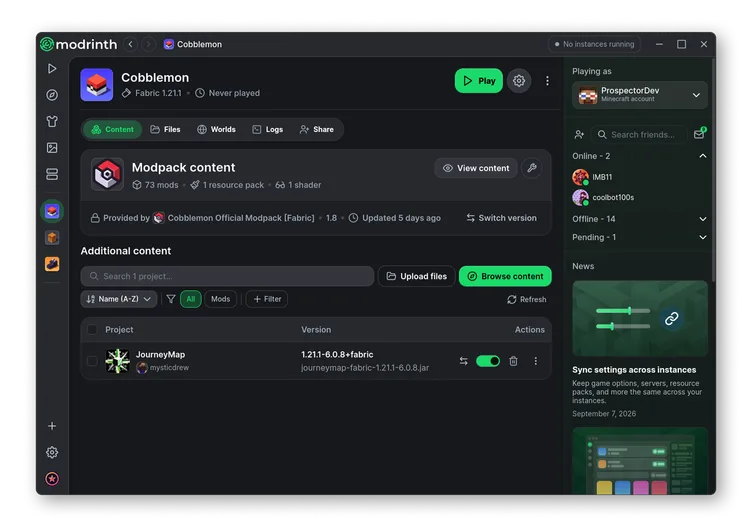
Screenshots of the Linux version, from Flathub.
Downloads
Windows 0.23.4
Show SHA-256
982c0275cacb6d50fecdd45bfcff434988f486de1486102b3538ebc23c376af8 Mac 0.23.5
Show SHA-256
4575bef6ae1ef2012d5e6d9e46a5426eb6adc90d6f588959e50eec3e3879caf7 Linux 0.23.1
The publisher offers a 64-bit (x64) build for Intel or AMD PCs. The package data states no minimum Windows version, so check the publisher’s system requirements before installing on an older PC. The Universal build runs on both Intel and Apple silicon Macs. The Homebrew cask states no minimum macOS version, so check the publisher’s system requirements before installing on an older Mac. Choose the x64 (64-bit) download for Intel or AMD computers and the ARM64 download for ARM computers. The Flathub listing states no minimum Linux version or distribution, so check the publisher’s system requirements before installing.
Install with winget: winget install --id Modrinth.ModrinthApp --exact
Install with Homebrew: brew install --cask modrinth
Install with Flatpak (Flathub): flatpak install flathub com.modrinth.ModrinthApp
Check a download: Get-FileHash .\<file> -Algorithm SHA256 (PowerShell) or shasum -a 256 ~/Downloads/<file> (Terminal) and compare it with the SHA-256 above.
Linux (Flatpak): Flathub publishes no file checksum; Flatpak checks the app against Flathub’s signed repository when it installs. Flathub shows this app as publisher-verified. App page on Flathub.
What the installer does
Windows
- Delivered as an NSIS (Nullsoft) setup program (.exe) for x64.
- Installs for the current user only, so administrator rights are normally not needed.
- No custom silent switch is declared; winget falls back to its default for this installer type (
/S).
PC requirements
- CPU architecture: x64 (64-bit)
Mac
- Delivered as a disk image (.dmg) for Apple silicon and Intel.
- Installs the app
Modrinth App.appinto the Applications folder. - The app updates itself, so it may be newer than the version Homebrew lists.
- On uninstall, Homebrew asks the app to quit.
- A full “zap” removal also deletes up to 8 support, cache and preference locations in your home folder.
Mac requirements
- CPU architecture: Universal (Apple silicon + Intel)
Linux
- Delivered as a "flatpak" installer for x64 and ARM64.
- The manifest does not state an install scope.
- No silent-install switch is declared in the manifest.
Linux requirements
- Architectures: ARM64, x64 (64-bit)
- Download size: 53 MiB
- Installed size: 86 MiB
Description
The Modrinth App is a unique, open source Minecraft launcher that allows you to play your favorite mods, and keep them up to date, all in one neat little package.
Best for: Minecraft players who mod their game and want a free, open-source launcher that installs and updates mods and modpacks from Modrinth, and who do not mind an ad unless they subscribe.
Features
- Mods in one click: The launcher installs, updates and removes mods and modpacks from Modrinth, and lets you build and share your own packs. Each instance keeps its own mods and settings.
- Brings your old setup: You can import existing instances from your previous launcher; the page shows GDLauncher and MultiMC among them.
- Free and open source, with ads: The app is GPL-3.0 and free to download. It shows ads; Modrinth+ removes them for USD 4.99 per month, with 16% off on annual billing, and half of the fee goes to creators. Prices were read on the date below.
- Still labeled beta: Modrinth offers the app as a beta. Its help center has articles for sign-in problems, crashes, broken Edge WebView2 installs on Windows and Java launcher errors.
- Linux works with caveats: Modrinth notes known stability issues on Linux and has a help article on a laggy interface there. The Flatpak is published by Rinth, Inc., Modrinth's company, and Flathub marks it verified for x64 and Arm64.
- Versions kept here: The Windows installer is per-user, so no administrator rights are needed. The Windows listing keeps 145 versions; macOS and Linux list only the current release, and the Flatpak was at 0.23.1 when Windows and Mac were at 0.23.4.
Modrinth App at a glance
| What it is | The Modrinth App is a unique, open source Minecraft launcher that allows you to play your favorite mods, and keep them up to date, all in one neat little package. |
|---|---|
| Latest version | Windows 0.23.4 (November 18, 2026) Mac 0.23.5 Linux 0.23.1 (November 5, 2026) |
| Price | Free and open source |
| Open source | Yes |
| License | GPL-3.0 |
| License type | Open source · Strong copyleft Software built on it must be shared under the same license. |
| Made by | Modrinth |
| Category | Game launchers and stores |
| Runs on | Windows, Mac, Linux |
| Official website | modrinth.com |
| More links | Support · Docs · Privacy policy · Release notes |
| Source code | github.com/modrinth/code |
| Tags | minecraft minecraft-launcher modrinth |
| winget ID | Modrinth.ModrinthApp |
| Homebrew cask | modrinth |
| Flathub | com.modrinth.ModrinthApp Verified data from Flathub |
| Flathub verification | Publisher verified on Flathub by proving control of modrinth.com, 2026-01-22 |
| License on Flathub | GPL-3.0-only as listed on Flathub |
| Check your download | SHA-256 checksums in the download tables · Security scan |
What’s new in Modrinth App 0.23.4
Notes for the Windows release.
Changed - Skin previews on the Skins page now load faster, at about 20-30 ms per skin. - Replaced the username field in Profile settings with a Change username button that opens the website, and added a Refresh profile button. - Raised the shared instance limits to 16,384 files and 2 GB per version. - Use paste.modrinth.com for app logs and errors to make support easier. Fixed - Fixed modpacks failing to install when an override file has a name that Windows does not allow, such as `CON.txt`. - Fixed shared instances failing to install a file after you chose to continue past the external files warning. - Fixed instance icons larger than 8192 pixels failing to load. - Fixed instance creation failing when the instance icon can't be downloaded. - Fixed Java 16 and 18 failing to install on macOS and Linux. - Fixed local NeoForge mods showing their banner instead of their icon in the instance content list. - Fixed game settings changed while Modrinth App was closed being overwritten on the next launch when Sync game settings is on. - Fixes some issues with importing instances from CurseForge, Prism and MultiMC. Security - Disabled base64 intrinsics to prevent java4shell. - Fixed "Export debug info" in Troubleshooting settings including sensitive information. - IP addresses, computer usernames in file paths, and other sensitive information is now censored in instance logs and debug info exports. - Modrinth Hosting: Fixed payments accepting a charge that belongs to another account.
Read the full release notes on the publisher’s site
Notes for older versions are inside each version below.
Is Modrinth App safe?
Score result: No detections so far
None of the 68 security engines on VirusTotal flagged the scanned file.
Covers 1 of 3 files. The rest have no VirusTotal report yet, so this result does not speak for them.
- 0 flagged in total
- 1 of 3 files scanned
- 68 engines
Scan info
- Last scan
- Scan provider
- VirusTotal · Full report
File integrity
| File | SHA-256 | Hash check | Signature | VirusTotal |
|---|---|---|---|---|
| Modrinth App_0.23.4_x64-setup.exeWindows · x64 (64-bit) | 982c0275cacb6d50fecdd45bfcff434988f486de1486102b3538ebc23c376af8 |
Matches the manifest (re-computed) | Valid | 0/68 flagged |
| Modrinth App_0.23.5_universal.dmgMac · Universal (Apple silicon + Intel) | 4575bef6ae1ef2012d5e6d9e46a5426eb6adc90d6f588959e50eec3e3879caf7 |
Matches the manifest (re-computed) | Valid | Open not on VirusTotal |
| com.modrinth.ModrinthApp.flatpakrefLinux · x64 (64-bit) | Not provided | Copied from the manifest, not re-computed | Not checked | — |
| Hash re-computed by Everyversion | 2 of 2 installers match. |
|---|---|
| Code signature checked | 2 valid. |
We host no installers. Every download link goes to the download location named in the package listing, normally the publisher’s own server. For this software we downloaded the files from that source ourselves, re-computed each checksum and checked the code signature where our tools could, as shown above. A passing check shows a file is the one that was published; it is not a guarantee it is free of problems. For more information, visit our Security and Trust Center.
Source and provenance
| Windows: source | microsoft/winget-pkgs |
|---|---|
| Windows: SHA-256 in upstream manifest | Yes |
| Windows: observed at commit | 6581c2e6d123 · retrieved 2026-11-25 |
| Mac: source | Homebrew/homebrew-cask |
| Mac: SHA-256 in upstream manifest | Yes |
| Mac: observed at commit | 05ed6977d588 · retrieved 2026-11-25 |
| Linux: source | Flathub · Flathub API · github.com/flathub/com.modrinth.ModrinthApp |
| Linux: checksum | None published. Flatpak checks the app against Flathub’s signed repository when it installs. |
| Linux: publisher verified | Publisher verified on Flathub by proving control of modrinth.com, 2026-01-22 |
| Linux: data retrieved | 2026-11-24 · attribution: app data from Flathub, license listed there: GPL-3.0-only |
Old versions
Windows versions
Showing the newest 20 of 145 versions (the JSON and Markdown versions list 100). Open a version for its installers, checksums and a command that pins it.
0.23.4 latest · 2026-11-18 · 1 installer notes
| Architecture | Format | Scope | SHA-256 | Download |
|---|---|---|---|---|
| x64 (64-bit) | NSIS | Per user | 982c0275cacb6d50fecdd45bfcff434988f486de1486102b3538ebc23c376af8 |
Download |
Pin this version: winget install --id Modrinth.ModrinthApp --version 0.23.4 --exact
Release notes
Changed - Skin previews on the Skins page now load faster, at about 20-30 ms per skin. - Replaced the username field in Profile settings with a Change username button that opens the website, and added a Refresh profile button. - Raised the shared instance limits to 16,384 files and 2 GB per version. - Use paste.modrinth.com for app logs and errors to make support easier. Fixed - Fixed modpacks failing to install when an override file has a name that Windows does not allow, such as `CON.txt`. - Fixed shared instances failing to install a file after you chose to continue past the external files warning. - Fixed instance icons larger than 8192 pixels failing to load. - Fixed instance creation failing when the instance icon can't be downloaded. - Fixed Java 16 and 18 failing to install on macOS and Linux. - Fixed local NeoForge mods showing their banner instead of their icon in the instance content list. - Fixed game settings changed while Modrinth App was closed being overwritten on the next launch when Sync game settings is on. - Fixes some issues with importing instances from CurseForge, Prism and MultiMC. Security - Disabled base64 intrinsics to prevent java4shell. - Fixed "Export debug info" in Troubleshooting settings including sensitive information. - IP addresses, computer usernames in file paths, and other sensitive information is now censored in instance logs and debug info exports. - Modrinth Hosting: Fixed payments accepting a charge that belongs to another account.
Full release notes from the publisher
Manifest: manifests/m/Modrinth/ModrinthApp/0.23.4
0.23.3 · 2026-11-12 · 1 installer
| Architecture | Format | Scope | SHA-256 | Download |
|---|---|---|---|---|
| x64 (64-bit) | NSIS | Per user | 6412ce814fdff0bd6020dd800a419ff1f206c1bc2d039a2ab15ff510275d0d12 |
Download |
Pin this version: winget install --id Modrinth.ModrinthApp --version 0.23.3 --exact
Release notes
Manifest: manifests/m/Modrinth/ModrinthApp/0.23.3
0.23.2 · 2026-11-12 · 1 installer notes
| Architecture | Format | Scope | SHA-256 | Download |
|---|---|---|---|---|
| x64 (64-bit) | NSIS | Per user | f122efed7afffa26548fbeabcbc29876d60b4c8e96978b44eb2871b07c8253c2 |
Download |
Pin this version: winget install --id Modrinth.ModrinthApp --version 0.23.2 --exact
Release notes
Added - Reset to default button next to each setting on the Java and memory, Window, and Launch hooks tabs of instance settings. - Save and discard bar in instance settings, which asks before you switch tabs or close with unsaved changes. - Recommended Java version for the instance's Minecraft version on the Java and memory tab of instance settings. - Added an advanced settings for installation settings which allows you to relink an instance to a shared instance if you unexpectedly leave or get unlinked. Changed - "Copy ad details" in Troubleshooting settings is disabled if there isn't an ad or you have Modrinth+ or don't see ads for another reason. - Redesigned the App directory setting in Resource management settings. - Selecting the current app directory path copies it to the clipboard. - Change directory opens a modal that shows the current and new folders, with options to move and restart now or move on next launch. - A pending move shows a warning with options to cancel the move or move and restart now. - The Change directory modal blocks a folder inside the current app directory, or one that contains it, and asks you to close running instances first. - The Change directory modal recommends a folder over the top level of a drive. - Moving the app directory copies files in parallel and checks every copied file before Modrinth App switches to the new folder. - The splash screen shows the progress of an app directory move with the message "Moving your app directory..."…
Full release notes from the publisher
Manifest: manifests/m/Modrinth/ModrinthApp/0.23.2
0.23.1 · 2026-11-05 · 1 installer notes
| Architecture | Format | Scope | SHA-256 | Download |
|---|---|---|---|---|
| x64 (64-bit) | NSIS | Per user | d4f20ea66b0b0af22394690729116901709bc24951172f9d46740bc4c16cb008 |
Download |
Pin this version: winget install --id Modrinth.ModrinthApp --version 0.23.1 --exact
Release notes
Fixed - Fixed issue with "Install to instance" not working via the browse page.
Full release notes from the publisher
Manifest: manifests/m/Modrinth/ModrinthApp/0.23.1
0.23.0 · 2026-11-03 · 1 installer notes
| Architecture | Format | Scope | SHA-256 | Download |
|---|---|---|---|---|
| x64 (64-bit) | NSIS | Per user | 3b10437749b61665e762a0ef0a7b4b15d6bec651840f9a3220089ccbf08d9611 |
Download |
Pin this version: winget install --id Modrinth.ModrinthApp --version 0.23.0 --exact
Release notes
Added - Shared instances you've joined but haven't installed on your device now appear on the Library page. - Install status and Owner filters on the Library page. - "Shared by" labels on shared instance cards in the Library page, showing who owns each one. - A "Hide from library" option in the instance menu and on the instance page. - Hidden instances don't appear on the Library page or in the quick instance switcher. - Hidden instances are listed under Settings > Behavior, where you can show them again. - Leave and Unpublish options for shared instances that aren't installed, including for several instances selected at once on the Library page. - A "Skip" option on the welcome screen's "Create an instance" button. - Modrinth Hosting: Play tab in the server panel. "Play server" opens Modrinth App straight into the server, and you can invite friends by Modrinth username or link, push updates to their instances, and download the player content as an `.mrpack`. Read the blog post for more information. - Modrinth Hosting: "Enabled for" column in the Content tab to choose whether each item is installed on the server, shared with players, or both. - Modrinth Hosting: One-time migration for existing modded servers, which backs up the server and reinstalls its content the first time you share it from the Play tab. - Modrinth Hosting: "Upload a CurseForge modpack" option when setting up or resetting a server, from a CurseForge link or file, with automatic server pack detection…
Full release notes from the publisher
Manifest: manifests/m/Modrinth/ModrinthApp/0.23.0
0.22.1 · 2026-10-29 · 1 installer notes
| Architecture | Format | Scope | SHA-256 | Download |
|---|---|---|---|---|
| x64 (64-bit) | NSIS | Per user | 87f867ca0cfb2cb1808f9b6003e744d13595f77d69d00b72f06f811e23958017 |
Download |
Pin this version: winget install --id Modrinth.ModrinthApp --version 0.22.1 --exact
Release notes
Changed - File drop areas, such as in the Skin selector, now highlight while dragging and show a spinner while files process. - Updated translations. Want to help translate Modrinth App? Click here - Depends on filter styling for app. - Modrinth Hosting: Updated translations. Want to help translate Modrinth Hosting? Click here - Modrinth Hosting: When resubscribing to a Modrinth Hosting server, it will now let you switch payment method and preview the tax (if any) that you will be additionally charged. Removed - Removed "Verify and restore" action from the Resources tab of app settings. Fixed - Fixed Minecraft 1.8.9 failing to launch on Apple Silicon Macs. - Fixed Modrinth App slowing down or stalling while installing or updating large amounts of content. - Fixed files dragged into Modrinth App dropping onto the wrong area on macOS and Linux with display scaling. - Improved loading speed of the Versions page for projects that support many game versions. - Fixed searchable dropdowns flickering while typing. Selecting the arrow icon now opens and closes the dropdown. - Fixed instance name sort to also be alphanumerical instead of only alphabetical. - Fixed issue where you cannot open an instance with track pad. - Fixed drag to resize slider is to handle multiple jump back in columns. - Padded bottom of search filters in sidebar since last item can be covered by "Upgrade to Modrinth+" link. - Modrinth Hosting: Fixed the Created and Created by columns being too narrow in the…
Full release notes from the publisher
Manifest: manifests/m/Modrinth/ModrinthApp/0.22.1
0.22.0 · 2026-10-21 · 1 installer notes
| Architecture | Format | Scope | SHA-256 | Download |
|---|---|---|---|---|
| x64 (64-bit) | NSIS | Per user | 7275eee11220128f4c5697186b7d27bb8016534ab7b573194a6040998c0839bc |
Download |
Pin this version: winget install --id Modrinth.ModrinthApp --version 0.22.0 --exact
Release notes
Added - Shared instances can now include any file in the instance, not just config files. - A storage allowance meter in the Push update modal, which shows how far over the limit an update is. - The download manager now shows shared instance updates as they upload, with progress and upload speed. - Modrinth Hosting: Added a new Backup settings page in the server panel settings modal. You can now turn on or off automatic backups, set the automatic backup cadence and decide how many backup slots are allocated to manual backups vs. automatic backups. Changed - Redesigned the Push update modal with separate Changes and Files tabs. - Players joining or updating a shared instance no longer download files they already have. - Executables can't be pushed to shared instances, and the Files tab in the Push update modal marks them as "File type not allowed". - Modrinth Hosting: Redesigned the Backups tab in the server panel. It's now clearer how many backup slots you have left, and how many slots are being allocated to automated backups. Fixed - Fixed `.DS_Store` files showing up in the Files tab of an instance. - Fixed folders in the shared instance file picker not expanding to show all of their contents.
Full release notes from the publisher
Manifest: manifests/m/Modrinth/ModrinthApp/0.22.0
0.21.10 · 2026-10-16 · 1 installer notes
| Architecture | Format | Scope | SHA-256 | Download |
|---|---|---|---|---|
| x64 (64-bit) | NSIS | Per user | afcd82366f881dcc1456f54b7d3a5a8a0535d70b3d55cee8c5ec1b9d1e7f4751 |
Download |
Pin this version: winget install --id Modrinth.ModrinthApp --version 0.21.10 --exact
Release notes
Added - Added a new "Report ad" action in the troubleshooting tab of the app settings modal. Changed - Updated translations. Want to help translate Modrinth App? Click here - Mods can now be installed, enabled, disabled, or removed while the instance is running. - Reorganized the Settings modal into Display, Account, Instance defaults, and System sections. - Default Java and memory, Window, and Launch hooks settings now each have their own tab under Instance defaults. - Moved Java installations into the Java and memory tab. - Renamed the Synced settings tab to Syncing. - Split the Resource management tab into Resources and Troubleshooting tabs. - Renamed `Purge cache` to `Clear cache` on the Troubleshooting tab. - Reorganized the instance settings modal into Instance and Game sections. - Java and memory, Window, Launch hooks, and Syncing are now separate tabs that replace the Sync overrides tab. - Each Game tab has a `Manage default settings` button that opens the matching tab in the Settings modal. - Refreshed the sidebar, backgrounds, and scrollbars in the Settings, instance settings, and server settings modals. - Settings modals that open on a specific tab now scroll the sidebar to show that tab. - Modrinth Hosting: Updated translations. Want to help translate Modrinth Hosting? Click here Fixed - Fixed a blank modal when joining a server whose modpack is unavailable or under review. - Fixed sometimes constant high CPU usage on Linux due to database issue. - Fixed command…
Full release notes from the publisher
Manifest: manifests/m/Modrinth/ModrinthApp/0.21.10
0.21.9 · 2026-10-06 · 1 installer notes
| Architecture | Format | Scope | SHA-256 | Download |
|---|---|---|---|---|
| x64 (64-bit) | NSIS | Per user | 8dd3ea4c9f2a190e2d1b6e21b3e6a065501ffbddc990297c4c0a7f64e16dbd50 |
Download |
Pin this version: winget install --id Modrinth.ModrinthApp --version 0.21.9 --exact
Release notes
Fixed - Improved Modrinth sign-in to support deeplinking, improve security, and fix random sign-outs due to shared tokens with the website. - Fixed `missing field synced_options` error.
Full release notes from the publisher
Manifest: manifests/m/Modrinth/ModrinthApp/0.21.9
0.21.8 · 2026-10-06 · 1 installer notes
| Architecture | Format | Scope | SHA-256 | Download |
|---|---|---|---|---|
| x64 (64-bit) | NSIS | Per user | 2214a646d97fce6e94410de760c2060385654345bd00e16579df4d2fc0049545 |
Download |
Pin this version: winget install --id Modrinth.ModrinthApp --version 0.21.8 --exact
Release notes
Fixed - Fixed an issue when opening the app relating to `synced_options`
Full release notes from the publisher
Manifest: manifests/m/Modrinth/ModrinthApp/0.21.8
0.21.7 · 2026-10-06 · 1 installer notes
| Architecture | Format | Scope | SHA-256 | Download |
|---|---|---|---|---|
| x64 (64-bit) | NSIS | Per user | 553311c70ee28aad1e5d456bf4e326a12b95ef622f0a834bebdcd292f2a8fa02 |
Download |
Pin this version: winget install --id Modrinth.ModrinthApp --version 0.21.7 --exact
Release notes
Added - Added a "Export debug info" button to the Resource management page in app settings which support can use to help identify any problems you are currently having. - Added the Christina skin from the Dungeons Hero skin pack to the Skin selector page. - Added the Dani skin from the Dungeons Hero skin pack to the Skin selector page. - Added the Fishy skin from the Dungeons Hero skin pack to the Skin selector page. - Added the Hal skin from the Dungeons Hero skin pack to the Skin selector page. - Added the Hedwig skin from the Dungeons Hero skin pack to the Skin selector page. - Added the Hex skin from the Dungeons Hero skin pack to the Skin selector page. - Added the Jellyfish Girl skin from the Dungeons Hero skin pack to the Skin selector page. - Added the Loge skin from the Dungeons Hero skin pack to the Skin selector page. - Added the Paw Prints skin from the Dungeons Hero skin pack to the Skin selector page. - Added the Penguin Onesie skin from the Dungeons Hero skin pack to the Skin selector page. - Added the Pig Onesie skin from the Dungeons Hero skin pack to the Skin selector page. - Added the Tim skin from the Dungeons Hero skin pack to the Skin selector page. - Added the Valorie skin from the Dungeons Hero skin pack to the Skin selector page. - Added the Darian skin from the Dungeons II Hero skin pack to the Skin selector page. - Added the Edson skin from the Dungeons II Hero skin pack to the Skin selector page. - Added the Eshe skin from the Dungeons II Hero…
Full release notes from the publisher
Manifest: manifests/m/Modrinth/ModrinthApp/0.21.7
0.21.6 · 2026-09-27 · 1 installer notes
| Architecture | Format | Scope | SHA-256 | Download |
|---|---|---|---|---|
| x64 (64-bit) | NSIS | Per user | 5a555f48c357eeced711ef4728585d2c33e25c265167eca8d56398bc76bd01a5 |
Download |
Pin this version: winget install --id Modrinth.ModrinthApp --version 0.21.6 --exact
Release notes
Added - Added a new modal for Update all in the Content tab of your instance. You can now select each version for each project that needs an update, and view the changelogs, all in one place. - Modrinth Hosting: Added a new modal for Update all in the Content tab of the server panel. You can now select each version for each project that needs an update, and view the changelogs, all in one place. Changed - Bulk update operations now go through the download manager, rather than preventing you from leaving the content tab while it installs the updates. Fixed - Fixed relying on external metadata for already-installed loader verisons. - Fixed close button icon in the window controls not turning red on hover. - Fixed text overlapping into `` in markdown descriptions.
Full release notes from the publisher
Manifest: manifests/m/Modrinth/ModrinthApp/0.21.6
0.21.5 · 2026-09-23 · 1 installer notes
| Architecture | Format | Scope | SHA-256 | Download |
|---|---|---|---|---|
| x64 (64-bit) | NSIS | Per useren-US | e8904effec07201312f7c850aac12d297c4255e383a77f6c6a601e4c27659852 |
Download |
Pin this version: winget install --id Modrinth.ModrinthApp --version 0.21.5 --exact
Release notes
Changed - Changed how some app settings are stored. - Added a setting to refocus Modrinth App when Minecraft closes - this is disabled by default. Fixed - Fixed some issues where "Database is locked" errors would occur. - Fixed an issue where renaming an externally uploaded file in File Explorer or Finder would prevent an instance's linked modpack from being updated. - Fixed "Instance not found" issue with super old pre-0.9.0 instances with folder naming that isn't allowed now. - Fixed performance issues loading instance pages. - Fixed navigation crash issue. - Fixed download manager always showing "Needs attention" tooltip when no attention is needed. - Fixed issue where if you had any screenshots which were symlinked it would break the app's screenshot pages. - Fixed issue with keybind inputs treating Alt Gr as Left Ctrl on Windows. - Fixed issue where syncing command history would break instance duplication action.
Full release notes from the publisher
Manifest: manifests/m/Modrinth/ModrinthApp/0.21.5
0.21.4 · 2026-09-16 · 1 installer notes
| Architecture | Format | Scope | SHA-256 | Download |
|---|---|---|---|---|
| x64 (64-bit) | NSIS | Per user | e3d6b1d86629270462e2d04886a1ed59817ef517a992ba3da6dbc641c57b8663 |
Download |
Pin this version: winget install --id Modrinth.ModrinthApp --version 0.21.4 --exact
Release notes
Fixed - Fixes issue for some users not being able to launch the game - Fixed some styling and snapping issues with slider inputs.
Full release notes from the publisher
Manifest: manifests/m/Modrinth/ModrinthApp/0.21.4
0.21.3 · 2026-09-15 · 1 installer notes
| Architecture | Format | Scope | SHA-256 | Download |
|---|---|---|---|---|
| x64 (64-bit) | NSIS | Per user | e3c5c46391051c6f980f29009fe52b9b907709f8ad690b241ca38fef6be7fcb9 |
Download |
Pin this version: winget install --id Modrinth.ModrinthApp --version 0.21.3 --exact
Release notes
Added - Added validation of Minecraft libraries on launch. Changed - Reverted usage of links instead of duplicated content due to issues with a couple mods.
Full release notes from the publisher
Manifest: manifests/m/Modrinth/ModrinthApp/0.21.3
0.21.2 · 2026-09-14 · 1 installer notes
| Architecture | Format | Scope | SHA-256 | Download |
|---|---|---|---|---|
| x64 (64-bit) | NSIS | Per user | 8805c78c233a494bf04f70fcd4412f36bc70e7f1a374b9540843e48175516b04 |
Download |
Pin this version: winget install --id Modrinth.ModrinthApp --version 0.21.2 --exact
Release notes
Fixed - Fixed logo on macOS appearing below traffic light buttons.
Full release notes from the publisher
Manifest: manifests/m/Modrinth/ModrinthApp/0.21.2
0.21.1 · 2026-09-14 · 1 installer notes
| Architecture | Format | Scope | SHA-256 | Download |
|---|---|---|---|---|
| x64 (64-bit) | NSIS | Per user | 2a7224f72b0d78ae7ca608af2ec7172de6a916cd80793fe1b4aca0006d89b018 |
Download |
Pin this version: winget install --id Modrinth.ModrinthApp --version 0.21.1 --exact
Release notes
Changed - Changed resource management icon to microchip. Fixed - Fixed the alignment of the Modrinth logo on windows and linux - Fixed issue with Resource management tab not loading when calculating storage usage. - Fixed issue with Sync overrides toggles not showing true state until clicked on.
Full release notes from the publisher
Manifest: manifests/m/Modrinth/ModrinthApp/0.21.1
0.21.0 · 2026-09-14 · 1 installer notes
| Architecture | Format | Scope | SHA-256 | Download |
|---|---|---|---|---|
| x64 (64-bit) | NSIS | Per user | 631db68bf5cec669b9bbfad792f7c4c039823c9d12a711c4036ef00aab57231a |
Download |
Pin this version: winget install --id Modrinth.ModrinthApp --version 0.21.0 --exact
Release notes
Added - Added a download manager showing installation progress, download speeds, estimated time remaining, and groups for active, completed, and failed tasks. - Added controls to pause, resume, and cancel ongoing installations in the download manager. - Added a Content storage section in Resource management showing disk usage for unique, shared, and unused content. - Added controls to limit or clear unused downloads in Resource management, including mods, packs, Minecraft files, and Java installations. - Added automatic cleanup of unused downloads when the cache exceeds its configured limit. - Added "Verify and repair" in Content storage to check for missing or damaged files, repair recoverable files, and report remaining problems. Changed - Consolidated identical mods, resource packs, shader packs, and data packs across new and existing instances to reduce disk usage. - Improved repeat modpack installations by reusing cached mrpack downloads. - Updated the Files tab to make managed mods and packs read-only, with changes handled through the Content tab. If you are adding custom content you must do it through the Upload button on the Content tab. - Improved recovery from interrupted app directory moves to preserve instances and shared content. - The "Managed content" card will not be shown for server project linked instances which do not have any content, e.g they are a vanilla server. Fixed - Fixed issue with shared instances where an installed project which has been…
Full release notes from the publisher
Manifest: manifests/m/Modrinth/ModrinthApp/0.21.0
0.20.5 · 2026-09-14 · 1 installer notes
| Architecture | Format | Scope | SHA-256 | Download |
|---|---|---|---|---|
| x64 (64-bit) | NSIS | Per user | 4e6aa17970ba21bd5d4ae89e44bed7fe3f2e2cbd758931993dd57d29c4f45c0e |
Download |
Pin this version: winget install --id Modrinth.ModrinthApp --version 0.20.5 --exact
Release notes
Changed - Tooltips now appear only after a delay, no longer re-open when quickly moving to another nearby tooltip, smoothly animate between positions, and have a slight delay before closing to bring them closer to typical tooltip guidelines. Tooltip animations have also been improved to be smoother. Fixed - Fixed focus trapping of modal menus. - Fixed the action bar in the modpack content modal displaying below the modal.
Full release notes from the publisher
Manifest: manifests/m/Modrinth/ModrinthApp/0.20.5
0.20.4 · 2026-09-11 · 1 installer notes
| Architecture | Format | Scope | SHA-256 | Download |
|---|---|---|---|---|
| x64 (64-bit) | NSIS | Per user | 4e99a37ce6fac8fd6b3aa330c4e43cf336c205fbb510ab29d929dfd37036903e |
Download |
Pin this version: winget install --id Modrinth.ModrinthApp --version 0.20.4 --exact
Release notes
Fixed - Fixed server projects not showing in Jump In properly.
Full release notes from the publisher
Manifest: manifests/m/Modrinth/ModrinthApp/0.20.4
All older versions: manifests/m/Modrinth/ModrinthApp
Mac versions
Homebrew casks list only the current release. Earlier builds appear in the cask’s history on GitHub, and Homebrew cannot install them directly.
0.23.5 latest · 1 installer
| Architecture | Format | Requires | File & source | SHA-256 | Download |
|---|---|---|---|---|---|
| Universal (Apple silicon + Intel) | DMG | — | Modrinth App_0.23.5_universal.dmglauncher-files.modrinth.com | 4575bef6ae1ef2012d5e6d9e46a5426eb6adc90d6f588959e50eec3e3879caf7 |
Download |
Release notes
Linux versions
Flathub lists only the current release, and Flatpak installs the newest build; earlier versions cannot be chosen from the listing.
Alternatives to Modrinth App
Similar apps in Game launchers and stores on Everyversion. Each one links to the download location named in the publisher’s package data, with a SHA-256 checksum.

Modrinth App FAQ
Is Modrinth App safe to download from here?
We host no installers. Every download button goes to the download location named in the package listing, and the checks below were run on those files.
On 2026-11-25 we downloaded the latest 2 installers from those sources and re-computed the SHA-256 of each: 2 of 2 match the package catalog’s value. Code signatures: 2 valid.
VirusTotal: none of its 68 security engines flagged the scanned file.
Reports exist for 1 of 3 files, so the rating does not cover the rest.
Our rating: Safe so far. No check is a guarantee. See the security details above and our Security and Trust Center. Publisher’s website: Modrinth App’s official website.
Does Modrinth App update itself after I install an old version?
For Windows, we have no information on whether Modrinth App updates itself, and for Mac, the app is listed as updating itself, so an older build will likely offer, or simply install, the newest release when you open it. To keep an old version, look for an automatic-update setting in Modrinth App (see Modrinth App’s documentation) and turn it off before you rely on it.
Does Modrinth App cost anything?
No. Modrinth App is free and open source (license: GPL-3.0).
Which versions of Modrinth App are listed here, and how far back?
For Windows, we list 100 versions, from 0.11.2 (2026-03-04) up to 0.23.4 (the catalog has 145, and we keep the newest 100), and for Mac, only the current release (0.23.5) is listed, because older Mac builds are not kept in the package listing, and for Linux, we list 1 version, from 0.23.1 (2026-11-05) up to 0.23.1. This page shows the newest 20 Windows versions; the JSON and Markdown files for this app list all 100 Windows versions.
Where do the download links go?
They go straight to the source named in the package catalog, with nothing added by us: for Windows, to launcher-files.modrinth.com, and for Mac, to launcher-files.modrinth.com, and for Linux, to dl.flathub.org. We host no files. Compare the SHA-256 shown next to each file with the one you compute after downloading. Publisher’s website: Modrinth App’s official website.