
Download Google Earth Pro 7.3.7.1327
Safe so farDeveloper: Google
Last updated: · Verified by  CristianBuilt Everyversion after working at Softonic. Runs the checks and answers for the results. ClaudeAnthropic’s AI. Runs the download, checksum and signature checks and reports every result. VirusTotalScans files with dozens of security engines. We look up each file by its SHA-256 only.
The world's most detailed globe
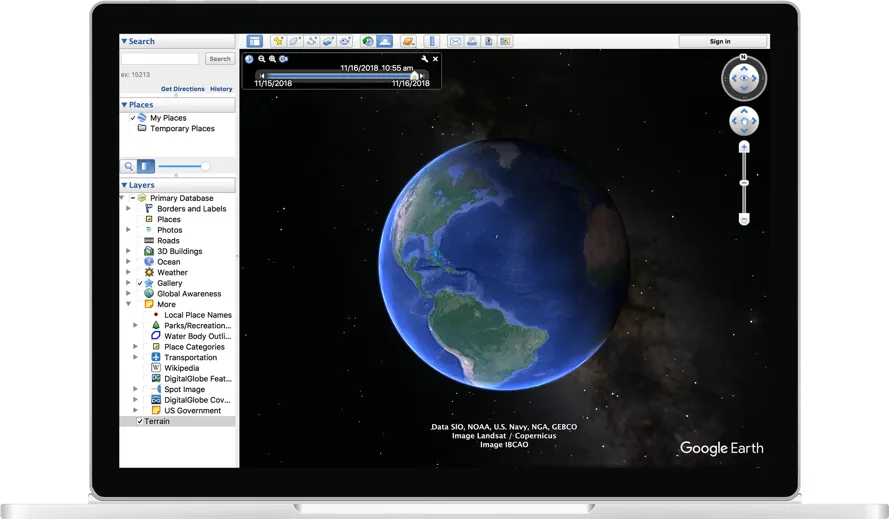
Screenshots of the Linux version, from Flathub.
Downloads
Windows 7.3.7.1327
Show SHA-256
12955495fb4357c88d18b2665513a5adadda0724152147529ca853c80354422b Show SHA-256
1e3991e9b90b68ffa0a9fe6cb80476933a1a6defa7ae0db19257de3bf4c24db7 Mac 7.3.7.1327
Show SHA-256 (computed by us)
20df0f4927f312f8d47e60294b9a77fd60e44be61476a581fb9195c029ba0893 Linux 7.3.6
Choose the x64 (64-bit) installer for Intel or AMD PCs. The x86 (32-bit) installer is only for 32-bit Windows. The package data states no minimum Windows version, so check the publisher’s system requirements before installing on an older PC. The Universal build runs on both Intel and Apple silicon Macs. The Homebrew cask states no minimum macOS version, so check the publisher’s system requirements before installing on an older Mac. The publisher offers a 64-bit (x64) build for Intel or AMD computers. The Flathub listing states no minimum Linux version or distribution, so check the publisher’s system requirements before installing.
Install with winget: winget install --id Google.EarthPro --exact
Install with Homebrew: brew install --cask google-earth-pro
Install with Flatpak (Flathub): flatpak install flathub com.google.EarthPro
Check a download: Get-FileHash .\<file> -Algorithm SHA256 (PowerShell) and compare it with the SHA-256 above.
Linux (Flatpak): Flathub publishes no file checksum; Flatpak checks the app against Flathub’s signed repository when it installs. The ownership of the com.google.EarthPro app ID has not been verified and it may be a community package. App page on Flathub.
What the installer does
Windows
- Delivered as a standalone setup program (.exe) for x64 and x86.
- Installs for all users on the PC, which normally requires administrator rights.
- Supports unattended install with
OMAHA=1. - Declared install modes: interactive and silent.
- Associates with the file types
.eta,.kml, and.kmz. - Upgrades install over the existing version.
PC requirements
- CPU architecture: x86 (32-bit), x64 (64-bit)
Mac
- Delivered as a disk image (.dmg) for Apple silicon and Intel.
- Runs the installer package
Install Google Earth Pro 7.3.7.1327.pkg; package installers usually ask for an administrator password and can place files anywhere on the system. - On uninstall, Homebrew forgets installer package receipts.
- A full “zap” removal also deletes up to 5 support, cache and preference locations in your home folder.
- The cask does not pin a checksum for this download (an unversioned URL), so the file can change without notice.
Mac requirements
- CPU architecture: Universal (Apple silicon + Intel)
Linux
- Delivered as a "flatpak" installer for x64.
- The manifest does not state an install scope.
- No silent-install switch is declared in the manifest.
Linux requirements
- Architectures: x64 (64-bit)
- Download size: 59 MiB
- Installed size: 70 MiB
Description
Google Earth Pro on desktop is available for users with advanced feature needs. Import and export GIS data, and go back in time with historical imagery. Available on PC, Mac, or Linux.
Best for: Students, planners and GIS hobbyists who need historical imagery or GIS file import on the desktop, and who can live with an app Google stops offering in mid-2027.
Features
- Downloads end June 25, 2027: Google says Google Earth Pro on desktop will no longer be available for download from June 25, 2027. Plan for the web or mobile versions if you need it beyond that.
- What Pro adds: Compared with the web version, the desktop app offers historical imagery and GIS import and export, aimed at users with advanced needs. There is no charge listed for it.
- Modest hardware: Google lists 2 GB of RAM, 2 GB of free disk and DirectX 9 or OpenGL 1.4 graphics as the minimum, with 4 GB of RAM and a dual-core 2 GHz chip recommended. You need an internet connection to load imagery.
- Old systems still listed: The help page lists Windows 7 and Mac OS 10.8 on a 64-bit Intel chip as minimums. Street View needs version 7.3.3 or newer.
- Linux: prefer Google's packages: Google offers 64-bit .deb and .rpm packages and tests on Ubuntu and Fedora. The Flatpak here is x64 only, unverified, not affiliated with Google, and still at 7.3.6 while Windows and macOS have 7.3.7.1327.
- Install details: Windows installers come in 32-bit and 64-bit and install for all users. The Mac download is one universal disk image. The Windows listing keeps 9 versions; macOS and Linux list only the current release.
Google Earth Pro at a glance
| What it is | The world's most detailed globe |
|---|---|
| Latest version | Windows 7.3.7.1327 (August 17, 2026) Mac 7.3.7.1327 Linux 7.3.6 (October 26, 2022) |
| Price | Freeware |
| Open source | No |
| License | Freeware |
| License type | Proprietary · Freeware |
| Copyright | © 2026 Google LLC. All rights reserved. |
| Made by | |
| Category | Productivity and study tools |
| Runs on | Windows, Mac, Linux |
| Official website | google.com |
| More links | Support · Privacy policy · Release notes |
| Tags | discover earth geo geographic globe map mapping navigation |
| winget ID | Google.EarthPro |
| Homebrew cask | google-earth-pro |
| Flathub | com.google.EarthPro Unverified · community data from Flathub |
| Flathub verification | The ownership of the com.google.EarthPro app ID has not been verified and it may be a community package. |
| License on Flathub | LicenseRef-proprietary as listed on Flathub |
| winget moniker | googleearthpro |
| Check your download | SHA-256 checksums in the download tables · Security scan |
What’s new in Google Earth Pro 7.3.7.1327
Notes for the Windows release.
Here are highlights of the fixes, changes, and improvements we've made since the last major release of Google Earth Pro: - Google Earth 10 KML compatibility improvements: - Support for gx:CascadingStyle KML extension; KML features imported from Google Earth 10 retain styles like icons, line widths, and colors. - Support for other extensions found in KML exported from Google Earth 10. - Fix for app launch issue on some recent Linux releases. - Measurement tool and property editor measurement tab use the same unit selection. - GeoTIFF imports or super overlays can be saved as KMZs that can be opened in Google Earth 10. - Other minor fixes and improvements.
Read the full release notes on the publisher’s site
Notes for older versions are inside each version below.
Is Google Earth Pro safe?
Score result: No detections so far
None of the 69 security engines on VirusTotal flagged any of the 3 scanned files.
Covers 3 of 4 files. The rest have no VirusTotal report yet, so this result does not speak for them.
- 0 flagged in total
- 3 of 4 files scanned
- 69 engines
Scan info
- Last scan
- Scan provider
- VirusTotal · Full report
File integrity
| File | SHA-256 | Hash check | Signature | VirusTotal |
|---|---|---|---|---|
| googleearth-win-pro-7.3.7.1327-x64.exeWindows · x64 (64-bit) | 12955495fb4357c88d18b2665513a5adadda0724152147529ca853c80354422b |
Matches the manifest (re-computed) | Valid | 0/69 flagged |
| googleearth-win-pro-7.3.7.1327-x86.exeWindows · x86 (32-bit) | 1e3991e9b90b68ffa0a9fe6cb80476933a1a6defa7ae0db19257de3bf4c24db7 |
Matches the manifest (re-computed) | Valid | 0/68 flagged |
| googleearthpromac-intel-7.3.7.dmgMac · Universal (Apple silicon + Intel) | 20df0f4927f312f8d47e60294b9a77fd60e44be61476a581fb9195c029ba0893 |
Computed by us; the source lists no hash | Valid | 0/54 flagged |
| com.google.EarthPro.flatpakrefLinux · x64 (64-bit) | Not provided | Copied from the manifest, not re-computed | Not checked | — |
| Hash re-computed by Everyversion | 2 of 3 installers match, 1 had no upstream hash. |
|---|---|
| Code signature checked | 3 valid. |
We host no installers. Every download link goes to the download location named in the package listing, normally the publisher’s own server. For this software we downloaded the files from that source ourselves, re-computed each checksum and checked the code signature where our tools could, as shown above. A passing check shows a file is the one that was published; it is not a guarantee it is free of problems. For more information, visit our Security and Trust Center.
Source and provenance
| Windows: source | microsoft/winget-pkgs |
|---|---|
| Windows: SHA-256 in upstream manifest | Yes |
| Windows: observed at commit | b5471dcc3b6c · retrieved 2026-11-13 |
| Mac: source | Homebrew/homebrew-cask |
| Mac: SHA-256 in upstream manifest | No: the source declares no checksum |
| Mac: observed at commit | 192c285f7def · retrieved 2026-11-13 |
| Linux: source | Flathub · Flathub API · github.com/flathub/com.google.EarthPro |
| Linux: checksum | None published. Flatpak checks the app against Flathub’s signed repository when it installs. |
| Linux: publisher verified | The ownership of the com.google.EarthPro app ID has not been verified and it may be a community package. |
| Linux: data retrieved | 2026-11-13 · attribution: app data from Flathub, license listed there: LicenseRef-proprietary |
Old versions
Windows versions
9 versions listed. Open a version for its installers, checksums and a command that pins it.
7.3.7.1327 latest · 2026-08-17 · 2 installers notes
| Architecture | Format | Scope | SHA-256 | Download |
|---|---|---|---|---|
| x64 (64-bit) | EXE | All users | 12955495fb4357c88d18b2665513a5adadda0724152147529ca853c80354422b |
Download |
| x86 (32-bit) | EXE | All users | 1e3991e9b90b68ffa0a9fe6cb80476933a1a6defa7ae0db19257de3bf4c24db7 |
Download |
Pin this version: winget install --id Google.EarthPro --version 7.3.7.1327 --exact
Release notes
Here are highlights of the fixes, changes, and improvements we've made since the last major release of Google Earth Pro: - Google Earth 10 KML compatibility improvements: - Support for gx:CascadingStyle KML extension; KML features imported from Google Earth 10 retain styles like icons, line widths, and colors. - Support for other extensions found in KML exported from Google Earth 10. - Fix for app launch issue on some recent Linux releases. - Measurement tool and property editor measurement tab use the same unit selection. - GeoTIFF imports or super overlays can be saved as KMZs that can be opened in Google Earth 10. - Other minor fixes and improvements.
Full release notes from the publisher
Manifest: manifests/g/Google/EarthPro/7.3.7.1327
7.3.7.1155 · 2 installers notes
| Architecture | Format | Scope | SHA-256 | Download |
|---|---|---|---|---|
| x64 (64-bit) | EXE | All users | d58f4db230805387ecad5bedff5e373a803b410ef1f995a6660e92ef9d7f429e |
Download |
| x86 (32-bit) | EXE | All users | 80116b7dec305a9b0a62b49b3865c597485213fb3c3391c6dcefb6b5cbf5c8c8 |
Download |
Pin this version: winget install --id Google.EarthPro --version 7.3.7.1155 --exact
Release notes
Here are highlights of the fixes, changes, and improvements we've made since the last major release of Google Earth Pro: - Google Earth 10 KML compatibility improvements: - Support for gx:CascadingStyle KML extension; KML features imported from Google Earth 10 retain styles like icons, line widths, and colors. - Support for other extensions found in KML exported from Google Earth 10. - Fix for app launch issue on some recent Linux releases. - Measurement tool and property editor measurement tab use the same unit selection. - GeoTIFF imports or super overlays can be saved as KMZs that can be opened in Google Earth 10. - Other minor fixes and improvements.
Full release notes from the publisher
Manifest: manifests/g/Google/EarthPro/7.3.7.1155
7.3.7.1094 · 2 installers notes
| Architecture | Format | Scope | SHA-256 | Download |
|---|---|---|---|---|
| x64 (64-bit) | EXE | All users | e677726d5bf6969eb498d1052039d2b21e7a0658d22f1a76df36120e737783a1 |
Download |
| x86 (32-bit) | EXE | All users | 8540c068eb2a70cc66146292fd91a8a3334ef62011ed50b88b0165a882e30730 |
Download |
Pin this version: winget install --id Google.EarthPro --version 7.3.7.1094 --exact
Release notes
Read the release notes on the publisher’s site
Manifest: manifests/g/Google/EarthPro/7.3.7.1094
7.3.6.10441 · 2 installers notes
| Architecture | Format | Scope | SHA-256 | Download |
|---|---|---|---|---|
| x64 (64-bit) | EXE | All users | d8aa6d38d95d92d18601f94b1da092b34f9d275ade630fb972baff8bf1e4ebd8 |
Download |
| x86 (32-bit) | EXE | All users | 50be0c04b12a577bb449d44388ed98310a47e5be852a9e7a43219dab32d220f7 |
Download |
Pin this version: winget install --id Google.EarthPro --version 7.3.6.10441 --exact
Release notes
Here are highlights of the fixes, changes, and improvements we've made for this release of Google Earth Pro: - Movie Maker tool: - Hardware-accelerated video encoding for faster processing and better image quality. - HEVC (H.265) codec support. - Full navigation controls, including Historical Imagery and Street View, available in live recording mode. - Better responsiveness during live recording. - Can defer video encoding until after live recording is finished. - In live recording mode, less obtrusive recording status dialog. - Live recordings accurately show the timing of user actions during the recording session. - Save video frames in QOI image format. - Break apart a Multi Geometry place mark into individual place marks. - Combine multiple selected place marks into a single Multi Geometry place mark. - Import GeoJSON files. - Improved printing tool quality. - Save Image tool: - Increased maximum image size. - PNG format support. - Adjusted Google Earth logo size in main view, saved images, and printouts. - Windows: Automatically support high-DPI displays. - macOS: Fix illegible dialog tabs on macOS 11+. - macOS: Cosmetic refinements to My Places and Layers panels. - Regionate tool supports KML Schema extended data. - Consistently save KML files with no changes from session to session. - Correctly import CSV files with values that contain quotation marks. - Edit KML LinearRing place mark line style. - Other minor fixes and improvements.
Full release notes from the publisher
Manifest: manifests/g/Google/EarthPro/7.3.6.10441
7.3.6.10201 · 2 installers notes
| Architecture | Format | Scope | SHA-256 | Download |
|---|---|---|---|---|
| x64 (64-bit) | EXE | All users | 663d2e45bdf7df41d3d9a355a99c121d10a3830a23fc66bc554f1c532f6e2238 |
Download |
| x86 (32-bit) | EXE | All users | c97c459d609a6114c696d703dac844ea0377cc64d04f88b08e5acc26fa91f779 |
Download |
Pin this version: winget install --id Google.EarthPro --version 7.3.6.10201 --exact
Release notes
Here are highlights of the fixes, changes, and improvements we've made for this release of Google Earth Pro: - Movie Maker tool: - Hardware-accelerated video encoding for faster processing and better image quality. - HEVC (H.265) codec support. - Full navigation controls, including Historical Imagery and Street View, available in live recording mode. - Better responsiveness during live recording. - Can defer video encoding until after live recording is finished. - In live recording mode, less obtrusive recording status dialog. - Live recordings accurately show the timing of user actions during the recording session. - Save video frames in QOI image format. - Break apart a Multi Geometry place mark into individual place marks. - Combine multiple selected place marks into a single Multi Geometry place mark. - Import GeoJSON files. - Improved printing tool quality. - Save Image tool: - Increased maximum image size. - PNG format support. - Adjusted Google Earth logo size in main view, saved images, and printouts. - Windows: Automatically support high-DPI displays. - macOS: Fix illegible dialog tabs on macOS 11+. - macOS: Cosmetic refinements to My Places and Layers panels. - Regionate tool supports KML Schema extended data. - Consistently save KML files with no changes from session to session. - Correctly import CSV files with values that contain quotation marks. - Edit KML LinearRing place mark line style. - Other minor fixes and improvements.
Full release notes from the publisher
Manifest: manifests/g/Google/EarthPro/7.3.6.10201
7.3.6.10155 · 2 installers notes
| Architecture | Format | Scope | SHA-256 | Download |
|---|---|---|---|---|
| x64 (64-bit) | EXE | All users | 78bcfb435e018cf4e88167900e8cfd486208dc38b59663141f4195d4c352460c |
Download |
| x86 (32-bit) | EXE | All users | 3f0ffcf6d8037655526c988eeaeef96852b75e5fd8c08785a044d12442ff96ce |
Download |
Pin this version: winget install --id Google.EarthPro --version 7.3.6.10155 --exact
Release notes
Here are highlights of the fixes, changes, and improvements we've made for this release of Google Earth Pro: - Movie Maker tool: - Hardware-accelerated video encoding for faster processing and better image quality. - HEVC (H.265) codec support. - Full navigation controls, including Historical Imagery and Street View, available in live recording mode. - Better responsiveness during live recording. - Can defer video encoding until after live recording is finished. - In live recording mode, less obtrusive recording status dialog. - Live recordings accurately show the timing of user actions during the recording session. - Save video frames in QOI image format. - Break apart a Multi Geometry place mark into individual place marks. - Combine multiple selected place marks into a single Multi Geometry place mark. - Import GeoJSON files. - Improved printing tool quality. - Save Image tool: - Increased maximum image size. - PNG format support. - Adjusted Google Earth logo size in main view, saved images, and printouts. - Windows: Automatically support high-DPI displays. - macOS: Fix illegible dialog tabs on macOS 11+. - macOS: Cosmetic refinements to My Places and Layers panels. - Regionate tool supports KML Schema extended data. - Consistently save KML files with no changes from session to session. - Correctly import CSV files with values that contain quotation marks. - Edit KML LinearRing place mark line style. - Other minor fixes and improvements.
Full release notes from the publisher
Manifest: manifests/g/Google/EarthPro/7.3.6.10155
7.3.6.9796 · 2 installers notes
| Architecture | Format | Scope | SHA-256 | Download |
|---|---|---|---|---|
| x64 (64-bit) | EXE | All users | dfb78631d794fd32b09fdc3c9105594f0e100d2343d6f9681612a84fa3fc5325 |
Download |
| x86 (32-bit) | EXE | All users | ebf093542cf10105c02fc7e6ee650e1b11293e9ecb74ce4e7d906e04613e292d |
Download |
Pin this version: winget install --id Google.EarthPro --version 7.3.6.9796 --exact
Release notes
Here are highlights of the fixes, changes, and improvements we've made for this release of Google Earth Pro: - Movie Maker tool: - Hardware-accelerated video encoding for faster processing and better image quality. - HEVC (H.265) codec support. - Full navigation controls, including Historical Imagery and Street View, available in live recording mode. - Better responsiveness during live recording. - Can defer video encoding until after live recording is finished. - In live recording mode, less obtrusive recording status dialog. - Live recordings accurately show the timing of user actions during the recording session. - Save video frames in QOI image format. - Break apart a Multi Geometry place mark into individual place marks. - Combine multiple selected place marks into a single Multi Geometry place mark. - Import GeoJSON files. - Improved printing tool quality. - Save Image tool: - Increased maximum image size. - PNG format support. - Adjusted Google Earth logo size in main view, saved images, and printouts. - Windows: Automatically support high-DPI displays. - macOS: Fix illegible dialog tabs on macOS 11+. - macOS: Cosmetic refinements to My Places and Layers panels. - Regionate tool supports KML Schema extended data. - Consistently save KML files with no changes from session to session. - Correctly import CSV files with values that contain quotation marks. - Edit KML LinearRing place mark line style. - Other minor fixes and improvements.
Full release notes from the publisher
Manifest: manifests/g/Google/EarthPro/7.3.6.9796
7.3.4.8642 · 2 installers
| Architecture | Format | Scope | SHA-256 | Download |
|---|---|---|---|---|
| x64 (64-bit) | EXE | All users | 2b1bdcb63b7239505e89ce2632555fa86851a47231a0e85b168245e56c02ba08 |
Download |
| x86 (32-bit) | EXE | All users | fa46be3ca404015e56ff3219052afbe702ac2ce02130e49135753e8a0b25d5ae |
Download |
Pin this version: winget install --id Google.EarthPro --version 7.3.4.8642 --exact
Release notes
Manifest: manifests/g/Google/EarthPro/7.3.4.8642
7.3.3.7786 · 2 installers
| Architecture | Format | Scope | SHA-256 | Download |
|---|---|---|---|---|
| x64 (64-bit) | EXE | All usersen-US | fe2711c7cb75455b52d7e4a6700be296fd567af607d5d43bfa8ba7451bb7c2b7 |
Download |
| x86 (32-bit) | EXE | All usersen-US | 30f4db70ade8c80bc40c1cc44f22ab725292f5f84d15dda8f7958891adcfc2c9 |
Download |
Pin this version: winget install --id Google.EarthPro --version 7.3.3.7786 --exact
Release notes
Manifest: manifests/g/Google/EarthPro/7.3.3.7786
Mac versions
Homebrew casks list only the current release. Earlier builds appear in the cask’s history on GitHub, and Homebrew cannot install them directly.
7.3.7.1327 latest · 1 installer
| Architecture | Format | Requires | File & source | SHA-256 | Download |
|---|---|---|---|---|---|
| Universal (Apple silicon + Intel) | DMG | — | googleearthpromac-intel-7.3.7.dmgdl.google.com | 20df0f4927f312f8d47e60294b9a77fd60e44be61476a581fb9195c029ba0893Computed by us |
Download |
Release notes
Linux versions
Flathub lists only the current release, and Flatpak installs the newest build; earlier versions cannot be chosen from the listing.
7.3.6 latest · 2022-10-26 · 1 installer notes
| Architecture | Format | Scope | SHA-256 | Download |
|---|---|---|---|---|
| x64 (64-bit) | Flatpak | — | Not provided | Download |
Release notes
Google Earth Pro FAQ
Is Google Earth Pro safe to download from here?
We host no installers. Every download button goes to the download location named in the package listing, and the checks below were run on those files.
On 2026-11-13 we downloaded the latest 3 installers from those sources and re-computed the SHA-256 of each: 2 of 3 match the package catalog’s value, 1 had no catalog hash to compare. Code signatures: 3 valid.
VirusTotal: none of its 69 security engines flagged any of the 3 scanned files.
Reports exist for 3 of 4 files, so the rating does not cover the rest.
Our rating: Safe so far. No check is a guarantee. See the security details above and our Security and Trust Center. Publisher’s website: Google Earth Pro’s official website.
Does Google Earth Pro update itself after I install an old version?
For Windows, we have no information on whether Google Earth Pro updates itself, and for Mac, we have no confirmation that the app updates itself, although many apps check for updates and offer to install them. Look for an update setting in Google Earth Pro (see Google Earth Pro’s documentation) before you rely on an older version.
Does Google Earth Pro cost anything?
No. Google Earth Pro is freeware (license: Freeware).
Which versions of Google Earth Pro are listed here, and how far back?
For Windows, we list 9 versions, from 7.3.3.7786 up to 7.3.7.1327, and for Mac, only the current release (7.3.7.1327) is listed, because older Mac builds are not kept in the package listing, and for Linux, we list 1 version, from 7.3.6 (2022-10-26) up to 7.3.6. This page shows all of the Windows versions.
Where do the download links go?
They go straight to the source named in the package catalog, with nothing added by us: for Windows, to dl.google.com, and for Mac, to dl.google.com, and for Linux, to dl.flathub.org. We host no files. Compare the SHA-256 shown next to each file with the one you compute after downloading. Publisher’s website: Google Earth Pro’s official website.