
Download BleachBit 6.0.6.633
Safe so farDeveloper: BleachBit
Last updated: · Verified by  CristianBuilt Everyversion after working at Softonic. Runs the checks and answers for the results. ClaudeAnthropic’s AI. Runs the download, checksum and signature checks and reports every result. VirusTotalScans files with dozens of security engines. We look up each file by its SHA-256 only.
Clean Your System and Free Disk Space
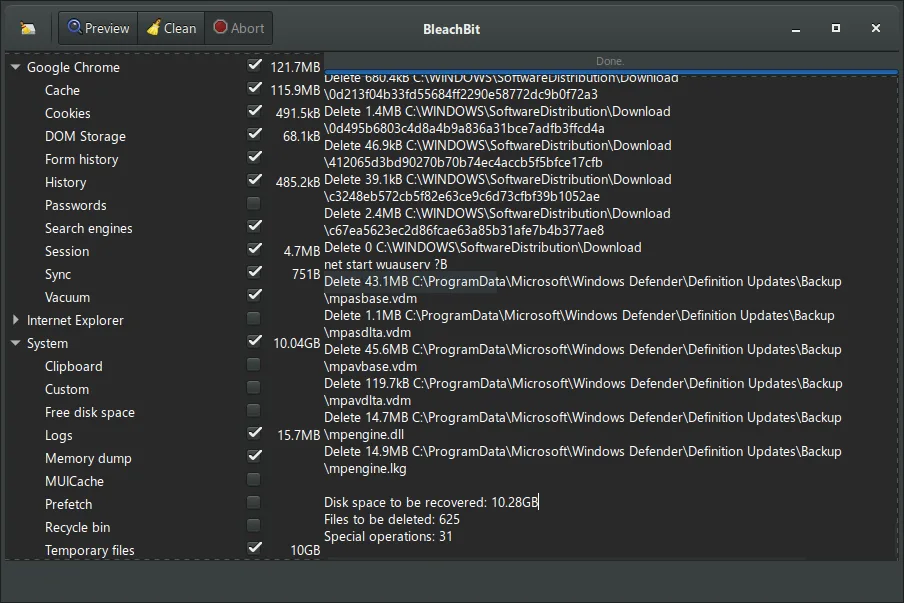
Screenshots of the Linux version, from Flathub.
Downloads
Windows 6.0.6.633
Show SHA-256
a8d27535cdc53e89c21090eabca6026d32c4d385863f8dfc6fc8814bda7881c4 Show SHA-256
a8d27535cdc53e89c21090eabca6026d32c4d385863f8dfc6fc8814bda7881c4 Linux v6.0.6
The publisher offers only a 32-bit (x86) build. The package data states no minimum Windows version, so check the publisher’s system requirements before installing on an older PC. Choose the x64 (64-bit) download for Intel or AMD computers and the ARM64 download for ARM computers. The Flathub listing states no minimum Linux version or distribution, so check the publisher’s system requirements before installing.
Install with winget: winget install --id BleachBit.BleachBit --exact
Install with Flatpak (Flathub): flatpak install flathub org.bleachbit.BleachBit
Check a download: Get-FileHash .\<file> -Algorithm SHA256 (PowerShell) and compare it with the SHA-256 above.
Linux (Flatpak): Flathub publishes no file checksum; Flatpak checks the app against Flathub’s signed repository when it installs. The ownership of the org.bleachbit.BleachBit app ID has not been verified and it may be a community package. App page on Flathub.
What the installer does
Windows
- Delivered as an NSIS (Nullsoft) setup program (.exe) for x86.
- Offers both a per-user and an all-users installer.
- No custom silent switch is declared; winget falls back to its default for this installer type (
/S). - Needs this winget package first:
Microsoft.VCRedist.2010.x86. - Upgrades install over the existing version.
PC requirements
- CPU architecture: x86 (32-bit)
- Dependencies:
Microsoft.VCRedist.2010.x86(winget package)
Linux
- Delivered as a "flatpak" installer for x64 and ARM64.
- The manifest does not state an install scope.
- No silent-install switch is declared in the manifest.
Linux requirements
- Architectures: ARM64, x64 (64-bit)
- Download size: 3 MiB
- Installed size: 9 MiB
Description
When your computer is getting full, BleachBit quickly frees disk space. When your information is only your business, BleachBit guards your privacy. With BleachBit you can free cache, delete cookies, clear Internet history, shred temporary files, delete logs, and discard junk you didn't know was there. Designed for Linux and Windows systems, it wipes clean thousands of applications including Firefox, Adobe Flash, Google Chrome, Opera, and more. Beyond simply deleting files, BleachBit includes advanced features such as shredding files to prevent recovery, wiping free disk space to hide traces of files deleted by other applications, and vacuuming Firefox to make it faster. Better than free, BleachBit is open source.
Best for: Windows 10 and 11 and Linux users who want to clear browser caches, logs and temp files without ads or upsells, and who can review a preview before deleting.
Features
- Free, with no paid tier: BleachBit is open source under GPL 3.0. There is no Pro edition to buy and nothing in the app is held back.
- Preview before you delete: You tick the cleaners you want, run a preview to see what would go, then delete. Cleaners cover Chrome, Edge, Firefox, VLC, system logs, temp files and Linux package caches such as APT, DNF and Pacman.
- Shredding is permanent: It can shred files and overwrite free disk space so deleted data cannot be read back. That is the point, so there is no undo: check the preview first.
- Scriptable: A command-line interface lets you run the same cleaning from scripts or scheduled tasks, and custom cleaners can be written in its CleanerML format.
- Windows 7 and 8 stop at 4.7.0: Version 6.0.6 supports Windows 10 and 11. The project points users of XP, Vista, 7 and 8 to BleachBit 4.7.0. The Windows listing here keeps 11 versions, with 32-bit installers for the current user or the whole machine.
- No Mac app: There is no macOS download. On Linux the project ships its own .deb and .rpm packages for current Debian, Ubuntu, Mint, Fedora, AlmaLinux and openSUSE releases, plus an AppImage. The Flatpak listed here is not marked verified by Flathub, and only the current release is kept.
BleachBit at a glance
| What it is | Clean Your System and Free Disk Space |
|---|---|
| Latest version | Windows 6.0.6.633 Linux v6.0.6 (October 18, 2026) |
| Price | Free and open source |
| Open source | Yes |
| License | GPL-3.0 |
| License type | Open source · Strong copyleft Software built on it must be shared under the same license. |
| Copyright | Copyright (C) 2008-2026 Andrew Ziem |
| Made by | BleachBit |
| Category | System utilities |
| Runs on | Windows, Linux |
| Official website | bleachbit.org |
| More links | Support · Privacy policy · Release notes |
| Tags | cache clean clear cookies delete disk-space junk logs remove shred temp temporary-files wipe |
| winget ID | BleachBit.BleachBit |
| Flathub | org.bleachbit.BleachBit Unverified · community data from Flathub |
| Flathub verification | The ownership of the org.bleachbit.BleachBit app ID has not been verified and it may be a community package. |
| License on Flathub | GPL-3.0 as listed on Flathub |
| winget moniker | bleachbit |
| Check your download | SHA-256 checksums in the download tables · Security scan |
What’s new in BleachBit 6.0.6.633
Notes for the Windows release.
The publisher gives no notes text for this release.
Release notes on the publisher’s site
Notes for older versions are inside each version below.
Is BleachBit safe?
Score result: No detections so far
None of the 69 security engines on VirusTotal flagged the scanned file.
Covers 1 of 2 files. The rest have no VirusTotal report yet, so this result does not speak for them.
- 0 flagged in total
- 1 of 2 files scanned
- 69 engines
Scan info
- Last scan
- Scan provider
- VirusTotal · Full report
File integrity
| File | SHA-256 | Hash check | Signature | VirusTotal |
|---|---|---|---|---|
| BleachBit-6.0.6-setup.exeWindows · x86 (32-bit) | a8d27535cdc53e89c21090eabca6026d32c4d385863f8dfc6fc8814bda7881c4 |
Matches the manifest (re-computed) | Valid | 0/69 flagged |
| org.bleachbit.BleachBit.flatpakrefLinux · x64 (64-bit) | Not provided | Copied from the manifest, not re-computed | Not checked | — |
| Hash re-computed by Everyversion | 1 of 1 installers match. |
|---|---|
| Code signature checked | 1 valid. |
We host no installers. Every download link goes to the download location named in the package listing, normally the publisher’s own server. For this software we downloaded the files from that source ourselves, re-computed each checksum and checked the code signature where our tools could, as shown above. A passing check shows a file is the one that was published; it is not a guarantee it is free of problems. For more information, visit our Security and Trust Center.
Source and provenance
| Windows: source | microsoft/winget-pkgs |
|---|---|
| Windows: SHA-256 in upstream manifest | Yes |
| Windows: observed at commit | 4fb5e09afe52 · retrieved 2026-11-11 |
| Linux: source | Flathub · Flathub API · github.com/flathub/org.bleachbit.BleachBit |
| Linux: checksum | None published. Flatpak checks the app against Flathub’s signed repository when it installs. |
| Linux: publisher verified | The ownership of the org.bleachbit.BleachBit app ID has not been verified and it may be a community package. |
| Linux: data retrieved | 2026-11-11 · attribution: app data from Flathub, license listed there: GPL-3.0 |
Old versions
Windows versions
11 versions listed. Open a version for its installers, checksums and a command that pins it.
6.0.6.633 latest · 2 installers notes
| Architecture | Format | Scope | SHA-256 | Download |
|---|---|---|---|---|
| x86 (32-bit) | NSIS | All users | a8d27535cdc53e89c21090eabca6026d32c4d385863f8dfc6fc8814bda7881c4 |
Download |
| x86 (32-bit) | NSIS | Per user | a8d27535cdc53e89c21090eabca6026d32c4d385863f8dfc6fc8814bda7881c4 |
Download |
Pin this version: winget install --id BleachBit.BleachBit --version 6.0.6.633 --exact
Release notes
6.0.4.310 · 2 installers notes
| Architecture | Format | Scope | SHA-256 | Download |
|---|---|---|---|---|
| x86 (32-bit) | NSIS | All users | c4cd6bb1f4b163dc28b13cef2995423de69e6776f16387f54943dcc6e7267a6d |
Download |
| x86 (32-bit) | NSIS | Per user | c4cd6bb1f4b163dc28b13cef2995423de69e6776f16387f54943dcc6e7267a6d |
Download |
Pin this version: winget install --id BleachBit.BleachBit --version 6.0.4.310 --exact
Release notes
6.0.2.3702 · 2 installers notes
| Architecture | Format | Scope | SHA-256 | Download |
|---|---|---|---|---|
| x86 (32-bit) | NSIS | All users | 16532bc640315f87bd66e04f78b137e1ec90db2d0b7357bfcc47af8873e0076e |
Download |
| x86 (32-bit) | NSIS | Per user | 16532bc640315f87bd66e04f78b137e1ec90db2d0b7357bfcc47af8873e0076e |
Download |
Pin this version: winget install --id BleachBit.BleachBit --version 6.0.2.3702 --exact
Release notes
Changes since version 6.0.0 All Platforms New Features - Add cleaning support for Visual Studio Code, Codium, Antigravity, Cursor, Windsurf, and Devin - Add support for multiple browser profiles on Chrome and Edge - Add cleaner for Claude Code - Add DNS cache cleaner - Clean AI models from Google Chrome - When shredding a filename, reduce data remnants and speed up shredding files - Convert Apache OpenOffice (formerly called OpenOffice.org) cleaner from Python to CleanerML - Add options to deep scan for developers: venv, __pycache__, node_modules, and .angular - Clear clipboard after shredding files from paste operation User interface and performance - Limit the line width of long warning text - Improve the logic that triggers the notice during startup about Expert Mode - During deep scan, skip directories listed in the keep list to improve the speed of scanning - Stop trying to rename files when an error is not retryable - Respond to keyboard interrupt (Ctrl+C) when shredding filenames - Warn when the configuration file is not writable - Disable the chaff controls while generating chaff Bug Fixes - If there are errors reading the cookie keep list, then it will abort the cookie cleaning process to avoid removing important cookies - Fix: crash in recognition of local cleaners - Fix: GUI stops loading if recognition fails - Fix: cleaner loading with invalid data types - Fix crash with certain Unicode on the CLI - Fix: escape invalid Unicode in system information output - Fix…
6.0.0.3482 · 2 installers notes
| Architecture | Format | Scope | SHA-256 | Download |
|---|---|---|---|---|
| x86 (32-bit) | NSIS | All users | d8b2a8f98a677283e13bcf7f8d91df10e6daf3870a70ac8f7479c082ed67ac39 |
Download |
| x86 (32-bit) | NSIS | Per user | d8b2a8f98a677283e13bcf7f8d91df10e6daf3870a70ac8f7479c082ed67ac39 |
Download |
Pin this version: winget install --id BleachBit.BleachBit --version 6.0.0.3482 --exact
Release notes
Changes since version 5.0.2
5.0.2.3065 · 2 installers notes
| Architecture | Format | Scope | SHA-256 | Download |
|---|---|---|---|---|
| x86 (32-bit) | NSIS | All users | 14ba97054fd77564bf8e050916dba44235c0e32eb60fc9c20cce3c9b844028dd |
Download |
| x86 (32-bit) | NSIS | Per user | 14ba97054fd77564bf8e050916dba44235c0e32eb60fc9c20cce3c9b844028dd |
Download |
Pin this version: winget install --id BleachBit.BleachBit --version 5.0.2.3065 --exact
Release notes
5.0.0.2936 · 2 installers notes
| Architecture | Format | Scope | SHA-256 | Download |
|---|---|---|---|---|
| x86 (32-bit) | NSIS | All users | 3676b7740a6518572dbd42ca178a582a15e3cc11e841da91d10ca03c4db9b154 |
Download |
| x86 (32-bit) | NSIS | Per user | 3676b7740a6518572dbd42ca178a582a15e3cc11e841da91d10ca03c4db9b154 |
Download |
Pin this version: winget install --id BleachBit.BleachBit --version 5.0.0.2936 --exact
Release notes
Changes These are the changes since version 4.6.2: - Add a display-language option in preferences (demo video) - Enable closing the application via CTRL+Q or CTRL+W - Make updates notifications less intrusive - Fix the --debug command line switch - Clean variants of Discord such as beta and snap - Fix loading of personal cleaners in portable mode - Improve experience on multi-user systems by ignoring other users' running processes - Prevent invalid entries in the custom and whitelist tabs - Improve stability significantly Linux - Clean Librewolf - Clean non-beta Microsoft Edge - Clean Bash's temporary files - Clean Geary, the email client - Improve cleaning of rotated logs - Improve cleaning of broken .desktop files - Add AppIndicator icon - Fix CleanerML external processes with spaces - Fix usage of dconf as external command - Add .rpm packages for Fedora 41 and 42, and CentOS 9 Stream - Add .deb packages for Ubuntu 24.10 and Ubuntu 25.04 Windows - Patch DLL-related vulnerabilities (CVE-2023-47113, CVE-2025-32780) - Protect MMC snap-ins (e.g., Device Manager, Computer Management) - Upgrade to Python 3.11.10 and GTK 3.24.43 - Update NSIS installer to 3.11 - Add metadata such as company name to bleachbit.exe - Drop support for starting on Windows XP and 7 - Update the Windows 10 theme by Christian Medel - Fix SSL: CERTIFICATE_VERIFY_FAILED error on update checks Developers - Switch Linux CI from Travis CI to GitHub Actions - Clean up the codebase extensively - Overhaul RPM…
4.6.2.2665 · 2 installers notes
| Architecture | Format | Scope | SHA-256 | Download |
|---|---|---|---|---|
| x86 (32-bit) | NSIS | All users | 43bc44163015e62c32a344f354d5d16ce3e3d45d402e9d52b79079cc7d9b4d05 |
Download |
| x86 (32-bit) | NSIS | Per user | 43bc44163015e62c32a344f354d5d16ce3e3d45d402e9d52b79079cc7d9b4d05 |
Download |
Pin this version: winget install --id BleachBit.BleachBit --version 4.6.2.2665 --exact
Release notes
Changes These are the changes since version 4.6.0: - Clean more cookies, cache, and sessions in Google Chrome. - Fix ValueError: Unexpected UTF-8 BOM (decode using utf-8-sig) when cleaning JSON files in Google Chrome Linux - Add packages for Ubuntu 24.04, Fedora 39 and 40, and openSUSE Slowroll. - Fix detection of Wayland. - Fix error SyntaxWarning: invalid escape sequence with Python 3.12. - Fix missing developer name in metainfo.xml file. Windows - There was a major update to the Winapp2.ini file on August 29, which includes many updates for various cleaners. When enabled in the preferences, it is available OTA also for older releases of BleachBit. - Restore the missing DLL to fix the regression causing the error "Code execution cannot proceed because msvcr100.dll was not found" that affected many users. - Renew the digital code-signing certificate and switch certificate authority. The publisher will now show as Open Source Developer, Andrew Ziem . - Fix the excessively long application name in Task Manager and when the application was not responding - Fix errors like [WinError 3] The system cannot find the path specified: '\\?\C:\WINDOWS\Sysnative\config\systemprofile\AppData\Local\Microsoft\Windows\INetCache\Content.IE5': Command to delete - Hide a Linux-specific option in the preferences. Developers - List of commits - List of closed issues - There were major improvements to the distribution system for Winapp2.ini, so there will be more timely Winapp2.ini updates…
4.6.0.2537 · 2 installers notes
| Architecture | Format | Scope | SHA-256 | Download |
|---|---|---|---|---|
| x86 (32-bit) | NSIS | All users | 4be77c019328203bc16fcd6ab62b41e26e14edfdc4572448d0ddb101ba796ec9 |
Download |
| x86 (32-bit) | NSIS | Per user | 4be77c019328203bc16fcd6ab62b41e26e14edfdc4572448d0ddb101ba796ec9 |
Download |
Pin this version: winget install --id BleachBit.BleachBit --version 4.6.0.2537 --exact
Release notes
Changes These are the changes since version 4.4.2: - Clean recently-closed tabs on Firefox (reported by Luran2132). - Clean autofill data in Chromium-based browsers (thanks to rados). - Clean more of Firefox: AlternativeServices.txt. - Improve support for FileZilla (thanks to fbruand). - Support new versions of GIMP and add runtime detection (thanks to Finoway). - Fix AttributeError and "OperationalError: no such table" when cleaning Firefox (thanks to rados and az0). - Add workaround for DLL security vulnerability (reported by Daniel Hulliger, aka dhulliger). - Prevent opening other dialogs when making chaff (thanks to sanjaykaria). - Vacuum last after other operations in every language (reported by Tobias-B-Besemer, fixed by sanjaykaria). - Add title for dialogs. - Enable more strings to be translated (reported by bovirus). - Improve organization of --help in the CLI (thanks to abitrolly). - Show debug information in CLI only if --debug or --preset is set (thanks to abitrolly). - Fix crash when wiping free space with Brazilian Portuguese (reported by fnfontana). - Specific to Linux - Clean Microsoft Edge on Linux (requested by aoguang). - Clean Firefox and Thunderbird when installed as Flatpak (thanks to MauroGuida). - Clean Google Chrome as Flatpak (thanks to fbruand). - Clean recent documents list on KDE 5 (thanks to Martii). - Clean Firefox installed as a snap (thanks to rodin-ia). - Add shred context menu for KDE (thanks to kenrap). - Keep bookmark icons in Firefox…
4.4.2.2142 · 2023-11-05 · 2 installers
| Architecture | Format | Scope | SHA-256 | Download |
|---|---|---|---|---|
| x86 (32-bit) | NSIS | All usersen-US | 5e1e6e2e269216a8c40ab1dbba26b1b7d53f1f9f106cb94abbe7a4d1f38eb460 |
Download |
| x86 (32-bit) | NSIS | Per useren-US | 5e1e6e2e269216a8c40ab1dbba26b1b7d53f1f9f106cb94abbe7a4d1f38eb460 |
Download |
Pin this version: winget install --id BleachBit.BleachBit --version 4.4.2.2142 --exact
Release notes
4.4.0.1929 · 2021-10-24 · 2 installers
| Architecture | Format | Scope | SHA-256 | Download |
|---|---|---|---|---|
| x86 (32-bit) | NSIS | All usersen-US | cc491e1d825de29b3116d603ba584ef0333fe3fc233d59b35eefb44171f43235 |
Download |
| x86 (32-bit) | NSIS | Per useren-US | cc491e1d825de29b3116d603ba584ef0333fe3fc233d59b35eefb44171f43235 |
Download |
Pin this version: winget install --id BleachBit.BleachBit --version 4.4.0.1929 --exact
Release notes
4.2.0.1795 · 2021-06-26 · 2 installers
| Architecture | Format | Scope | SHA-256 | Download |
|---|---|---|---|---|
| x86 (32-bit) | NSIS | All usersen-US | 85699e6d5c29d2e163e775eec060a34171066968561e665907a73346590e5345 |
Download |
| x86 (32-bit) | NSIS | Per useren-US | 85699e6d5c29d2e163e775eec060a34171066968561e665907a73346590e5345 |
Download |
Pin this version: winget install --id BleachBit.BleachBit --version 4.2.0.1795 --exact
Release notes
Linux versions
Flathub lists only the current release, and Flatpak installs the newest build; earlier versions cannot be chosen from the listing.
Alternatives to BleachBit
Similar apps in System utilities on Everyversion. Each one links to the download location named in the publisher’s package data, with a SHA-256 checksum.


BleachBit FAQ
Is BleachBit safe to download from here?
We host no installers. Every download button goes to the download location named in the package listing, and the checks below were run on those files.
On 2026-11-11 we downloaded the latest installer from those sources and re-computed the SHA-256: it matches the package catalog’s value. Code signatures: 1 valid.
VirusTotal: none of its 69 security engines flagged the scanned file.
Reports exist for 1 of 2 files, so the rating does not cover the rest.
Our rating: Safe so far. No check is a guarantee. See the security details above and our Security and Trust Center. Publisher’s website: BleachBit’s official website.
Does BleachBit update itself after I install an old version?
For Windows, we have no information on whether BleachBit updates itself, and for Mac, we have no confirmation that the app updates itself, although many apps check for updates and offer to install them. Look for an update setting in BleachBit (see BleachBit’s documentation) before you rely on an older version.
Does BleachBit cost anything?
No. BleachBit is free and open source (license: GPL-3.0).
Which versions of BleachBit are listed here, and how far back?
For Windows, we list 11 versions, from 4.2.0.1795 (2021-06-26) up to 6.0.6.633, and for Linux, we list 1 version, from v6.0.6 (2026-10-18) up to v6.0.6. This page shows all of the Windows versions.
Where do the download links go?
They go straight to the source named in the package catalog, with nothing added by us: for Windows, to download.bleachbit.org, and for Linux, to dl.flathub.org. We host no files. Compare the SHA-256 shown next to each file with the one you compute after downloading. Publisher’s website: BleachBit’s official website.