
Download Bambu Studio 02.09.02.62
Safe so farDeveloper: Bambulab
Last updated: · Verified by  CristianBuilt Everyversion after working at Softonic. Runs the checks and answers for the results. ClaudeAnthropic’s AI. Runs the download, checksum and signature checks and reports every result. VirusTotalScans files with dozens of security engines. We look up each file by its SHA-256 only.
Bambu Studio is a cutting-edge, feature-rich slicing software. It contains project-based workflows, systematically optimized slicing algorithms, and an easy-to-use graphic interface, bringing users an incredibly smooth printing experience.
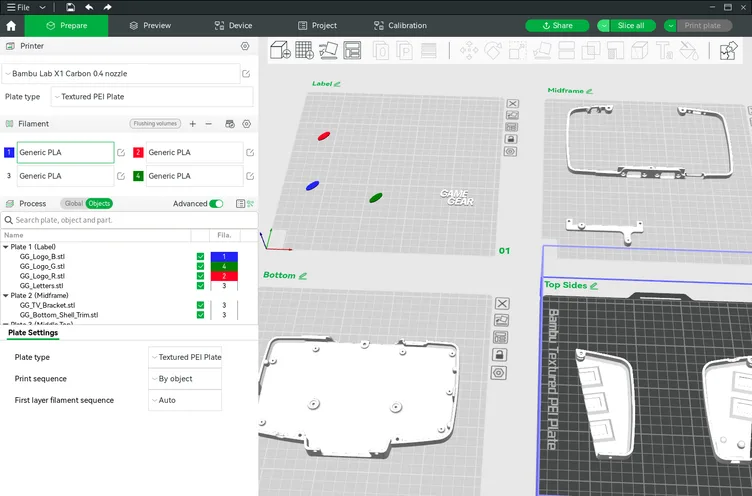
Screenshots of the Linux version, from Flathub.
Downloads
Windows 02.09.02.62
Show SHA-256
f2c038305625c59c3cdf1cb30da7e8625e9bf1b132cc1be7c58a9e1e3903d022 Show SHA-256
e99a704660a25beadfe4fb6a0ca18f9e4ecabcf044e9a8da002ed9365921d343 Mac 02.09.02.62
Show SHA-256
bcd8bbec4b95e673badb156de56fe6a9d86987425a7cf7d89807771373a20213 Linux 2.9.2 Public Release
The publisher offers a 64-bit (x64) build for Intel or AMD PCs. The package data states no minimum Windows version, so check the publisher’s system requirements before installing on an older PC. The Universal build runs on both Intel and Apple silicon Macs. The Homebrew cask states no minimum macOS version, so check the publisher’s system requirements before installing on an older Mac. Choose the x64 (64-bit) download for Intel or AMD computers and the ARM64 download for ARM computers. The Flathub listing states no minimum Linux version or distribution, so check the publisher’s system requirements before installing.
Install with winget: winget install --id Bambulab.Bambustudio --exact
Install with Homebrew: brew install --cask bambu-studio
Install with Flatpak (Flathub): flatpak install flathub com.bambulab.BambuStudio
Check a download: Get-FileHash .\<file> -Algorithm SHA256 (PowerShell) or shasum -a 256 ~/Downloads/<file> (Terminal) and compare it with the SHA-256 above.
Linux (Flatpak): Flathub publishes no file checksum; Flatpak checks the app against Flathub’s signed repository when it installs. Flathub shows this app as publisher-verified. App page on Flathub.
What the installer does
Windows
- Delivered as an NSIS (Nullsoft) setup program (.exe) for x64 and a ZIP archive that is unpacked containing a portable program that runs without being installed for x64.
- The manifest does not state an install scope.
PC requirements
- CPU architecture: x64 (64-bit)
Mac
- Delivered as a disk image (.dmg) for Apple silicon and Intel.
- Installs the app
BambuStudio.appinto the Applications folder. - A full “zap” removal also deletes up to 7 support, cache and preference locations in your home folder.
Mac requirements
- CPU architecture: Universal (Apple silicon + Intel)
Linux
- Delivered as a "flatpak" installer for x64 and ARM64.
- The manifest does not state an install scope.
- No silent-install switch is declared in the manifest.
Linux requirements
- Architectures: ARM64, x64 (64-bit)
- Download size: 363 MiB
- Installed size: 967 MiB
Description
Bambu Studio is a cutting-edge, feature-rich slicing software. It contains project-based workflows, systematically optimized slicing algorithms, and an easy-to-use graphic interface, bringing users an incredibly smooth printing experience.
Best for: Owners of Bambu Lab printers, especially those with an AMS for multi-color prints, who want the slicer the printer was tuned for and the option to send and watch jobs from the desktop.
Features
- Built for Bambu printers, from PrusaSlicer: Bambu Studio started from PrusaSlicer, which itself comes from Slic3r. It ships profiles for Bambu Lab machines, and the project says it also supports other printers, but the README does not list which ones.
- Project files with many plates: A project can hold several build plates, with auto-arrange and auto-orient. Settings work at the project, object and part level, and there are tree, hybrid and custom supports, painting tools for multi-material prints and STEP file import.
- The network plugin is not open source: The slicer is AGPL-3.0, but remote control and monitoring rely on an optional plugin built on non-free libraries. Without it, you can still slice and carry the file to the printer on an SD card.
- Release 2.9.1 adds mixed nozzles: The 2.9.1 release can print parts of one model with different nozzle diameters and layer heights. That needs the H3C printer for now; the notes say other models will follow.
- Linux: AppImage or verified Flatpak: Bambu Lab publishes AppImages built for Ubuntu and Fedora and points everyone else to Flathub. The Flathub build covers x64 and Arm64 and is marked verified for Bambu Lab, though it is a large download of about 450 MB.
- Versions kept on this site: The Windows listing keeps 33 versions, as a machine-wide installer or a zip, which helps if a new release changes a profile you depend on. macOS (a universal build) and Linux list only the current release, so downgrades there need another source.
Bambu Studio at a glance
| What it is | Bambu Studio is a cutting-edge, feature-rich slicing software. It contains project-based workflows, systematically optimized slicing algorithms, and an easy-to-use graphic interface, bringing users an incredibly smooth printing experience. |
|---|---|
| Latest version | Windows 02.09.02.62 (November 24, 2026) Mac 02.09.02.62 Linux 2.9.2 Public Release (November 24, 2026) |
| Price | Free and open source |
| Open source | Yes |
| License | AGPL-3.0 |
| License type | Open source · Network copyleft Like the GPL, and it also applies when the software is offered over a network. |
| Made by | Bambulab |
| Category | 3D and CAD |
| Runs on | Windows, Mac, Linux |
| Official website | github.com |
| More links | Support · Bug tracker · Wiki · Release notes |
| Source code | github.com/bambulab/BambuStudio |
| winget ID | Bambulab.Bambustudio |
| Homebrew cask | bambu-studio |
| Flathub | com.bambulab.BambuStudio Verified data from Flathub |
| Flathub verification | Publisher verified on Flathub by proving control of bambulab.com, 2024-10-11 |
| License on Flathub | AGPL-3.0-only as listed on Flathub |
| Check your download | SHA-256 checksums in the download tables · Security scan |
What’s new in Bambu Studio 02.09.02.62
Notes for the Windows release.
This release adds support for the new Bambu Lab P3C printer and mixed nozzle diameters on the H2D, plus performance and usability improvements and fixes for several issues affecting print quality and stability. New Features Added Support for Bambu Lab P3C Studio now supports the Bambu Lab P3C multi-nozzle 3D printer. It can carry up to seven print heads at the same time, and each print head has its own independent feeding and heating system. Filament therefore stays loaded at all times and can be preheated in advance, so a relay print between two filaments can be completed in as little as 6 seconds. Added Support for H2D Mixed Nozzle Diameter Printing (incl. Filament Track Switch) Multi-diameter slicing and printing on the H2D, including scenarios that use the Filament Track Switch. Within a single model, you can assign nozzles of different diameters to local details and to the main body, so each diameter prints at its own suitable layer height: the smaller nozzle handles details such as text and scales, while the larger nozzle prints the main body quickly. What sets Bambu Studio's multi-diameter feature apart from other slicers is that it is built on a deeply refactored the slicing engine, which delivers a level of freedom no other slicer offers: - Full-range mixing: it supports not only different nozzle diameters, but more importantly, each diameter paired with its own layer height. - Free per-region assignment: not limited to walls and infill. You can assign nozzles…
Read the full release notes on the publisher’s site
Notes for older versions are inside each version below.
Is Bambu Studio safe?
Score result: No detections so far
None of the 41 security engines on VirusTotal flagged any of the 2 scanned files.
Covers 2 of 4 files. The rest have no VirusTotal report yet, so this result does not speak for them.
- 0 flagged in total
- 2 of 4 files scanned
- 41 engines
Scan info
- Last scan
- Scan provider
- VirusTotal · Full report
File integrity
| File | SHA-256 | Hash check | Signature | VirusTotal |
|---|---|---|---|---|
| Bambu_Studio_win-v02.09.02.62-20261124164959.exeWindows · x64 (64-bit) | f2c038305625c59c3cdf1cb30da7e8625e9bf1b132cc1be7c58a9e1e3903d022 |
Matches the manifest (re-computed) | Valid | 0/41 flagged |
| Bambu_Studio_win-v02.09.02.62-20261124164959.zipWindows · x64 (64-bit) | e99a704660a25beadfe4fb6a0ca18f9e4ecabcf044e9a8da002ed9365921d343 |
Matches the manifest (re-computed) | Not applicable | Open not on VirusTotal |
| Bambu_Studio_mac-v02.09.02.62-20261124164959.dmgMac · Universal (Apple silicon + Intel) | bcd8bbec4b95e673badb156de56fe6a9d86987425a7cf7d89807771373a20213 |
Matches the manifest (re-computed) | Valid | 0/56 flagged |
| com.bambulab.BambuStudio.flatpakrefLinux · x64 (64-bit) | Not provided | Copied from the manifest, not re-computed | Not checked | — |
| Hash re-computed by Everyversion | 3 of 3 installers match. |
|---|---|
| Code signature checked | 2 valid, 1 not signable (ZIP/portable). |
We host no installers. Every download link goes to the download location named in the package listing, normally the publisher’s own server. For this software we downloaded the files from that source ourselves, re-computed each checksum and checked the code signature where our tools could, as shown above. A passing check shows a file is the one that was published; it is not a guarantee it is free of problems. For more information, visit our Security and Trust Center.
Source and provenance
| Windows: source | microsoft/winget-pkgs |
|---|---|
| Windows: SHA-256 in upstream manifest | Yes |
| Windows: observed at commit | 630042ce38c9 · retrieved 2026-11-25 |
| Mac: source | Homebrew/homebrew-cask |
| Mac: SHA-256 in upstream manifest | Yes |
| Mac: observed at commit | 05ed6977d588 · retrieved 2026-11-25 |
| Linux: source | Flathub · Flathub API · github.com/flathub/com.bambulab.BambuStudio |
| Linux: checksum | None published. Flatpak checks the app against Flathub’s signed repository when it installs. |
| Linux: publisher verified | Publisher verified on Flathub by proving control of bambulab.com, 2024-10-11 |
| Linux: data retrieved | 2026-11-25 · attribution: app data from Flathub, license listed there: AGPL-3.0-only |
Old versions
Windows versions
Showing the newest 20 of 34 versions (the JSON and Markdown versions list 34). Open a version for its installers, checksums and a command that pins it.
02.09.02.62 latest · 2026-11-24 · 2 installers notes
| Architecture | Format | Scope | SHA-256 | Download |
|---|---|---|---|---|
| x64 (64-bit) | NSIS | All users | f2c038305625c59c3cdf1cb30da7e8625e9bf1b132cc1be7c58a9e1e3903d022 |
Download |
| x64 (64-bit) | ZIPin Portable | — | e99a704660a25beadfe4fb6a0ca18f9e4ecabcf044e9a8da002ed9365921d343 |
Download |
Pin this version: winget install --id Bambulab.Bambustudio --version 02.09.02.62 --exact
Release notes
This release adds support for the new Bambu Lab P3C printer and mixed nozzle diameters on the H2D, plus performance and usability improvements and fixes for several issues affecting print quality and stability. New Features Added Support for Bambu Lab P3C Studio now supports the Bambu Lab P3C multi-nozzle 3D printer. It can carry up to seven print heads at the same time, and each print head has its own independent feeding and heating system. Filament therefore stays loaded at all times and can be preheated in advance, so a relay print between two filaments can be completed in as little as 6 seconds. Added Support for H2D Mixed Nozzle Diameter Printing (incl. Filament Track Switch) Multi-diameter slicing and printing on the H2D, including scenarios that use the Filament Track Switch. Within a single model, you can assign nozzles of different diameters to local details and to the main body, so each diameter prints at its own suitable layer height: the smaller nozzle handles details such as text and scales, while the larger nozzle prints the main body quickly. What sets Bambu Studio's multi-diameter feature apart from other slicers is that it is built on a deeply refactored the slicing engine, which delivers a level of freedom no other slicer offers: - Full-range mixing: it supports not only different nozzle diameters, but more importantly, each diameter paired with its own layer height. - Free per-region assignment: not limited to walls and infill. You can assign nozzles…
02.09.01.70 · 2026-11-03 · 2 installers notes
| Architecture | Format | Scope | SHA-256 | Download |
|---|---|---|---|---|
| x64 (64-bit) | NSIS | All users | 63f0362a1a8af079f6bb07fd61a2f1d11911de40f68be4f71644aefb99327a80 |
Download |
| x64 (64-bit) | ZIPin Portable | All users | a4c0d5f94109cb2c2c07fb02ca1f740e96b586fbf3ae557a1647eeb5503a15b8 |
Download |
Pin this version: winget install --id Bambulab.Bambustudio --version 02.09.01.70 --exact
Release notes
New Features Mixed Nozzle Diameter Slicing and Printing This is the most important update in this Bambu Studio release. Printing with multiple nozzle diameters is not a new topic. Previously, users could assign filament and nozzles by slicing line type such as wall, infill, and support, for example, by setting the filament for sparse infill, solid infill, and walls on the Process > Strength > Advanced page. What is different about this update is that Bambu Studio extends this capability into regions of the model: within a single model, users can assign nozzles of different diameters to local details and to the main body, and let each nozzle print at its own appropriate layer height. This means that, even within the same height range of a model, a small nozzle no longer has to increase its layer height to accommodate the main body, and a large nozzle no longer has to keep using thin layers for local details. A small nozzle can reproduce text and scales with a narrower line width and thinner layers; a large nozzle prints the main body with a wider line width and thicker layers. Detail is left to the areas that need it, and efficiency is left to the areas suited to fast printing. Thanks to this capability, with the Maker Watch (by DadaLand) printed on the H3C, the fine watch face, the watch case body, and the flexible TPU strap can be completed in a single print job, reducing the need for separate parts and post-print assembly. See the Wiki to learn how the feature works, when…
02.08.02.61 · 2026-08-21 · 2 installers notes
| Architecture | Format | Scope | SHA-256 | Download |
|---|---|---|---|---|
| x64 (64-bit) | NSIS | All users | 8af94a386689f265d22fd420c6d9bc72d3da872cc2c28d025eef4dd6cd614823 |
Download |
| x64 (64-bit) | ZIPin Portable | — | 3faaa194a90a2e7defa39a6a63f5a654b8cdb762c6a98556cf771fba582229f5 |
Download |
Pin this version: winget install --id Bambulab.Bambustudio --version 02.08.02.61 --exact
Release notes
Bambu Studio 2.8.2.61 is a minor optimization update based on the previous version. It fixes several known issues and improves the experience of certain features. You can download the Flathub version for Linux from Bambu Studio on Flathub The Flathub version is maintained by @hadess , thanks to him for his outstanding work. Bug Fixes 1. Fixed an issue where some MakerLab generators were inaccessible. (Note: Relief Maker downloads may experience import delays; a fix will be deployed via a subsequent MakerLab backend update.) 2. Fixed an issue where the login window did not appear when accessing MakerWorld while not signed in. 3. Fixed an issue where, after clicking “Sync Printer Information” in older 3MF files, the number of extruders could still be displayed as 0, which could further lead to slicing errors. 4. When adding or removing filaments from the filament list on the left side of the Prepare page, the list will now automatically scroll to the bottom. This helps prevent users from mistakenly thinking the operation did not take effect when the filament list is long. 5. Fixed an occasional crash in LAN mode under unstable network conditions. 6. Updated presets for X2D and H-series printers, fixing several abnormal parameter values to prevent issues when loading or using the presets.
V02.08.02.61 · 2026-08-21 · 2 installers notes
| Architecture | Format | Scope | SHA-256 | Download |
|---|---|---|---|---|
| x64 (64-bit) | NSIS | All usersen-US | 8af94a386689f265d22fd420c6d9bc72d3da872cc2c28d025eef4dd6cd614823 |
Download |
| x64 (64-bit) | NSISin Portable | All usersen-US | 8af94a386689f265d22fd420c6d9bc72d3da872cc2c28d025eef4dd6cd614823 |
Download |
Pin this version: winget install --id Bambulab.Bambustudio --version V02.08.02.61 --exact
Release notes
Bambu Studio 2.8.2.61 is a minor optimization update based on the previous version. It fixes several known issues and improves the experience of certain features. You can download the Flathub version for Linux from Bambu Studio on Flathub The Flathub version is maintained by @hadess , thanks to him for his outstanding work. Bug Fixes 1. Fixed an issue where some MakerLab generators were inaccessible. (Note: Relief Maker downloads may experience import delays; a fix will be deployed via a subsequent MakerLab backend update.) 2. Fixed an issue where the login window did not appear when accessing MakerWorld while not signed in. 3. Fixed an issue where, after clicking “Sync Printer Information” in older 3MF files, the number of extruders could still be displayed as 0, which could further lead to slicing errors. 4. When adding or removing filaments from the filament list on the left side of the Prepare page, the list will now automatically scroll to the bottom. This helps prevent users from mistakenly thinking the operation did not take effect when the filament list is long. 5. Fixed an occasional crash in LAN mode under unstable network conditions. 6. Updated presets for X2D and H-series printers, fixing several abnormal parameter values to prevent issues when loading or using the presets.
02.08.02.60 · 2026-08-14 · 2 installers notes
| Architecture | Format | Scope | SHA-256 | Download |
|---|---|---|---|---|
| x64 (64-bit) | NSIS | All users | cd2f8f2c789a22efee1300e993827cfdb047f27cfb0b8f5dd7395fbafadef4c7 |
Download |
| x64 (64-bit) | ZIPin Portable | — | 85844d64a927ab36e3fd9bbef16da22adde1d25b3dcba4e8f58cef89db0c1291 |
Download |
Pin this version: winget install --id Bambulab.Bambustudio --version 02.08.02.60 --exact
Release notes
Known Issue: 1. The macOS 27 Beta network plugin can now be downloaded normally and supports cloud connections. However, users may be unable to connect to printers over LAN. This is because the current configuration may trigger a permission issue on macOS 27 Beta. We are working on this issue and will fix it in a future release, when the final release of macOS 27 is public. 2. On macOS 27 Beta , after switching filament mapping in the send-to-print dialog, a white floating window may occasionally appear. Re-selecting the same filament slot resolves the issue. 3. On macOS 27 Beta, Bambu Studio cannot exit full screen after the window is maximized. You can use the shortcut Command (⌘) + Control (^) + F to exit full screen as a workaround. This Bambu Studio update brings several major new features and experience improvements, including pause point information on the print progress bar, model assembly guide creation, upgraded color prediction and color decompose capabilities, enhanced filament management on the Device page, E3D hotend support, and multiple improvements to slicing and device interaction. You can download the Flathub version for Linux from Bambu Studio on Flathub The Flathub version is maintained by @hadess ; thanks to him for his outstanding work. New Features Pause Point Information on the Print Progress Bar Users can now view pause point information directly on the print progress bar, including the total number of pause points in the current print job, how…
02.07.01.62 · 2026-06-16 · 1 installer notes
| Architecture | Format | Scope | SHA-256 | Download |
|---|---|---|---|---|
| x64 (64-bit) | NSIS | All users | 699fda3727e8451b763fa00f37e3f8f5970d6d60f6e49e5f9a9a03170375e406 |
Download |
Pin this version: winget install --id Bambulab.Bambustudio --version 02.07.01.62 --exact
Release notes
This version is based on the 2.7.1 Public Release and includes optimizations for Studio startup slowdown issues on certain MacOS versions. Affected MacOS users are encouraged to upgrade as soon as possible. This release also includes several other bug fixes. Bug Fixes 1. Fixed a potential startup slowdown issue on certain MacOS versions. Thanks to @BenJule for the contribution. An option to enable or disable Filament Management has been added in Preferences. On MacOS, this option is disabled by default. 2. Fixed an issue where network plugin installation could fail for some MacOS users (excluding MacOS 27 and later versions). 3. Fixed a path planning error that could occur in certain scenarios when using cross-Z-height coloring in mixed-color printing. 4. Fixed a UI flickering issue with the X2D Filament Track Switch. 5. Fixed an issue with the "Connect Same Color" feature in the Painting Tool. 6. Fixed an issue where the Device page could crash or become unresponsive in certain scenarios. 7. Fixed a crash that occurred when opening certain MakerWorld models. Special thanks to @BenJule once again.
02.07.01.57 · 2026-06-01 · 1 installer notes
| Architecture | Format | Scope | SHA-256 | Download |
|---|---|---|---|---|
| x64 (64-bit) | NSIS | All users | 2960254c538d71ca3f9deeb5982fa18b357998aaa69f697bf5b8d4e9f199c494 |
Download |
Pin this version: winget install --id Bambulab.Bambustudio --version 02.07.01.57 --exact
Release notes
V2.7.1 Public Release is a new version based on 2.6.1 Public Beta and 2.7.0 Public Beta. Compared to V2.6.0 Public Release, this version adds support for the Bambu Lab A2L, introduces important new features such as Texture-to-Color Painting and the Filament Manager, along with various improvements and bug fixes. You can download the Flathub version for Linux from Bambu Studio on Flathub The Flathub version is maintained by @hadess ; thanks to him for his outstanding work. > ⚠️ Notice for V2.7.0 Public Beta Users: Due to the addition of new machine preset configurations and related placeholders in this release, slicing with V2.7.0 may result in errors in certain scenarios. Please upgrade to V2.7.1 Public Release as soon as possible to avoid these issues. Features Gradient Color Curve Control for Multi-Color Printing Gradient effects now support more flexible layer height control. A Color Curve Panel has been added for gradient colors, allowing users to freely add anchor points (left-click to add, right-click to remove) and drag the color curve to customize the blending ratio of two colors at different Z heights, enabling richer gradient effects. ───────────────────────── Liveview Full-Screen Support Liveview now supports full-screen display and playback. Thanks to @bdpdx for the contribution, we optimized some frontend interaction features based on his work. > 💡 Tip: Press ESC to exit full-screen mode. Alternate Extra Wall When enabled, an extra wall is added to alternating…
02.06.00.51 · 2026-04-17 · 1 installer notes
| Architecture | Format | Scope | SHA-256 | Download |
|---|---|---|---|---|
| x64 (64-bit) | NSIS | All users | c56df1dc1ddf84fab7b34caee71eecfb9db96c6785bf467faced8006ce375600 |
Download |
Pin this version: winget install --id Bambulab.Bambustudio --version 02.06.00.51 --exact
Release notes
This release is a hotfix based on the V2.5.3 Public Release, primarily addressing an issue in which the P2S nozzle temperature would not cool down properly after printing. Since delivering this fix through a preset update could affect existing presets for some users on V2.5.0, it is instead released as V2.6.0 to minimize the impact on existing users. If you are using a P2S and your current Studio version is V2.5.3, we recommend upgrading to this version as soon as possible to avoid this issue. You can download the flathub version for linux from bambustudio on flathub The Flathub version is maintained by @hadess and thanks to him for his outstanding work. Statement on the Color Mixing Feature After receiving feedback from the community, we re-examined the implementation and code paths of the current version. During development of this feature, we evaluated multiple color-mixing prediction approaches, including the RGB mixing approach and Full Spectrum’s prediction implementation. Under the validation conditions at the time, we chose the RGB mixing approach that is currently used in v2.5.3. During development, to facilitate side-by-side evaluation of different approaches, we retained implementation code under evaluation. However, we did not clearly indicate its runtime status in our previous notes. This omission caused confusion for users and the community, and we sincerely apologize. Next, we will do two things: 1. Correct the relevant wording in this release and clearly…
02.05.03.61 · 2026-04-14 · 1 installer notes
| Architecture | Format | Scope | SHA-256 | Download |
|---|---|---|---|---|
| x64 (64-bit) | NSIS | All users | 9fb80d2a9a3930a9218770d5e719b1360794d4b7270de39351a3a0fee2142e91 |
Download |
Pin this version: winget install --id Bambulab.Bambustudio --version 02.05.03.61 --exact
Release notes
V2.5.3 adds support for the Bambu Lab X2D, along with new features, improvements, and bug fixes. Please see the release logs of v2.5.1 Beta and v2.5.2 Beta for the complete list of changes with respect to v2.5.3.The full release notes of v2.5.3 can be found on the Bambu Lab Wiki under the Bambu Studio Changelog page. You can download the flathub version for linux from bambustudio on flathub The Flathub version is maintained by @hadess and thanks to him for his outstanding work. Features Color Mixing The Color Mixing feature allows you to mix multiple filaments in the same print to create new colors by adjusting the ratio. To use it, click "Add Mixed Filament" at the bottom of the filament list to configure them in the pop-up dialog. - Supports mixing 2 or 3 filaments of the same type. - Mixing modes: - Normal mode: Adjust the ratio of two or three colors using the color bar or color triangle in the ratio panel, or select directly from the recommended colors below. With the Bambu Lab CMYK filament kit, a wide range of colors can be achieved — for example, all the boats shown in the left image were printed using the CMYK filament kit on a single plate. - Gradient mode: Create gradient color transitions between two colors for rich transitional effects, as shown in the right image. > ⚠ Note: > 1. This feature is only suitable for near-vertical walls. It is not recommended for sloped surfaces or top/bottom surface color layering. > 2. Single-nozzle printers are not recommended…
02.05.00.66 · 2026-01-28 · 1 installer notes
| Architecture | Format | Scope | SHA-256 | Download |
|---|---|---|---|---|
| x64 (64-bit) | NSIS | All usersen-US | fab33011933f6807a7694c4edc0ddb84362d789b5e8974ea01042ed6eadbefb9 |
Download |
Pin this version: winget install --id Bambulab.Bambustudio --version 02.05.00.66 --exact
Release notes
This is a hotfix version based on V2.5.0.64. You can download the flathub version for linux from bambustudio on flathub The Flathub version is maintained by @hadess and thanks to him for his outstanding work. Bug fixed 1. Fixed an issue where the prime tower toolpath could be incorrect when printing multiple on a non-first plate with H2D. 2. Fixed an issue where the right extruder inner wall speed and infill speed were incorrectly configured in the H2D process presets. 3. Fixed an issue where Go Live could not be enabled due to a plugin loading error. 4. Fixed an issue where the height panel on the right could not be clicked when using Variable Layer Height. 5. Fixed an issue where slicing could fail for some third-party filaments on X Series and P Series printers when using high-flow presets.
02.05.00.65 · 2026-01-27 · 1 installer notes
| Architecture | Format | Scope | SHA-256 | Download |
|---|---|---|---|---|
| x64 (64-bit) | NSIS | All usersen-US | 5912561d567d0a61e2b1c6d7fb36cc96ada3a6e68c1244fe0ae67da895117439 |
Download |
Pin this version: winget install --id Bambulab.Bambustudio --version 02.05.00.65 --exact
Release notes
This is the official public release of Bambu Studio v2.5.0. You can download the flathub version for linux from bambustudio on flathub The Flathub version is maintained by @hadess and thanks to him for his outstanding work. Features Remote AMS drying support You can now start AMS drying directly from Studio’s Device page for AMS 2 Pro and AMS HT. - Click the humidity button on the target AMS to open the control dialog to Start and Stop the drying feature. - You can now dry filament while printing, but the drying temperature will be lowered during printing. > ⚠ Minimum supported firmware version: 01.02.30.00(H2D) ────────────┬──────────── image │image ────────────┴──────────── Optimized prime tower strategy for PLA & PETG mixing print Mixing PLA and PETG print is a common user scenario where one filament is used as support for the other one. We noticed that prime tower stability could be further improved under “low-adhesion” conditions. To address typical cases where bonding is difficult, we optimized the interface-layer temperature, extrusion, ironing, and flushing workflow: - Interface-layer temperature boost for better adhesion: Added a new parameter to increase the interface-layer temperature. -1 means boosting it to the material’s maximum printing temperature. - Extra pre-extrusion before printing the interface layer: Added new parameters for interface-layer pre-extrusion distance and length. Before printing the prime tower, the interface layer now performs a short…
02.05.00.64 · 2026-01-27 · 1 installer notes
| Architecture | Format | Scope | SHA-256 | Download |
|---|---|---|---|---|
| x64 (64-bit) | NSIS | All usersen-US | 5912561d567d0a61e2b1c6d7fb36cc96ada3a6e68c1244fe0ae67da895117439 |
Link returns 404 |
Pin this version: winget install --id Bambulab.Bambustudio --version 02.05.00.64 --exact
Release notes
Features Remote AMS drying support You can now start AMS drying directly from Studio’s Device page for AMS 2 Pro and AMS HT. - Click the humidity button on the target AMS to open the control dialog to Start and Stop the drying feature. - You can now dry filament while printing, but the drying temperature will be lowered during printing. > ⚠ Minimum supported firmware version: 01.02.30.00(H2D) ────────────┬──────────── image │image ────────────┴──────────── Optimized prime tower strategy for PLA & PETG mixing print Mixing PLA and PETG print is a common user scenario where one filament is used as support for the other one. We noticed that prime tower stability could be further improved under “low-adhesion” conditions. To address typical cases where bonding is difficult, we optimized the interface-layer temperature, extrusion, ironing, and flushing workflow: - Interface-layer temperature boost for better adhesion: Added a new parameter to increase the interface-layer temperature. -1 means boosting it to the material’s maximum printing temperature. - Extra pre-extrusion before printing the interface layer: Added new parameters for interface-layer pre-extrusion distance and length. Before printing the prime tower, the interface layer now performs a short pre-extrusion to build pressure and extend the extrusion path. - Improved ironing strategy: Ironing is no longer applied to the interface layer. Added a configurable ironing area parameter for non-interface layers to preserve…
02.04.00.70 · 2025-11-18 · 1 installer notes
| Architecture | Format | Scope | SHA-256 | Download |
|---|---|---|---|---|
| x86 (32-bit) | NSIS | — | 359d5d763121a5a0d287ef87d59d26aac5a0b7eb828a6fc5d87b276ec956fb85 |
Download |
Pin this version: winget install --id Bambulab.Bambustudio --version 02.04.00.70 --exact
Release notes
02.03.01.51 · 2025-10-30 · 1 installer notes
| Architecture | Format | Scope | SHA-256 | Download |
|---|---|---|---|---|
| x86 (32-bit) | NSIS | — | 1162f3a0e235b6b68d8993d431af810b4f5a35d085707aa8b4c4ef27826311f1 |
Download |
Pin this version: winget install --id Bambulab.Bambustudio --version 02.03.01.51 --exact
Release notes
02.03.00.70 · 2025-10-14 · 1 installer
| Architecture | Format | Scope | SHA-256 | Download |
|---|---|---|---|---|
| x86 (32-bit) | NSIS | — | 0b0e6092f25f0d875e554d0657d9a1b5c753ec53b3063dca71b9d192669fc3ee |
Download |
Pin this version: winget install --id Bambulab.Bambustudio --version 02.03.00.70 --exact
Release notes
02.02.02.56 · 2025-09-15 · 1 installer notes
| Architecture | Format | Scope | SHA-256 | Download |
|---|---|---|---|---|
| x64 (64-bit) | NSIS | — | 23c297f7b4a96af43369c0c790c54cb4bb8b059a433f69b62dd39020352b267d |
Download |
Pin this version: winget install --id Bambulab.Bambustudio --version 02.02.02.56 --exact
Release notes
02.02.01.60 · 2025-08-28 · 1 installer notes
| Architecture | Format | Scope | SHA-256 | Download |
|---|---|---|---|---|
| x64 (64-bit) | NSIS | — | 4d092c47879660fa186a0152ebc30426e7b162be244774f8b8f9e4c8292fc2a3 |
Download |
Pin this version: winget install --id Bambulab.Bambustudio --version 02.02.01.60 --exact
Release notes
02.02.01.58 · 2025-08-26 · 1 installer notes
| Architecture | Format | Scope | SHA-256 | Download |
|---|---|---|---|---|
| x64 (64-bit) | NSIS | — | 6ead163d79eb181bdf58d6d99835b61d67be5507bf97de5bf582c70d97f1317d |
Download |
Pin this version: winget install --id Bambulab.Bambustudio --version 02.02.01.58 --exact
Release notes
02.02.00.85 · 2025-08-12 · 1 installer notes
| Architecture | Format | Scope | SHA-256 | Download |
|---|---|---|---|---|
| x64 (64-bit) | NSIS | — | 487152f98ac96beef78622b45f73f88bd1dbb13068b2a114209ed5cc35fbee18 |
Download |
Pin this version: winget install --id Bambulab.Bambustudio --version 02.02.00.85 --exact
Release notes
02.01.01.52 · 2025-06-16 · 1 installer notes
| Architecture | Format | Scope | SHA-256 | Download |
|---|---|---|---|---|
| x64 (64-bit) | NSIS | — | 30788cbc9a2196c9d9da07e6900f9abaf0abf98b2ee2d78255220e81c22fb0b4 |
Download |
Pin this version: winget install --id Bambulab.Bambustudio --version 02.01.01.52 --exact
Release notes
All older versions: manifests/b/Bambulab/Bambustudio
Mac versions
Homebrew casks list only the current release. Earlier builds appear in the cask’s history on GitHub, and Homebrew cannot install them directly.
02.09.02.62 latest · 1 installer
| Architecture | Format | Requires | File & source | SHA-256 | Download |
|---|---|---|---|---|---|
| Universal (Apple silicon + Intel) | DMG | — | Bambu_Studio_mac-v02.09.02.62-20261124164959.dmggithub.com | bcd8bbec4b95e673badb156de56fe6a9d86987425a7cf7d89807771373a20213 |
Download |
Release notes
Linux versions
Flathub lists only the current release, and Flatpak installs the newest build; earlier versions cannot be chosen from the listing.
Bambu Studio FAQ
Is Bambu Studio safe to download from here?
We host no installers. Every download button goes to the download location named in the package listing, and the checks below were run on those files.
On 2026-11-25 we downloaded the latest 3 installers from those sources and re-computed the SHA-256 of each: 3 of 3 match the package catalog’s value. Code signatures: 2 valid, 1 not applicable (archives and similar).
VirusTotal: none of its 41 security engines flagged any of the 2 scanned files.
Reports exist for 2 of 4 files, so the rating does not cover the rest.
Our rating: Safe so far. No check is a guarantee. See the security details above and our Security and Trust Center. Publisher’s website: Bambu Studio’s official website.
Does Bambu Studio update itself after I install an old version?
For Windows, we have no information on whether Bambu Studio updates itself, and for Mac, we have no confirmation that the app updates itself, although many apps check for updates and offer to install them. Look for an update setting in Bambu Studio (see Bambu Studio’s documentation) before you rely on an older version.
Does Bambu Studio cost anything?
No. Bambu Studio is free and open source (license: AGPL-3.0).
Which versions of Bambu Studio are listed here, and how far back?
For Windows, we list 34 versions, from 1.7.7.89 up to 02.09.02.62, and for Mac, only the current release (02.09.02.62) is listed, because older Mac builds are not kept in the package listing, and for Linux, we list 1 version, from 2.9.2 Public Release (2026-11-24) up to 2.9.2 Public Release. This page shows the newest 20 Windows versions; the JSON and Markdown files for this app list all 34 Windows versions.
Where do the download links go?
They go straight to the source named in the package catalog, with nothing added by us: for Windows, to github.com, and for Mac, to github.com, and for Linux, to dl.flathub.org. We host no files. Compare the SHA-256 shown next to each file with the one you compute after downloading. Publisher’s website: Bambu Studio’s official website.