
Download Angry IP Scanner 3.12.2
Safe so farDeveloper: Angry IP Scanner
Last updated: · Verified by  CristianBuilt Everyversion after working at Softonic. Runs the checks and answers for the results. ClaudeAnthropic’s AI. Runs the download, checksum and signature checks and reports every result. VirusTotalScans files with dozens of security engines. We look up each file by its SHA-256 only.
Angry IP scanner is a very fast IP address and port scanner.
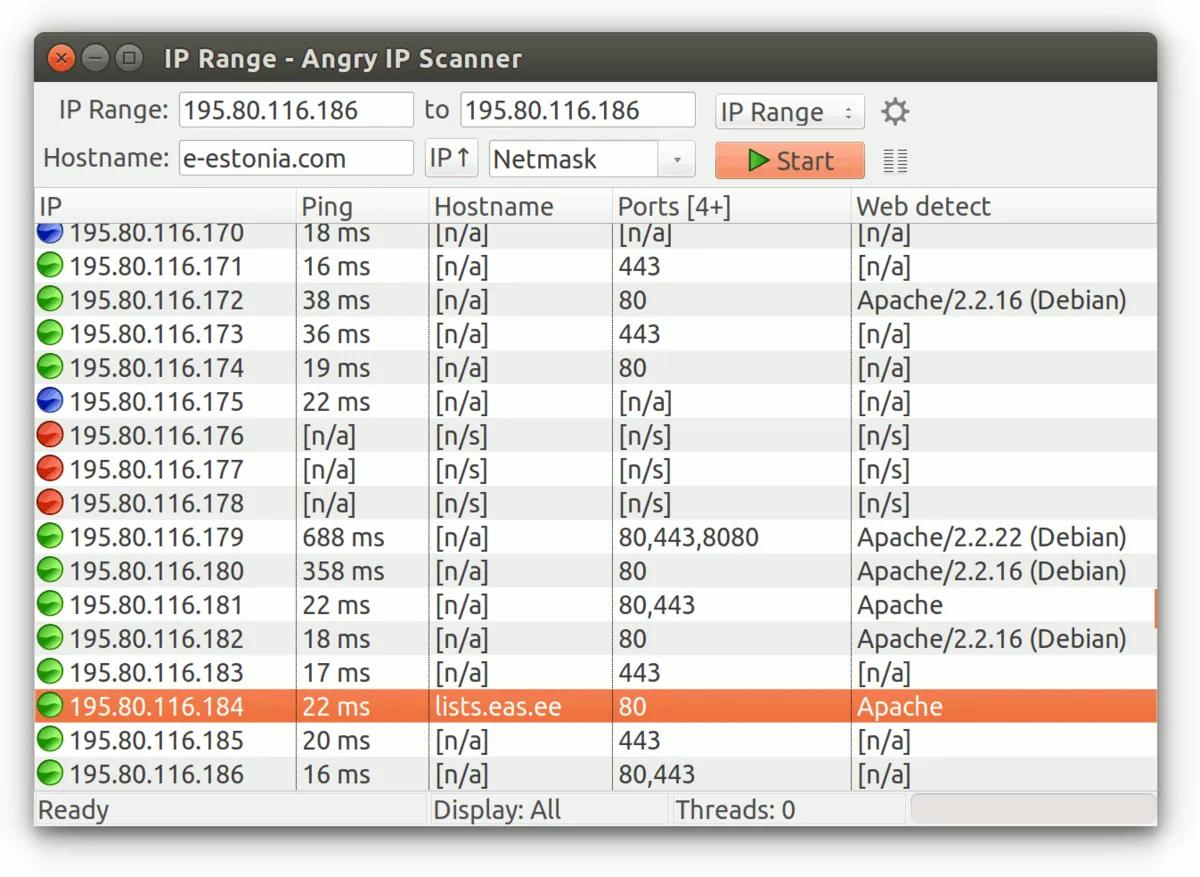
Screenshots of the Linux version, from Flathub.
Downloads
Windows 3.12.2
Show SHA-256
ed6daf48d8648f722900b9eee5d60a73f28715f7b4558050a09e0690aa324c04 Mac 3.9.3
brew install no longer works and macOS blocks the app when you try to open it. You can still download it below from the publisher, at your own judgement. Homebrew’s cask pageShow SHA-256
554c5a14ee32c1ef1812f5382209afee75548c350ed767cf924bc5e0532f403b Show SHA-256
e8997d2ff12f7322ecb3dd0b4c4a410187aa8a26ad89772c833af6de781dfd29 Linux 3.10.0
The publisher offers only a 32-bit (x86) build. The package data states no minimum Windows version, so check the publisher’s system requirements before installing on an older PC. Choose the Apple silicon (ARM64) build for Macs with an M-series chip and the Intel (x64) build for older Intel Macs. The Homebrew cask states no minimum macOS version, so check the publisher’s system requirements before installing on an older Mac. The publisher offers a 64-bit (x64) build for Intel or AMD computers. The Flathub listing states no minimum Linux version or distribution, so check the publisher’s system requirements before installing.
Install with winget: winget install --id angryziber.AngryIPScanner --exact
Install with Flatpak (Flathub): flatpak install flathub org.angryip.ipscan
Check a download: Get-FileHash .\<file> -Algorithm SHA256 (PowerShell) or shasum -a 256 ~/Downloads/<file> (Terminal) and compare it with the SHA-256 above.
Linux (Flatpak): Flathub publishes no file checksum; Flatpak checks the app against Flathub’s signed repository when it installs. The ownership of the org.angryip.ipscan app ID has not been verified and it may be a community package. App page on Flathub.
What the installer does
Windows
- Delivered as an NSIS (Nullsoft) setup program (.exe) for x86.
- Installs for all users on the PC, which normally requires administrator rights.
- No custom silent switch is declared; winget falls back to its default for this installer type (
/S). - Declared install modes: interactive and silent.
PC requirements
- CPU architecture: x86 (32-bit)
Mac
- Delivered as a ZIP archive for Intel (x64) and Apple silicon (ARM64).
- Installs the app
Angry IP Scanner.appinto the Applications folder.
Mac requirements
- CPU architecture: Intel (x64), Apple silicon (ARM64)
Linux
- Delivered as a "flatpak" installer for x64.
- The manifest does not state an install scope.
- No silent-install switch is declared in the manifest.
Linux requirements
- Architectures: x64 (64-bit)
- Download size: 68 MiB
- Installed size: 199 MiB
Description
Angry IP scanner is a very fast IP address and port scanner.
Best for: Network admins and home-lab owners who want a quick look at which hosts and ports answer on a subnet, without learning a full security scanner.
Features
- Quick sweeps of a network: It pings an IP range, random addresses or a list from a file, and checks ports on the hosts it finds. Results export to several formats, and a command-line mode suits scripts.
- Free and open source: It costs nothing and is released under the GPL 2.0.
- Pick the Windows installer: The Windows installer bundles its own Java runtime and installs for the whole machine. The standalone .exe on the project site needs a separate 64-bit Java 21 or later.
- Mac here lags behind: The project offers 3.12.2 for macOS 11 and later, with Java bundled, for Intel and Apple silicon. This site's Mac entry is 3.9.3, the release the project keeps for older macOS. Homebrew disabled its cask on 2026-09-01 because the app fails Gatekeeper checks, so right-click and choose Open the first time.
- Linux: community Flatpak or the .deb: The Flatpak listed here is 3.10.0, a Flathub build that Flathub does not mark as verified, for x64 only. The project's own .deb and .rpm packages carry 3.12.2 and need Java 21 or later.
- Very old Windows still covered: The project keeps version 2.21 for Windows 98, ME, 2000 and XP. It needs no installation.
- Versions kept: The Windows listing keeps 7 versions. macOS and Linux list only one release, so downgrades there need another source.
Angry IP Scanner at a glance
| What it is | Angry IP scanner is a very fast IP address and port scanner. |
|---|---|
| Latest version | Windows 3.12.2 (November 16, 2026) Mac 3.9.3 Linux 3.10.0 (November 10, 2025) |
| Price | Free and open source |
| Open source | Yes |
| License | GPL-2.0 |
| License type | Open source · Strong copyleft Software built on it must be shared under the same license. |
| Made by | Angry IP Scanner |
| Category | Security and network analysis |
| Runs on | Windows, Mac, Linux |
| Official website | angryip.org |
| More links | Support · Bug tracker · Release notes |
| Source code | github.com/angryip/ipscan |
| Tags | foss ip ip-scanner network open-source |
| winget ID | angryziber.AngryIPScanner |
| Homebrew cask | angry-ip-scanner |
| Flathub | org.angryip.ipscan Unverified · community data from Flathub |
| Flathub verification | The ownership of the org.angryip.ipscan app ID has not been verified and it may be a community package. |
| License on Flathub | GPL-2.0+ as listed on Flathub |
| winget moniker | angryipscanner |
| Check your download | SHA-256 checksums in the download tables · Security scan |
What’s new in Angry IP Scanner 3.12.2
Notes for the Windows release.
- Windows installer: Italian and Spanish translations and file properties #562 - Windows: default silent install and uninstall to the current user when no install mode is specified #561 - Windows: rebuild launcher to avoid concatenation in the installer, hopefully flagging less virus heuristics #565 - Enable Comments fetcher by default for new users - Fix loading of results exported from other feeders than IP Range #387 - Open dialogs on the same monitor as the main window, even if it is above or to the left of the primary one #346 - Do not restore the main window outside of the visible area, e.g. after disconnecting an external screen #393 - Show comments stored by MAC address regardless of the order of columns #419 - Windows: pass IPv4 addresses to ICMP and ARP APIs as plain integers, which may fix bogus alive hosts and MAC addresses #337 #395 #488 - Fix reverse IP ranges (start > end) scanning past the end when crossing a byte boundary - IP List File feeder: detect the network interface for all hosts, not only the first one - Linux: fix leaking of file descriptors when reading the ARP table - TCP pinger: fix possible hanging after a very fast reply and keep probing the port that has responded - UDP pinger: count actual UDP replies as alive - Hostname fetcher: accept hostnames that resolve to multiple addresses, e.g. both IPv4 and IPv6 - Do not use 100% of a CPU core while waiting for a free thread if thread delay is 0 - Updated translations for all languages
Read the full release notes on the publisher’s site
Notes for older versions are inside each version below.
Is Angry IP Scanner safe?
Score result: No detections so far
None of the 68 security engines on VirusTotal flagged any of the 3 scanned files.
Covers 3 of 4 files. The rest have no VirusTotal report yet, so this result does not speak for them.
- 0 flagged in total
- 3 of 4 files scanned
- 68 engines
Scan info
- Last scan
- Scan provider
- VirusTotal · Full report
File integrity
| File | SHA-256 | Hash check | Signature | VirusTotal |
|---|---|---|---|---|
| ipscan-3.12.2-setup.exeWindows · x86 (32-bit) | ed6daf48d8648f722900b9eee5d60a73f28715f7b4558050a09e0690aa324c04 |
Matches the manifest (re-computed) | Not signed | 0/68 flagged |
| ipscan-macX86-3.9.3.zipMac · Intel (x64) | 554c5a14ee32c1ef1812f5382209afee75548c350ed767cf924bc5e0532f403b |
Matches the manifest (re-computed) | Not applicable | 0/64 flagged |
| ipscan-macArm64-3.9.3.zipMac · Apple silicon (ARM64) | e8997d2ff12f7322ecb3dd0b4c4a410187aa8a26ad89772c833af6de781dfd29 |
Matches the manifest (re-computed) | Not applicable | 0/63 flagged |
| org.angryip.ipscan.flatpakrefLinux · x64 (64-bit) | Not provided | Copied from the manifest, not re-computed | Not checked | — |
| Hash re-computed by Everyversion | 3 of 3 installers match. |
|---|---|
| Code signature checked | 0 valid, 1 unsigned, 2 not signable (ZIP/portable). |
We host no installers. Every download link goes to the download location named in the package listing, normally the publisher’s own server. For this software we downloaded the files from that source ourselves, re-computed each checksum and checked the code signature where our tools could, as shown above. A passing check shows a file is the one that was published; it is not a guarantee it is free of problems. For more information, visit our Security and Trust Center.
Source and provenance
| Windows: source | microsoft/winget-pkgs |
|---|---|
| Windows: SHA-256 in upstream manifest | Yes |
| Windows: observed at commit | a3521d58a2ae · retrieved 2026-11-21 |
| Mac: source | Homebrew/homebrew-cask |
| Mac: SHA-256 in upstream manifest | Yes |
| Mac: observed at commit | 13c9a1d8f501 · retrieved 2026-11-12 |
| Linux: source | Flathub · Flathub API · github.com/flathub/org.angryip.ipscan |
| Linux: checksum | None published. Flatpak checks the app against Flathub’s signed repository when it installs. |
| Linux: publisher verified | The ownership of the org.angryip.ipscan app ID has not been verified and it may be a community package. |
| Linux: data retrieved | 2026-11-12 · attribution: app data from Flathub, license listed there: GPL-2.0+ |
Old versions
Windows versions
7 versions listed. Open a version for its installers, checksums and a command that pins it.
3.12.2 latest · 2026-11-16 · 1 installer notes
| Architecture | Format | Scope | SHA-256 | Download |
|---|---|---|---|---|
| x86 (32-bit) | NSIS | All usersen-US | ed6daf48d8648f722900b9eee5d60a73f28715f7b4558050a09e0690aa324c04 |
Download |
Pin this version: winget install --id angryziber.AngryIPScanner --version 3.12.2 --exact
Release notes
- Windows installer: Italian and Spanish translations and file properties #562 - Windows: default silent install and uninstall to the current user when no install mode is specified #561 - Windows: rebuild launcher to avoid concatenation in the installer, hopefully flagging less virus heuristics #565 - Enable Comments fetcher by default for new users - Fix loading of results exported from other feeders than IP Range #387 - Open dialogs on the same monitor as the main window, even if it is above or to the left of the primary one #346 - Do not restore the main window outside of the visible area, e.g. after disconnecting an external screen #393 - Show comments stored by MAC address regardless of the order of columns #419 - Windows: pass IPv4 addresses to ICMP and ARP APIs as plain integers, which may fix bogus alive hosts and MAC addresses #337 #395 #488 - Fix reverse IP ranges (start > end) scanning past the end when crossing a byte boundary - IP List File feeder: detect the network interface for all hosts, not only the first one - Linux: fix leaking of file descriptors when reading the ARP table - TCP pinger: fix possible hanging after a very fast reply and keep probing the port that has responded - UDP pinger: count actual UDP replies as alive - Hostname fetcher: accept hostnames that resolve to multiple addresses, e.g. both IPv4 and IPv6 - Do not use 100% of a CPU core while waiting for a free thread if thread delay is 0 - Updated translations for all languages
3.10.0 · 2026-08-31 · 1 installer notes
| Architecture | Format | Scope | SHA-256 | Download |
|---|---|---|---|---|
| x86 (32-bit) | NSIS | All usersen-US | ad40a95676ab8a89dae9439a4b80cd65126afba5a1af13e3118d66601535bd55 |
Download |
Pin this version: winget install --id angryziber.AngryIPScanner --version 3.10.0 --exact
Release notes
- Minimum required Java is now 21, due to updated SWT - Bundle Java 25 with Windows and Mac builds - Virtual Threads are now used by default without the maximum upper limit - Default display mode is now Alive Only, so dead hosts are not shown - MacOS build should not require Rosetta anymore - Added Japanese translations - Update all translations with newer keys - Fixed some rare crashes if no network connectivity - Fixed possible SQL injection when executing files generated by SQLExporter - Make getting started dialog resizable - Security: plugin trust confirmation dialog - new plugins require user approval before loading - Security: shell arguments are now quoted when passed to openers to prevent command injection via DNS poisoning - Better escaping in XMLExporter & CSVExporter - Many minor stability fixes - Updated MAC vendors
3.9.3 · 2025-11-10 · 1 installer notes
| Architecture | Format | Scope | SHA-256 | Download |
|---|---|---|---|---|
| x86 (32-bit) | NSIS | All usersen-US | 91d77c63169249e8fcdd2d912963d4d5cd143d87b65352fc62ba8113fb49f9f5 |
Download |
Pin this version: winget install --id angryziber.AngryIPScanner --version 3.9.3 --exact
Release notes
Changes in 3.9.3: - Bundle Java 21 with Windows and Mac builds - Updated SWT for all platforms, improved loading of correct SWT library on Linux - Add support for plugin jars containing their own messages.properties - Add support for Pinger plugins #491 - Allow plugins to merge multiple ping results - The UDP pinger now uses the same port as traceroute programs - FileFeeder: recognition of FQDNs (with trailing dots and numbers in TLDs) in IP list files - FileFeeder: recognition of IPv6 addresses in IP list files - Time is now specified in 24-hour format in XML export - Fix exporting of very long lines as .txt - Strings up to 255 bytes in length can now be exported to SQL. Among other things, this enables the export of IPv6 scans to SQL - Updated MAC vendors Thanks to @marek22k for many fixes!
3.9.2 · 2025-08-19 · 1 installer notes
| Architecture | Format | Scope | SHA-256 | Download |
|---|---|---|---|---|
| Any | NSIS | All users | 324c97b0e1c84382c3d059aaea39eb4dbc9cdeb9ee631a7d31c1129f983b867a |
Download |
Pin this version: winget install --id angryziber.AngryIPScanner --version 3.9.2 --exact
Release notes
3.9.1 · 2023-02-11 · 1 installer notes
| Architecture | Format | Scope | SHA-256 | Download |
|---|---|---|---|---|
| Any | NSIS | All users | 892405573aa34dfc49b37e4c35b655543e88ec1c5e8ffb27ab8d1bbf90fc6ae0 |
Download |
Pin this version: winget install --id angryziber.AngryIPScanner --version 3.9.1 --exact
Release notes
- Mac: fix permissions in bundled JRE, so that MAC address scanning would work #384 - Linux startup fix if JAVA_HOME has spaces #391 - Update MAC vendors
3.8.2 · 2022-01-22 · 1 installer notes
| Architecture | Format | Scope | SHA-256 | Download |
|---|---|---|---|---|
| Any | NSIS | All users | 50fd26b82963fe0813a7cc5a5d1b4c2adb75cac715c498176e8bfc5aba7e5307 |
Download |
Pin this version: winget install --id angryziber.AngryIPScanner --version 3.8.2 --exact
Release notes
3.7.1 · 1 installer
| Architecture | Format | Scope | SHA-256 | Download |
|---|---|---|---|---|
| x64 (64-bit) | EXE | All users | c049a837cfa5f098e27fbbe5904daa2cf3d21e6ad51b662b2ecc723c3abf6c6a |
Download |
Pin this version: winget install --id angryziber.AngryIPScanner --version 3.7.1 --exact
Release notes
Mac versions
Homebrew casks list only the current release. Earlier builds appear in the cask’s history on GitHub, and Homebrew cannot install them directly.
3.9.3 latest · 2 installers
| Architecture | Format | Requires | File & source | SHA-256 | Download |
|---|---|---|---|---|---|
| Intel (x64) | ZIP | — | ipscan-macX86-3.9.3.zipgithub.com | 554c5a14ee32c1ef1812f5382209afee75548c350ed767cf924bc5e0532f403b |
Download |
| Apple silicon (ARM64) | ZIP | — | ipscan-macArm64-3.9.3.zipgithub.com | e8997d2ff12f7322ecb3dd0b4c4a410187aa8a26ad89772c833af6de781dfd29 |
Download |
Release notes
Linux versions
Flathub lists only the current release, and Flatpak installs the newest build; earlier versions cannot be chosen from the listing.
3.10.0 latest · 2025-11-10 · 1 installer notes
| Architecture | Format | Scope | SHA-256 | Download |
|---|---|---|---|---|
| x64 (64-bit) | Flatpak | — | Not provided | Download |
Release notes
Alternatives to Angry IP Scanner
Similar apps in Security and network analysis on Everyversion. Each one links to the download location named in the publisher’s package data, with a SHA-256 checksum.
 Burp Suite Community Edition
PortSwigger Web Security
2026.3.32026.11.22026.11.2-
Fiddler Classic
Progress Software Corporation
6.0.20262.10021 -
GlassWire
GlassWire
3.11.1183 -
Nmap
Nmap Project
7.80  Wireshark
The Wireshark developer community, https://www.wireshark.org
4.6.104.6.104.6.10 ZAP
ZAP
2.17.02.17.02.17.0
Angry IP Scanner FAQ
Is Angry IP Scanner safe to download from here?
We host no installers. Every download button goes to the download location named in the package listing, and the checks below were run on those files.
On 2026-11-21 we downloaded the latest 3 installers from those sources and re-computed the SHA-256 of each: 3 of 3 match the package catalog’s value. Code signatures: 0 valid, 1 not signed, 2 not applicable (archives and similar).
VirusTotal: none of its 68 security engines flagged any of the 3 scanned files.
Reports exist for 3 of 4 files, so the rating does not cover the rest.
Our rating: Safe so far. No check is a guarantee. See the security details above and our Security and Trust Center. Publisher’s website: Angry IP Scanner’s official website.
Does Angry IP Scanner update itself after I install an old version?
For Windows, we have no information on whether Angry IP Scanner updates itself, and for Mac, we have no confirmation that the app updates itself, although many apps check for updates and offer to install them. Look for an update setting in Angry IP Scanner (see Angry IP Scanner’s documentation) before you rely on an older version.
Does Angry IP Scanner cost anything?
No. Angry IP Scanner is free and open source (license: GPL-2.0).
Which versions of Angry IP Scanner are listed here, and how far back?
For Windows, we list 7 versions, from 3.7.1 up to 3.12.2, and for Mac, only the current release (3.9.3) is listed, because older Mac builds are not kept in the package listing, and for Linux, we list 1 version, from 3.10.0 (2025-11-10) up to 3.10.0. This page shows all of the Windows versions.
Where do the download links go?
They go straight to the source named in the package catalog, with nothing added by us: for Windows, to github.com, and for Mac, to github.com, and for Linux, to dl.flathub.org. We host no files. Compare the SHA-256 shown next to each file with the one you compute after downloading. Publisher’s website: Angry IP Scanner’s official website.